
What Happened – Invalid value in field “sku” (optional)
A URL Inspection on a live product page returned a single amber line inside an otherwise healthy merchant listing: Invalid value in field “sku” (optional). The Rich Results Test agreed. Everything else on the node passed – images, brand, offers, availability, the lot.
The value causing it looked like this:
AL- FERRITIN- GOLD-CAP-welzoRead it slowly. There is a space after AL- and another after FERRITIN-. That is the entire defect.
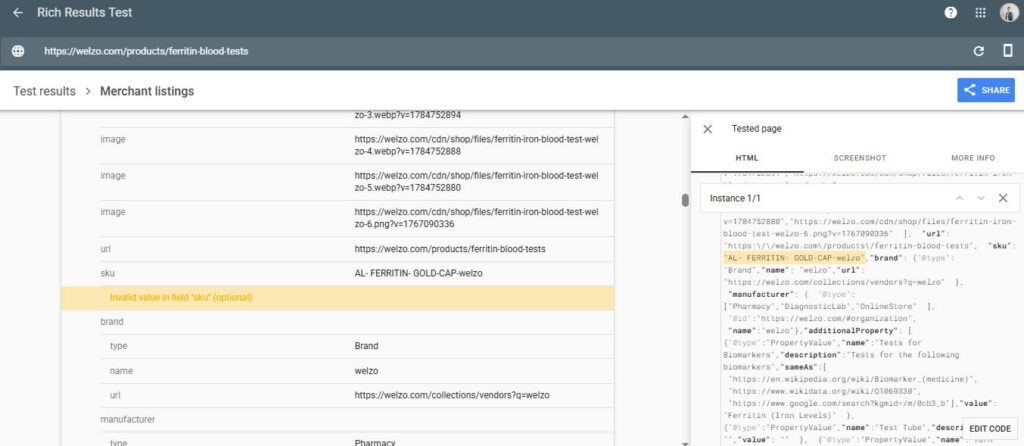
Google’s merchant listing documentation is clear on the point. The sku value must use Unicode characters that are valid for interchange, it must not contain any whitespace characters as defined by the Unicode whitespace property, and Google recommends restricting it to ASCII. One value only, per product.
Two spaces, therefore, and Google discards the identifier.
That last point is the one that gets missed. An invalid value is not a slightly degraded value – it is a rejected one. The page did not ship a messy SKU. It shipped no merchant-specific identifier at all, on a product that has no GTIN to fall back on, because a diagnostic blood test does not carry a retail barcode. Every other identity signal on that node – brand, manufacturer, images – is generic to the retailer. The SKU was the only thing making this product distinguishable from any other test in the range, and it was being thrown away silently on every crawl.
The label says “optional”. The consequence is not.
Why Does It Matter? – Invalid value in field “sku” (optional)
- The SKU is usually the join key between your site and Google’s shopping systems.
Google’s own recommendation for the Merchant Center id attribute is to use your product SKU, because SKUs are unique and they help Google understand the structure of your landing page. When the SKU on the page is rejected as invalid, that join weakens exactly where you need it strongest.
- Feed and page normalise differently, which is worse than both being wrong.
Merchant Center strips leading and trailing whitespace from the id attribute and collapses consecutive whitespace, so a messy value submitted through a feed gets quietly tidied on the way in. The structured data on the page gets no such courtesy – it is validated and discarded.
You end up with an identifier that exists in the feed, does not exist on the page, and cannot be reconciled between them. Silent divergence is harder to debug than a loud error, and this one produces no error anywhere except a line marked “optional”.
- GTIN-less catalogues have no safety net.
For barcoded retail goods, a broken SKU is survivable because gtin carries the identity.
Diagnostics, lab services, made-to-order goods, own-label and bundled products have no GTIN. In those catalogues sku, mpn and brand are the whole identity stack, and Merchant Center already reports “Limited performance due to missing identifiers” against products that come up short.
- Variant disambiguation degrades first.
Where a product has several variants at different prices, the identifier is how Google works out which offer belongs to which landing page state. Without a usable one, the platform falls back on inference, and inference is where price and availability mismatches come from.
- The defect is almost never a single product.
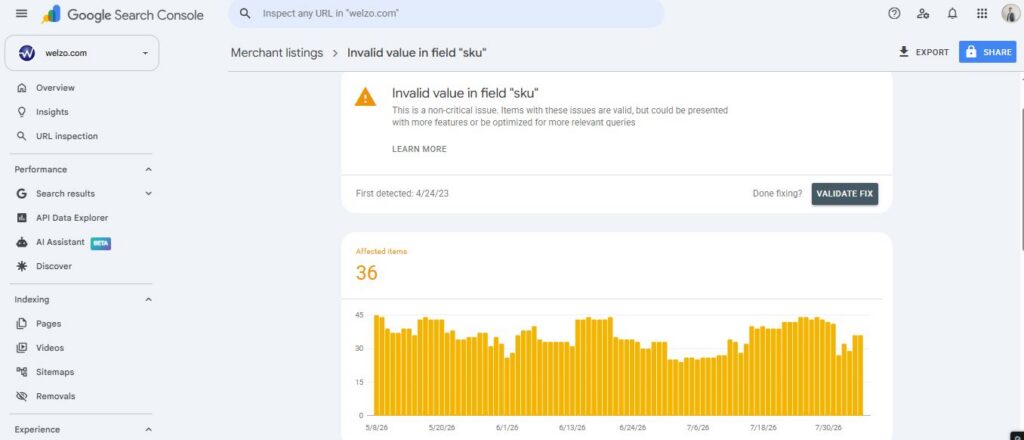
SKUs arrive in batches – a supplier import, a vendor onboarding, a spreadsheet paste. If one product in a range carries stray spaces, the rest of that supplier’s range almost certainly does too. This is a catalogue-hygiene problem wearing a single-product costume. We actually already spotted a few yellow flags.
- And identifiers are becoming more load-bearing, not less.
Product matching across shopping surfaces, AI Overviews, AI Mode and agentic comparison tools all depend on resolving “is this the same item?” across merchants and sources. The identifier is the primitive that answers that question. Sloppy identifiers used to cost you a line in a report. Increasingly they cost you candidacy.
Who Is Affected? – Invalid value in field “sku” (optional)
- Anyone importing supplier or manufacturer SKUs.
Supplier codes get transcribed by humans, pasted out of PDFs, or exported from systems that pad fields. AL- FERRITIN- GOLD-CAP reads exactly like a supplier code typed by hand.
- Teams concatenating SKUs in templates.
The -welzo suffix on that value tells you the rendered SKU is built from a stored value plus something appended at render time. Any concatenation of an editable human field is a place where whitespace survives into output.
Anyone whose data path includes a spreadsheet. CSV and XLSX round-trips introduce trailing spaces, non-breaking spaces and zero-width characters that are completely invisible in an admin UI. A visual inspection will never find these. Only a byte-level check will.
- Shopify, WooCommerce and PIM-driven catalogues alike.
This is not a platform bug. Every platform faithfully renders whatever is in the SKU field, including the parts you cannot see.
- Marketplaces and multi-vendor stores.
Vendor-supplied identifiers arrive in whatever shape the vendor sends, and the normalisation burden sits with you.
- Services, diagnostics and regulated categories.
No GTIN, so no fallback, and typically higher scrutiny on data accuracy in the first place.
What Should Businesses Do? – Invalid value in field “sku” (optional)
This section is written for the team implementing it.
1. The rule that decides everything: fix at source, never at render
The tempting one-line fix is to strip the whitespace in the template:
liquid
{%- comment -%} Do not do this {%- endcomment -%}
"sku": "{{ variant.sku | remove: ' ' }}"
Do not ship that. It clears the validation warning and creates a worse problem: the structured data now emits AL-FERRITIN-GOLD-CAP-welzo while the feed, the ERP, the warehouse system and the order records all still hold AL- FERRITIN- GOLD-CAP. You have traded a visible warning for an invisible mismatch across every system that needs to agree.
Clean the value in the system of record — the Shopify variant field, the PIM, the ERP — and let every consumer read the same corrected string. Rendering layers should validate and refuse, never mutate.
2. Define the canonical SKU format, then enforce it
Pick a pattern that satisfies both the structured data rules and the Merchant Center id constraints at once, so a valid SKU is automatically a valid ID:
^[A-Za-z0-9][A-Za-z0-9._~-]{0,49}$- No whitespace of any kind, which is the structured data requirement.
- Printable ASCII only, which is Google’s recommendation for
sku. - Fifty characters maximum, which keeps you inside the Merchant Center
idceiling. - Fix your casing convention and stick to it. Merchant Center treats
abc123andABC123as different identifiers, so inconsistent casing between a primary and a supplemental feed will fail to pair.
3. Detect what you actually have
Whitespace is a bigger category than the space bar. The Unicode whitespace property covers the regular space, tab, newline, non-breaking space (U+00A0), en and em spaces (U+2000–U+200A), line and paragraph separators, narrow no-break space (U+202F), medium mathematical space (U+205F) and ideographic space (U+3000).
Zero-width characters are a separate hazard. Zero-width space (U+200B), zero-width joiner and non-joiner, and the byte order mark (U+FEFF) are not classified as whitespace, so a naïve \s check will pass them straight through – and they will still corrupt every downstream match. Screen them explicitly.
js
const UNICODE_WS  = /[\s\u00A0\u1680\u2000-\u200A\u2028\u2029\u202F\u205F\u3000]/;
const ZERO_WIDTH  = /[\u200B-\u200D\uFEFF]/;
const NON_ASCII   = /[^\x21-\x7E]/;

function auditSku(raw) {
  if (raw == null || raw === '') return { ok: false, reason: 'missing' };
  if (ZERO_WIDTH.test(raw))      return { ok: false, reason: 'zero-width character' };
  if (UNICODE_WS.test(raw))      return { ok: false, reason: 'whitespace' };
  if (NON_ASCII.test(raw))       return { ok: false, reason: 'non-ascii' };
  if (raw.length > 50)           return { ok: false, reason: 'too long' };
  return { ok: true };
}
Run that across a full variant export before you change a single record. You want the size and shape of the problem first: how many offenders, clustered under which vendors, how many are live in the feed, how many carry Merchant Center performance history.
4. Normalise deliberately, in the system of record
js
function normaliseSku(raw) {
  if (raw == null) return null;
  const cleaned = raw
    .normalize('NFKC')                        // NBSP and friends become plain spaces
    .replace(/[\u200B-\u200D\uFEFF]/g, '')    // drop zero-width and BOM
    .replace(/[\s\u00A0\u1680\u2000-\u200A\u202F\u205F\u3000]+/g, '')
    .toUpperCase();

  return /^[A-Z0-9][A-Z0-9._~-]{0,49}$/.test(cleaned) ? cleaned : null;
}
normalize('NFKC') first is what catches the invisible cases: it folds compatibility characters, so a non-breaking space becomes an ordinary space and is then removed by the strip. Returning null on failure rather than a best-effort string is intentional — a SKU that cannot be normalised safely needs a human, not a guess.
5. Handle the migration properly, because IDs have memory
This is the step teams get wrong, and it is the expensive one.
Merchant Center treats a changed id as a new product. Historical performance and quality signals attached to the old identifier do not carry over. If your feed id is mapped straight from the SKU column – which is the common setup, and the one Google recommends – then bulk-cleaning SKUs silently resets item history across the affected range.
Three options, in order of preference:
- Decouple
idfrom the SKU permanently. Map the Merchant Centeridfrom an immutable internal key — the Shopify variant ID, the PIM record ID, the database primary key — and carry the cleaned SKU in thesku,mpnand structured data fields. Editable human fields should never be primary keys. This costs one migration and removes the problem forever. - Keep the existing
idvalues via an ID rule while cleaning the underlying SKU, if the current identifiers already have meaningful history you cannot afford to reset. - Accept the reset, scheduled into a low-traffic window, if the affected range is small or new. Deliberately, with the trading team told in advance — not as a side effect of a find-and-replace.
Whichever you choose, decide it before the remediation script runs.
6. Emit identifiers at the correct level
sku is a property of the thing being sold, and on a multi-variant product that means the variant, not the parent. Google accepts at most one sku value per node, so a product with five variants needs five offers each carrying their own identifier, not one product node with a guessed SKU.
json
{
  "@context": "https://schema.org",
  "@type": "Product",
  "name": "Ferritin Blood Test",
  "sku": "AL-FERRITIN-GOLD-CAP",
  "mpn": "AL-FERRITIN-GOLD-CAP",
  "brand": { "@type": "Brand", "name": "Welzo" },
  "offers": {
    "@type": "Offer",
    "sku": "AL-FERRITIN-GOLD-CAP",
    "url": "https://example.com/products/ferritin-blood-tests",
    "price": 39.00,
    "priceCurrency": "GBP",
    "itemCondition": "https://schema.org/NewCondition",
    "availability": "https://schema.org/InStock"
  }
}
In Liquid, validate rather than mutate, and simply omit the property when it fails:
liquid
{%- assign sku = variant.sku | strip -%}
{%- if sku != blank and sku contains ' ' == false -%}
  "sku": {{ sku | json }},
{%- endif -%}
Omitting an invalid identifier is not a fix – it is a fail-safe. It stops you asserting something Google will reject, while your monitoring picks up the gap. The actual fix still happens in the data.
Include every global identifier that genuinely applies: gtin (or the most specific variant, gtin8 through gtin14), mpn, and productID where you use a scheme. Where no GTIN exists, say so honestly in your feed rather than inventing one.
7. Rolling it out across the catalogue
- Export and audit. Every variant SKU, run through the detector in 4.3. Output a CSV grouped by vendor and defect type. Expect clusters, not a scatter.
- Cross-reference the feed. Which offenders are live in Merchant Center, and which of those have accumulated performance history. This determines your migration path in 5.
- Decide the
idstrategy and document it before touching data. - Remediate in batches by vendor. Vendor-scoped batches keep the blast radius small and make rollback meaningful. Keep the original value in an audit column.
- Add ingest validation. Admin save hooks, CSV import validators, ERP sync guards, supplier feed pre-processors. Every write path, not just the ones you remember.
- Add a CI check. Assert the pattern across a sample of rendered PDPs on every deploy, alongside a schema validation step. Structured data regressions belong in the same class as failing tests.
- Update templates to validate-and-omit rather than sanitise.
- Verify. Rich Results Test and URL Inspection on a sample per template, then Validate Fix in Search Console. Watch Merchant Center diagnostics for identifier issues over the following fortnight.
8. While you are in that JSON-LD
The same node carried three other things worth correcting in the same release.
- Empty
additionalPropertyentries.
Objects of the shape {"@type":"PropertyValue","name":"Test Tube","description":"","value":""} assert a property and then decline to state it. Omit properties with no value rather than emitting empty strings – an empty value on a PropertyValue is noise that dilutes the node without adding a single retrievable fact.
manufacturerpointing at the retailer.
The node declares the store as the manufacturer of a diagnostic test, multi-typed as Pharmacy, DiagnosticLab and OnlineStore. Two of those are LocalBusiness subtypes, which imply a physical premises with an address and opening hours. If the organisation node cannot substantiate that, you are asserting a business classification you do not hold. Use manufacturer for the actual manufacturer, or drop it.
brand.urlpointing at a faceted vendor filter.
Google consumes brand.name for merchant listings; a brand.url aimed at a parameterised ?q= collection filter adds nothing and ties your brand entity to a URL you probably do not want treated as canonical anything.
Each is small. Together they are the difference between markup that describes a product and markup that describes a product convincingly.
What We’re Watching Next? – Invalid value in field “sku” (optional)
- Identifier quality becoming a distribution issue.
Product matching across merchants is the mechanism behind comparison in shopping surfaces and, increasingly, in AI-mediated buying journeys. The identifier is the primitive that makes matching possible. Catalogues with clean, stable, unique identifiers will be resolvable; catalogues without them will be approximated, and approximation loses to precision every time a system has to choose.
- Tighter validation, not looser.
Google has steadily added property-level checks to the merchant listings report. Fields marked “optional” today are the fields whose absence quietly costs you eligibility tomorrow. We would rather clients cleared them while they are still labelled optional.
- GTIN-less categories under more pressure.
Services, diagnostics, own-label and made-to-order goods cannot lean on barcodes. Expect sku, mpn and brand consistency to matter disproportionately in those verticals, and expect the gap between tidy and untidy catalogues to widen.
- Structured data validation moving into CI.
Schema is application output. Treating it as a marketing artefact that gets audited quarterly is how a two-space defect survives a full crawl cycle. The teams shipping fastest already assert their JSON-LD in the build pipeline.
About Szymaniak Digital
Szymaniak Digital is an enterprise AI SEO consultancy working with senior marketing teams and the engineering teams who ship for them. We audit product markup and identifier hygiene at catalogue scale, design entity models that resolve cleanly across Search and AI surfaces, and write remediation specs developers can implement without a translation layer.
If your Merchant listings report has a line marked “optional” that nobody has costed, that is usually where the money is. Book a structured data audit.