

Missing Field “validFrom” in Offers – What Happened?
Retailers running large product catalogues have started seeing a pair of warnings stack up inside the Merchant listings report in Google Search Console, filed under “Improve item appearance”: Missing field “validFrom” (in “offers”) and Missing field “id” (in “offers.shippingDetails.hasShippingService”).
On the sites we have looked at, both warnings hit the same item count – every indexed product URL in the catalogue – because both originate from a single product template, not from individual product data.
PS: Since this is a Shopify site, implementation is straightforward. Neither warning is a critical error, but fixing it enables your products to display offer information to your customers directly on Google’s Shopping tab, and improves your likelihood of being displayed for customers searching for “product” with “offer” and “shipping”, and related longer-tail queries.
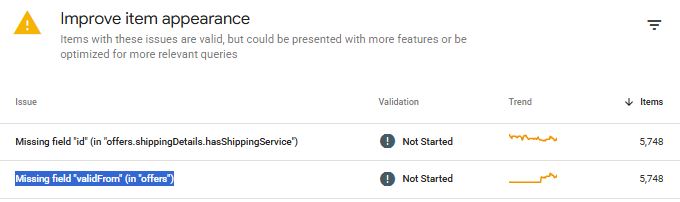
Again, neither warning is a critical error. Google classifies them as non-critical: the pages remain eligible for merchant listing experiences, and rich results will still render. But “valid” and “complete” are not the same thing, and Google is explicit that fixing non-critical issues improves the quality of your structured data and how well it can be matched to relevant queries. And this is important for your future SEO revenue.
Missing Field “validFrom” in Offers – What This Means?
The validFrom property is the start date and time from which the price in your Offer is valid, expressed in ISO 8601 format. It is the opening bookend of a pair. Google reads the sale window as validFrom at one end and either validThrough or priceValidUntil at the other. Most e-commerce platforms emit the closing bookend by default and omit the opening one entirely, which is why so many catalogues throw this warning on 100% of product URLs while looking otherwise healthy.
The shipping warning has a different root cause and is more commonly misdiagnosed. Inside an Offer, the hasShippingService property is not designed to define a shipping service. It exists to reference one that has already been defined at organisation level, using nothing but an @id.
When a template writes a full inline ShippingService object – shipping conditions, order value thresholds, rate tables – into an offer-level OfferShippingDetails, Google looks for the identifier it expects, finds nothing to resolve, and reports the field as missing.
Missing Field “validFrom” in Offers – Why Does It Matter?
The usual instinct on a non-critical GSC warning is to dismiss it. That instinct is usually right and, in this case, mostly wrong. Here is the business case for treating it as a scheduled fix rather than a permanent dev backlog item.
- Sale pricing is only as credible as its dates.
Strikethrough pricing in shopping surfaces depends on Google understanding that your current price is a genuine, time-bounded sale price rather than the everyday price. Supplying validFrom alongside priceValidUntil or validThrough gives Google the full window. Supplying only an end date gives it half a signal, and half a signal is where promotional treatment gets withheld.
- Stale end dates suppress listings.
Google states plainly that a listing may not display if priceValidUntil indicates a past date. Catalogues that hard-code an end date at product creation and never refresh it will silently roll off shopping surfaces once that date passes. The validFrom warning is frequently the visible symptom of a date-handling problem that has a much sharper edge at the other end.
- Structured data is now a retrieval layer, not just a display layer.
Product markup feeds AI Overviews, AI Mode, and the shopping experiences being built into assistant interfaces. These surfaces reward machine-legible, verified, current data. Price validity windows, shipping terms, and returns terms are exactly the attributes that get compared across merchants when an assistant assembles a recommendation. Incomplete offer data is not a rendering problem in that world. It is a candidacy problem.
- Warnings mask errors.
A Merchant listings report with two warnings on 5,000+ items is a report nobody reads. The genuine faults – currency mismatches, expired dates, broken availability logic – get buried under noise your team has been trained to ignore. Clearing the known warnings restores the report as an alerting tool.
- One real fault usually travels with these two.
In the implementation that prompted this article, the offer declared a price in EUR while every shippingRate beneath it was denominated in GBP. Google’s requirement is that the currency of the shipping rate must match the currency of the offer. Where a product is genuinely sold in more than one currency, Google’s guidance is a distinct URL per currency, not a single URL with mixed denominations. That is not a nice-to-have warning. That is a data integrity failure capable of causing item disapprovals.
Missing Field “validFrom” in Offers – Who Is Affected?
- Shopify and Shopify Plus merchants.
The most affected group, because the offer block is generated by theme Liquid or by a schema app, and neither typically exposes a price-change timestamp. Merchants running third-party schema apps alongside a theme’s native markup often provide two competing Product nodes, which compounds the problem.
- WooCommerce stores.
WooCommerce actually holds the data needed: “_sale_price_dates_from” and “_sale_price_dates_to” are stored per product – but core structured data output does not map them to validFrom and validThrough. This is one of the cleanest fixes available on any platform.
- Magento, BigCommerce and headless builds.
Templated output means a single change corrects the entire catalogue. It also means a single mistake corrupts the entire catalogue, so staging validation matters more here than anywhere else.
- Multi-currency and multi-region retailers.
The highest-risk group. Currency mismatch between offer price and shipping rate, single URLs serving multiple currencies, and country-specific return windows all converge on the same offer node.
- Regulated and high-consideration categories.
Supplements, health products, medical devices, pharmacy, finance-adjacent retail. These verticals already face higher scrutiny on trust signals. Shipping and returns terms that resolve cleanly are part of that YMYL picture too.
- Marketplaces and large aggregators.
At six-figure URL counts, the difference between defining a policy once and repeating it in every offer is measurable in crawl budget and payload size.
Missing Field “validFrom” in Offers – What Should Businesses Do?
Missing Field “validFrom” in Offers – The minimum viable fix
Add validFrom to the Offer node, in ISO 8601 format, with a timezone offset. Google recommends including the time and timezone for accuracy.
json
"offers": {
  "@type": "Offer",
  "url": "https://example.com/products/example-product",
  "priceCurrency": "GBP",
  "price": "26.95",
  "validFrom": "2026-08-05T00:00:00+01:00",
  "priceValidUntil": "2027-08-05T23:59:59+01:00",
  "itemCondition": "https://schema.org/NewCondition",
  "availability": "https://schema.org/InStock"
}
Three rules govern the values:
validFrommust be earlier than or equal topriceValidUntil(orvalidThrough).validFrommust not be in the future for a price that is live right now.priceValidUntilmust never fall into the past. Roll it forward automatically.
Populate validFrom from the date the current price took effect – the last price change, or the product’s publish date as a fallback. Do not emit “today” on every crawl. A date that changes on every request tells Google the price is one day old forever, which is a poor signal and defeats the purpose of the property.
Missing Field “validFrom” in Offers – Fixing the shipping identifier properly
The offer-level hasShippingService property expects a reference, not a definition. There are two correct patterns and one wrong one.
Wrong – defining the service inline inside the offer with no identifier:
json
"shippingDetails": {
  "@type": "OfferShippingDetails",
  "hasShippingService": {
    "@type": "ShippingService",
    "shippingConditions": { "...": "..." }
  }
}
Correct, option A – describe the shipping terms at offer level and drop hasShippingService entirely. Use this when a product genuinely overrides your standard policy.
json
"shippingDetails": {
  "@type": "OfferShippingDetails",
  "shippingRate": {
    "@type": "MonetaryAmount",
    "value": 3.99,
    "currency": "GBP"
  },
  "shippingDestination": {
    "@type": "DefinedRegion",
    "addressCountry": "GB"
  },
  "deliveryTime": {
    "@type": "ShippingDeliveryTime",
    "handlingTime": {
      "@type": "QuantitativeValue",
      "minValue": 1,
      "maxValue": 2,
      "unitCode": "DAY"
    },
    "transitTime": {
      "@type": "QuantitativeValue",
      "minValue": 1,
      "maxValue": 5,
      "unitCode": "DAY"
    }
  }
}
Correct, option B – define the service once under Organization on your shipping policy page, then reference it by @id. This is the pattern Google recommends for a standard policy that applies to most or all products, and it is the one that scales.
On /policies/shipping:
json
{
  "@context": "https://schema.org",
  "@type": "Organization",
  "@id": "https://example.com/#organization",
  "hasShippingService": [
    {
      "@type": "ShippingService",
      "@id": "https://example.com/policies/shipping#free-delivery",
      "name": "Free Delivery",
      "description": "Free UK delivery on orders over £50.",
      "fulfillmentType": "https://schema.org/FulfillmentTypeDelivery",
      "handlingTime": {
        "@type": "ServicePeriod",
        "businessDays": [
          "https://schema.org/Monday",
          "https://schema.org/Tuesday",
          "https://schema.org/Wednesday",
          "https://schema.org/Thursday",
          "https://schema.org/Friday"
        ],
        "cutoffTime": "15:00:00+01:00",
        "duration": {
          "@type": "QuantitativeValue",
          "minValue": 1,
          "maxValue": 2,
          "unitCode": "DAY"
        }
      },
      "shippingConditions": {
        "@type": "ShippingConditions",
        "shippingDestination": {
          "@type": "DefinedRegion",
          "addressCountry": "GB"
        },
        "orderValue": {
          "@type": "MonetaryAmount",
          "minValue": 50,
          "currency": "GBP"
        },
        "shippingRate": {
          "@type": "MonetaryAmount",
          "value": 0,
          "currency": "GBP"
        },
        "transitTime": {
          "@type": "ServicePeriod",
          "duration": {
            "@type": "QuantitativeValue",
            "minValue": 1,
            "maxValue": 5,
            "unitCode": "DAY"
          }
        }
      }
    }
  ]
}
On every product page:
json
"shippingDetails": {
  "@type": "OfferShippingDetails",
  "hasShippingService": {
    "@id": "https://example.com/policies/shipping#free-delivery"
  }
}
Apply the identical pattern to returns. Define MerchantReturnPolicy once under Organization on your returns page and reference it from each offer with @id alone. Offer-level return policies support only a subset of the properties available at organisation level, so a policy that is genuinely site-wide belongs at organisation level. One canonical identifier per policy – not a per-SKU identifier repeated thousands of times, which prevents Google from deduplicating and inflates every product payload.
Missing Field “validFrom” in Offers – Platform-specific implementation
- Shopify.
Edit the JSON-LD in product.liquid or the theme’s structured data snippet, or the equivalent field in your schema app.
Derive validFrom from a price_updated_at metafield where you maintain one, falling back to product.published_at.
Roll priceValidUntil forward relative to the current date rather than hard-coding it.
Test the output of any date filter in your theme before deploying, and confirm you are not shipping duplicate Product nodes from theme and app simultaneously.
- WooCommerce.
Hook woocommerce_structured_data_product and map the existing sale-date meta into the offer.
Where no sale is running, use the post date as the fallback for validFrom and generate a rolling priceValidUntil.
- Magento 2.
Extend the product schema block or template and apply the same date logic centrally.
- Headless and custom builds.
Generate the offer node in one shared serialiser and validate it against a schema fixture in CI, so the template can never regress silently.
Missing Field “validFrom” in Offers – Site-wide rollout in eight steps
- Export the affected URLs from the Merchant listings report and confirm the warning count matches your indexed product count. Equal numbers confirm a template-level cause.
- Sample across templates. Take 20 URLs spanning simple products, variant products, sale items, out-of-stock items and each currency or region. Run each through the Rich Results Test to establish a baseline.
- Decide the architecture before touching code: organisation-level policies referenced by
@id, with offer-level overrides reserved for genuine exceptions. - Build and publish the policy page markup first. References must resolve to something that already exists.
- Update the product template with
validFrom, the rollingpriceValidUntil, and the corrected shipping reference. Fix any currency mismatch in the same release. - Validate on staging using the Rich Results Test and the Schema Markup Validator. Then deploy to a canary set of 50 to 100 live URLs and run URL Inspection live tests against them.
- Roll out to the full catalogue, resubmit your product sitemap, and use Validate Fix in Search Console to trigger reprocessing.
- Monitor for 28 days. Watch the Merchant listings report, Merchant Center diagnostics if you have an account, and impressions on product URLs. Expect the report to take days to weeks to clear as Google recrawls at its own pace.
Missing Field “validFrom” in Offers – QA guardrails worth encoding as tests
validFrom≤priceValidUntil/validThrough, always.validFromnever in the future for a live price;priceValidUntilnever in the past.- All dates ISO 8601, with an explicit timezone offset.
shippingRate.currencyidentical tooffers.priceCurrency.- One distinct URL per currency where a product is sold in more than one.
- Every
@idstable, absolute, and unique to the entity it names. - Exactly one
Productnode per product page. - Structured data present in the initial HTML rather than injected client-side, which keeps shopping crawls frequent and reliable.
Missing Field “validFrom” in Offers – One important caveat before you scope the work.
If you configure shipping settings in Merchant Center or Search Console, those settings take priority over your on-page markup. Google’s order of priority runs like this: 1. Content API, 2. Merchant Center or Search Console settings, then 3. product-level markup, then 4. organisation-level markup.
Retailers already managing delivery settings in Merchant Center may find the shipping warning is largely a nice to have – though the validFrom fix stands on its own regardless.
Missing Field “validFrom” in Offers – What We’re Watching Next
- Offer completeness becoming a recommendation signal in AI surfaces.
As shopping journeys move into AI Mode and assistant interfaces, the merchants whose offers resolve cleanly – price, validity window, shipping terms, returns terms, all machine-readable and current – are the ones that will get compared and cited. We expect the practical gap between “valid markup” and “complete markup” to widen.
- More entity referencing, less repetition.
Google’s steady direction of travel is toward defining policies once at organisation level and referencing them by identifier. Expect the offer-level property subset to stay deliberately narrow and expect @id hygiene to matter more, not less.
- Date freshness under closer scrutiny.
Rolling priceValidUntil values that never expire, and validFrom values that reset daily, are both gameable. It would not surprise us to see Google become more discerning about implausible price-validity windows.
- Search Console reporting is getting more granular.
Recent additions to the Merchant listings report have consistently surfaced properties that were previously invisible. Retailers who fix the current warnings will find the next batch far easier to triage.
We will update this article as Google’s shopping structured data documentation evolves.
About Szymaniak Digital
Szymaniak Digital is an enterprise AI SEO consultancy working with senior marketing teams on technical SEO, structured data architecture, and generative engine optimisation. We audit product markup at catalogue scale, design entity models that resolve cleanly across Search and AI surfaces, and work alongside development teams to implement fixes that have a really positive effect on your SEO revenue.
If your Merchant listings report has warnings nobody has read in six months, that is usually a sign the underlying data model needs attention rather than a patch. Get in touch for a structured data audit and growth plan.