
Tomorrow’s Lead Generation: When AI Agents Submit Your Customers’ Details
The person behind your next enquiry may never see your contact form. They may never read your headline, weigh up your proof points, or hover over your call to action. Increasingly, the entity completing that form on their behalf will be an AI agent – instructed to find a supplier, compare options, and hand over the customer’s details so a conversation can begin.
This is the quiet structural change happening underneath demand generation right now. For years, lead generation has been an exercise in persuading a human to type their name and email address into a box. The discipline of conversion rate optimisation has been built almost entirely around human attention, human hesitation and human trust. That assumption is no longer safe. When an agent acts for the buyer, your form stops being a piece of marketing and starts being a piece of machinery – and machinery either works or it doesn’t.
The brands that recognise this early will capture demand that their competitors never even see arrive. The brands that don’t will lose enquiries silently, with no bounce rate to flag the loss and no error in the CRM to explain it. This article sets out exactly what is changing, why it matters to your revenue, and what a marketing director or business owner should do about it now.
The Lead Gen Shift: From Humans Filling Forms to Agents Filling Forms
Agentic browsing is the practice of an AI agent navigating the web and completing tasks on a user’s behalf. Rather than the buyer opening ten tabs, reading ten homepages and filling in ten “request a quote” forms, the buyer delegates: “Find three accredited suppliers in my region, and submit my details so they can quote.” The agent then does the legwork – reading pages, identifying interactive elements, and attempting to complete the actions the human wanted.
For most of the web, this is a convenience question. For anyone whose growth depends on inbound enquiries, it is a commercial one. Your lead form is the precise moment where intent becomes a contact record. If an agent can read, understand and complete that form reliably, you receive the lead. If it can’t, the agent moves on to a competitor whose form it could complete – and you are never told why.
This is the same transition we are guiding clients through with our Enterprise Agent Search Experience Optimisation work and the A.G.E.N.T. Framework. Discovery is no longer only about ranking in a list of blue links; it is about whether machines can actually act on your site once they arrive.
Why this should concern the Boardroom, not just the Dev team
It is tempting to file all of this under “technical SEO” and leave it with the engineers. That would be a mistake, because the risk here is fundamentally a revenue risk, and it has three properties that should worry any commercial leader.
The losses are invisible. A human who can’t complete your form rage-clicks, abandons, and shows up in your analytics as a drop-off you can investigate. An agent that can’t reliably interpret your form simply doesn’t submit it. There is no failed submission, no error event, no friction signal – only an enquiry that never lands. You cannot optimise a leak you cannot detect.
The advantage compounds. When an agent is comparing suppliers on a buyer’s behalf, the field is narrowed to the businesses it can successfully transact with. Being machine-completable is not a tie-breaker at that point; it is the entry requirement. The first movers in your category will quietly absorb agent-mediated demand while everyone else debates whether this is real yet.
The fix is structural, not cosmetic. This is not a matter of rewriting button copy. It requires changes to how your forms, markup and site architecture are built, which is precisely why marketing and engineering need to be aligned on it before, not after, the first quarter of missed enquiries.
For brands focused on capturing more demand, growing market share and leading their category, agent-readiness belongs on the same agenda as enterprise AI SEO itself.
What actually happens when an Agent meets your Lead Form
Agents are capable of inferring how a form works. They can look at a layout, read nearby text, and make an educated guess that a field labelled “Your email” wants an email address. But inference is probabilistic, and probabilistic systems fail in exactly the situations that cost you money: ambiguous or missing labels, fields that appear dynamically, custom inputs that don’t behave like standard ones, and layouts that shift while the agent is working.
The answer to this fragility is WebMCP – a way of describing your forms to agents declaratively, so that nothing is left to guesswork. Instead of hoping an agent infers the purpose of your form, you tell it. The reliability gap between “the agent probably understood” and “the agent definitely understood” is the difference between a captured lead and a lost one.
There are five foundations that, together, make a lead form genuinely agent-ready. None of them is exotic; most of them also improve the experience for human and disabled users. But they need to be implemented deliberately.
The Five Foundations of an Agent-Ready Lead Form
1. Declarative WebMCP metadata – the explicit instruction layer
The most direct way to make a form reliable for agents is to attach WebMCP metadata to it. At its simplest, this means giving your <form> element a toolname and a tooldescription, and giving each input a toolparamdescription that explains what value is expected.
<form toolname="newsletter_signup"
      tooldescription="Subscribes the user to the weekly newsletter">
  <input name="email" type="email"
         toolparamdescription="The user's email address">
  <button type="submit">Sign Up</button>
</form>
The same principle applies, with far higher commercial stakes, to a quote request, a demo booking, or a “speak to sales” form. You are no longer relying on the agent to interpret your intent – you are declaring it. This removes the single largest source of agentic form failure: misunderstanding.
2. A sound accessibility tree – the machine-eye view of your page
Accessibility standards were written for humans, but the design principles behind them turn out to be enormously helpful for agents too. Agents review the accessibility tree — a structured representation of your page’s interactive elements — as their primary data model for understanding what can be clicked, typed into and submitted.
That means the discipline you (hopefully) already apply for users with visual disabilities directly determines whether an agent can use your form. Every interactive element needs a programmatic name. Roles and parent-child relationships need to be valid. Content that is interactive must not be hidden from the accessibility tree. A missing label that blocks a screen-reader user will, in many cases, block an agent in exactly the same way. Investing in semantic HTML and proper ARIA labelling is therefore not a compliance afterthought; it is the machine-eye view of your page, and it is now a lead-capture asset.
3. WebMCP schema validity — symmetry and completeness
It is not enough to add metadata; it has to be valid. The schema is what allows an agent to understand the structure of the data it needs to provide, and there are clear, common ways it breaks:
- A form has a
tooldescriptionbut is missing thetoolname— or vice versa. Always provide both; they must come as a pair. - A required field is missing a
nameattribute. Every input within a tool form needs a uniquename. - An optional field has a
namebut notoolparamdescriptionor associated<label>, leaving the agent without the context it needs to fill the field correctly.
The principle is symmetry and completeness: a name and a description for every tool, a unique name for every input, and parameter context wherever an agent must supply a value. Validity is what turns “metadata exists” into “the agent can act on it”.
4. Visual stability — don’t move the goalposts mid-submission
Cumulative Layout Shift (CLS) is usually discussed as a Core Web Vitals and user-experience metric. For agents it becomes something more critical: a question of whether an element is still where the agent thinks it is. An agent identifies a field, then attempts to interact with it. If an ad loads, an image without dimensions reflows, or injected content pushes the form down the page in that interval, the agent can end up acting on the wrong element — or failing entirely.
Reducing layout shift — sizing images, reserving space for dynamic content, controlling injected elements is a precondition for reliable machine interaction, and it sits naturally alongside the broader technical SEO work that underpins agent-readiness.
5. llms.txt — a machine-readable map of your site
llms.txt is an emerging convention: a Markdown file placed at the root of your domain (for example, https://example.com/llms.txt) that provides a concise, machine-readable summary of your site’s purpose and key links, written specifically for LLMs and AI agents. Without it, an agent may spend far more time crawling your site simply to work out what you do and where the important pages are. With it, you hand the agent an orientation map before it has to interpret a single page — which makes it faster and more likely to reach the action you actually want it to take.
How to measure Agent-readiness: the Lighthouse Agentic Browsing category
You can now measure much of this. Lighthouse — the auditing tool built into Chrome’s developer tools — has an experimental Agentic Browsing category that evaluates how well a site is constructed for machine interaction.
It works differently from the familiar 0–100 scores. Because the standards for the agentic web are still emerging, the focus is on gathering data and providing actionable signals rather than a definitive ranking. Instead of a single number, the report shows a fractional score (a ratio of how many agentic-readiness checks your site passes), a pass or fail status on specific audits, and informational counts so you can watch your progress over time. The audits are deterministic, which makes them reproducible and suitable for integration into CI/CD pipelines — so agent-readiness can become part of how you ship, not a one-off review.
It is worth understanding why results sometimes fluctuate even when the audits themselves are deterministic. The common causes are revealing:
- Dynamic tool registration. If your site registers WebMCP tools via JavaScript, the timing of those registrations can affect whether they are captured during the audit snapshot.
- Variability in accessibility-tree construction. Significant changes to DOM size or complexity can alter the structure of the accessibility tree, which is a core metric for agentic navigation.
- Layout shift. CLS caused by ads, undimensioned images or injected content can move elements between the moment an agent identifies them and the moment it tries to interact.
Each of these is a clue about where your site’s machine-reliability is fragile — and therefore where your lead capture is exposed.
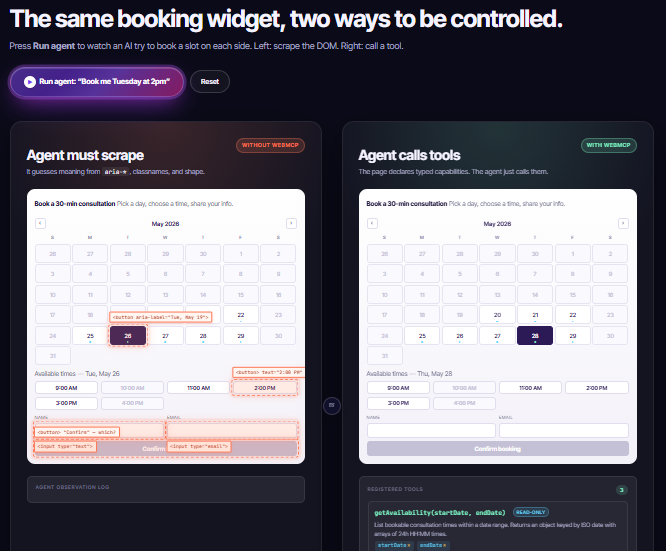
Below is a screenshot example of SearchBERT, an internal tool we use to test how your customers’ agents behave on your website!
What a Marketing Director or Business Owner should do now?
You do not need to solve the entire agentic web this quarter. You do need to make sure the single most commercially important interaction on your site — the lead form — is built so an agent can complete it reliably. In priority order:
- Audit your highest-value forms first. Quote requests, demo bookings, “contact sales” and newsletter sign-ups are where revenue is won or lost. Start there, not with low-stakes forms.
- Adopt declarative WebMCP. Add a
toolnameandtooldescriptionto each form and atoolparamdescriptionto each input, so an agent never has to guess your intent. - Fix the accessibility tree. Ensure every interactive element has a programmatic name, valid roles and proper labelling. This serves disabled users and agents simultaneously.
- Validate your schema. Check for the common failures — missing
toolname/tooldescriptionpairs, inputs without aname, fields lacking parameter context — before they cost you leads. - Stabilise your layout. Reduce CLS so elements stay put while an agent works through your form.
- Publish an
llms.txt. Give agents a fast, accurate map of who you are and where your key pages live. - Measure and monitor. Run the Lighthouse Agentic Browsing audits, track your fractional score over time, and fold the checks into your deployment process.
This is the practical, machine-facing complement to everything we already do in enterprise AI SEO — making sure that once a brand is found by an agent, the agent can actually transact with it.
The Window is Open Now: Start Generating Leads from Your Customers’ Interaction with Google AI Mode or ChatGPT
Lead generation is quietly being rebuilt around a new user: the agent acting on behalf of your customer. The businesses that treat their forms as machinery — explicitly described, accessible, schema-valid, visually stable and mapped for machines — will keep capturing enquiries even as buying behaviour shifts. The businesses that leave it all to inference will lose leads they never knew existed.
The encouraging part is that this is an open window rather than a closed door. The standards are still emerging, most of your competitors are not paying attention yet, and the foundational work overlaps heavily with the technical quality and accessibility you should already be pursuing. Move early and agent-readiness becomes a durable advantage; wait, and it becomes a quarterly leak you spend a long time trying to explain.
If you want to know whether your website is genuinely agent-ready – and to put a measurable plan behind tomorrow’s lead generation – book an Enterprise AI SEO Consultation with Szymaniak Digital, or say hello and tell us what your forms are costing you that you can’t yet see.