
Before Gemini writes an answer using Google Search, it decides what information it needs and what to search for.
In our first home care experiment, we asked Gemini about home care services in South Essex. It ran two Google searches. One used almost exactly the same wording as our question. The other changed “home care services” to “domiciliary care agencies” and added three towns: Southend, Basildon and Thurrock.
These searches matter because they influence which websites Gemini can find and use when building its answer.
This is the second experiment in our seven-part research series, Inside the Grounded Answer. We’re looking at the information Google returns when Gemini uses grounding, from the searches it runs to the sources it selects and the final answer it produces.
In this article, we’ll explain where Gemini’s searches appear in Google’s two API formats, what they tell us about how the model understands a question and how we’re testing whether covering the same search terms improves a website’s chances of being cited in Google AI Mode.
The experiment in brief
- The question: Do the extra words Gemini uses in its searches help predict which websites it cites, and does including those terms on a page make a difference?
- The method: We use the same fixed prompt panel as our first experiment. Each prompt is run at least five times every week. We record the searches Gemini generates and compare their wording with the original question.
- What we measure: The number of searches per answer, words added or removed, the types of extra terms used, how much searches change between runs and how well each website covers the terms.
- Our first example: In the SESNHA Care test, Gemini ran two searches: “domiciliary care agencies south essex southend basildon thurrock” and “home care services south essex”.
- Research status: The wider study is in progress. The SESNHA example is an initial finding, not a conclusion about all searches or industries.
1. What Are Gemini’s Search Queries?
When you use Google Search grounding, Gemini can search the web before writing its answer.
It doesn’t simply take your question and send it to Google unchanged. It can generate its own searches, using different wording and adding locations, product details or other information it thinks will help answer the question.
Google’s documentation describes a process with five stages:
- Your application sends a prompt to Gemini with Google Search grounding enabled.
- Gemini considers the question and decides whether searching the web would improve its answer.
- If a search is needed, Gemini creates and runs one or more Google searches.
- It reviews the results and uses the information to prepare its answer.
- The API returns the answer, along with the citations and information about the searches.
The searches are written by the model, not by the user. You don’t normally see them in the final answer, although Google can display related search suggestions alongside some grounded responses. We examine those suggestions in a separate experiment.
Where to find the searches in the generateContent API
When using Google’s generateContent API, the searches appear in:
candidates[0].groundingMetadata.webSearchQueries[]
This field contains a list of the searches Gemini ran to produce the answer.
For example, our SESNHA test returned:
{
  "groundingMetadata": {
    "webSearchQueries": [
      "domiciliary care agencies south essex southend basildon thurrock",
      "home care services south essex"
    ]
  }
}
Each item is a separate search.
It’s also possible for Gemini to answer without searching. In that case, there may be no search queries or grounding sources in the response.
Record this as a result rather than treating it as an error. It tells you that Gemini didn’t use Google Search grounding for that particular run.
Where to find the searches in the Interactions API
The Interactions API organises the information differently.
Look for the following steps:
| API field or step | What it contains |
|---|---|
google_search_call | A Google Search call made by Gemini, including its ID and the searches in arguments.queries. A response can contain more than one call. |
google_search_result | The results returned for a search call. The call_id connects the results to the corresponding search. This step can also contain search suggestions. |
google_maps_call | A separate step for searches made using Google Maps grounding. We examine these in another experiment. |
usage.grounding_tool_count | The number of times grounding tools were used, broken down by type, such as Google Search or Google Maps. |
Here’s an example of a Google Search call containing the two searches from our SESNHA test:
{
  "type": "google_search_call",
  "id": "call_1",
  "arguments": {
    "queries": [
      "domiciliary care agencies south essex southend basildon thurrock",
      "home care services south essex"
    ]
  }
}
The main difference between the two API formats is how the information is organised. Both allow us to record the searches Gemini generated.
Gemini searches can affect the cost of a request
There is also a cost implication.
For Gemini 3 and newer models, Google charges for each search the model runs, rather than charging only for the original prompt.
For example, a request that triggers two searches counts as two searches for billing purposes. A request that triggers four searches counts as four.
The pricing information in the source material states that the first 5,000 searches per month are free across these models, followed by a charge of $14 per 1,000 searches.
Gemini 2.5 and older models use a different billing approach, based on the grounded prompt.
This is worth considering when planning research across hundreds or thousands of prompts.
What did Gemini search for in our SESNHA test?
The original question was:
home care services in South Essex
Gemini generated two searches:
domiciliary care agencies south essex southend basildon thurrockhome care services south essex
Comparing these searches with the original question shows how Gemini changed the wording.
| Search | Words kept from the question | Words added | Words removed |
|---|---|---|---|
| domiciliary care agencies south essex southend basildon thurrock | care, south, essex | domiciliary, agencies, southend, basildon, thurrock | home, services |
| home care services south essex | home, care, services, south, essex | None | None |
The first search made two important changes.
It used different industry terminology.
Gemini replaced “home care services” with “domiciliary care agencies”.
Domiciliary care is a term commonly used in the care sector, including by regulators and care directories. However, customers may be more likely to search for home care.
It added specific locations.
Gemini also expanded South Essex into three towns: Southend, Basildon and Thurrock.
The second search kept the original wording almost exactly as it was.
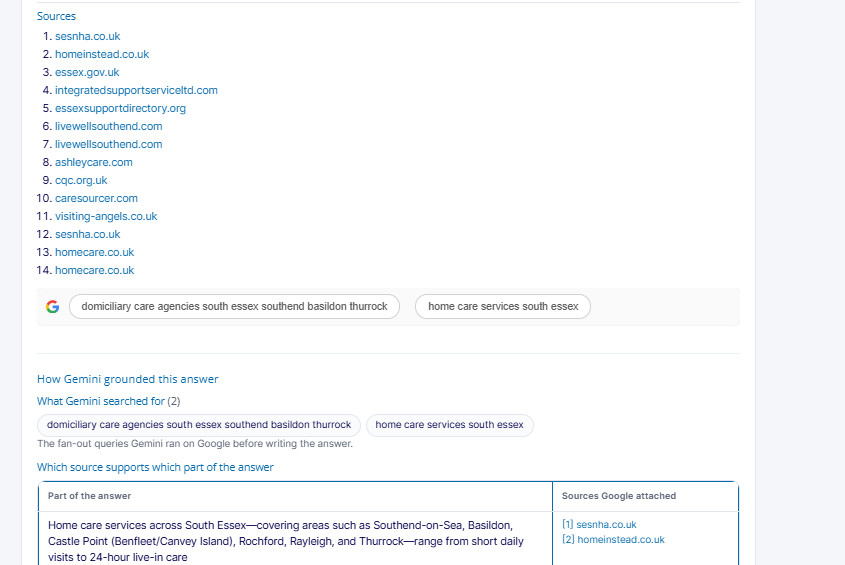
Figure 1. The Grounding Lab shows the two searches Gemini generated, both in the search suggestions and in the record of the searches made before it wrote its answer.
This is useful because it shows that Gemini didn’t rely on just one interpretation of the question. It explored the original wording and a more specific version using industry terminology and local areas.
What we cannot see in Google AI Mode
Google AI Mode also uses query fan-out. This means it can break a question into several related searches to explore different parts of the subject.
However, Google doesn’t show users the full list of searches AI Mode runs.
The searches returned by Gemini’s API are therefore a useful way to study how a Gemini model interprets a question and searches the web.
They are not a direct record of Google AI Mode’s searches. We don’t know whether the two systems use the same search terms or follow the same process.
That’s why our experiment tests whether Gemini’s searches can help predict what Google AI Mode cites, rather than assuming they are identical.
2. Why Do Gemini’s Search Queries Matter for SEO?
A website can only be selected as a source if the system finds it during the search process.
The searches Gemini generates influence which pages it can find in the first place. They can also introduce words and locations that weren’t included in the customer’s original question.
This creates an important consideration for SEO teams: your website needs to cover the language and information relevant to the topic, not just repeat the main keyword.
1. Gemini may use different words from your customers
In our SESNHA test, the customer asked about “home care services”, but Gemini also searched for “domiciliary care agencies”.
These phrases describe a similar service, but they use different terminology.
A page that only uses the phrase “home care” may not cover the full range of language used in the care sector.
This doesn’t mean you should repeat every possible variation of a keyword. It means you should use the terms that accurately describe your services and that your customers and industry use.
For example, a care provider might naturally use both “home care” and “domiciliary care” when explaining its services.
2. Gemini may add locations that weren’t in the question
The SESNHA search also shows how Gemini can turn a regional query into searches for individual towns.
Someone searching for home care in South Essex might be interested in providers in Basildon, Southend or Thurrock.
For a business serving several locations, this raises some practical questions:
- Which towns does Gemini include in its searches?
- Does the business actually serve those locations?
- Are those towns clearly named on the relevant pages?
- Are there useful location pages covering the areas where the business operates?
This is particularly important for businesses with several branches or large service areas.
3. Gemini may add other requirements
The extra words aren’t always locations or industry terms.
Depending on the original question, Gemini may add words relating to:
| Type of information | Examples |
|---|---|
| Location | Towns, postcodes, “near”, “local” |
| Provider | Agency, company, provider, specialist |
| Quality | Best, top, rated, reviews |
| Cost | Cost, price, fees, funding |
| Regulation | CQC, registered, accredited, FCA, SRA |
| Comparison | Versus, compare, alternatives |
| Time | A year, latest, current |
| Other industry terms | Words that describe a particular service or product category |
Each extra term provides a clue about the information Gemini is trying to find.
For example, a search that adds “reviews” may lead Gemini towards review platforms. A search that adds “CQC” may lead it towards regulatory information.
These are possibilities to investigate, not proof of why a particular source was selected.
Gemini’s searches can change between runs
Gemini doesn’t always generate exactly the same searches when you ask the same question.
Different searches can lead to different websites being found, which can also change the final answer.
Research by SE Ranking, reported by Search Engine Journal in July 2025, found that only 9.2% of the URLs cited in Google AI Mode were the same across three runs of the same keywords on the same day. In 21.2% of cases, the runs had no cited URLs in common.
Changing searches between runs could be one reason for this variation, although the study doesn’t prove that query fan-out was the cause.
Our research will measure how much Gemini’s searches change between runs and whether that variation is related to changes in the sources it cites.
What other research says about query fan-out
Other studies have also found that AI search can use sources that don’t appear near the top of the traditional results for the original query.
seoClarity analysed 1,000 transactional queries in September 2025. It found that only 19% of AI Mode citations came from the organic top 20. The analysis linked this gap to query fan-out, where AI Mode searches related topics that aren’t included in the original question.
Moz analysed AI Mode citations and found that 88% of cited pages didn’t rank in the organic results for the exact query. This finding was reported by WebFX in March 2026.
Google’s own guidance on generative AI features, published in May 2026, explains query fan-out. It also warns against creating separate pages for every variation of a search, as this could fall under its scaled content abuse policy.
The practical point is that ranking for the customer’s original words may not be enough to cover every part of an AI-generated answer.
However, the solution isn’t to create a page for every search Gemini generates. It’s to make sure your existing pages explain your services, products and locations using accurate, relevant language.
The four questions we’re testing
Our experiment is built around four hypotheses.
- Does covering more of Gemini’s search vocabulary improve visibility? We want to know whether pages that include more of the relevant terms are more likely to be cited by Gemini and Google AI Mode.
- Do added locations help explain which local pages are selected? We’re testing whether the towns Gemini adds to its searches are related to the local pages it cites.
- Are unstable searches linked to unstable citations? If Gemini changes its searches between runs, do the websites it cites also change?
- Do some types of questions trigger more searches? We expect comparison, cost and quality questions to generate more searches than straightforward local queries. The data will show whether this is correct.
3. Which Industries Are Affected?
This research is particularly relevant to businesses where customers and industry professionals use different words to describe the same product or service.
It’s also important for businesses that operate across several towns, cities or regions.
| Sector | Where the wording may differ | What to look for in Gemini’s searches |
|---|---|---|
| Healthcare and social care | “Home care” and “domiciliary care”; “care home” and “residential care”. | Regulatory terms, service descriptions and the towns within a region. |
| Ecommerce and retail | Everyday product names compared with technical category or specification terms. | Product attributes, sizes, materials and searches containing “best” or “reviews”. |
| SaaS and B2B technology | The problem a customer wants to solve compared with the name of a software category. For example, “track sales” and “CRM”. | Category names, pricing, alternatives and integrations. |
| Finance and insurance | Everyday terms such as “savings account” compared with products such as a “fixed-rate bond” or “ISA”. | Product types, interest rates and the year or date attached to the information. |
| Legal and professional services | “Lawyer” and “solicitor”, or a general legal problem compared with a specific area of law. | Specialisms, fees and town names. |
| Travel and hospitality | “Family hotel” compared with features such as “family rooms”. | Facilities, distances, locations and seasonal information. |
| Multi-location businesses | A regional search compared with the names of individual towns. | Which towns appear in the searches and whether any important service areas are missing. |
The wider the difference between the language customers use and the terminology used in your industry, the more useful it is to understand which terms Gemini searches for.
4. What Should Businesses Do?
The first step is to record the searches Gemini generates. Then compare them with the original question and the content on your website.
This gives you a way to identify missing information without creating unnecessary pages or adding keywords that don’t belong.
Step 1: Record every search Gemini makes
The following Python function extracts the searches from both Google’s API formats.
def searches(resp):
    if "candidates" in resp:  # generateContent
        gm = resp["candidates"][0].get("groundingMetadata", {})
        return gm.get("webSearchQueries", [])

    out = []  # Interactions API

    for step in resp.get("steps", []):
        if step.get("type") == "google_search_call":
            out += step.get("arguments", {}).get("queries", [])

    return out
Run each prompt at least five times and save the searches from every response.
For a larger study, continue testing until a new run produces no additional searches. Record the runs where Gemini doesn’t search as well.
This helps you understand whether a prompt consistently produces the same searches or whether the model keeps exploring different wording.
Step 2: Identify the words Gemini adds
For each search, compare its wording with the original prompt.
Record:
- Words that remain from the original question.
- Words Gemini adds.
- Words it removes.
- The type of information each added word represents.
We use the following categories:
| Type of added term | Examples |
|---|---|
| Location | Towns, postcodes, “near”, “local” |
| Provider | Agency, company, provider, specialist |
| Quality | Best, top, rated, reviews |
| Cost | Cost, price, fees, funding |
| Regulation | CQC, registered, accredited, FCA, SRA |
| Comparison | Versus, compare, alternatives |
| Time | A year, latest, current |
| Other | Other relevant terms, including industry-specific words such as “domiciliary” |
In our SESNHA example, Gemini added three towns, a word describing the type of provider and an industry term.
The purpose of this exercise is to understand how the model changes the original question, not to add every extra word to your website.
Step 3: Measure how consistent the searches are
Next, compare the searches from different runs of the same prompt.
We use the Jaccard index to measure how much two sets of searches have in common.
It compares the searches found in both runs with the total number of unique searches across the two runs.
[
J(A,B)=\frac{|A\cap B|}{|A\cup B|}
]
A score closer to 1 means the runs have more searches in common. A score closer to 0 means they have fewer in common.
We calculate this in two ways:
- Exact searches: whether Gemini generated the same search wording.
- Added terms: whether Gemini used similar extra words, even if the complete search was phrased differently.
This distinction matters. A small change in wording can make two searches look different, even when they cover the same topic.
Step 4: Check how well your pages cover the searches
Once we have the searches, we compare their wording with the content on your website.
For each prompt and website, we calculate the percentage of relevant search terms that appear on the page.
The calculation is:
[
C=\frac{|V_{\text{searches}}\cap V_{\text{page}}|}{|V_{\text{searches}}|}
]
Here, (V_{\text{searches}}) is the set of relevant words from Gemini’s searches and (V_{\text{page}}) is the set of relevant words found on the page.
The comparison accounts for plurals, so a singular and plural version of the same word can be treated as a match.
We also record:
- The percentage of searches where all relevant words appear on the page.
- Which terms are missing.
- Whether Gemini cited the website.
- Whether Google AI Mode cited the website.
This lets us investigate whether pages covering more of Gemini’s search vocabulary are more likely to appear as sources.
It doesn’t prove that adding those words will cause a page to be selected. That’s what the wider experiment is designed to test.
The different tests we’re running
We’re using six research methods to examine the relationship between Gemini’s searches and website visibility.
| Test | What we do |
|---|---|
| Client one-time test | Run SESNHA’s priority prompts five times each. Record the searches and check how well the 17 location pages cover the terms. |
| Longitudinal test | Run the full prompt panel weekly for 12 weeks. Measure the number of searches, how consistent they are and which words appear or disappear. |
| Bivariate test | Compare page coverage and the number of searches covered with Gemini citations and Google AI Mode inclusion. |
| Multivariate test | Compare search coverage alongside the answer measurements from our first experiment. Include the number of searches and their stability, while accounting for prompts that appear more than once. |
| A/B test | Add missing but relevant terms to randomly selected test pages. Leave the control pages unchanged, then compare coverage and citations before and after. |
| Before-and-after test | Compare the searches and their wording during the four weeks before and after a new Gemini model is released. |
The A/B test is particularly important because it allows us to investigate whether improving a page’s coverage makes a difference.
However, the changes must be accurate and natural. For SESNHA, we would only add sector terminology where it correctly describes the service and towns the business genuinely covers.
We would not add locations the business doesn’t serve or create a separate page for every search Gemini generates.
What content and development teams should do now
There are several practical improvements teams can make while the experiment continues.
Content teams: use customer language and industry terminology
Where appropriate, include both the words customers use and the terms used by professionals in your industry.
For example, a care provider might explain its home care and domiciliary care services on the same page.
A law firm might use both “lawyer” and “solicitor” where they accurately describe its services.
The goal is to make the content clear, not to repeat keywords unnecessarily.
Content teams: name the locations you actually serve
For businesses covering several towns, make sure those locations are clearly listed in the relevant page content.
Don’t rely on a map alone to explain your service area.
Only include towns where the business genuinely operates.
Content teams: don’t create a page for every search
Gemini may generate several different searches for one question. That doesn’t mean you need a separate page for each one.
Google’s guidance warns against creating pages for every query variation. Build useful pages around your actual services, products and locations instead.
Development teams: make service-area information accessible
Keep important location information in normal HTML text so search engines can access it.
Don’t rely entirely on images, maps or content that only appears after a user interaction.
Check that important information isn’t excluded from search snippets unnecessarily.
SEO and data teams: include fan-out searches in your research
Record the searches Gemini generates for important topics and group the extra vocabulary with your existing keyword research.
This can help identify terminology and locations that your current content doesn’t cover.
5. What We’re Measuring in the Wider Study
The first SESNHA example gives us two searches to examine. The wider study will show whether similar patterns appear across more prompts and industries.
The main results will cover:
| Measure | What it tells us |
|---|---|
| Searches per answer | How many Google searches Gemini generates for each prompt, including the median and range. |
| Search stability | How similar the searches are between repeated runs, measured using the average Jaccard index. |
| Searches adding locations | The proportion of searches that introduce a town, postcode or other location. |
| Term coverage and AI Mode inclusion | Whether websites covering more of the search vocabulary are more likely to appear in Google AI Mode. |
| Term coverage and Gemini citations | Whether websites covering more of the search vocabulary are more likely to be cited by Gemini. |
| A/B test results | Whether adding relevant missing terms to selected pages changes their coverage or visibility compared with unchanged pages. |
We’ll also look at whether search coverage provides useful information after considering the other features measured in our first experiment.
The results will be reported once the study has enough data. Until then, the SESNHA example should be treated as an illustration of how Gemini changes a search, not evidence that a particular content change will improve AI visibility.
6. Frequently Asked Questions
Does Google AI Mode run the same searches as the Gemini API?
We don’t know. Google hasn’t confirmed that the two systems generate identical searches.
AI Mode doesn’t display its full list of searches, so we’re using Gemini’s API searches as a way to study how the model interprets questions.
The experiment tests whether these searches help predict the websites Google AI Mode cites.
Why did Gemini search for “domiciliary care agencies”?
The API response doesn’t explain exactly why Gemini chose that wording.
It shows that the model used the term, but not the full reason behind its decision.
Thinking summaries can sometimes provide more information about the model’s approach. We examine those separately in the seventh experiment.
Do more searches cost more?
Yes, for Gemini 3 and newer models, Google charges for each search the model runs.
A prompt that generates four searches costs more in search usage than one that generates a single search.
Check the current Gemini API pricing before planning a large research project.
Should I create a separate page for every search Gemini generates?
No.
Gemini may use several searches to investigate different parts of a question, but that doesn’t mean each one needs its own page.
Improve your existing service, product and location pages where they can answer the relevant questions naturally.
Google has warned against creating pages for every query variation, as this can fall under its scaled content abuse policy.
How many times should I run each prompt?
We recommend starting with at least five runs.
This helps identify whether Gemini uses the same searches repeatedly or changes its wording between attempts.
For larger research projects, continue until an additional run doesn’t introduce any new searches, and record how many runs were needed.
Do I need to rank for every search Gemini generates?
Not necessarily.
The purpose of this experiment is to understand which searches Gemini generates and whether the websites covering those topics are more likely to appear in its answers or Google AI Mode.
Another part of our research looks at the Google search results and suggestions associated with those searches.
Being relevant to a search is not the same as guaranteeing a citation.
7. The Toolkit: Fan-Out Query Extractor
We’ve built a Python script to help collect and analyse the searches Gemini generates.
The Fan-Out Query Extractor works with the shared statistics tool used in the first experiment. It requires Python, with nothing else to install.
It has two main commands.
The queries command
The queries command lists each search Gemini generated and compares it with the original prompt.
It records:
- Words kept from the original question.
- Words added by Gemini.
- Words removed.
- The type of extra information added.
- The number of searches per run.
- How consistent the searches are between runs.
- Whether additional runs continue to produce new searches.
The coverage command
The coverage command compares the search vocabulary with the content on your website.
It measures how much of the relevant wording appears on each page and can combine this with Gemini citation and Google AI Mode data.
The result is a dataset with one row for each prompt and website, ready for further analysis.
Running the script
Use the following commands in your terminal:
python3 fanout_query_extractor.py queries runs/ --places "Basildon,Southend,Thurrock"

python3 fanout_query_extractor.py coverage runs/ --pages pages/ --ai-mode ai_mode.csv --domain yoursite.co.uk

python3 grounding_experiment_stats.py bivariate fanout_observations.csv --outcome ai_mode --factors term_coverage,queries_covered,gemini_cited
Replace the example locations and website address with the information relevant to your research.
8. What We’re Watching Next
The first results should help us understand how consistently Gemini searches for the same information and whether the wording it adds is related to the websites that appear in Google AI Mode.
There are also several developments we want to monitor.
How stable are Gemini’s searches?
We’ll measure how often the same searches appear when we run an identical prompt several times.
This will help us understand whether changes in the final answer are linked to changes in the searches Gemini generates.
Do newer Gemini models run more searches?
We’ll compare the number of searches generated by different Gemini models.
More searches could mean a wider range of sources, but they could also increase the cost of running research through the API.
Does the model’s thinking level affect its searches?
We want to understand whether a higher thinking level leads to more searches or more specific searches.
The seventh experiment, which looks at thinking summaries, will help us investigate this.
How does Gemini combine Google Search and Google Maps?
Google supports combined Search and Maps grounding on Gemini 3.5 Flash-Lite and later models.
This is particularly relevant to local searches, where the model may need information from both websites and Google Maps listings.
We’ll examine how the two sources are used together.
Will Google show the searches behind AI Mode?
At the moment, Google doesn’t provide users with a complete list of the searches AI Mode runs.
If Google makes this information available in the future, we could compare AI Mode’s searches directly with those returned by the Gemini API, rather than using one as a way to study the other.
The Inside the Grounded Answer research series
This seven-part series examines different parts of a grounded Gemini response:
- The final answer: What Gemini tells the user and which brands it names.
- Search queries: What Gemini searched for. This article.
- Sources: Which websites Gemini cites.
- Supported sections: Which parts of the answer are supported by each source.
- Search suggestions: The Google searches shown alongside the answer.
- Google Maps sources: Which places Gemini finds and cites.
- Thinking summaries: What the model’s planning summary tells us about its approach.
Together, these experiments will help us understand how Gemini searches for information, which websites it uses and whether those findings can help explain visibility in Google AI Mode.
9. About Szymaniak Digital
Szymaniak Digital is an Enterprise AI SEO Consultancy led by Konrad Szymaniak.
We research how AI platforms search for information, select sources and answer the questions customers ask about businesses, products and services.
Our work combines AI search research, technical SEO and content strategy. We help businesses understand where their website is missing from AI answers and make practical improvements without creating unnecessary pages.
The Grounding Lab in SD SEO Suite lets businesses investigate the searches behind Gemini’s grounded answers. Our AI visibility tracking also helps teams monitor how their brands appear across AI platforms.
