
When Gemini uses Google Search to answer a question, it can run several searches before writing its response. Google also returns these searches as clickable suggestions, often displayed as a row of search chips underneath the answer.
In our first home care experiment, Gemini generated two searches for the question:
home care services in South Essex
One used almost exactly the same wording. The other changed “home care services” to “domiciliary care agencies” and added three towns: Southend, Basildon and Thurrock.
These suggestions are more than something to display underneath an AI answer. Each one opens a Google results page, showing the websites that appear for a search Gemini actually ran.
This gives SEO teams an opportunity to investigate whether their websites rank for the searches behind an AI answer, rather than looking only at the original question.
This is the fifth experiment in our seven-part Inside the Grounded Answer research series. We’re testing whether a website’s rankings across Gemini’s suggested searches help predict whether Google AI Mode will cite it for the original question.
This article explains where the suggestions appear in Google’s two Gemini API formats, how to check the results behind them and how we’re measuring their relationship with AI Mode visibility.
The experiment in brief
- The question: Do the Google search results behind Gemini’s suggestions help predict which websites Google AI Mode cites for the original question?
- The method: We use the same prompt panel as our first four experiments. Each prompt is run five times per week. We record every suggested search, check its Google results in the same week and location, and compare the findings with AI Mode.
- What we measure: The number of suggestions per answer, whether they match the searches Gemini ran, each website’s best ranking across those searches, its share of top-ten positions, its ranking for the original question and the features shown in the search results.
- Our first example: In the SESNHA Care test, Gemini returned two suggestions that matched the two searches it had run.
- Research status: The wider study is in progress. The SESNHA example is an initial finding, not a conclusion about all searches.
1. What Are Google’s Search Suggestions in Gemini?
When Gemini uses Google Search grounding, the API can return the searches it ran as clickable suggestions.
These suggestions are usually displayed as a row of search chips alongside or underneath the grounded answer. Each chip links to a Google results page for that search.
The suggestions give users a way to explore the information behind the answer. They also give SEO teams a record of the searches Gemini generated.
Google returns this information differently in its two Gemini API formats.
Where to find the suggestions in generateContent
In the generateContent API, look for:
candidates[0].groundingMetadata.searchEntryPoint
This contains two fields.
renderedContent
This is an HTML and CSS snippet designed to be displayed with the grounded answer.
It creates the row of search suggestions, with each one linking to Google’s results for that search.
sdkBlob
Where available, this contains encoded data listing the searches and their associated search URLs. It is useful for developers who want to build their own display rather than use the supplied HTML snippet.
Google Cloud’s API documentation describes both fields.
Where to find the suggestions in the Interactions API
In the Interactions API, look for the google_search_result steps.
Each result step has a call_id that connects it to the corresponding google_search_call. The results can also contain a search_suggestions field.
Google describes this as a web content snippet that can be displayed in a website or an app’s webview.
A response can contain several search calls and several result steps. Each may have its own suggestions, so make sure you collect them all rather than checking only the first result.
Do you have to display the suggestions?
Google’s terms require applications that display grounded results to show the associated search suggestions as well.
This is important for businesses building products, dashboards or reports that use Gemini’s grounded answers.
Before launching a product that displays these answers, check Google’s Gemini API terms and the requirements for Grounding with Google Search. Make sure the suggestions are displayed correctly alongside the answer.
What did the suggestions show in our SESNHA test?
We asked Gemini 3.8 Flash:
home care services in South Essex
The Grounding Lab returned two suggestions:
domiciliary care agencies south essex southend basildon thurrockhome care services south essex
These matched the two searches Gemini had generated for the question.
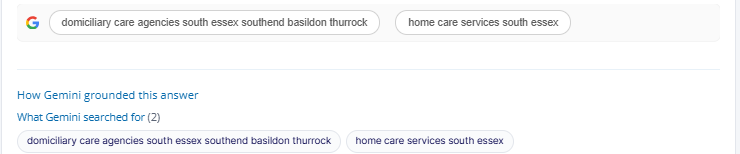
Figure 1. The Grounding Lab displayed two Google search suggestions. The same two searches also appeared in the record of the searches Gemini ran before writing its answer.
In this test, the suggestions and searches matched exactly.
We don’t assume this will happen every time. Our research checks every run for searches that don’t have a matching suggestion and suggestions that don’t appear in the search record.
This is important because the suggestions are what users can click, while the search metadata shows what Gemini actually ran. We need to know whether they consistently match before using the suggestions as a reliable source for SEO research.
2. Why Do the Search Suggestions Matter for SEO?
Each suggestion opens a Google results page for a search Gemini actually ran.
By checking those results, you can see whether your website appears for the searches behind an AI answer, which competitors rank and whether Google displays features such as AI Overviews or local business listings.
This gives you another way to investigate why a website might appear in an AI answer, or why it might be missing.
Check the searches Gemini actually used
Most AI visibility reports compare citations with rankings for the original customer question.
However, Gemini may search for something quite different.
For example, a customer might ask for home care services in South Essex, but Gemini also searches for domiciliary care agencies in three specific towns.
Checking the original query alone would miss those extra searches.
The suggestions let us investigate:
- Whether your website ranks for the searches Gemini generated.
- Which websites appear at the top of the results.
- Whether Gemini also cited those websites.
- Whether an AI Overview appears for each suggested search.
- Whether Google displays a local pack with business listings.
This is useful because it connects AI visibility research with the actual Google results behind the model’s searches.
The original question and Gemini’s searches can produce different results
Previous research has shown that Google AI Mode citations don’t always match the websites ranking at the top of the results for the original query.
A SE Ranking study, reported by Search Engine Journal in July 2025, found that 14% of AI Mode URLs matched the organic top ten for the original keyword.
Separately, seoClarity’s September 2025 analysis found that only 19% of AI Mode citations came from the organic top 20.
Both seoClarity and Moz have pointed to query fan-out as one possible reason.
Instead of relying only on the original question, AI Mode can search for related topics and use different websites to answer different parts of the question.
Gemini’s search suggestions give us a way to examine this process. We can check rankings for the searches the model actually generated, then compare them with rankings for the original question.
The four questions we’re testing
Our research focuses on four hypotheses.
- Do rankings across Gemini’s suggested searches predict AI Mode citations better than rankings for the original question? We want to know whether the model’s searches provide a better indication of which websites will appear in AI Mode.
- Are websites that rank in the top ten for more suggested searches more likely to be cited? We measure how often each website appears in the top ten across all the suggested searches for a prompt.
- Do local search results lead to more Google Maps listings in AI Mode? We’re checking whether suggested searches that return a local pack are more likely to produce local business listings in the AI Mode answer.
- Do the suggestions always match the searches Gemini ran? Our SESNHA example showed an exact match, but we’re checking this across every run.
3. Which Businesses Should Pay Attention?
This research is relevant to SEO teams whose traditional rankings don’t fully explain their visibility in AI search.
It’s also useful for product and development teams building applications that display grounded Gemini answers.
Different industries will see different types of searches and search results.
| Sector | What to check in the results behind the suggestions |
|---|---|
| Healthcare and social care | Whether your website ranks for suggested searches containing town names, and whether regulators or local business listings appear prominently. |
| Ecommerce and retail | Whether product and category pages rank for searches about specific features, sizes and materials, and whether shopping results take up much of the page. |
| SaaS and B2B technology | Whether your website ranks for searches about alternatives and comparisons, and which software review platforms appear. |
| Finance and insurance | Whether comparison websites rank above individual providers for searches about specific financial products. |
| Legal and professional services | Whether your firm ranks for searches combining a legal specialism with a town, and whether directories appear above law firm websites. |
| Travel and hospitality | Whether booking platforms or hotel websites rank for searches about specific facilities and features. |
| Product and engineering teams | Whether your application displays the search suggestions alongside grounded answers, in line with Google’s requirements. |
For SEO teams, the important difference is between ranking for the question a customer asks and ranking for the searches Gemini generates.
That’s where some of the missing explanation behind AI visibility may sit.
4. How Should Businesses Use Gemini’s Search Suggestions?
The process is straightforward.
First, collect the suggestions and check that they match the searches Gemini ran. Then check the Google results for each suggestion, using the same location and time period as your Gemini tests.
Finally, compare your rankings across those searches with your ranking for the original question and your visibility in Google AI Mode.
Step 1: Collect the search suggestions
The following Python function extracts Google search URLs from the HTML snippet returned by the API.
import re
from urllib.parse import urlparse, parse_qs


def suggested_searches(snippet):
    """Extract Google search terms from a suggestions snippet."""
    searches = []

    for href in re.findall(r'href=["\']([^"\']+)["\']', snippet):
        url = urlparse(href.replace("&", "&"))

        if "google." in url.netloc and url.path.startswith("/search"):
            searches.extend(parse_qs(url.query).get("q", []))

    return searches
For generateContent, the HTML snippet is available in:
candidates[0].groundingMetadata.searchEntryPoint.renderedContent
For the Interactions API, collect the suggestions from each google_search_result step’s result[].search_suggestions field.
The example above is a simple starting point. For a production tool, use an HTML parser to handle different link formats and attributes more reliably.
Step 2: Check that suggestions match the searches
Compare the suggestions with the searches returned in the API response.
For generateContent, use:
groundingMetadata.webSearchQueries
For the Interactions API, use the queries in each google_search_call step.
Record any differences:
- A search that Gemini ran but didn’t return as a suggestion.
- A suggestion that doesn’t appear in the search record.
- A suggestion that uses different wording from the original search.
In our SESNHA test, both suggestions matched the searches exactly.
If a response contains search metadata but no suggestions, check that the complete response was saved. Missing metadata can lead to an incomplete comparison.
Step 3: Check the Google results behind each suggestion
Once you’ve collected the suggestions, check each distinct search in Google.
You should also check the original question so you can compare the results.
Keep the location and timing consistent with your Gemini tests. Google results can vary by location and change over time, so checking them several weeks later may give you a different picture.
For each search, record:
- Your website’s organic position.
- The websites occupying the top positions.
- Whether an AI Overview appears.
- Which websites the AI Overview cites.
- Whether a local pack appears.
- Which businesses are included in the local listings.
This gives you a record of what Google showed for the searches Gemini generated.
Step 4: Compare your rankings across the searches
We use several measures to compare rankings for the suggested searches.
| Measure | What it means |
|---|---|
| Best rank | The best organic position your website achieved across all the suggested searches. |
| Rank score | The inverse of your best rank: 1 divided by the position. A website at position one scores 1, while a website that doesn’t rank receives 0. |
| Top-ten share | The percentage of suggested searches where your website appears in the top ten. |
| AI Overview citation share | The percentage of suggested searches where an AI Overview cites your website. |
| Original query rank | Your organic position for the original customer question, used for comparison. |
| AI Overview and local pack presence | The percentage of suggested searches where each of these search features appears. |
The main comparison in our first hypothesis is between two ways of measuring rankings:
- Your website’s rankings across the searches Gemini generated.
- Your website’s ranking for the original question.
We then compare both measures with the same outcome: whether Google AI Mode cites your website for the original question.
We use AUC (area under the curve) to compare how well each measure distinguishes between websites that are cited and those that aren’t. If rankings across the suggested searches produce a higher AUC, they provide a better indication of AI Mode citations than the original query ranking alone.
One approach measures rankings for the searches Gemini actually ran. The other measures rankings for the customer’s original question. Both are compared with the same outcome: citation in Google AI Mode.
The six research methods we’re using
We’re applying the same six research methods used across the wider series.
| Test | What we do |
|---|---|
| Client one-time test | Check every suggested search from SESNHA’s priority prompts. Record the client’s rankings, AI Overviews and local packs, then compare them with Google AI Mode on the same day. |
| Longitudinal test | Repeat the prompt panel weekly for 12 weeks, tracking the suggested searches, rankings across them and AI Mode results. |
| Bivariate test | Compare the rank score and top-ten share across suggested searches with AI Mode citations. Compare these with the original query ranking. |
| Multivariate test | Consider rankings across the suggested searches and the original query together with Gemini citations, share of the answer and page coverage, while accounting for repeated prompts. |
| A/B test | Improve existing pages for relevant suggested searches where they currently don’t rank. Randomly select test locations and leave control locations unchanged. Compare rankings and AI Mode visibility over eight to 12 weeks. |
| Before-and-after test | Compare rankings across suggested searches and AI Mode results in the four weeks before and after a Google core update. |
The A/B test is particularly important because rankings can take time to change.
We won’t assume that adding a relevant term to a page will immediately improve its position or lead to an AI Mode citation. The test needs enough time to measure whether anything changes.
What should content and development teams do now?
Developers and product teams: display the suggestions
If your application displays grounded Gemini answers, check Google’s terms and make sure the search suggestions are displayed as required.
Test the display on mobile devices and in both light and dark themes.
SEO teams: track the suggested searches
Add the searches Gemini generates to your keyword and rank tracking.
Don’t rely only on the original customer prompt. The suggested searches show which related searches the model actually ran.
SEO teams: identify missing rankings
Check whether the correct service, product or location page ranks for each suggested search.
If your website ranks for the original question but not for the related searches, investigate whether the relevant information is missing from the page or whether another page would be more suitable.
Content teams: use the suggestions to understand customer questions
Treat the suggested searches as useful research, not a list of keywords to repeat across your website.
Don’t create a separate page for every suggestion. Google has warned against creating pages for every query variation, as this can fall under its scaled content abuse policy.
Data teams: save suggestions with every run
Keep the suggestions alongside the original prompt, the Gemini answer and the source information.
This gives you a record of how the searches change over time and makes it easier to compare results between runs.
5. What We’re Measuring in the Wider Study
Our SESNHA test returned two search suggestions, and both matched the searches Gemini ran.
The wider study will show whether this happens consistently and whether the Google results behind the suggestions help explain AI Mode visibility.
We’ll report the following measures:
| Measure | What it tells us |
|---|---|
| Suggestions per answer | The median and range of suggestions returned for each answer. |
| Exact matches | The percentage of runs where the suggestions match the searches Gemini ran. |
| Suggested-search rankings | Whether a website’s rank score across the suggestions predicts AI Mode citations. We compare AUC and statistical significance. |
| Original query rankings | Whether the ranking for the customer’s original question predicts AI Mode citations. |
| Local pack presence | How often suggested searches return a local pack, particularly for local prompts. |
| Main influence in the combined model | Which ranking and visibility measures provide the strongest indication of AI Mode citations when considered together. |
The most important comparison is between rankings for the original question and rankings for the searches Gemini actually generated.
This should help us understand whether conventional keyword tracking is missing some of the searches that matter for AI visibility.
6. Frequently Asked Questions
Do we have to display Google’s search suggestions?
Google’s terms require applications that display grounded results to show the associated search suggestions.
Check the Gemini API terms and the Grounding with Google Search requirements before launching a product or service that displays these answers.
Are the suggestions always the same as the searches Gemini ran?
Not necessarily.
In our SESNHA example, the two suggestions matched the two searches exactly.
However, we’re checking every run to see whether this happens consistently. The extractor records searches without suggestions and suggestions without a matching search.
Why should we check the Google results ourselves?
Because rankings are often used to explain why a website appears in an AI answer.
Checking the results behind the suggested searches lets us compare rankings for the searches Gemini actually ran, rather than relying only on the words in the original question.
Does ranking for a suggested search guarantee a citation in Google AI Mode?
No.
Rankings are one factor we’re investigating. The wider research also measures the sources Gemini uses, how much of the answer each website supports and other features of the response.
The combined analysis will help us understand how much rankings explain, rather than assuming they guarantee visibility.
Which rank tracking tool should we use?
Use a tool that records organic positions and search results features for a specific location.
The important thing is to keep the market and timing consistent between your Gemini tests and your Google results checks.
7. The Toolkit: Search Suggestions Extractor
We’ve built a Python script to collect Gemini’s search suggestions and help analyse the Google results behind them.
The Search Suggestions Extractor has two main commands.
The chips command
The chips command:
- Lists the suggestions returned for each run.
- Checks them against the searches Gemini actually made.
- Identifies searches that don’t have a matching suggestion.
- Creates a checklist of searches to investigate in your rank tracking tool.
This makes it easier to build a consistent list of searches for each prompt.
The serp command
The serp command combines your Google results checks with the Gemini and AI Mode data.
It creates one row for each prompt and website, including:
- Best organic position.
- Rank score.
- Share of top-ten positions.
- Share of top-three positions.
- AI Overview citations.
- Ranking for the original prompt.
- Google AI Mode visibility.
The resulting dataset can then be used for further statistical analysis.
Running the script
Use these commands in your terminal:
python3 search_suggestions_extractor.py chips runs/

python3 search_suggestions_extractor.py serp runs/ --serp serp_results.csv --ai-mode ai_mode.csv --domain yoursite.co.uk

python3 grounding_experiment_stats.py bivariate suggestion_observations.csv --outcome ai_mode --factors rank_score,top10_share,aio_cited_share,gemini_cited
Replace the example domain and file names with the information from your own research.
The final command compares rankings across Gemini’s suggested searches, top-ten visibility, AI Overview citations and Gemini citations against the outcome in Google AI Mode.
8. What We’re Watching Next
The first priority is to compare rankings for the searches Gemini generates with rankings for the original customer question.
There are also several other areas we’re monitoring.
Do rankings across suggested searches predict AI Mode citations better?
We’ll compare the AUC results for both ranking measures and examine where they sit in the combined statistical model.
This should help us understand whether tracking the searches Gemini actually ran provides a better indication of AI visibility.
What happens with local searches?
We’re particularly interested in suggested searches that return a local pack.
We’ll compare these with Google AI Mode’s local business listings to see whether the two are related.
Our separate research into Google Maps grounding will provide further information about how Gemini finds local businesses.
Will Google change the suggestions or the way they are returned?
We’ll monitor changes to the HTML snippet and the machine-readable information returned by the API.
A more consistent data format would make it easier for developers to collect and analyse suggestions.
How are developers displaying the suggestions?
We’ll also look at how applications built on Gemini present grounded answers and whether users interact with the suggestions.
The aim is to understand how useful these search chips are to people using AI-powered products.
Do AI Overviews in the suggested searches help explain AI Mode citations?
When checking each suggested search, we’ll also record which websites appear in its AI Overview, where one is shown.
This will help us investigate whether websites cited in the AI Overviews of Gemini’s suggested searches are more likely to appear in AI Mode for the original question.
The Inside the Grounded Answer research series
This seven-part series looks at the information returned when Gemini uses Google Search grounding.
- The final answer: What Gemini tells users and which brands it names.
- Search queries: What Gemini searched for.
- Sources: Which websites Gemini cites.
- Supported sections: Which parts of the answer are linked to a source.
- Search suggestions: The Google searches shown with the answer. This article.
- Google Maps sources: Which places Gemini finds and cites.
- Thinking summaries: What the model’s planning summary tells us about its approach.
Together, the experiments will help us understand how Gemini searches for information, which websites it uses and how these findings relate to visibility in Google AI Mode.
9. About Szymaniak Digital
Szymaniak Digital is an Enterprise AI SEO Consultancy led by Konrad Szymaniak.
We help businesses understand how Google and AI platforms find information, select sources and present answers to customers.
Our work combines traditional SEO, AI search research and performance measurement. We help teams identify which searches matter, which pages should appear and where their current visibility is falling short.
We also develop SD SEO Suite, including the Grounding Lab for investigating Gemini’s searches and sources, and tools for checking Google search results and tracking AI visibility.
