
Knowing that Gemini has cited your website is useful. Knowing how much of its answer your website actually supports is even more useful.
In our first home care experiment, SESNHA Care’s website appeared twice in Gemini’s list of 14 sources. However, it supported eight of the 23 parts of the answer that had a source. That’s 35% of the sourced information, more than any other website.
This tells us something that a simple citation count doesn’t: a website can appear only once or twice in a source list but still provide a large part of the answer.
We’re investigating this in the fourth experiment in our seven-part Inside the Grounded Answer series. We’re looking at how Gemini connects individual claims in its answer to the websites it uses, how much each website contributes and whether that contribution helps predict which websites Google AI Mode cites.
This article explains how Google’s two Gemini API formats record these connections, how we measure a website’s contribution and what we’re testing next.
The experiment in brief
- The question: Does the amount of an answer supported by a website predict whether Google AI Mode will cite it better than simply recording whether it was cited? And which types of information does each website provide?
- The method: We use the same prompt panel as our first three experiments, with five Gemini runs per prompt each week and Google AI Mode checked during the same week. We’re also testing whether adding specific, verifiable facts to selected pages changes the results.
- What we measure: The parts of an answer each website supports, its share of the sourced information, the claims it supports on its own, how much of the answer has a source, and the types of facts each website provides.
- Our first example: In the SESNHA Care test, sesnha.co.uk supported eight of 23 sourced parts (35%). Essex.gov.uk supported six (26%).
- Research status: The wider study is in progress. The SESNHA example is an initial finding, not a final conclusion.
1. How Does Gemini Connect Its Answers to Sources?
When Gemini answers a question using Google Search grounding, it can link individual parts of its answer to the websites that support them.
These links are called grounding supports in the generateContent API.
They help us understand more than which websites Gemini used. They show which parts of the answer each website supports.
Google’s two API formats record this information differently.
How supports work in the generateContent API
In the generateContent API, look for:
candidates[0].groundingMetadata.groundingSupports[]
Each entry represents a section of the answer that has one or more supporting sources.
There are several fields worth understanding:
| Field | What it tells you |
|---|---|
groundingSupports[] | The list of answer sections linked to sources. |
segment.partIndex | Which part of the response contains the supported text. This matters when an answer is split into several parts. |
segment.startIndex | The position where the supported text begins. |
segment.endIndex | The position immediately after the end of the supported text. |
segment.text | The actual wording of the supported section. This is useful when checking that the text positions are correct. |
groundingChunkIndices[] | The source numbers linked to the section. These refer to positions in groundingChunks, starting at zero. |
confidenceScores[] | Source confidence scores, where provided. Google’s documentation says these are populated for Gemini 2.0 and earlier, but are empty for Gemini 2.5 and later. |
One section of an answer can have several supporting sources.
For example, if sources 1 and 12 both support the same statement, the API refers to them using the corresponding zero-based positions: 0 and 11.
Here’s a shortened example based on the type of information in our SESNHA analysis:
{
  "segment": {
    "partIndex": 0,
    "text": "An independent agency operating across South and West Essex, offering personal care, dementia support, and home help."
  },
  "groundingChunkIndices": [0, 11]
}
This tells us that the sentence is supported by two sources.
It doesn’t tell us which exact passage on each website Gemini used. It identifies the sources linked to that part of the answer.
How supports work in the Interactions API
The Interactions API records citations differently.
Instead of providing a separate list of supported sections, it attaches annotations to the text blocks in the model’s answer.
Each url_citation or place_citation annotation includes:
start_index: where the supported text begins.end_index: where the supported text ends.- The URL or place information identifying the source.
There are two important details to remember.
One section can have several citations. If three websites support the same statement, each may have its own annotation with the same start and end positions. Combine those annotations when measuring the section, otherwise you’ll count the same part of the answer several times.
Positions relate to individual text blocks. If an answer contains several text blocks, the positions in each block start from that block. You need to account for the length of earlier blocks when working out positions in the complete answer.
Why you need to understand bytes and characters
One technical detail can cause problems when extracting supported sections: byte positions and character positions are not always the same.
Google’s API references describe the start and end positions in bytes. Some example code works directly with text positions, which can lead to confusion when an answer contains symbols or accented letters.
In UTF-8, different characters take up different numbers of bytes.
For example:
- The pound symbol (£) uses two bytes.
- An em dash (—) uses three bytes.
- A standard English letter generally uses one byte.
Imagine a sentence starts with two em dashes. The byte position after those characters will be four positions higher than the equivalent character position.
Code that treats byte positions as character positions can therefore select the wrong part of the answer. That can lead to incorrect reporting about which words a website supported.
For generateContent, you can use segment.text to check whether the extracted section matches the text returned by the API.
For the Interactions API, check that the extracted positions fall at sensible word boundaries and account for the fact that positions are relative to their individual text blocks.
Here’s a simple Python function to convert byte positions into character positions:
def to_chars(text, start, end):
    """Convert UTF-8 byte positions to character positions."""
    raw = text.encode("utf-8")

    return (
        len(raw[:start].decode("utf-8", "ignore")),
        len(raw[:end].decode("utf-8", "ignore"))
    )
It’s important to validate the extracted text rather than assume every response uses positions in exactly the same way.
What did the supports show in our SESNHA test?
We used the SD SEO Suite Grounding Lab to ask Gemini 3.8 Flash:
home care services in South Essex
The answer contained 23 parts that were linked to sources.
SESNHA’s website supported eight of those parts, giving it a share of 35%. Essex.gov.uk supported six, or 26%.
Two statements in the answer had no source attached.
The difference between the two ways of measuring visibility is clear:
| Measure | SESNHA’s result |
|---|---|
| Number of sources in the answer | 2 of 14 |
| Number of sourced answer parts supported | 8 of 23 |
| Share of sourced answer parts | 35% |
| Website with the largest share | Yes |
SESNHA appeared twice in the list of 14 sources, but its website supported more of the answer than any other individual website.
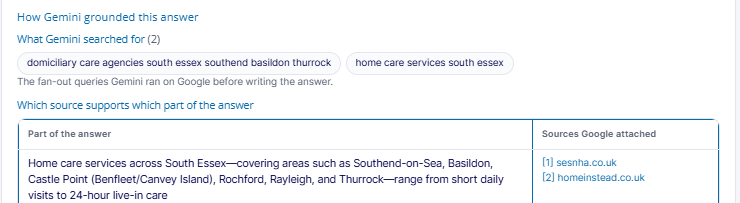
Figure 1. The Grounding Lab support table links the opening statement about home care across South Essex to the websites supporting it, including sesnha.co.uk and homeinstead.co.uk.
This is why we look beyond the number of citations. The important question is not just whether a website appears, but how much useful information it provides.
2. Why Does This Matter for AI Search Visibility?
A website that appears once in a source list could support a large part of an answer. Another website might appear several times but contribute very little.
Looking at the supported sections helps us understand what each website actually provides.
It also shows where information comes from and which claims aren’t supported by a visible source.
Four things supports show that citation counts don’t
1. How much of the answer your website supports
We measure the number of sourced sections supported by a website and compare it with the total number of sourced sections.
In the SESNHA example, its website supported eight of 23 sections. That is a more useful measure of its contribution than simply saying it appeared twice in the source list.
2. Whether your website is the only source for a claim
Some statements are supported by one website. Others are supported by several.
A section supported only by your website is information that Gemini has taken from your source alone. A section supported by your website and a directory or regulator has more than one source behind it.
We record these separately to see whether information supported by one website behaves differently from information supported by several.
We don’t assume that having several supporting sources automatically makes a claim more likely to appear in another AI answer. That’s something the research needs to test.
3. Which types of information your website provides
The supported sections also show what information Gemini uses from your website.
For a home care provider, this might include:
- Services offered.
- Areas covered.
- Prices and visit lengths.
- Ratings and accreditations.
- Business details.
In our SESNHA example, the website supported statements about the type of provider it is, where it operates and what services it offers.
This helps us understand which parts of a website are contributing to the answer.
4. Which statements have no visible source
Not every statement in a grounded answer has a citation.
An unsourced statement about your business isn’t directly linked to a page in the returned grounding information. That makes it difficult to identify where the information came from or which page should be corrected if it is wrong.
We record these statements separately, particularly when they mention a brand or make a claim about a business.
Could a website’s share of the answer predict Google AI Mode citations?
This is one of the main questions we’re trying to answer.
Gemini builds its response using information from the websites it finds. If a website supports a larger part of the answer, it may also contain information that Google AI Mode finds useful.
That is a reasonable hypothesis, but Google hasn’t confirmed that AI Mode selects sources in the same way as Gemini’s API.
We’re therefore testing whether a website’s share of Gemini’s answer is a better way to predict AI Mode citations than simply checking whether the website appeared in the source list.
Our research also looks at the actual passages Google AI Mode selects, so we can compare the findings from both sides: the website’s contribution to Gemini’s answer and the passages used by AI Mode.
The four hypotheses we’re testing
- A website’s share of the answer predicts AI Mode citations better than a simple yes-or-no citation measure. We want to know whether contributing more information to Gemini’s answer is associated with a greater chance of appearing in AI Mode.
- Sections supported only by a website are more useful predictors than sections shared with other sources. We’re testing whether information supplied by one website has a different relationship with AI Mode visibility.
- Specific facts are more likely to come from a brand’s own website than general descriptions. We’re looking at numbers, locations, prices and ratings with dates to see where these claims are sourced.
- Adding accurate, verifiable facts to a page increases its share of Gemini’s answer. We also want to see whether any increase is linked to a greater chance of appearing in AI Mode.
3. Which Businesses Should Pay Attention?
This research matters to any business whose information may be repeated in AI answers.
If an AI assistant discusses your prices, ratings, locations, features or services, it’s useful to know which website provided that information.
The issue is especially important in sectors where customers compare several businesses before making a decision.
| Sector | Types of information to look for | What to check |
|---|---|---|
| Healthcare and social care | Services, areas covered and regulator ratings | Whether ratings come from your website or the regulator, and whether the correct date is shown. |
| Ecommerce and retail | Prices, product specifications, delivery and returns | Whether the information comes from your own product page or a reseller. |
| SaaS and B2B technology | Features, pricing plans and integrations | Which website provides the feature information used in comparisons. |
| Finance and insurance | Interest rates, fees and eligibility requirements | Whether quoted rates are accurate and current. Incorrect information can create compliance risks. |
| Legal and professional services | Specialisms, fees and accreditations | Whether qualifications and accreditations are taken from your website or a directory. |
| Travel and hospitality | Facilities, prices and distances | Whether descriptions come from your own website or a booking platform. |
| Enterprise brands | Company history, size, locations and leadership | Whether claims about your business are supported by a reliable source. |
The more specific the information in an AI answer, the more important it becomes to understand which website supplied it.
4. How Should Businesses Measure Their Share of an AI Answer?
The process starts with extracting the supported sections from the Gemini response.
You then need to connect each section to its source websites, calculate how much of the answer each website supports and identify the types of claims being made.
Step 1: Extract the supported sections and check the text positions
When working with the generateContent API, start by converting the byte positions into character positions where necessary.
def to_chars(text, start, end):
    """Convert UTF-8 byte positions to character positions."""
    raw = text.encode("utf-8")

    return (
        len(raw[:start].decode("utf-8", "ignore")),
        len(raw[:end].decode("utf-8", "ignore"))
    )
For generateContent, compare the extracted text with segment.text. If the text doesn’t match, check whether the positions have already been returned as character positions.
For the Interactions API, there isn’t a separate segment.text field to compare. Check that the extracted text starts and ends at sensible word boundaries.
Where several annotations have the same positions, combine them into one supported section and record all the websites behind it.
This avoids counting the same statement several times.
Step 2: Calculate each website’s share of the answer
We use two main measures.
Share of the sourced answer
This is the number of sourced sections supported by a website, divided by the total number of sourced sections.
[
\text{Share}_w =
\frac{\text{Sourced sections supported by website }w}
{\text{Total sourced sections}}
]
For SESNHA:
[
\frac{8}{23}\times100 = 34.8%
]
Rounded to the nearest whole number, that’s 35%.
Share supported by the website alone
This measures how many sourced sections rely only on that website.
[
\text{Sole-source share}_w =
\frac{\text{Sections supported only by website }w}
{\text{Total sourced sections}}
]
We report this separately because a section supported by several websites is different from one where a single website is the only source.
We also measure how much of the answer is supported overall.
Answer coverage is the proportion of the answer’s characters, excluding spaces, that sit inside a sourced section.
Finally, we identify unsourced sentences. For this study, we define these as sentences containing at least six words with no characters inside a sourced section.
These definitions give us consistent measures to compare across prompts and websites.
Step 3: Identify the claims each website supports
We also want to understand what kind of information each website contributes.
We group the claims into six categories.
| Claim type | What we look for |
|---|---|
| Numbers | Figures and quantities used in the answer. |
| Prices | Currency amounts and rates, such as a cost per hour, visit, week or month. |
| Ratings | Statements about ratings, stars, regulator grades and scores. |
| Dates | Years, months and phrases such as “since”. |
| Locations | Towns, cities, postcodes and other named places. |
| Contact details | Telephone numbers, email addresses and instructions to contact a business. |
The script looks for patterns that might identify these claims, but automated detection isn’t perfect.
For example, a capitalised word could be a town, company or person’s name. We therefore review claims attributed to a client before including them in a report.
This is especially important for prices, ratings and other information that needs to be accurate.
The six research methods we’re using
We use six different tests to investigate how a website’s contribution to Gemini’s answer relates to Google AI Mode visibility.
| Test | What we measure |
|---|---|
| Client one-time test | Run SESNHA’s priority prompts five times each. Record every claim supported by sesnha.co.uk, how often it appears, whether it is the only source and whether the answer contains unsourced statements naming SESNHA. |
| Longitudinal test | Repeat the prompt panel weekly for 12 weeks. Track each website’s share of the answer and the overall percentage of the answer supported by sources. |
| Bivariate test | Compare share of the answer, sole-source share and the proportion of factual claims with Google AI Mode citations. Check whether these measures predict visibility better than a simple citation count. |
| Multivariate test | Consider share, sole-source share, citation status, website type and the other measurements from our first two experiments together, while accounting for repeated prompts. |
| A/B test | Add accurate, verifiable facts to randomly selected test pages. Leave the control pages unchanged and compare their share of the answer and AI Mode visibility before and after. |
| Before-and-after test | Compare answer share and coverage during the four weeks before and after a Gemini model release. This will show whether different models change how much of an answer they support with sources. |
A closer look at the SESNHA A/B test
For SESNHA, we’re focusing on information the business can verify and stand behind.
This includes:
- Visit lengths.
- Areas covered.
- The latest CQC rating and the date of the assessment.
The CQC rating is particularly relevant. CQC Regulation 20A requires registered providers to display their latest rating on their website. Showing the rating clearly, with the date and access to the relevant report, also gives customers and search systems a specific fact they can check.
We plan to split SESNHA’s 17 location pages into two groups.
The pages will be selected at random, with the groups balanced according to their starting share of Gemini’s answer.
The test pages will receive the agreed improvements. The control pages will remain unchanged.
We’ll then compare the change in answer share and Google AI Mode inclusion between the two groups. This is known as a difference-in-differences analysis.
With only 17 location pages, the test is limited. It may only identify a large effect. If the results aren’t statistically clear, that doesn’t prove the changes had no effect. It means we couldn’t establish one from this sample.
We’ll also look to combine the findings with similar tests from other clients.
The following commands show how we plan to assign the pages and analyse the results:
python3 grounding_experiment_stats.py assign pages.csv --unit page --stratify baseline_share

python3 grounding_experiment_stats.py abtest support_observations.csv --unit prompt --group variant --phase phase --outcome share --where domain=sesnha.co.uk
What should content and development teams do now?
There are several improvements businesses can make while the experiment continues.
Content teams: write facts that make sense on their own
Make important information clear without relying on the surrounding paragraph.
For example:
We provide home care across Basildon, Southend and Thurrock.
This is more useful than:
We cover a wide area.
The first statement explains what the business does and where it operates. The second doesn’t give customers enough information to understand the service area.
Content teams: keep dates and changing information up to date
Prices, opening hours and ratings can change.
Include dates where they help customers understand how current the information is. Review these details regularly.
Content teams: keep information consistent
Make sure your website, directories and regulator listings agree on important facts.
If two websites show different prices, addresses or service areas, an AI assistant may use information that no longer reflects the business.
Development teams: keep important facts in normal HTML text
Don’t place key information only inside images, PDFs or scripts.
Make sure the content is accessible and isn’t hidden from search snippets by settings such as nosnippet or data-nosnippet.
SEO and data teams: report contribution as well as citations
A website that appears once but supports a third of an answer may be contributing more than a website that appears several times but supports very little.
Report the share of the answer alongside the number of citations.
5. What We’re Measuring in the Wider Study
The SESNHA example gives us an initial view of how much information one website can contribute to a grounded answer.
The wider study will show whether that pattern appears across different prompts, brands and industries.
We’ll report the following measures:
| Measure | What it tells us |
|---|---|
| Sourced sections per answer | The median and range of answer sections linked to sources. |
| Overall answer coverage | The average proportion of the answer supported by sources. |
| Share of the answer and AI Mode citations | Whether websites with a larger share of Gemini’s answer are more likely to appear in AI Mode. We’ll compare the results using AUC and statistical tests. |
| Simple citation and AI Mode citations | Whether simply appearing as a Gemini source predicts AI Mode visibility. |
| Sole-source share and AI Mode citations | Whether information supported only by one website is a stronger predictor of AI Mode visibility. |
| A/B test results | Whether adding verifiable facts changes a page’s share of the answer compared with unchanged pages. |
We’ll also examine whether newer Gemini models use sources for more or less of their answers.
The aim is to understand whether the amount and type of information a website contributes can help explain its visibility in other AI search experiences.
6. Frequently Asked Questions
Do grounding supports show the exact passage Gemini read on my website?
No. They identify the part of Gemini’s answer that is linked to a source. They don’t show the exact passage on the original website.
Passage analysis in SD SEO Suite takes this further by examining the cited pages and identifying the passages that may support the answer.
What are the confidence scores in the API?
Confidence scores are values between zero and one that can be associated with individual sources.
Google’s documentation says these scores are populated for Gemini 2.0 and earlier, but the list is empty for Gemini 2.5 and later models.
For current models, don’t rely on these scores when measuring source importance.
Why don’t my extracted numbers match the Grounding Lab?
One possible reason is the difference between byte positions and character positions.
Another is that you’ve counted source entries rather than unique websites, or counted several annotations for the same answer section separately.
Check the extracted text against the API response and make sure repeated sources and annotations are handled correctly.
Can one part of an answer have several sources?
Yes. Several websites can support the same section of an answer.
We record each website’s contribution to that section, but count it as a sole-source section only when one website supports it on its own.
What should we do about statements that mention our business but have no source?
First, check whether the statement is accurate.
If the information is correct, make it easy to find on your own website and on relevant third-party profiles. If it’s wrong, correct the information at its source and across any websites that repeat it.
We then monitor whether the statement becomes properly supported in future answers.
7. The Toolkit: Support Claims Extractor
We’ve built a Python script to help analyse which parts of a Gemini answer each website supports.
The Support Claims Extractor has two main commands and works with the shared statistics tool used in the other experiments.
The supports command
The supports command creates two datasets.
The first contains one row for each prompt and website, including:
- Share of the sourced answer.
- Share supported by that website alone.
- Share of factual claims.
- Position of the first supported section.
- Overall answer coverage.
- Unsourced sentences.
- Whether the website also appears in Google AI Mode.
The second dataset contains one row for each sourced section of the answer, showing which websites support it.
This makes it possible to examine individual claims as well as the overall contribution of each website.
The claims command
The claims command lists the claims attributed to a particular website across repeated runs.
It also identifies sentences that mention the brand but don’t have a visible source.
This is useful when checking what Gemini says about a business and whether those statements are supported by the correct information.
Running the script
Use the following commands in your terminal:
python3 support_claims_extractor.py supports runs/ --ai-mode ai_mode.csv --domain yoursite.co.uk

python3 support_claims_extractor.py claims runs/ --domain yoursite.co.uk --brand "Your Brand"

python3 grounding_experiment_stats.py bivariate support_observations.csv --outcome ai_mode --factors gemini_cited,share,sole_share,fact_share
Replace the example domain and brand name with the details relevant to your research.
The final command compares Gemini citation status, share of the answer, sole-source share and the share of factual claims against Google AI Mode inclusion.
8. What We’re Watching Next
The first results will show whether a website’s share of Gemini’s answer is a better predictor of Google AI Mode visibility than a simple citation count.
There are five areas we’re particularly interested in.
Does a larger share of the answer predict AI Mode visibility?
We’ll compare the share of the answer, sole-source share and factual claims against Google AI Mode citations across the full prompt panel.
This will help us understand whether the amount of information a website provides matters more than simply appearing in the source list.
Do the changes improve SESNHA’s results?
The A/B test will show whether adding specific, verifiable information increases the share of Gemini’s answer supported by SESNHA’s pages.
We’ll also check whether any improvement is reflected in Google AI Mode.
Do newer Gemini models use more sources?
We’ll compare how much of an answer different models support with citations.
If newer models attach sources to a larger proportion of their answers, this could change how we measure a website’s contribution.
Will Google bring back source confidence scores?
Google’s API no longer provides populated confidence scores for Gemini 2.5 and later models.
If this changes, a confidence score for each source could provide another way to measure how much influence a website has on an answer.
Will Google clarify how it measures text positions?
The API documentation describes byte positions, while some code examples work directly with text.
We’ll continue checking both approaches in our toolkit so that changes in text extraction don’t lead to incorrect reporting.
The Inside the Grounded Answer research series
This seven-part series looks at different parts of a grounded Gemini response:
- The final answer: What Gemini tells users and which brands it names.
- Search queries: What Gemini searched for.
- Sources: Which websites Gemini cites.
- Supported sections: Which parts of the answer are linked to a source. This article.
- Search suggestions: The Google searches shown alongside the answer.
- Google Maps sources: Which places Gemini finds and cites.
- Thinking summaries: What the model’s planning summary tells us about its approach.
Together, the experiments will help us understand not only which websites Gemini uses, but also what information those websites contribute and whether that matters for visibility in Google AI Mode.
9. About Szymaniak Digital
Szymaniak Digital is an Enterprise AI SEO Consultancy led by Konrad Szymaniak.
We research how Google and AI platforms find information, select sources and use website content to answer customer questions.
Our work helps businesses understand which of their claims appear in AI answers, which come from other websites and which have no visible source. We then help content, SEO and development teams make important business information clearer and easier to find.
The Grounding Lab and Passage analysis in SD SEO Suite help businesses investigate how AI systems use their website content and which sources support their answers.
