
In the first part of this experiment, Bing’s Topics Portfolio identified vibe coding as the biggest AI search opportunity for a B2B SaaS client.
For the next stage, I wanted to turn that opportunity into a practical content strategy. To do this, I combined data from three sources:
- Bing Webmaster Tools: To identify where AI assistants were citing websites and where the client had opportunities to gain visibility.
- Google Search Console: To understand which vibe coding searches the client already appeared for, which pages were performing and where there was room to improve.
- SD SEO Suite: To research keywords, People also ask questions, Google AI Overviews, searches made by AI assistants, competitors and the websites those assistants rely on.
Together, these sources gave me around 3,000 potential queries. After cleaning, combining and prioritising the data, I narrowed the list to approximately 1,000 content opportunities.
The priority questions are now being monitored across ChatGPT, Gemini, Perplexity and Claude, with the aim of understanding which competitors are mentioned, which websites are cited and what information the assistants look for before answering.
The next stage is to turn the research into content around the client’s vibe coding services and educational resources.
This is an ongoing experiment. The research and content plan are in place, but the results will follow once the new pages have been published and have had enough time to perform.
The Experiment So Far
| Stage | What we did | Status |
|---|---|---|
| 1. Find the opportunity | Bing’s Topics Portfolio identified vibe coding as the biggest gap among the client’s services | Complete |
| 2. Check the current position | Reviewed the client’s citations in Bing and its queries and pages in Google Search Console | Complete |
| 3. Build the query list | Collected keywords, People also ask questions, AI assistant searches, competitors and sources using SD SEO Suite | Complete |
| 4. Prioritise | Reduced around 3,000 candidate queries to approximately 1,000 content opportunities | Complete |
| 5. Track | Set up AI visibility tracking across ChatGPT, Gemini, Perplexity and Claude | Ongoing |
| 6. Create the content | Plan and produce content around the client’s vibe coding services and educational resources | In progress |
| 7. Measure the results | Compare citations, mentions and rankings against the original performance data | Next stage |
The client is a B2B SaaS company offering services around vibe coding, Model Context Protocol (MCP) and AI-assisted data modelling. The company has not been named.
1. What Happened?
I took the vibe coding opportunity identified in Bing’s Topics Portfolio, checked the client’s existing visibility and then used SD SEO Suite to research the searches that matter for this topic across Google and four AI assistants.
The result was around 3,000 potential queries, which I narrowed to approximately 1,000 content opportunities. The priority questions are now being tracked so that we can monitor how the client and its competitors appear in AI-generated answers.
Starting With Bing and Google Search Console
The first decision was already made: vibe coding was the client’s biggest AI search opportunity, so it would become the first content cluster.
Before creating any pages, I needed to understand what was already happening.
In Bing Webmaster Tools, I used the AI Performance report, specifically the Citations & Pages view. This showed which of the client’s pages were already being cited and the grounding queries associated with those citations.
A grounding query is a search or question that helps an AI system find information to use in its answer.
I then moved to Google Search Console and filtered the Performance report for searches related to vibe coding.
This helped me understand:
- Which vibe coding searches the client already appeared for.
- Which pages received impressions and clicks.
- The positions those pages achieved.
- Which searches were already close to page one.
- Where the website had content that could be improved rather than replaced.
These two sources gave me a picture of the client’s existing visibility. However, they didn’t show the full range of questions people were asking or the searches AI assistants were carrying out before answering.
For that, I used SD SEO Suite.
How I Used SD SEO Suite to Expand the Research
I used three different modules, each with a specific purpose.
| SD SEO Suite module | What I used it for | What it added to the research |
|---|---|---|
| Keyword research | Vibe coding seed keywords and keyword lists collected from other sources | Google search volume, 12-month trends, keyword difficulty, cost per click and search intent |
| Google results and AI Overview checker | The top 20 search results for the main queries | People also ask questions, AI Overview answers and the websites cited in those answers |
| AI visibility | Questions about vibe coding asked in ChatGPT, Gemini, Perplexity and Claude | Searches made by each assistant before answering, websites used as sources, competitors mentioned and the full answers |
The keyword research gave me information about traditional Google search demand.
The Google results checker helped identify related questions and the sources Google was using in its AI Overviews.
The AI visibility module provided another layer of research. It showed the searches each assistant carried out before answering, the websites it relied on and the competitors it mentioned.
Combining this with Bing Webmaster Tools and Google Search Console produced around 3,000 rows of potential queries.
I then cleaned, combined and scored the data, reducing it to approximately 1,000 content opportunities.
Tracking the Priority Questions
After identifying the opportunities, I set up AI visibility tracking for the priority questions across ChatGPT, Gemini, Perplexity and Claude.
This allows me to monitor:
- Which competitors are mentioned.
- Which brands are named first.
- Which websites are cited.
- Which pages are being used as sources.
- What searches the assistants carry out before answering.
- How the answers differ between AI assistants.
The purpose is to create a baseline that we can compare against as the new content goes live.
The content strategy is based on what Google and the AI assistants are already showing for the topic. We’re now structuring and producing content around the client’s vibe coding services and educational resources, with a focus on answering potential customers’ questions and supporting revenue growth.
2. Why Does It Matter?
No single SEO tool gives you the full picture of AI search.
Bing shows where AI citation opportunities exist. Google Search Console tells you how your website performs in Google. SD SEO Suite brings together keyword research, related questions, AI Overview sources and the searches and sources used by four AI assistants.
Using these sources together gives you a much stronger basis for planning content for both traditional search and AI search.
Each Tool Answers a Different Question
| Tool | The question it answers | What it doesn’t show on its own |
|---|---|---|
| Bing Webmaster Tools – Topics Portfolio | Where is there AI citation demand, and which websites are being cited instead of us? | Google search volumes, activity in other AI assistants and a complete picture of competitor citations |
| Google Search Console | Which searches do we already appear for in Google, which pages rank and how well do they perform? | What AI assistants say, which competitors they mention and where we have no existing visibility |
| SD SEO Suite | What do people and AI assistants search for, what do the answers contain and which brands and websites appear? | The website’s full click and impression data or Bing’s total citation figures |
Each tool fills a gap left by the others.
Bing helped identify the topic worth targeting. Search Console showed where the client already had visibility and which pages could be improved. SD SEO Suite provided the wider search demand, related questions, competitors and sources.
The value comes from bringing everything together into one content plan rather than treating each platform as a separate SEO project.
AI Assistants’ Searches Provide Another Source of Keyword Ideas
One of the more interesting parts of the research was looking at the searches AI assistants carry out before giving an answer.
When an AI assistant answers a question, it may first search for additional information. These searches help it find the pages and sources it needs to build its response.
These are often called fan-out queries.
For example, someone might ask an assistant about the best vibe coding platform for an enterprise team. The assistant could then search for information about security, collaboration, integrations, pricing and the differences between available tools.
Those searches provide useful information about what the assistant needs to understand before it can answer the original question.
Many of these searches have little or no measurable search volume in traditional keyword tools. However, that doesn’t mean they are unimportant.
They help show what information AI assistants are looking for and which websites they may use to answer a question.
A content plan based only on keyword volume could miss these opportunities.
The Websites AI Assistants Use Are Part of the Strategy
The AI visibility data also showed which websites the assistants relied on when answering vibe coding questions, along with the competitors they mentioned.
This matters because improving your own website is only part of the work.
Some of the sources may be documentation websites or developer communities. Others may be comparison websites, review platforms or competitors’ pages.
Each type of source creates a different opportunity.
For example, a business could improve its own documentation, contribute useful information to a developer community, make sure it is included in relevant comparisons or publish original research that attracts attention from industry websites.
An AI search strategy therefore needs to consider what happens outside the company’s own website as well.
One Content Plan Can Support Google and AI Search
Many searches have demand in both traditional Google search and AI assistants.
For example, a question could have measurable Google search volume, appear in Google’s People also ask results and also be used by ChatGPT or Perplexity when answering a related question.
These opportunities shouldn’t automatically be treated as separate content projects.
Planning for both types of search at the same time avoids having different teams create multiple pages that answer essentially the same question.
The aim is to create one useful page that can perform across different search experiences.
You Need a Consistent Way to Prioritise Thousands of Queries
Collecting 3,000 queries is relatively straightforward compared with deciding which ones are worth targeting.
Some queries will be duplicates. Others will use different spellings, include competitor brand names or have little to do with the services the business actually offers.
You cannot sensibly prioritise thousands of queries by looking at them individually.
You need a consistent way to combine the data, remove irrelevant searches and score the remaining opportunities.
That’s what I did before reducing the list to approximately 1,000 content opportunities.
I’ll explain the process in more detail in the next section.
3. Who Is This Approach Suitable For?
This approach is particularly useful for businesses planning content around both Google and AI assistants.
It is especially relevant when buyers research a fast-moving topic, compare different providers or use AI assistants to understand a product or service before making a decision.
| Business type | Why this approach is useful | Where to start |
|---|---|---|
| B2B SaaS and technology | New areas such as vibe coding, MCP and AI agents develop quickly. Buyers use AI assistants to explain and compare them | Use Bing’s Topics Portfolio to identify opportunities and AI assistant searches to understand buyer questions |
| Enterprise and multi-product brands | Many products and topics compete for the same content budget | Compare opportunities and prioritise the topics most likely to support business goals |
| Ecommerce and retail | Product questions appear in Google, AI Overviews and AI assistants, but each may use different sources | Research People also ask questions and the websites AI assistants rely on for each product category |
| Professional services and agencies | Expertise needs to be recognised and cited, not just published and ranked | Identify the competitors AI assistants mention and the websites they use as sources |
| Publishers and education providers | Explanations, tutorials and courses compete with documentation websites and online communities | Combine AI assistant searches with Search Console queries that are already close to page one |
Which Teams Need to Be Involved?
The process involves more than SEO and content production.
- SEO: Collects the data from the three tools, combines and scores it, and manages ongoing tracking.
- Content strategy: Turns the prioritised queries into topic clusters, individual pages and content briefs.
- Product and subject experts: Check that the content reflects what the business actually offers and knows.
- Marketing leadership: Decides which topics receive budget and which pages should support revenue.
- Communications: Works with relevant third-party websites and communities that AI assistants use as sources.
- Development: Builds the page templates, site structure, internal links and structured data needed for the new content.
4. What Should Businesses Do?
Use each tool for what it does best, bring the data together, prioritise the opportunities and build pages around the most important questions.
Then monitor those same questions over time to understand whether your content is gaining visibility.
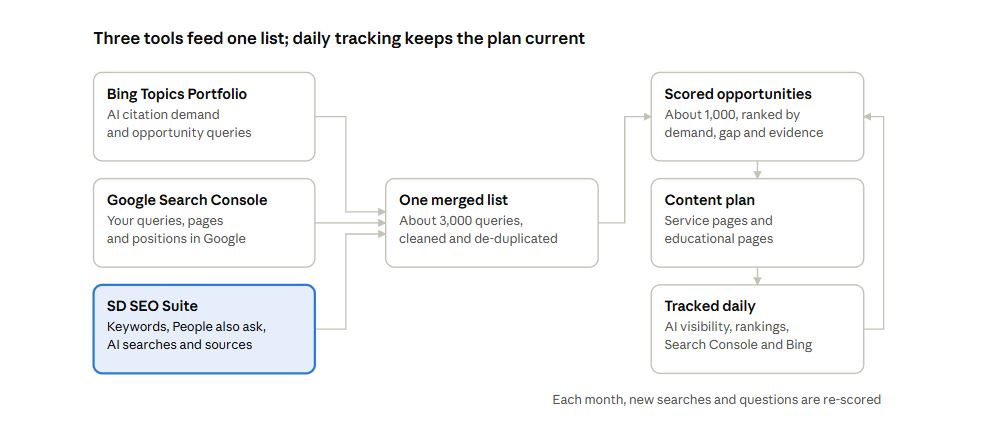
This is the workflow I used for the B2B SaaS client.
Bing and Google Search Console helped identify the opportunity and establish the client’s current position. SD SEO Suite supplied most of the additional keyword and question research, as well as the AI answer and competitor data.
Ongoing tracking then gives us information to improve the plan as new questions and competitors appear.
Step 1: Choose the Topic Using Bing’s Topics Portfolio
Start by identifying the topic where your business has the biggest opportunity to gain AI search visibility.
In this experiment, I used Bing Webmaster Tools’ Topics Portfolio to identify the opportunity queries and compare them with the client’s services.
Vibe coding emerged as the biggest gap, so it became the first content cluster.
The important thing is to choose a topic that is relevant to what the business actually sells or provides.
A large AI citation opportunity isn’t automatically worth pursuing if it has no connection to your products, services or customers.
Step 2: Record Your Starting Position in Google Search Console and Bing
Before creating new content, record how the website currently performs.
This is important because you need a baseline to measure against later.
Google Search Console
Open the Performance report and filter queries related to the topic.
For vibe coding, a regular expression can help capture different spellings:
(?i)vibe ?codThis matches variations such as “vibe coding” and “vibecoding”.
Export both the queries and pages so you can see which URLs already receive impressions and clicks.
Pay particular attention to queries where the website ranks between positions 4 and 20.
These can be some of the quickest opportunities because the website already has visibility and may be able to improve its position by strengthening the relevant page.
Bing Webmaster Tools
Open the AI Performance report and use the Citations & Pages view.
This shows which of your pages Bing is citing and the grounding queries associated with those citations.
Pages that already appear in AI answers are a useful starting point for building the wider topic cluster.
Record the baseline
Save the date and the main performance figures for the topic.
At a minimum, record:
- Google clicks.
- Google impressions.
- Average position.
- The pages receiving impressions and clicks.
- Bing citations.
- The queries associated with those citations.
You will need the same information later when comparing the results.
Step 3: Build a Wider List of Queries in SD SEO Suite
This is where most of the additional research happens.
Use each SD SEO Suite module to collect a different type of query and download the results for further analysis.
1. Keyword research
Start with up to five seed keywords at a time, with up to 200 keyword ideas for each search.
Repeat the process for the main sub-topics.
For a vibe coding content strategy, these might include:
- Vibe coding tools.
- Enterprise vibe coding.
- Security and risks.
- Learning and training.
- Platform comparisons.
You can also upload keyword lists from other sources, with up to 200 keywords at a time, to add search volume, difficulty and intent data.
2. Google results and AI Overview checker
Research the main queries and collect:
- The top 20 Google results.
- People also ask questions.
- AI Overview text.
- Websites cited in AI Overviews.
Check both mobile and desktop results where relevant to your audience.
This helps identify the questions Google associates with the topic and the websites it uses in its AI-generated answers.
3. AI visibility
Create an AI visibility project using your brand and up to four competitors.
Add the main questions you want to monitor across ChatGPT, Gemini, Perplexity and Claude.
For each answer, collect the information available about:
- Searches carried out by the assistant before answering.
- Websites used as sources.
- Competitors mentioned in the answer.
- The complete answer provided by the assistant.
This gives you a much broader view of the questions and sources influencing AI-generated answers.
For this client, the three SD SEO Suite modules, combined with Google Search Console and Bing Webmaster Tools, produced around 3,000 candidate queries.
Step 4: Combine, Clean and Score the Data
When you combine around 3,000 rows from five sources, you will naturally find duplicates, different spellings, competitor brand names and searches that are unrelated to your services.
Clean the data before deciding which opportunities deserve attention.
I used the following process.
Merge different spellings
For example, “vibecoding” and “vibe coding” refer to the same topic.
These should not be treated as separate content opportunities.
Remove competitor brand searches where they aren’t relevant
Competitor names may appear in the research, but that doesn’t mean you should create a page for every competitor-related search.
Remove those searches unless you have a clear reason to create an honest comparison page.
Keep queries relevant to the topic and services
The list should focus on questions that relate to what the business offers.
Remove searches that have no meaningful connection to its products, services or target customers.
Score the remaining opportunities
Once the data has been cleaned, score each query against four factors.
| Factor | What it measures | Data source |
|---|---|---|
| Google demand | Monthly search volume, or Search Console impressions where search volume is unavailable | SD SEO Suite keyword research and Google Search Console |
| AI demand | Bing citations, how often AI assistants search for the query and whether it appears in People also ask | Bing Webmaster Tools and SD SEO Suite |
| Visibility gap | Whether the website already ranks in the top three or receives citations, or whether it has little or no visibility | Google Search Console and Bing Webmaster Tools |
| Evidence | How many different sources contain the query | All collected sources |
The score is a working model, not an industry standard or Google’s own ranking system.
You can adjust the weighting depending on your business goals. For example, a company focused on lead generation might give more weight to commercial intent, while a publisher might prioritise broader search demand.
The important thing is to apply the same approach consistently so that you can compare opportunities fairly.
For this client, the cleaning and prioritisation process reduced the list from around 3,000 candidate queries to approximately 1,000 content opportunities.
Step 5: Turn the Opportunities Into Pages
One thousand queries do not necessarily require one thousand pages.
In most cases, many queries are simply different ways of asking the same or similar questions.
The next step is to organise them into groups based on topic and search intent.
Start with the pages you already have
If Search Console or Bing shows that an existing page is close to gaining visibility for a query, improve it before creating another page.
There is little value in publishing a new page when an existing one can answer the question properly.
Group queries by sub-topic and intent
Create one page for each distinct user need.
For a vibe coding topic cluster, this could include pages covering:
- What vibe coding is.
- How to use vibe coding.
- The best vibe coding tools.
- Enterprise applications.
- Security risks.
- Examples and use cases.
- Costs and pricing.
- Training and professional support.
The exact pages should reflect the research, the services offered and the questions customers are asking.
Separate service pages from educational content
This is particularly important for businesses that want content to generate revenue.
Service pages should answer commercial questions about what the business offers, who it helps, how its services work and what customers can expect.
Educational pages should answer the wider questions people ask while researching the topic.
For this client, the commercial pages focus on its vibe coding services and educational offerings. The supporting educational pages are designed to answer related questions and help potential customers understand the subject.
Both types of content should work together.
Build a content cluster
Start with a main page targeting the broader topic, supported by more specific pages covering related questions.
This gives the website a clear structure and helps visitors move from general information to more detailed answers and relevant services.
The plan command in the toolkit later in this article groups the scored queries into proposed pages. It also identifies each page as either a service page or an educational page and lists its main and supporting queries.
Step 6: Write Each Page for Google and AI Assistants
The research should influence what goes into every page.
It shouldn’t simply be used to produce a list of keywords for writers to include.
I would use the following approach.
Answer the main question at the beginning
The first two sentences should explain what the page is about and answer the main question in straightforward language.
Don’t make readers work through a long introduction to find the information they need.
Cover the related questions AI assistants search for
The searches an assistant makes before answering can reveal which supporting questions it needs to understand.
Use those questions as section headings where they make sense.
This helps ensure the content covers the wider subject rather than focusing on one keyword.
Include People also ask questions
Use relevant People also ask questions to identify additional information readers may need.
Where appropriate, answer these questions in a short FAQ section.
Show real expertise
This is especially important for B2B SaaS and technical subjects.
Use information that comes from the business itself, such as:
- Engineers’ knowledge and experience.
- Worked examples.
- Original code.
- Product demonstrations.
- Technical data.
- Real use cases.
The aim is to provide useful information that readers cannot simply find repeated across dozens of other websites.
Compare alternatives honestly
If AI assistants regularly mention particular tools or competitors, understand why they appear.
Where comparisons are relevant, explain the differences honestly and give readers enough information to make an informed decision.
Connect educational content to commercial pages
Educational pages should help readers understand the topic and guide them towards relevant services when appropriate.
Service pages should also provide clear next steps, supported by relevant examples and case studies.
This creates a sensible journey from researching a problem to considering a solution.
Step 7: Work on the Websites AI Assistants Already Use
The AI visibility research gives you a list of websites that assistants rely on when answering questions.
Sort those sources into groups because each group requires a different approach.
| Type of source | What to do |
|---|---|
| Your own website | Improve existing pages, add missing information and connect them to the new content cluster |
| Documentation websites and developer communities | Contribute useful answers, examples and open-source work under the business’s name |
| Comparison, review and list websites | Check whether the business is included and make sure its details are correct |
| News and industry publications | Share original data, expert commentary and useful research |
| Competitors’ websites | Identify the questions they answer that your business does not, then create better and more useful content |
This is an important part of AI search strategy.
Publishing more pages on your own website will not necessarily solve every visibility gap. Sometimes, the opportunity is to get your business recognised on the third-party websites that AI assistants already use.
Step 8: Track Performance and Update the Content Plan
The work doesn’t finish when the content plan has been written or the pages have been published.
Ongoing tracking helps you understand which pages are gaining visibility, which competitors are becoming more prominent and which new questions are appearing.
I would track the following:
| What to monitor | Where to monitor it | Frequency |
|---|---|---|
| Brand mentions, share of voice against up to four competitors, whether the brand is named first and citations across ChatGPT, Gemini, Perplexity and Claude | SD SEO Suite AI visibility | Daily on custom plans; weekly on Starter and Pro |
| Searches carried out by AI assistants and the websites they rely on | SD SEO Suite AI visibility | Daily or weekly, depending on the plan |
| Google rankings for priority keywords and AI Overview citations | SD SEO Suite rank tracking | Daily on Pro |
| Clicks, impressions and average positions for the topic’s queries and pages | Google Search Console using the same topic filter | Monthly |
| Bing citations, grounding queries and opportunity queries for the topic | Bing Topics Portfolio | Monthly |
Once a month, review the latest data and update the opportunity list.
Add new searches, People also ask questions and Bing opportunity queries, then clean and score the data again.
This keeps the content plan relevant as search behaviour changes.
Implementation by Team
Each team should have clear responsibilities for putting the strategy into practice.
SEO
- Own the performance baseline.
- Collect data from Bing, Google Search Console and SD SEO Suite.
- Combine, clean and score the research.
- Set up AI visibility and rank tracking.
- Review the results and score the opportunity list again each month.
Content Strategy
- Turn the prioritised opportunities into content briefs.
- Start with existing pages that are close to gaining visibility.
- Prioritise important service pages.
- Include AI assistant searches and People also ask questions in the briefs.
- Make sure each page has a clear purpose and search intent.
Product and Subject Experts
- Review technical content.
- Provide practical examples, code and data.
- Check that pages accurately describe the business’s products and services.
- Help writers explain complex subjects correctly.
Communications
- Review the websites and publications used by AI assistants.
- Identify opportunities to contribute useful information.
- Work with relevant communities, publishers and industry websites.
Development
- Build the templates and structure for the content cluster.
- Implement breadcrumbs, internal links and structured data.
- Make sure new pages can be found and crawled.
- Submit new URLs through XML sitemaps and IndexNow for Bing.
Marketing Leadership
- Approve the content priorities and budget.
- Make sure the content strategy supports commercial goals.
- Review progress against the original performance baseline each month.
Implementation Checklists
SEO
- Choose the topic using Bing’s Topics Portfolio.
- Record the starting position in Google Search Console and Bing, including the date.
- Export keyword research, People also ask questions, AI Overview citations and AI assistant searches from SD SEO Suite.
- Combine, clean and score the research using the toolkit.
- Set up AI visibility and rank tracking.
- Review and score the opportunity list every month.
Content
- Turn the prioritised queries into proposed pages.
- Improve existing pages before creating new ones.
- Create briefs covering AI assistant searches and People also ask questions.
- Make sure each page answers a clear question.
- Link relevant educational pages to the appropriate service pages.
Communications
- Group the websites and sources AI assistants rely on.
- Identify the most relevant third-party opportunities.
- Agree on an action for each type of source.
Development
- Build the content cluster templates.
- Implement breadcrumbs and internal links.
- Add appropriate Article and Organization structured data.
- Submit new pages through XML sitemaps and IndexNow.
5. Frequently Asked Questions
Why Use Three Tools Instead of One?
Each tool provides a different part of the research.
Bing shows AI citation opportunities and where other websites are being cited. Google Search Console shows the website’s existing performance in Google. SD SEO Suite provides keyword research, related questions, AI Overview citations, AI assistant searches, competitors and the sources used in their answers.
Combining them gives you a wider view of search demand and visibility.
What Are AI Assistants’ Searches or Fan-Out Queries?
These are the searches an AI assistant carries out before answering a user’s question.
They help the assistant find the information it needs and identify websites it can use as sources.
For example, a question about choosing an enterprise vibe coding platform could lead to additional searches about security, integrations, collaboration and pricing.
These searches provide useful information about what the assistant needs to know before producing an answer.
How Many Questions Should We Track?
Focus on the priority questions that are closest to revenue and where competitors are already gaining visibility.
SD SEO Suite Starter tracks 15 questions and Pro tracks 50, with weekly tracking. Custom plans can include more questions and daily tracking.
The right number depends on the size of your business, the number of competitors and the topics you want to monitor.
Can We Track All 1,000 Content Opportunities Every Day?
Not every query needs to be tracked as a separate AI question.
Many of the 1,000 opportunities are different variations of similar searches.
I would focus AI visibility tracking on the most important questions, monitor priority keywords through rank tracking and use Google Search Console to review the wider set of queries.
For example, SD SEO Suite Pro supports rank tracking for up to 1,000 keywords a day, while AI visibility tracking uses a smaller set of priority questions.
The remaining opportunities can be reviewed through Search Console and the monthly prioritisation process.
Do We Need Bing’s Topics Portfolio to Follow This Process?
Bing’s Topics Portfolio is a useful starting point when it is available because it helps identify AI citation opportunities by topic.
However, it isn’t essential.
If your website doesn’t yet have topic data in Bing, start with Google Search Console and SD SEO Suite to identify your existing visibility, search demand and AI search opportunities.
When Will the Results Be Published?
This is an ongoing experiment.
The research and content plan are complete, and tracking is running. The next stage is to publish the content and allow enough time to collect meaningful performance data.
The next report will compare citations, mentions and rankings against the original baseline.
6. The Toolkit: content_opportunity_builder.py
I also created a free Python script for SEO teams to help with the data processing in Steps 4 and 5.
It uses Python’s standard library, so there are no additional packages to install.
The script includes three commands.
merge
Combines exports from Google Search Console, Bing Topics Portfolio, keyword research, People also ask and AI assistant searches into one list.
It removes duplicate queries and records which sources each query came from.
score
Keeps queries relevant to the selected topic, removes excluded brand names and scores each opportunity against four factors:
- Google demand.
- AI demand.
- Existing visibility gap.
- Evidence across the research sources.
plan
Groups the prioritised queries into proposed pages based on sub-topic and search intent.
It also identifies whether each page should be a commercial service page or an educational page.
How to Run the Script
Put the Python script in the same folder as your exported files.
Open Terminal on Mac or Command Prompt on Windows, navigate to the folder and run the relevant commands.
On Windows, use python instead of python3 if that’s how Python is configured on your system.
python3 content_opportunity_builder.py merge --gsc Queries.csv --bing Technology.csv --keywords keywords.csv --paa paa.txt --fanout fanout.csv --synonyms "vibecoding=vibe coding"

python3 content_opportunity_builder.py score universe.csv --include "vibe cod" --exclude "rivalbrand"

python3 content_opportunity_builder.py plan opportunities.csv --topic "vibe coding"
Example Output
The following is a shortened example using small test files with made-up data. It is not the actual client’s research or results.
Merge
MERGE  12 unique queries from 5 file(s)
  gsc             4
  bing            5
  keywords        4
  paa             3
  fanout          3
  in two or more sources: 4
Score
SCORE  12 queries in, 10 kept, top 10 written
  dropped 1 off topic
  dropped 1 excluded brand

  Top 6:
    100.0  vibe coding  (bing|fanout|gsc|keywords)
     30.6  vibe coding security risks  (bing|fanout)
     27.8  vibe coding for enterprises  (bing)
     21.8  what is vibe coding  (bing|gsc|paa)
     21.5  best vibe coding platform for teams  (keywords)
     20.0  vibe coding agency  (keywords)
Plan
PLAN 8 page(s) from 10 queries: 1 service, 7 educationalThe column names in exports from different tools may vary from those used in the test files.
The script looks for columns by name, such as query, keyword, volume and position. If a file isn’t read correctly, check the column headings and rename them to match what the script expects.
Full script:
#!/usr/bin/env python3
"""
content_opportunity_builder.py - merge Bing, Search Console and SD SEO Suite
exports into one list of content opportunities, score them, and group them
into pages.

Szymaniak Digital. Standard library only (Python 3.8+). Nothing to install.
Built for SEO leads planning content for Google and AI assistants at once.

Three commands:

  merge   Combines your exports into one de-duplicated list of queries, and
          records which source each one came from and what it tells you:
            --gsc       Search Console queries export (clicks, impressions,
                        position)
            --bing      Bing Topics Portfolio download (your grounding
                        queries and opportunity queries, with citations)
            --keywords  keyword research export (volume, difficulty, CPC,
                        intent)
            --paa       People also ask questions (CSV or one per line)
            --fanout    the searches AI assistants ran before answering
                        (CSV with an assistant column, or one per line)
          Each option can be given more than once.
            python3 content_opportunity_builder.py merge \
                --gsc Queries.csv --bing Technology.csv \
                --keywords keywords.csv --paa paa.txt --fanout fanout.csv \
                --synonyms "vibecoding=vibe coding"

  score   Keeps the queries that match your topic, removes brands you
          exclude, and scores each query on Google demand, AI demand, the
          gap (you don't rank or aren't cited yet) and how many sources
          back it up. Writes the top N (1,000 by default).
            python3 content_opportunity_builder.py score universe.csv \
                --include "vibe cod" --exclude "rivalbrand" --top 1000

  plan    Groups the scored queries into pages by sub-topic and intent,
          marks each as a service page or an educational page, and lists
          the main query and supporting queries for each.
            python3 content_opportunity_builder.py plan opportunities.csv \
                --topic "vibe coding"

The score (our working model, adjustable with --weights)
  Google demand: log of monthly search volume (or Search Console
  impressions when there's no volume).
  AI demand: log of Bing citations, plus how many times AI assistants
  searched for the query, plus a bonus for People also ask.
  Gap: 1.0 if you don't rank in the top 10 and aren't cited in Bing,
  0.6 if you rank 4 to 10, 0.3 if you're already in the top 3 or cited.
  Evidence: +10% for each extra source that contains the query.

Plain-English run guide: put this file in the same folder as your exports,
open Terminal (Mac) or Command Prompt (Windows) there and type a command
above ("python" instead of "python3" on Windows). Add --help after a command
for its options. Each command prints a summary and writes a CSV.
"""

import argparse
import csv
import math
import re
import sys
from collections import Counter, defaultdict

SUFFIX = {"k": 1e3, "m": 1e6, "b": 1e9}
STOP = set("""a an and are as at be by can do does for from get how i in into
is it its me my of on or our the to vs what when where which who why will with
you your using use used best""".split())
INTENTS = [
    ("definition", r"^(what is|what are|what's|whats|define)\b|\bmeaning\b|"
                   r"\bdefinition\b|\bexplained\b"),
    ("how-to", r"\bhow (to|do|can|does)\b|\btutorial\b|\bguide\b|"
               r"\bstep by step\b|\bset ?up\b|\binstall\b|\blearn\b|"
               r"\bcourse\b|\bgetting started\b"),
    ("comparison", r"\bvs\b|\bversus\b|\bcompare\b|\bcomparison\b|"
                   r"\balternatives?\b|\bdifference\b"),
    ("tools", r"\btools?\b|\bsoftware\b|\bplatforms?\b|\bapps?\b|\bbest\b|"
              r"\btop\b|\bide\b|\beditors?\b|\bextensions?\b"),
    ("commercial", r"\bpric(e|es|ing)\b|\bcosts?\b|\bagency\b|\bagencies\b|"
                   r"\bservices?\b|\bconsult\w*\b|\bhire\b|\bcompany\b|"
                   r"\bcompanies\b|\benterprises?\b|\bfor (teams|business"
                   r"|businesses|startups)\b|\btraining\b|\bworkshop\b"),
    ("examples", r"\bexamples?\b|\buse cases?\b|\btemplates?\b|\bideas\b|"
                 r"\bprojects?\b"),
    ("risks", r"\bsecur\w*\b|\brisks?\b|\bsafe\w*\b|\bvulnerab\w*\b"),
]
SERVICE_INTENTS = {"commercial"}


# --------------------------------------------------------------------------
# reading
# --------------------------------------------------------------------------

def read_rows(path):
    for enc in ("utf-8-sig", "cp1252", "latin-1"):
        try:
            with open(path, newline="", encoding=enc) as fh:
                return list(csv.reader(fh))
        except UnicodeDecodeError:
            continue
    return []


def num(v):
    s = str(v or "").strip().lower().replace(",", "").replace("%", "")
    s = s.replace("~", "")
    m = re.fullmatch(r"(\d+(?:\.\d+)?)\s*([kmb])?", s)
    if not m:
        return None
    return float(m.group(1)) * SUFFIX.get(m.group(2) or "", 1)


def parse_range(v):
    s = str(v or "").strip().replace("–", "-").replace("—", "-")
    s = s.replace(" to ", "-").replace(" ", "")
    if not s:
        return None
    if s.startswith("<"):
        hi = num(s[1:])
        return (0.0, hi) if hi is not None else None
    if "-" in s.strip("-"):
        lo, _, hi = s.partition("-")
        lo, hi = num(lo), num(hi)
        return (min(lo, hi), max(lo, hi)) if lo is not None and \
            hi is not None else None
    n = num(s.lstrip(">").rstrip("+"))
    return (n, n) if n is not None else None


def range_mid(v):
    r = parse_range(v)
    if not r:
        return 0.0
    lo, hi = r
    return math.sqrt(lo * hi) if lo > 0 else hi / 2.0


def find_col(header, *words, exclude=()):
    for i, h in enumerate(header):
        low = h.strip().lower()
        if any(w in low for w in words) and not any(x in low for x in exclude):
            return i
    return None


def table(path):
    """Yield dict rows for a CSV, or {'query': line} for a plain list."""
    rows = read_rows(path)
    if not rows:
        return []
    header = [h.strip() for h in rows[0]]
    looks_like_header = any(re.search(r"query|keyword|question|search|"
                                      r"citation|volume|top queries", h, re.I)
                            for h in header)
    if not looks_like_header:
        return [{"query": r[0]} for r in rows if r and r[0].strip()]
    return [dict(zip(header, r)) for r in rows[1:] if any(c.strip() for c in r)]


def norm(q, synonyms):
    q = q.lower().strip()
    q = re.sub(r"[‘’]", "'", q)
    q = re.sub(r"[^\w\s'+#./-]", " ", q)
    q = re.sub(r"\s+", " ", q).strip(" .?")
    for a, b in synonyms:
        q = re.sub(r"\b" + re.escape(a) + r"\b", b, q)
    return q


def parse_synonyms(spec):
    out = []
    for part in [p for p in (spec or "").split("|") if p.strip()]:
        a, _, b = part.partition("=")
        if a.strip() and b.strip():
            out.append((a.strip().lower(), b.strip().lower()))
    return out


# --------------------------------------------------------------------------
# merge
# --------------------------------------------------------------------------

FIELDS = ["query", "sources", "evidence", "google_volume", "difficulty",
          "cpc", "intent_tool", "gsc_clicks", "gsc_impressions",
          "gsc_position", "bing_section", "bing_citations", "bing_mid",
          "fanout_count", "fanout_assistants", "paa"]


def blank(q):
    return {"query": q, "sources": set(), "google_volume": None,
            "difficulty": None, "cpc": None, "intent_tool": "",
            "gsc_clicks": None, "gsc_impressions": None, "gsc_position": None,
            "bing_section": "", "bing_citations": "", "bing_mid": 0.0,
            "fanout_count": 0, "fanout_assistants": set(), "paa": False}


def merge(inputs, synonyms):
    """inputs: list of (kind, path). Returns dict query -> record."""
    uni = {}

    def rec(q):
        k = norm(q, synonyms)
        if not k:
            return None
        if k not in uni:
            uni[k] = blank(k)
        return uni[k]
    for kind, path in inputs:
        if kind == "bing":
            for r in load_bing(path):
                x = rec(r["query"])
                if x is None:
                    continue
                x["sources"].add("bing")
                if r["section"] == "grounding" or not x["bing_section"]:
                    x["bing_section"] = r["section"]
                x["bing_citations"] = r["raw"]
                x["bing_mid"] = max(x["bing_mid"], r["mid"])
            continue
        rows = table(path)
        if not rows:
            continue
        header = list(rows[0].keys())
        qi = None
        for w in ("quer", "keyword", "question", "search"):
            qi = find_col(header, w, exclude=("volume", "monthly", "type",
                                              "count", "assistant", "trend"))
            if qi is not None:
                break
        qk = header[qi] if qi is not None else header[0]
        col = lambda *w, ex=(): (header[find_col(header, *w, exclude=ex)]
                                 if find_col(header, *w, exclude=ex)
                                 is not None else None)
        if kind == "gsc":
            c, i, p = col("click"), col("impression"), col("position")
            for r in rows:
                x = rec(r.get(qk, ""))
                if x is None:
                    continue
                x["sources"].add("gsc")
                x["gsc_clicks"] = (x["gsc_clicks"] or 0) + (num(r.get(c)) or 0)
                x["gsc_impressions"] = (x["gsc_impressions"] or 0) + \
                    (num(r.get(i)) or 0)
                pos = num(r.get(p)) if p else None
                if pos is not None:
                    x["gsc_position"] = pos if x["gsc_position"] is None \
                        else min(x["gsc_position"], pos)
        elif kind == "keywords":
            v = col("volume", "searches", ex=("trend",))
            d, cp, it = col("difficulty", "kd"), col("cpc", "cost per click"), \
                col("intent")
            for r in rows:
                x = rec(r.get(qk, ""))
                if x is None:
                    continue
                x["sources"].add("keywords")
                vol = num(r.get(v)) if v else None
                if vol is not None:
                    x["google_volume"] = max(x["google_volume"] or 0, vol)
                if d and num(r.get(d)) is not None:
                    x["difficulty"] = num(r.get(d))
                if cp and num(r.get(cp)) is not None:
                    x["cpc"] = num(r.get(cp))
                if it and r.get(it):
                    x["intent_tool"] = r.get(it).strip().lower()
        elif kind == "paa":
            for r in rows:
                x = rec(r.get(qk, ""))
                if x is None:
                    continue
                x["sources"].add("paa")
                x["paa"] = True
        elif kind == "fanout":
            a = col("assistant", "engine", "platform", "model")
            for r in rows:
                x = rec(r.get(qk, ""))
                if x is None:
                    continue
                x["sources"].add("fanout")
                x["fanout_count"] += 1
                if a and r.get(a):
                    x["fanout_assistants"].add(r.get(a).strip())
    return uni


def load_bing(path):
    """Topics Portfolio download: tables under 'Your Grounding Query' and
    'Opportunity Query' headings, or one table with a section column."""
    out = []
    qcol = vcol = scol = None
    current = None
    for cells in read_rows(path):
        cells = [c.strip() for c in cells]
        if not any(cells):
            continue
        low = [c.lower() for c in cells]
        if any("query" in c for c in low) and any("citation" in c for c in low):
            qcol = next(i for i, c in enumerate(low) if "query" in c)
            vcol = next(i for i, c in enumerate(low) if "citation" in c)
            scol = next((i for i, c in enumerate(low)
                         if c in ("section", "type")), None)
            h = low[qcol] + " " + low[vcol]
            current = "opportunity" if "opportun" in h else \
                "grounding" if ("grounding" in h or "your" in h) else None
            continue
        if qcol is None or qcol >= len(cells) or not cells[qcol]:
            continue
        sec = current
        if scol is not None and scol < len(cells):
            s = cells[scol].lower()
            sec = "opportunity" if "opportun" in s else "grounding" if (
                "grounding" in s or "your" in s) else sec
        raw = cells[vcol] if vcol < len(cells) else ""
        out.append({"query": cells[qcol], "section": sec or "opportunity",
                    "raw": raw, "mid": range_mid(raw)})
    return out


def to_rows(uni):
    rows = []
    for x in uni.values():
        r = dict(x)
        r["sources"] = "|".join(sorted(x["sources"]))
        r["evidence"] = len(x["sources"])
        r["fanout_assistants"] = "|".join(sorted(x["fanout_assistants"]))
        r["paa"] = "yes" if x["paa"] else ""
        rows.append(r)
    rows.sort(key=lambda r: (-r["evidence"], r["query"]))
    return rows


def cmd_merge(a):
    inputs = [(k, p) for k in ("gsc", "bing", "keywords", "paa", "fanout")
              for p in (getattr(a, k) or [])]
    if not inputs:
        print("  Give at least one export (--gsc, --bing, --keywords, --paa "
              "or --fanout)")
        return 2
    uni = merge(inputs, parse_synonyms(a.synonyms))
    rows = to_rows(uni)
    write(a.out, rows, FIELDS)
    src = Counter(s for r in rows for s in r["sources"].split("|") if s)
    print("MERGE  {:,} unique queries from {} file(s)".format(len(rows),
                                                            len(inputs)))
    for k in ("gsc", "bing", "keywords", "paa", "fanout"):
        if src[k]:
            print("  {:9} {:>7,}".format(k, src[k]))
    multi = sum(1 for r in rows if r["evidence"] >= 2)
    print("  in two or more sources: {:,}".format(multi))
    print("  wrote", a.out)
    return 0


# --------------------------------------------------------------------------
# score
# --------------------------------------------------------------------------

def f(v):
    try:
        return float(v) if v not in (None, "") else None
    except ValueError:
        return None


def score_row(r, weights):
    wg, wa = weights
    vol = f(r.get("google_volume"))
    if vol is None:
        vol = f(r.get("gsc_impressions")) or 0.0
    google = math.log10(1 + vol)
    ai = math.log10(1 + (f(r.get("bing_mid")) or 0.0)) + \
        0.5 * min(int(f(r.get("fanout_count")) or 0), 6) + \
        (0.5 if r.get("paa") == "yes" else 0)
    pos = f(r.get("gsc_position"))
    cited = r.get("bing_section") == "grounding"
    if cited or (pos is not None and pos <= 3):
        gap = 0.3
    elif pos is not None and pos <= 10:
        gap = 0.6
    else:
        gap = 1.0
    ev = int(f(r.get("evidence")) or 1)
    raw = (wg * google + wa * ai) * gap * (1 + 0.1 * max(ev - 1, 0))
    return raw, google, ai, gap


def matches(q, pats):
    return any((re.search(r"\b" + re.escape(p) + r"\b", q) if
                re.fullmatch(r"[a-z0-9]+", p) and len(p) <= 4 else p in q)
               for p in pats)


def cmd_score(a):
    with open(a.universe, newline="", encoding="utf-8-sig") as fh:
        rows = list(csv.DictReader(fh))
    inc = [p.strip().lower() for p in (a.include or "").split("|")
           if p.strip()]
    exc = [p.strip().lower() for p in (a.exclude or "").split("|")
           if p.strip()]
    weights = tuple(float(x) for x in a.weights.split(","))
    kept, dropped = [], Counter()
    for r in rows:
        q = r["query"]
        if inc and not matches(q, inc):
            dropped["off topic"] += 1
            continue
        if exc and matches(q, exc):
            dropped["excluded brand"] += 1
            continue
        if len(q.split()) < a.min_words:
            dropped["too short"] += 1
            continue
        raw, g, ai, gap = score_row(r, weights)
        r.update(score_raw=raw, google_demand=round(g, 3), ai_demand=round(
            ai, 3), gap=gap)
        kept.append(r)
    top = max((r["score_raw"] for r in kept), default=0) or 1
    for r in kept:
        r["score"] = round(100 * r["score_raw"] / top, 1)
    kept.sort(key=lambda r: (-r["score_raw"], r["query"]))
    for i, r in enumerate(kept, 1):
        r["rank"] = i
    out = kept[:a.top]
    write(a.out, out, ["rank", "query", "score", "google_demand", "ai_demand",
                       "gap", "evidence", "sources"] + [x for x in FIELDS if x
                                                       not in ("query",
                                                               "sources",
                                                               "evidence")])
    print("SCORE  {:,} queries in, {:,} kept, top {:,} written".format(
        len(rows), len(kept), len(out)))
    for k, n in dropped.items():
        print("  dropped {:,} {}".format(n, k))
    print("\n  Top {}:".format(min(a.show, len(out))))
    for r in out[:a.show]:
        print("    {:>5}  {}  ({})".format(r["score"], r["query"][:70],
                                         r["sources"]))
    print("  wrote", a.out)
    return 0


# --------------------------------------------------------------------------
# plan
# --------------------------------------------------------------------------

def intent_of(q, tool_intent=""):
    for name, rx in INTENTS:
        if re.search(rx, q):
            return name
    if tool_intent in ("commercial", "transactional"):
        return "commercial"
    return "general"


def subtopic(q, topic_words, df):
    toks = [t for t in re.findall(r"[a-z0-9+#.]+", q)
            if t not in STOP and t not in topic_words and len(t) > 2]
    toks = [t[:-1] if len(t) > 4 and t.endswith("s") and not t.endswith("ss")
            else t for t in toks]
    toks.sort(key=lambda t: (-df[t], t))
    return toks[0] if toks and df[toks[0]] >= 2 else "core"


def cmd_plan(a):
    with open(a.opportunities, newline="", encoding="utf-8-sig") as fh:
        rows = list(csv.DictReader(fh))
    topic_words = set(re.findall(r"[a-z0-9]+", (a.topic or "").lower()))
    topic_words |= {w.rstrip("s") for w in topic_words}
    df = Counter()
    for r in rows:
        toks = {t for t in re.findall(r"[a-z0-9+#.]+", r["query"])
                if t not in STOP and t not in topic_words and len(t) > 2}
        df.update(t[:-1] if len(t) > 4 and t.endswith("s") and
                  not t.endswith("ss") else t for t in toks)
    pages = defaultdict(list)
    for r in rows:
        it = intent_of(r["query"], r.get("intent_tool", ""))
        st = subtopic(r["query"], topic_words, df)
        pages[(st, it)].append(r)
    out = []
    for (st, it), rs in pages.items():
        rs.sort(key=lambda r: -float(r.get("score") or 0))
        main = rs[0]
        out.append({
            "page_type": "service page" if it in SERVICE_INTENTS
            else "educational page",
            "subtopic": st, "intent": it, "queries": len(rs),
            "total_score": round(sum(float(r.get("score") or 0)
                                     for r in rs), 1),
            "main_query": main["query"],
            "supporting": "; ".join(r["query"] for r in rs[1:a.per_page + 1]),
            "sources": "|".join(sorted({s for r in rs for s in
                                        r.get("sources", "").split("|")
                                        if s}))})
    small = [p for p in out if p["queries"] < a.min_queries]
    out = [p for p in out if p["queries"] >= a.min_queries]
    out.sort(key=lambda p: -p["total_score"])
    write(a.out, out, ["page_type", "subtopic", "intent", "queries",
                       "total_score", "main_query", "supporting", "sources"])
    kinds = Counter(p["page_type"] for p in out)
    print("PLAN  {:,} page(s) from {:,} queries: {} service, {} "
          "educational".format(len(out), len(rows), kinds["service page"],
                               kinds["educational page"]))
    if small:
        print("  {} group(s) with fewer than {} queries left out; their "
              "queries can be answered on related pages".format(
                  len(small), a.min_queries))
    print("\n  {:17} {:12} {:12} {:>7} {:>7}  main query".format(
        "type", "subtopic", "intent", "queries", "score"))
    for p in out[:a.show]:
        print("  {:17} {:12} {:12} {:>7} {:>7}  {}".format(
            p["page_type"], p["subtopic"][:12], p["intent"], p["queries"],
            p["total_score"], p["main_query"][:50]))
    print("  wrote", a.out)
    return 0


def write(path, rows, fields):
    with open(path, "w", newline="", encoding="utf-8") as fh:
        w = csv.DictWriter(fh, fieldnames=fields, extrasaction="ignore")
        w.writeheader()
        for r in rows:
            w.writerow({k: ("" if r.get(k) is None else r.get(k))
                        for k in fields})


def main(argv=None):
    ap = argparse.ArgumentParser(description="Merge, score and plan content "
                                 "opportunities for Google and AI search.")
    sub = ap.add_subparsers(dest="cmd", required=True)
    s = sub.add_parser("merge", help="combine exports into one list")
    for k, h in (("gsc", "Search Console queries export"),
                 ("bing", "Bing Topics Portfolio download"),
                 ("keywords", "keyword research export"),
                 ("paa", "People also ask questions"),
                 ("fanout", "AI assistants' searches")):
        s.add_argument("--" + k, action="append", help=h)
    s.add_argument("--synonyms", default="",
                   help="spellings to merge, e.g. 'vibecoding=vibe coding'")
    s.add_argument("--out", default="universe.csv")
    s.set_defaults(fn=cmd_merge)
    s = sub.add_parser("score", help="filter and score the merged list")
    s.add_argument("universe")
    s.add_argument("--include", default="", help="topic terms, separated by |")
    s.add_argument("--exclude", default="", help="brands to drop, by |")
    s.add_argument("--min-words", type=int, default=1)
    s.add_argument("--weights", default="1,1",
                   help="Google demand, AI demand (default 1,1)")
    s.add_argument("--top", type=int, default=1000)
    s.add_argument("--show", type=int, default=10)
    s.add_argument("--out", default="opportunities.csv")
    s.set_defaults(fn=cmd_score)
    s = sub.add_parser("plan", help="group opportunities into pages")
    s.add_argument("opportunities")
    s.add_argument("--topic", default="")
    s.add_argument("--per-page", type=int, default=8)
    s.add_argument("--min-queries", type=int, default=2)
    s.add_argument("--show", type=int, default=12)
    s.add_argument("--out", default="content_plan.csv")
    s.set_defaults(fn=cmd_plan)
    a = ap.parse_args(argv)
    return a.fn(a)


if __name__ == "__main__":
    sys.exit(main())
7. What We’re Watching Next
The research is complete and the tracking is running. The next stage is to see whether the content strategy leads to improved visibility across Google and AI assistants.
There are several things I’m particularly interested in measuring.
Results Compared With the Original Baseline
The first question is whether the new and improved pages gain visibility.
I’ll be looking at:
- New citations in Bing.
- Brand mentions and citations in ChatGPT, Gemini, Perplexity and Claude.
- Google rankings for the priority keywords.
- Organic clicks and impressions.
- Which pages become sources in AI-generated answers.
The aim is to understand whether the content strategy improves visibility across both traditional and AI search.
Which Research Signals Lead to More Visibility?
Another question is whether some types of research are better at predicting which content opportunities will gain visibility.
For example, do queries with Bing citations, frequent AI assistant searches or People also ask questions turn into AI citations more quickly?
If certain signals consistently lead to better results, I can adjust the scoring model and give those opportunities more weight in future projects.
How Do the AI Assistants Differ?
ChatGPT, Gemini, Perplexity and Claude may rely on different websites when answering questions about the same topic.
I want to understand whether they use similar sources for vibe coding or whether each assistant requires a different approach to content and third-party visibility.
This could have an impact on how businesses divide their SEO and communications resources.
How Quickly Do Competitors Gain Visibility?
Daily tracking makes it easier to spot when a competitor starts appearing in answers where they weren’t previously mentioned.
This will help us understand how quickly the competitive landscape changes and which businesses are gaining ground.
How Quickly Does Search Language Change?
Topics such as AI-assisted development are changing quickly.
The terms people use today may not be the same ones they use in a few months.
Monthly research and scoring should help identify which searches are becoming more popular, which are losing interest and where new content opportunities are emerging.
Which Topic Should Come Next?
Once the vibe coding content cluster is underway, the same process can be applied to the client’s next service area.
This makes the approach repeatable. Rather than choosing content topics based on assumptions, we can use search and AI visibility data to decide where the next investment should go.
8. About Szymaniak Digital
Szymaniak Digital is a UK-based Enterprise AI SEO Consultancy led by Konrad Szymaniak.
We help B2B and enterprise marketing teams build content strategies that improve visibility across Google and AI assistants.
Our approach combines first-party data from Google and Bing with research into AI-generated answers, competitor visibility, search demand and the websites AI assistants use as sources.
We also developed SD SEO Suite, the software used for much of the research in this experiment.
It brings together keyword research, Google search results, People also ask questions, AI Overview citations and AI visibility tracking across ChatGPT, Gemini, Perplexity and Claude. It also helps identify the searches AI assistants make and the websites they rely on when answering questions.
SD SEO Suite Pro includes a 30-day free trial, while custom plans offer additional AI tracking options.
The main lesson from this experiment is that a useful AI search strategy needs more than a list of keywords or a collection of prompts.
You need to understand what people search for, what AI assistants look for, which sources they trust and where your business has the biggest opportunity to gain visibility.
The aim is to turn that research into content that answers buyers’ questions, strengthens your position in search and helps your business acquire more customers.
