

AI assistants are starting to do more than answer questions. They can now search for products, compare prices, make bookings, complete purchases and sign people up for services.
For businesses, this creates a new type of website visitor: a personal AI agent acting on behalf of a real customer.
Until recently, many website owners had limited information about which personal agents were visiting their sites, what they were trying to do and whether they were helping customers or creating security risks.
That changed on 4 November 2026, when Cloudflare introduced new analytics and access controls for personal AI agents.
The morning after the announcement, we reviewed the new features on an airline client’s account. Working with the client’s infrastructure team, we used the new information to decide which agents should be allowed to access different parts of the website.
Our approach was to welcome personal agents on public pages and customer journeys where they can help people search and book flights, purchase extras and sign up for offers. At the same time, we kept tighter controls around sensitive areas and excluded selected sections of the website from AI training.
This is an ongoing experiment. The settings are live, and we’re monitoring how agents use the website, which journeys they complete and where problems occur.
In this article, I’ll explain what Cloudflare introduced, what we found on the airline’s website and how other businesses can manage personal agents without unnecessarily blocking potential customers.
The Experiment at a Glance
- Client: An anonymised airline.
- What prompted the work: Cloudflare’s announcement on 4 November 2026 about personal agent analytics and individual agent access policies, alongside Google’s guidance on AI training controls.
- What the data showed: Personal agents had explored several types of pages on the airline’s website during the previous week. Over the final two days we reviewed, traffic was mainly made up of automated bots and human visitors. Anthropic’s personal agent was the most active agent acting on behalf of the airline’s users.
- What we decided: Working with the client’s infrastructure team, we allowed supported personal agents across most of the website’s lower-risk sections. This included the parts of the site where customers search for flights, make bookings, buy extras and sign up for newsletters. We kept AI training allowed for most public content, while excluding selected areas for security and privacy reasons.
- What we’re monitoring: Which agents complete customer journeys, where they encounter errors, whether any unusual account activity appears and whether training crawlers stay out of the excluded sections.
1. What Happened?
On 4 November 2026, Cloudflare added personal AI agents to its bot analytics and introduced individual access policies for supported agents.
We reviewed the new information on an airline client’s account and worked with its infrastructure team to decide how agents should access different parts of the website.
What Did Cloudflare Introduce?
Personal agents are AI assistants that act on behalf of a person. They can help someone compare products, find information, book services or complete a purchase.
Until recently, website owners often had limited visibility into this type of activity. Cloudflare’s announcement, See the agents, set the terms, introduces four important changes.
1. A new category for personal assistants
Cloudflare has added a Personal Assistants category to Security Analytics.
It sits alongside the existing categories:
- Verified Bot.
- Likely Human.
- Likely Automated.
- Automated.
This makes it easier to identify traffic from personal AI agents rather than treating it as general automated traffic.
2. A new Personal Assistants widget
The Top statistics section now includes a Personal Assistants widget showing which agents visit the website and how many requests they make.
You can select an individual agent to filter the other statistics. This lets you investigate the pages it visits, the status codes it receives and the networks it uses.
Cloudflare’s announcement showed examples including Gemini Spark from Google, Claude Duet from Anthropic, Instinct, dots from OpenAI and Muse from Meta.
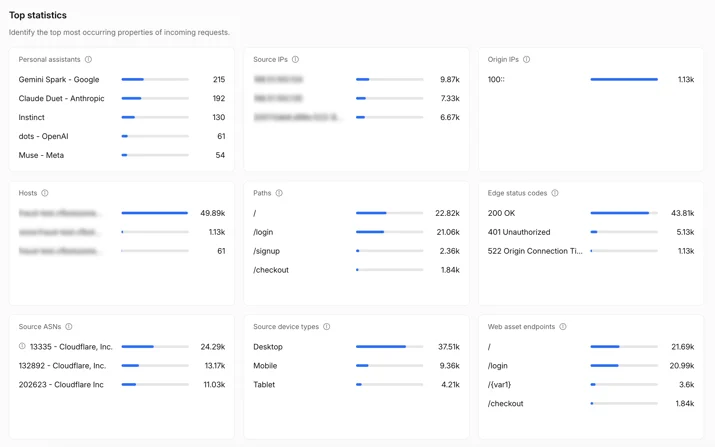
Cloudflare’s example of the Personal Assistants widget in Top statistics, showing agents and their request counts.
3. Account Abuse Protection
Cloudflare has also introduced early access to Account Abuse Protection.
This feature provides information about which user accounts personal agents are acting for. It can help identify agent logins and sign-ups and highlight activity that may indicate fraud or account abuse.
It also gives fraud and security teams a way to block activity against an individual account using a WAF rule based on its Hashed User ID, without necessarily blocking that agent for every other customer.
4. Individual access policies for personal agents
Cloudflare’s AI bot policies, originally introduced on 1 July 2026, separate access for Search, Training and Agents.
These settings are now grouped under AI Crawler and Agent access policies.
The Agents section allows website owners to set a policy for each supported personal agent.
The available options are:
- Allow (do not block): Let the agent access the website.
- Block on pages with ads: Block the agent from pages that display advertising.
- Block: Prevent the agent from accessing the website.
This gives businesses more control over which agents can visit their websites.
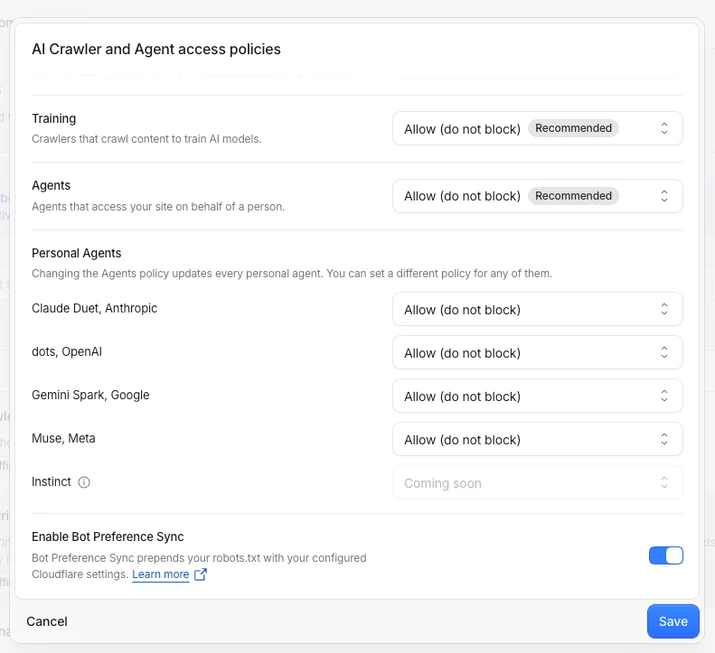
Cloudflare’s AI Crawler and Agent access policies panel, showing separate settings for Training and Agents and individual controls for supported personal agents.
These changes build on Cloudflare’s Bot Preference Sync, introduced on 21 August 2026.
Bot Preference Sync adds a managed section to the top of your robots.txt file, reflecting the AI crawler settings in your Cloudflare dashboard. Your existing robots.txt rules remain below that section.
What We Found on the Airline’s Website
The client is an airline, which makes personal AI agents particularly relevant.
A traveller might ask an assistant to find the cheapest available flight, compare routes, book a ticket, add baggage or sign up for a newsletter.
In these situations, the agent is acting on behalf of a potential customer.
We reviewed the new Cloudflare information with the client’s infrastructure team.
1. We looked at personal agent traffic
The previous week’s data showed personal agents exploring several types of pages on the website.
However, the traffic mix looked different over the final two days we reviewed, when most activity came from automated bots and human visitors.
This is why I wouldn’t recommend making access decisions based on one or two days of activity. A longer period gives a better understanding of how customers are using agents.
2. We investigated individual agents
Using the Personal Assistants widget, we reviewed the activity of individual agents.
Filtering the data allowed us to see which pages each agent requested and which status codes it received.
Anthropic’s personal agent was the most active agent acting on behalf of the airline’s users during the period we reviewed.
3. We considered IP addresses and account activity
We also looked at the available information about unique IP addresses and user accounts.
The purpose was to understand whether requests represented activity from different customers or whether there were patterns that needed closer security checks.
Cloudflare’s Account Abuse Protection can provide additional information about the accounts associated with agent activity, where the feature is available.
4. We reviewed the access policies
Finally, we worked through the overall Agents policy, the individual agent settings and the Training policy.
The decisions were based on which parts of the website could benefit from personal agents and which areas needed tighter controls.
Our main approach was to allow supported personal agents across the website’s lower-risk sections, while using additional rules for more sensitive areas.
We also kept AI training allowed for most public content, with selected subfolders excluded for security and privacy reasons.
Why Google’s AI Training Settings Matter
Cloudflare’s controls are only part of the picture. Google also has a separate way to manage how its crawlers use website content for AI.
The Google-Extended token in robots.txt controls whether content crawled by Google can be used for training Gemini models and grounding responses in Gemini apps.
Importantly, this is separate from Google Search.
A business can therefore keep its pages available for Google Search while excluding selected sections from Gemini training and grounding.
For the airline, this distinction matters because public information, such as destination guides and route details, serves a different purpose from information held in customer accounts or booking management areas.
2. Why Does It Matter?
A personal AI agent requesting access to a checkout page may be a customer trying to make a purchase.
Block every agent and you risk losing those customers. Allow every agent everywhere and you may expose parts of the website that should have tighter security.
The important change is that website owners now have more information to make decisions about individual agents and different types of access.
Personal Agents Are Becoming Another Way for Customers to Buy
Imagine someone asking an AI assistant to find a flight from London to New York.
The assistant might visit an airline’s website, compare available fares, check baggage allowances, select a flight and help the customer complete the booking.
If the airline blocks the agent or its website doesn’t work properly when the agent tries to use it, the customer may end up booking with another airline.
The same applies to buying additional baggage, choosing seats, checking in or signing up for offers.
Cloudflare makes an important point in its announcement: the person behind the agent is still a customer trying to reach the business.
Businesses need to consider this when making decisions about automated traffic.
Search, Training and Agents Need Different Policies
Cloudflare separates access into three main purposes. Businesses should do the same when deciding what to allow.
| Purpose | What allowing it provides | Potential risks | Main controls |
|---|---|---|---|
| Search | Visibility in search engines and AI answers that use search results | Blocking crawlers can reduce search visibility | Search policy and robots.txt |
| Training | The opportunity for public content to be used in future AI models | Content may be used without a direct website visit; sensitive information could be included in training data | Training policy and robots.txt, including Google-Extended |
| Agents | Bookings, purchases and sign-ups made on behalf of customers | Account abuse, misuse of booking flows and unnecessary server load | Individual agent policies, WAF rules and Account Abuse Protection |
These are different activities, and allowing one does not automatically mean a business should allow the others.
For example, you may want Googlebot to crawl your website, allow public information to be used for AI training and let personal agents complete bookings.
At the same time, you may want to exclude customer account pages from AI training and restrict agent access to certain sensitive areas.
robots.txt Is Not Enough to Control Personal Agents
The distinction between training crawlers and personal agents is important.
Many major AI training crawlers say they follow robots.txt. This means robots.txt and Cloudflare’s Training policy can work together to control which content is available for training.
Bot Preference Sync can also keep the managed crawler settings in line with your Cloudflare dashboard.
Personal agents are different.
They act on a user’s request in real time, and fetchers working on behalf of a user may not follow the same robots.txt rules as training crawlers.
Google, for example, says that its user-triggered fetchers generally ignore robots.txt.
For that reason, businesses should not rely on robots.txt to control personal agents.
Use Cloudflare’s access policies and WAF rules to enforce agent access at the website’s edge.
Airlines Have Particular Security and Commercial Risks
An airline’s website contains several types of content and functionality.
Some sections are public and useful to customers researching a trip:
- Destination information.
- Routes and timetables.
- Travel guides.
- Help articles.
- Baggage allowances.
Other sections handle payments, personal information and limited availability:
- Flight bookings.
- Payment flows.
- Manage-booking areas.
- Loyalty accounts.
- Check-in.
- Travel documents.
Personal agents can be valuable on public pages and booking journeys because they help customers find and purchase flights.
However, account areas, loyalty points and personal passenger information require more careful controls.
The aim isn’t to block agents simply because they are automated. It’s to decide where they can provide value and where the risks are greater.
The Parts of Your Website Agents Can Reach Affect What They Can Recommend and Sell
This also connects to the wider changes happening in AI search.
AI assistants can recommend businesses, products and services based on the information they can find. Personal agents can then take the next step by accessing the website and completing an action.
If an assistant cannot read relevant information or its agent cannot complete a booking, the customer may be directed towards a competitor with a more accessible website.
For businesses, this means AI visibility and website accessibility need to work together.
Appearing in an AI answer is useful, but being able to complete the customer journey is just as important.
3. Who Is Affected?
Any business that allows customers to buy, book, register or sign up online should review how personal agents access its website.
It is also particularly relevant to businesses using Cloudflare that have not reviewed their AI crawler settings since they were introduced.
Which Businesses Should Review Their Agent Policies?
| Business type | What personal agents could do for customers | Areas that need more care |
|---|---|---|
| Airlines and travel companies | Search fares, compare routes, book flights and hotels, buy extras and check in | Loyalty accounts, manage-booking areas, travel documents and bookings held without payment |
| Ecommerce and retail | Compare products, add items to baskets and complete purchases | Customer accounts, saved payment methods, gift cards and limited-stock releases |
| Education and course providers | Find courses, compare options and register for events | Student accounts and personal records |
| Publishers | Find and read articles on behalf of users | Advertising-funded pages, where the option to block agents on pages with ads may be appropriate |
| SaaS and subscription businesses | Sign up, log in and manage subscriptions | Sign-up abuse, free-trial abuse and administrative areas |
| Financial services and regulated businesses | Compare products and begin applications | Identity checks, payment processes and changes to customer accounts |
| Ticketing and events | Find and buy tickets | High-demand releases where automated purchasing can create problems |
Which Teams Need to Be Involved?
Managing agent access involves several parts of the business.
- SEO: Reviews agent and crawler data, maps website sections and manages the robots.txt and AI training decisions.
- Infrastructure and security: Configure Cloudflare policies and WAF rules, and monitor suspicious activity.
- Ecommerce and product: Decide which customer journeys agents should be able to complete and test them.
- Fraud: Reviews agent activity on customer accounts and investigates unusual behaviour.
- Marketing and legal: Agree on the company’s approach to AI training and agents acting on behalf of customers.
4. What Should Businesses Do?
Start by understanding which agents already visit your website. Then group your website sections according to risk and decide separately what to allow for Search, Training and Agents.
Enforce agent access through Cloudflare, use Cloudflare and robots.txt for training controls, and test the customer journeys you want agents to complete.
This is the process we followed with the airline.
Step 1: Review Personal Agent Traffic Before Changing Anything
Start with at least seven days of data.
On the airline’s website, the previous week and the most recent two days showed different traffic patterns. Personal agents had explored several page types during the week, while activity over the final two days was mostly from automated bots and human visitors.
Making a decision based only on a short period could have led us to underestimate how much customers were already using personal agents.
In Cloudflare, review the following sections.
Security Analytics – Bot analysis
Select the Personal Assistants category to view agent traffic separately.
Look at the activity over time and identify any increases or unusual patterns.
Top statistics – Personal Assistants
Review the agents listed and their request counts.
Then select each agent individually and investigate:
- Which pages it visits.
- Which paths it requests most often.
- Which status codes it receives.
- Which networks the requests come from.
Account Abuse Protection
If you have access to this feature, review the accounts associated with agent activity.
Look for unusual logins, unfamiliar agents accessing accounts and sign-up activity that may need further investigation.
Questions to Ask When Reviewing the Data
| Question | Where to look | What it tells you |
|---|---|---|
| How much traffic comes from personal agents? | Bot analysis, Personal Assistants category | Whether agents are already an important source of customer activity |
| Which agents are visiting the website? | Top statistics, Personal Assistants widget | Which agents may need individual access policies |
| What are agents trying to do? | Filter Top statistics by agent and review paths | Whether they are reading information, searching, logging in or checking out |
| Where are agents failing? | Filter by agent and review edge status codes | Whether important customer journeys are returning 4xx or 5xx errors |
| Are requests coming from many customers or a small number of users? | Source IP statistics and Account Abuse Protection | How many IP addresses and accounts are associated with the activity |
| Could any accounts be at risk? | Account Abuse Protection account overview | Whether agents are accessing accounts in unusual ways |
For SEO teams, I would also recommend exporting the agent data regularly.
This gives you a record of requests by agent and website section, making it easier to compare activity week by week.
Step 2: Group Website Sections by Risk
The risk isn’t the same across the whole website.
An airline’s destination guides are very different from its payment pages or staff portal.
Before changing the access policies, list your website’s main folders and group them according to what they do and the level of risk involved.
I would use four groups.
| Tier | Example airline pages | AI training | Personal agents | Reason |
|---|---|---|---|---|
| Open | Destination guides, route pages, timetables, help articles | Allow | Allow | Public information that customers and assistants should be able to find |
| Transaction | Fare search, booking, additional services and newsletter sign-up | Allow | Allow and monitor | These are the journeys where agents can help generate revenue |
| Account | Manage booking, loyalty accounts, saved passengers and check-in | Exclude sensitive sections | Allow with close monitoring or block, depending on the journey | These areas may contain personal information or financial value |
| Restricted | Trade and partner portals, staff areas and internal tools | Exclude | Block | These areas are not part of the normal customer journey and carry greater security risks |
These are example categories. Each business needs to review its own website structure and decide which pages belong in each group.
For an airline, a public destination guide and a customer loyalty account should not automatically receive the same access settings.
Agree the categories with the teams who understand the website and its risks:
- SEO, which understands the site structure.
- Security and fraud, which understand where abuse can happen.
- Ecommerce and product, which own the customer journeys.
- Legal, which advises on the company’s approach to AI training and customer data.
Step 3: Create a Policy for Search, Training and Agents
Once the website sections have been grouped, create a policy matrix.
The following is an example of how I would approach it for an airline.
| Type of access | Open | Transaction | Account | Restricted |
|---|---|---|---|---|
| Search crawlers, such as Googlebot, Bingbot and OAI-SearchBot | Allow | Allow | Keep existing rules | Keep existing rules |
| AI training crawlers, such as GPTBot, ClaudeBot and Google-Extended | Allow | Allow | Exclude | Exclude |
| Personal agents | Allow | Allow and monitor | Monitor closely or block, depending on the journey | Block |
The important thing is to treat these as separate decisions.
Search policies
Keep your existing search crawler settings unless there is a specific reason to change them.
Blocking search crawlers unnecessarily could affect your visibility in traditional search engines.
Training policies
Decide which sections of your website can be used for AI training and which should be excluded.
Public information may be suitable for training, while personal account information and internal areas should receive more protection.
Agent policies
Allow personal agents to access pages where they can help customers.
For sensitive account areas, decide whether agents need access to complete a legitimate customer journey or whether they should be blocked.
Restricted areas should not be accessible simply because an agent has been allowed elsewhere on the website.
What We Set Up for the Airline
On the airline’s account, we used the following approach:
- Personal agents: Supported agents were allowed across the website’s lower-risk sections, with additional controls for more sensitive areas.
- Individual agent settings: Claude Duet from Anthropic, dots from OpenAI, Gemini Spark from Google and Muse from Meta were set to Allow (do not block). Instinct was shown as coming soon in the dashboard at the time of our review.
- AI training: The overall Training policy was kept at Allow (do not block), which Cloudflare marked as the recommended setting. Selected subfolders were excluded separately through robots.txt.
- Search: Existing search crawler settings were left unchanged.
Cloudflare also provides a third agent option: Block on pages with ads.
This is intended for websites that make money from advertising and want to allow agents on other pages while preventing them from accessing advertising-funded content.
Step 4: Implement the Rules Across Your Website
There are four parts to the implementation. Each has a different purpose.
- Cloudflare’s AI Crawler and Agent access policies: Control which agents and crawlers are allowed to access the website.
- robots.txt: Tells training crawlers which sections of the website they should avoid.
- WAF custom rules: Control where agents can access the website, including individual paths.
- Account Abuse Protection: Helps identify and manage suspicious activity involving individual accounts.
4.1. Set the Access Policies in Cloudflare
The infrastructure team should handle this part.
- Open Security Settings > AI Crawler and Agent access policies.
- Review and set the overall Agents policy.
- Set the policy for each supported personal agent.
- Check that Training and Search are configured according to the agreed policy.
- Decide whether to enable Bot Preference Sync so that Cloudflare’s managed settings are reflected in robots.txt.
- Review existing security rules, including challenges, rate limits and bot protection.
There is an important point here.
Allowing an agent through Cloudflare does not automatically mean it can complete a booking.
If the agent encounters a challenge page, CAPTCHA or another restriction during the booking process, it may still be unable to finish the journey.
That is why testing is essential.
4.2. Exclude Selected Sections From AI Training Using robots.txt
Cloudflare’s Training policy and Bot Preference Sync manage crawler access at a wider level. They don’t provide all the subfolder controls a business may need.
For more specific exclusions, you can add rules to robots.txt.
For example:
# Cloudflare's managed block, written by Bot Preference Sync, sits above this section.

User-agent: *
Disallow: /search-results/

# AI training exclusions by subfolder

User-agent: GPTBot
User-agent: ClaudeBot
User-agent: Google-Extended
User-agent: CCBot
User-agent: Applebot-Extended
User-agent: meta-externalagent
Disallow: /manage-booking/
Disallow: /my-account/
Disallow: /partners/
Disallow: /search-results/
The paths above are examples. Use the actual folders on your website and check the current crawler names and robots.txt documentation for each provider.
There are four things businesses should understand before making changes.
A crawler with its own user-agent group may not follow the general rules
If you create a separate group for a crawler, don’t assume it will also follow rules under User-agent: *.
Repeat any general rules you still want that crawler to follow.
Rules for the same crawler can be combined
Where multiple groups apply to the same crawler, their rules can work together. When rules conflict, the most specific matching path takes priority.
This is why you should review the complete robots.txt file rather than looking at only the lines you have added.
Google-Extended is not a separate crawler
Google-Extended is a token Google checks when deciding whether content can be used for Gemini training and grounding.
Disallowing Google-Extended does not affect Google Search.
Google’s AI Overviews are part of Search, so they are not controlled by Google-Extended.
robots.txt is public
Anyone can view your robots.txt file.
Listing a sensitive folder can reveal that the folder exists. For that reason, robots.txt should not be used as a security measure.
Protect sensitive areas with proper authentication and access controls, and use general folder names rather than exposing unnecessary details.
4.3. Control Agent Access by Subfolder With WAF Rules
Cloudflare’s individual agent policies apply across the website.
However, a business may want to allow an agent on most pages while blocking it from a particular folder.
This is where custom WAF rules can help.
For example, you could create a rule that blocks recognised personal agents from selected restricted paths, such as partner or staff areas.
The rule needs to use the agent classification field and value shown in your Cloudflare dashboard, combined with the relevant URL path conditions.
Before creating the rule, confirm the exact field and category used by your Cloudflare account. Do not assume that the example category name from another account will be the same.
For account sections where you are unsure whether to allow or block agents, consider testing a rule in Log mode first, where your Cloudflare plan supports it.
This lets the security team review what the rule would catch before enforcing it.
4.4. Monitor Individual Accounts, Not Just Agents
If Account Abuse Protection is available on your account, use it to review the activity associated with individual users.
I would recommend:
- Reviewing the account activity overview every week.
- Checking which agents are accessing customer accounts.
- Looking for unfamiliar agents appearing alongside unusual activity.
- Investigating unusual logins and sign-ups.
- Blocking suspicious activity against individual accounts where appropriate.
One of the useful features is the ability to create a WAF rule using an account’s Hashed User ID.
This can help block an account that appears to be under attack without blocking the agent for every other customer.
4.5. Make Sure Your Website Works for Personal Agents
Allowing agents through Cloudflare is only the first step.
Your website still needs to provide the information and functionality they need to complete a customer journey.
For development teams, I would check the following:
- Make important information available in HTML. Fares, baggage allowances, fees and terms should not exist only inside images or interactions that search systems cannot easily process.
- Use clear form labels. Make sure form fields explain what information the customer needs to enter.
- Display errors clearly. Error messages should be available as readable text.
- Avoid interactions that only work on hover. Important information and actions should not depend on a specific mouse interaction or screen size.
- Keep booking URLs consistent. Avoid unnecessary URL changes during fare searches and booking journeys.
- Review CAPTCHAs and challenges. Check whether they prevent agents from completing journeys you want to support.
- Keep payment security in place. Any payment confirmation required from the customer or payment provider should remain in place.
The aim is to make the website accessible to legitimate agents without removing the security measures that protect customers.
Step 5: Test the Customer Journeys
Once the policies are live, test the journeys you want personal agents to complete.
Where possible, test with each supported agent and review its activity in Cloudflare’s Top statistics.
| Customer journey | What success looks like | What to check in Cloudflare |
|---|---|---|
| Find a flight | The agent returns the correct available fares | Successful responses on fare search paths |
| Book a flight | The agent reaches the payment stage with the correct details, and the customer can confirm payment | No unexpected 403 responses or challenges in the booking process |
| Buy extras | The agent can add baggage or seats to a test booking | Successful responses on the relevant account and booking paths |
| Book a course | The agent can complete the booking form | Successful form submission |
| Sign up for a newsletter | The customer’s sign-up is recorded | Successful form submission |
| Visit a restricted area | The agent is denied access | A blocked request from the relevant WAF rule |
Use test accounts and stop before making a real payment, or carry out the testing in a dedicated test environment.
Keep a record of each test, including the date, agent, journey, result, status codes and any changes needed.
This will help the development and infrastructure teams identify where a journey is failing.
Step 6: Measure What Changes
The settings are live, so we now need to understand how they affect the website.
For the first month, I would review the following every week.
Agent requests by website section
Record how many requests come from each personal agent and which folders they visit.
This shows whether agents are using the sections where you want them to help customers.
Agent error rates
Monitor 4xx and 5xx responses on transaction and account pages.
If an agent is receiving errors on a booking journey that should be accessible, investigate the cause.
Completed customer journeys
Track bookings, purchases, course registrations and newsletter sign-ups that involve agents.
Attribution may not be straightforward because agents do not always pass normal referral information. A booking-source field or another agreed tracking method may be more useful.
Activity on customer accounts
Where Account Abuse Protection is available, monitor new agents accessing accounts and any unusual login patterns.
Training crawler requests
Check whether training crawlers are still requesting pages in excluded sections.
For crawlers that follow robots.txt, requests to those folders should stop once the rules have been processed.
robots.txt changes
Check the file after changes to Cloudflare settings or robots.txt itself.
This is particularly important when Bot Preference Sync is enabled.
Who Is Responsible for Each Part?
| Team | Responsibilities |
|---|---|
| SEO and content | Map website folders into risk groups, manage robots.txt rules, check crawler access and monitor AI visibility |
| Marketing | Agree the approach to AI training, identify advertising-funded pages and monitor sign-ups made through agents |
| Development | Make important information accessible in HTML, ensure forms work correctly and fix journeys that fail testing |
| Infrastructure and security | Configure Cloudflare policies and WAF rules, review challenges and rate limits, and monitor agent traffic |
| Fraud | Review Account Abuse Protection data and investigate suspicious account activity |
| Legal | Approve the business’s position on AI training and the terms under which agents can act for customers |
Implementation Checklists
Before Making Changes
- Review at least seven days of Personal Assistants data.
- Record the agents, paths, status codes and available IP and account information.
- Map website folders into risk groups.
- Agree the policy with SEO, infrastructure, security and relevant business teams.
- Save a copy of the current robots.txt file.
On the Day of Implementation
- Set the overall Agents policy.
- Review and set individual agent policies.
- Check the Training and Search policies.
- Add the required subfolder rules to robots.txt below Cloudflare’s managed section.
- Add WAF rules for restricted areas.
- Use Log mode for testing where available.
- Check that robots.txt contains the expected rules.
During the First Week
- Test the important customer journeys.
- Review agent error rates by website section.
- Check training crawler requests to excluded folders.
- Review Account Abuse Protection data for unusual activity.
- Record any problems and agree the required fixes.
Frequently Asked Questions
Does Allowing Personal Agents Affect Google Rankings?
Not directly.
Cloudflare separates its Search and Agents policies from Training. Google also confirms that Google-Extended does not affect inclusion or rankings in Google Search.
However, you should still check your existing search crawler settings before making changes to any access policies.
If We Exclude Sections From AI Training, Will They Disappear From ChatGPT or Gemini Answers?
Not necessarily.
AI training crawlers and search crawlers are different.
For example, OpenAI uses GPTBot for training and OAI-SearchBot for search. Blocking GPTBot does not automatically block OAI-SearchBot.
Google-Extended controls whether content can be used for Gemini training and grounding in Gemini apps. It does not affect Google Search.
You therefore need to consider training and search access separately.
Do Personal Agents Follow robots.txt?
Don’t rely on it.
Personal agents acting on behalf of a user may use fetchers that do not follow the same robots.txt rules as training crawlers.
Google has also stated that its user-triggered fetchers generally ignore robots.txt.
Use Cloudflare’s agent policies and WAF rules to control personal agent access.
Why Not Block All Personal Agents to Be Safe?
Because some of them are potential customers.
If someone asks an AI assistant to book a flight and the assistant cannot use your website, the customer may book with a competitor instead.
The better approach is to allow agents where they help customers and apply stricter controls where there is a genuine security or privacy risk.
Will Bot Preference Sync Overwrite Our robots.txt File?
Cloudflare says Bot Preference Sync adds its managed section at the top of robots.txt and keeps your existing rules below it.
Avoid editing the managed section directly. Add your own rules underneath it and check the file after changes.
Can We Block an Agent on One Account Without Blocking It for Everyone?
Yes, where Account Abuse Protection is available.
You can create a WAF rule using the account’s Hashed User ID. This allows you to restrict activity against an individual account without necessarily blocking the same agent for other customers.
What Does “Block on Pages With Ads” Mean?
This setting is intended for websites where advertising pays for the content.
It allows businesses to block personal agents from advertising-funded pages while allowing them to access other sections of the website.
5. The Toolkit: agent_access_planner.py
I also put together a Python script to help SEO, infrastructure and security teams plan and review agent access.
It uses Python and includes three commands.
The Traffic Command
The traffic command reads a Cloudflare request export and summarises activity by website section.
It can show:
- Requests from humans.
- General automated traffic.
- Verified bots.
- Personal agents.
- Each agent’s most visited website sections.
- Error rates.
- The number of IP addresses and accounts associated with each agent, where the data is available.
The Policy Command
The policy command reads a risk map containing website folders and their assigned risk groups.
It then generates:
- A policy matrix.
- Suggested robots.txt rules for training crawlers.
- Draft WAF rules for restricted areas.
It can also retain the general robots.txt rules already in place.
The robots Command
The robots command checks the existing robots.txt file against the risk map.
It looks for:
- Training crawlers that can still access excluded folders.
- Search crawlers that may have been blocked by mistake.
- General rules that individual crawlers may not be following.
- The position of Cloudflare’s managed section.
Example Commands
Place the script and your exported files in the same folder. Open Terminal on Mac or Command Prompt on Windows and run the relevant command.
Use python instead of python3 on Windows if that is how Python is configured.
python3 agent_access_planner.py traffic requests.csv --groups "booking=/book|account=/my-account"

python3 agent_access_planner.py policy risk_map.csv --robots robots.txt

python3 agent_access_planner.py robots robots.txt --map risk_map.csv
The script is designed to help organise the data and prepare draft rules. Always review the generated policies with your infrastructure and security teams before applying them to a live website.
I won’t be pasting the script here – if you want it, email me: hello@szymaniakdigital.co.uk
6. What We’re Watching Next
The settings are now live, so the experiment moves from deciding what to allow to measuring what happens.
The main questions are which agents complete customer journeys, where they encounter problems and whether the sections excluded from training remain protected.
What We’re Monitoring on the Airline’s Website
Which agents complete customer journeys
We’ll monitor which agents successfully search for fares, make bookings, purchase extras and complete sign-ups.
We’ll also investigate which agents fail and why.
Error rates by website section
We’ll compare agent 4xx and 5xx responses on transaction and account pages over time.
This should help identify problems with access rules, security challenges and website functionality.
Changes in agent traffic
We’ll monitor whether agent activity changes now that supported agents are explicitly allowed across the website’s lower-risk sections.
We’ll also compare activity with the period before the new policies were introduced.
Which agents customers are using
Anthropic’s personal agent was the most active agent acting on behalf of users during the period we reviewed.
We’ll monitor whether that continues and whether more agents begin appearing in the traffic data.
Activity on customer accounts
We’ll look for signs of account abuse and assess whether account-level controls can deal with suspicious activity without affecting other customers.
AI training exclusions
We’ll check whether training crawlers continue to stay out of the sections excluded through robots.txt.
Bookings and revenue
Where the client’s tracking allows, we’ll look at whether bookings, purchases and sign-ups can be attributed to activity involving personal agents.
This may require additional tracking because normal referral information is not always available when an agent acts on someone’s behalf.
What We’re Watching From Cloudflare
There are also some developments from Cloudflare worth following.
Better information about the person using an agent
Cloudflare has said that one of its future goals is to help websites maintain their relationship with customers when AI agents act as intermediaries.
This could include privacy-conscious ways to pass user information through an agent, assess its reputation and establish responsibility when something goes wrong.
For an airline, knowing that an agent is acting for a loyalty member and understanding what that member has authorised it to do could make it easier to support legitimate activity in account areas.
Support for more personal agents
Cloudflare’s example policy panel showed Instinct as coming soon.
As more agents become supported, businesses will need to review them and decide whether they should have access.
More detailed access controls
One improvement that would be useful is the ability to set subfolder rules directly within the individual agent policies.
That would give infrastructure teams more control through the Cloudflare dashboard and could reduce the need for additional WAF rules.
Cloudflare has not announced this as a feature. It is simply something we would like to see.
What We’re Watching From Google and Other AI Companies
Changes to Google’s AI training controls
Google’s controls for Gemini training and its AI features in Search are worth monitoring separately.
Changes to those settings could affect how businesses manage public content and sensitive sections of their websites.
Changes to crawler and agent names
AI companies continue to introduce and update their crawlers and agents.
We’ll check our robots.txt rules against each provider’s current documentation during regular reviews.
The next stage of the experiment will focus on the results of the agent journey tests and the first month of activity.
7. About Szymaniak Digital
Szymaniak Digital is a UK-based Enterprise AI SEO Consultancy led by Konrad Szymaniak.
We help businesses improve their visibility across search engines and AI assistants, while making sure the right crawlers and personal agents can access the right parts of their websites.
Our work combines SEO, AI search research and technical implementation. We work with clients’ marketing, development and infrastructure teams to make decisions that support customer acquisition and revenue without ignoring security and privacy risks.
We also developed SD SEO Suite, our SEO and AI visibility software, which helps businesses monitor how AI assistants mention and cite their brands over time.
As AI assistants become more involved in buying decisions, businesses need to think beyond whether their websites appear in search results. They also need to make sure customers and the agents acting for them can actually use their websites.
