
We asked Gemini about home care services in South Essex, using Google Search to find information. It used our client’s website as its first source, relied on it for more parts of its answer than any other website and named the business as one of seven local providers.
The following morning, Google AI Mode answered exactly the same question without mentioning the client at all.
Instead, it used two pages from a care directory, information from the Care Quality Commission (CQC) and five business listings from Google Maps.
We then used Passage analysis in SD SEO Suite to investigate why the two answers were different.
The results were interesting. The pages Google AI Mode used contained local information, named businesses and facts that could be checked against the regulator’s records. Our client’s website already covered much of this information, but not always in the same format. Its information on other websites also needed attention.
This is the first experiment using the Grounding Lab and Passage analysis, two new features in SD SEO Suite 1.0.
It showed us two things: our client’s content was already performing well in Gemini’s grounded answer, but there were clear improvements to make if we wanted the business to appear in Google AI Mode.
Here’s what we found, why the two results were different and what businesses in local and regulated industries can learn from the experiment.
The Experiment at a Glance
- Client: An anonymised home care provider based in Basildon, serving South and West Essex.
- Search query: “home care services in south essex”.
- Location: United Kingdom.
- Tools: SD SEO Suite’s Grounding Lab, using Gemini 3.8 Flash with Google Search, and Passage analysis using Google’s live AI Mode answer.
- First result: On 6 November 2026, Gemini used the client’s website as its first source. It supported eight of the 23 parts of the answer that included citations, more than any other website, and named the business as one of seven providers.
- Second result: On 7 November 2026, Google AI Mode cited two care directory pages and one CQC page. It also displayed five Google Maps business listings. The client wasn’t cited or listed.
- What we found: The sources used by AI Mode contained local details, named providers and facts backed by the regulator. Our client’s website covered much of the relevant information, but needed to present it more clearly. Its third-party profiles also needed attention.
- What we’re changing: The website’s South Essex coverage information, CQC details, reviews, services and pricing information, alongside the business’s profiles on directories and Google Business Profile.
- Status: Changes are being worked on. The next stage is to repeat the same tests and compare the results.
1. What Happened?
On 6 November 2026, we used Gemini 3.8 Flash with Google Search to investigate the query “home care services in south essex”.
Gemini used our client’s website as its first source and relied on it for eight parts of its answer.
The following morning, we ran the same query through Google’s live AI Mode. This time, the client wasn’t mentioned or listed.
To understand why, it’s important to explain how the two tests worked.
Grounding Lab: Gemini Used the Client’s Website as Its Main Source
The first test took place on 6 November at 11:09.
I entered the query into the Grounding Lab using Gemini 3.8 Flash and Google Search.
Gemini decided to search for additional information before answering. It ran two searches:
- “domiciliary care agencies south essex southend basildon thurrock”
- “home care services south essex”
It then produced an answer covering several areas, including types of home care, local providers, council funding and advice on choosing a care agency.
The answer contained 14 citations from 11 websites.
The client’s website was source number one. It supported eight of the 23 parts of the answer that had supporting sources. Essex County Council’s website came next, supporting six parts.
Gemini also named the client as one of seven home care providers in South Essex, describing it as an independent agency operating across South and West Essex and offering personal care, dementia support and home help.
This was a positive result. The client’s website was not simply mentioned once. Gemini used it to support several different parts of its answer.
What the Grounding Lab Showed Us
The Grounding Lab provided more than the finished answer.
It also showed:
- The two searches Gemini carried out.
- The 14 citations and 11 websites used.
- Which sources supported individual parts of the answer.
- The providers Gemini identified.
- How the answer was organised into different topics.
This helped us understand why the client’s website appeared so prominently.
Its content covered several of the subjects Gemini needed to answer the question, including types of care, service areas, council funding and how to check a provider’s CQC rating.
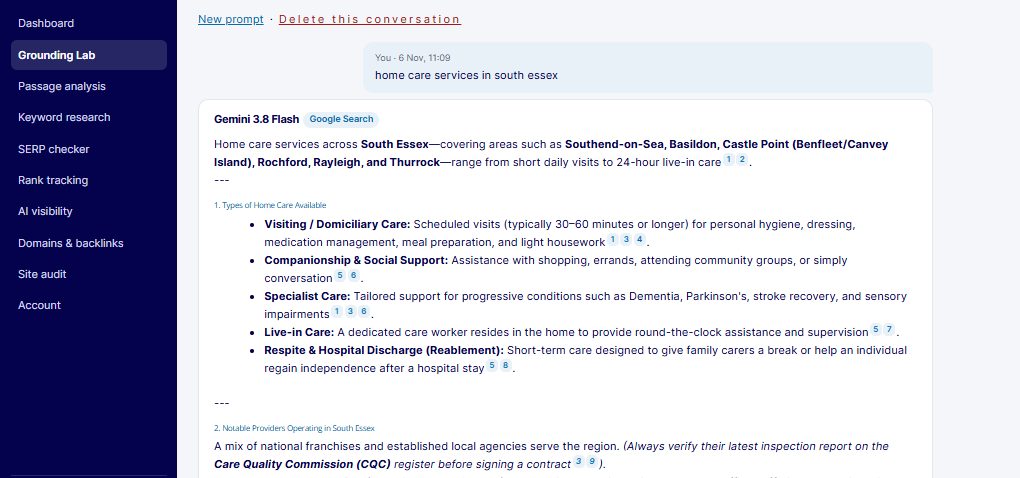
Figure 1. Gemini 3.8 Flash’s answer in the Grounding Lab, with numbered citations attached to its claims.
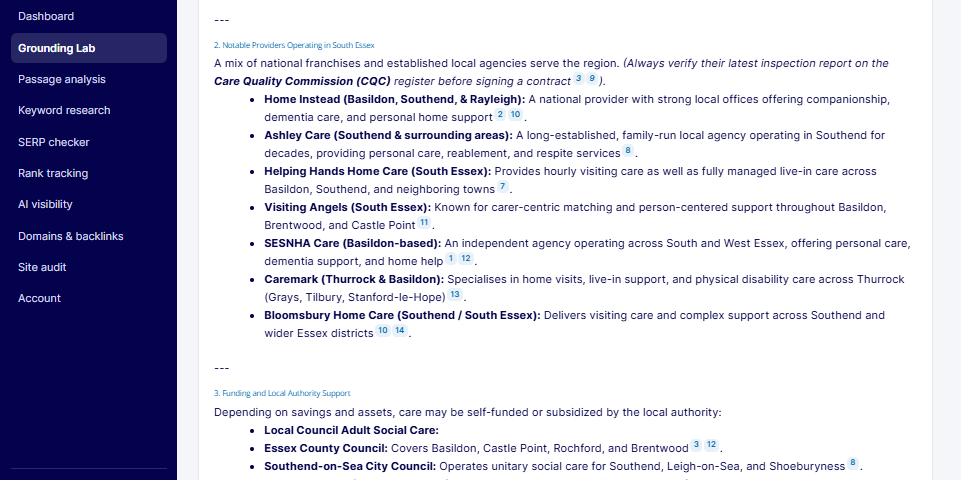
Figure 2. Gemini included the client among seven home care providers in South Essex.
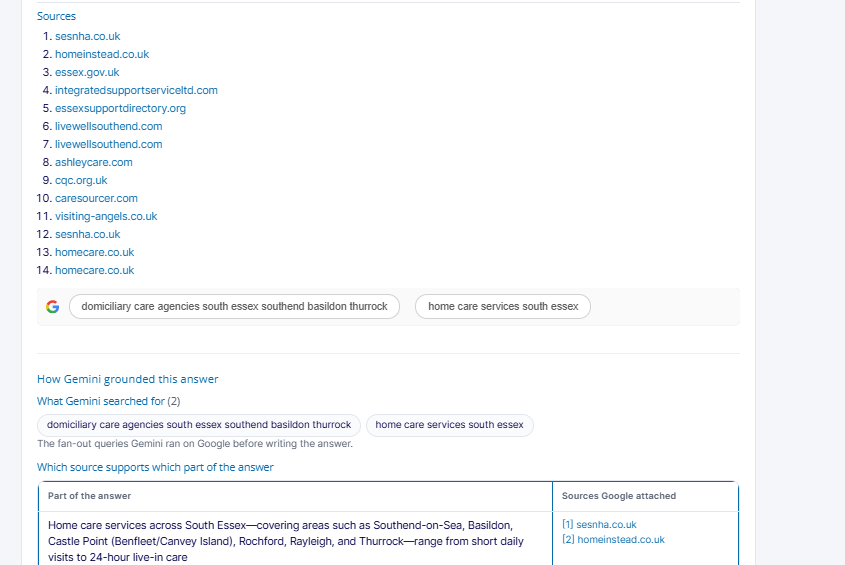
Figure 3. The Grounding Lab showed the sources, the two searches Gemini ran and which sources supported each part of the answer.
Google AI Mode: The Client Wasn’t Included
The second test took place on 7 November at 10:30.
This time, we used Passage analysis against Google’s live AI Mode answer for the same query:
“home care services in south essex”
We selected the United Kingdom as the market, supplied the client’s home care services page as the page we wanted Google to choose and used Gemini 3.8 Flash for the analysis.
Google AI Mode produced a different answer.
It cited:
- Two homecare.co.uk listing pages.
- One Care Quality Commission page.
It also displayed five business listings from Google Maps:
- Home Instead.
- Bluebird Care.
- Caremark, appearing twice.
- Bloomsbury Home Care.
The client was not cited as a source and did not appear among the business listings.
The answer finished by asking the user to provide more information, including which town they were interested in, what type of care they needed and how they intended to fund it.
This was an important detail. A family might start with a broad search for home care in South Essex before narrowing the search to a particular town or type of support.
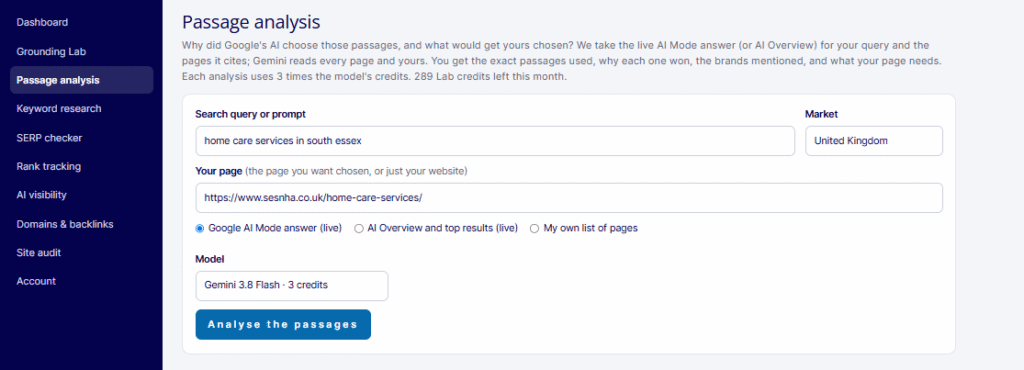
Figure 4. Setting up Passage analysis with the search query, market, target page, live Google AI Mode answer and selected Gemini model.
What Passage Analysis Found
Passage analysis identified nine passages behind Google’s AI Mode answer.
Six came from homecare.co.uk, while three came from the CQC page for Bloomsbury Home Care.
The analysis identified several common features:
| Finding | Number of passages |
|---|---|
| Passages mentioning important businesses, organisations or other named details | 6 of 9 |
| Passages containing local information | 5 of 9 |
| Passages showing experience or authority | 4 of 9 |
| Passages containing specific facts or numbers | 4 of 9 |
The tool also checked the quoted passages against the live pages.
It confirmed all three CQC passages word for word. However, it couldn’t load the directory pages to check the other six passages.
That doesn’t mean the directory passages were incorrect. It means we couldn’t independently confirm them using the live-page check.
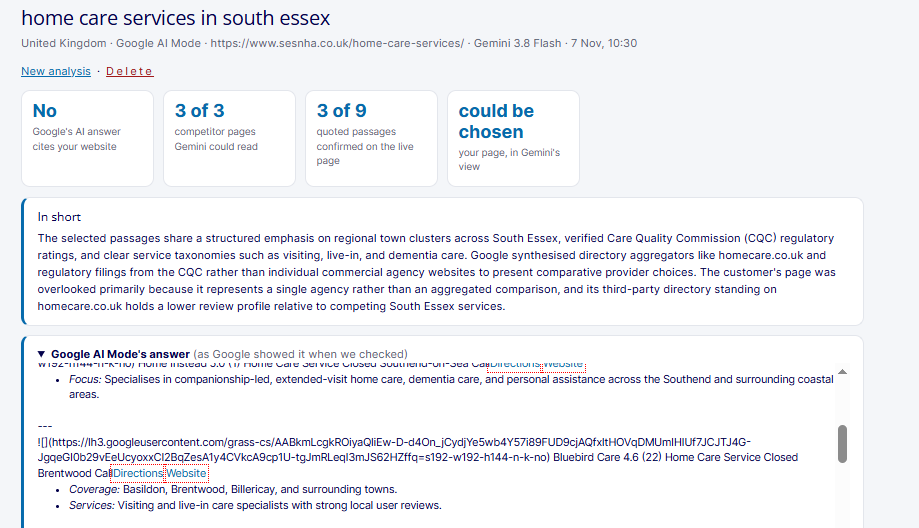
Figure 5. The summary showed that Google AI Mode hadn’t cited the client’s website, although Gemini’s analysis judged that the page could be chosen.
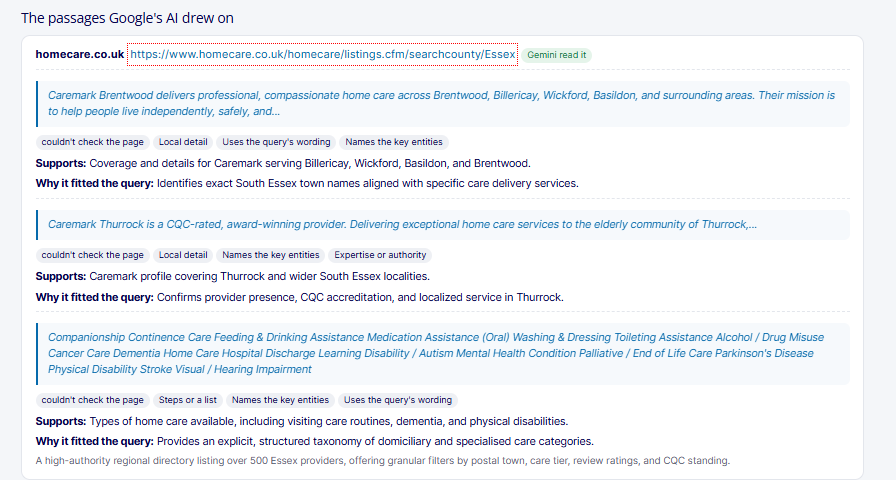
Figure 6. Passage analysis identified the information used from the directory and CQC pages, why it fitted the query and whether it could be checked against the live source.
The Same Query, Two Different Answers
The results highlight an important difference between the Grounding Lab and Google’s own AI Mode.
| What we compared | Grounding Lab | Google AI Mode |
|---|---|---|
| Date and time | 6 November 2026, 11:09 | 7 November 2026, 10:30 |
| Model | Gemini 3.8 Flash | Not stated by Google |
| Searches shown | 2 | No searches shown |
| Sources | 14 citations across 11 websites | 3 pages across 2 websites, plus 5 Google Maps listings |
| Main source types | Provider websites, council and local information websites, care directories and the regulator | A care directory, the regulator and Google Maps business listings |
| Providers named | 7 | 4 providers across 5 listings |
| Client’s website | First source, supporting 8 of 23 parts with citations | Not cited |
| Client named as a provider | Yes | No |
The two tests did not use the same system.
The Grounding Lab used Gemini with Google Search grounding. Google AI Mode is Google’s own search product, with its own retrieval and local search features.
The results show that the two systems can use different sources, even when answering the same question.
2. Why Does It Matter?
Being cited by Gemini doesn’t guarantee that your business will appear in Google AI Mode.
That is the main lesson from this experiment.
For this local search, Google’s AI Mode built its shortlist using a care directory, the regulator and Google Maps. The client had a strong website and was used extensively in Gemini’s answer, but that wasn’t enough to secure a place in Google’s AI Mode response.
Local businesses, particularly those operating in regulated industries, need to make sure their information is clear on their own websites and consistent across the other sources search engines use.
AI Citations Are Won Through the Information on Individual Pages
Google’s guidance for generative AI features explains that its AI search experiences can retrieve information from multiple pages and carry out related searches to answer a question. Google calls this process query fan-out.
This means an AI answer may use different pages to support different parts of a question.
In our Grounding Lab test, the client’s website supported eight parts of Gemini’s answer because it covered several of the topics Gemini needed:
- Types of home care.
- Areas covered.
- Council funding.
- How to check a care provider’s CQC rating.
A page doesn’t have to be the best source for every part of an answer. It needs to provide useful information for the questions being answered.
This is why we need to look beyond the page as a whole and examine the actual information that appears in it.
The Grounding Lab and Google AI Mode Can Use Different Sources
The Grounding Lab uses Gemini with Google’s Grounding with Google Search feature. This is a public feature of the Gemini API that allows developers to build answers using Google Search.
Google AI Mode is a separate search product with its own retrieval systems, local results and interface.
Our test showed the difference clearly.
Gemini used a range of provider websites and local information sources. Google AI Mode relied more heavily on a care directory, the regulator and Google Maps listings.
The Grounding Lab is therefore useful for investigating how Gemini uses search information. It should not be treated as an exact copy of Google’s AI Mode.
When making decisions about your SEO strategy, check the live AI Mode answer as well.
For Local Searches, Other Websites Matter Just as Much as Your Own
This was one of the most important findings from the experiment.
Every provider displayed by Google AI Mode had a Google Maps listing, a directory profile or information on a regulator’s website.
When someone searches for a service in a particular area, they usually want to compare several providers. A directory or local listing can be more useful for building that shortlist than a page belonging to just one business.
For a local provider, this means its visibility in AI Mode may depend on several sources:
- Its own website.
- Google Business Profile.
- Care directories.
- Council information websites.
- Regulator records.
- Reviews and other third-party information.
Having a good website is important, but it isn’t the whole job.
The business also needs accurate and useful information across the other websites that Google’s AI may use.
We have seen a similar pattern in our previous research into the sources behind ChatGPT’s product recommendations. Third-party websites can play an important role in how AI assistants compare and recommend businesses and products.
Facts That Can Be Checked Are Particularly Useful
The three CQC passages were the only passages in this test that our tool could confirm word for word against the live source.
They included:
- An address.
- A list of specialisms.
- An overall rating of Good.
These were short, factual pieces of information that could be checked directly against the regulator’s website.
Google AI Mode used all three passages.
This is a useful lesson for regulated businesses.
If an official regulator publishes your rating, registration details or other important information, make sure your website states the same facts clearly and includes the relevant date and source.
Don’t rely on a graphic or an embedded widget alone. Put the important information in normal page text so it can be read and checked.
AI Suggestions Still Need to Be Checked by a Person
Passage analysis can suggest example passages for your website. These are useful for understanding the type of information that may be missing, but they should never be published without checking the facts.
In our test, one suggestion included a CQC location ID that we couldn’t match to the client’s own identifier. Another suggested an hourly price range and a minimum visit length that didn’t match the information shown on the client’s directory profile.
For example, the suggested price range was £26 to £32 an hour, with visits starting at 30 minutes. The directory profile stated a 15-minute minimum visit.
This is exactly why a business must check every figure, service description, registration detail and price before publishing suggested content.
Use the examples to understand how to structure the information, not as a source of facts about your business.
The Commercial Opportunity Is in the Follow-Up Searches
The AI Mode answer ended by asking the user which town they were interested in.
That matters.
A family looking for home care might begin with a broad search for services across South Essex. After seeing an initial answer, they may narrow the search to Basildon, Southend-on-Sea or another town.
A provider missing from the first answer may still appear in the next one.
However, that depends on whether its town pages, Google Business Profile and directory listings provide enough accurate information.
The client already has location pages covering towns across its service area. The next test is to see whether those pages help it appear when the search becomes more specific.
3. Who Is Affected?
This approach is relevant to any business whose customers ask Google AI for recommendations in a particular area.
It is especially important for regulated businesses where official registers, inspections and ratings provide information that customers use when comparing providers.
Our experiment was in home care, but the same questions apply to healthcare, legal services, education, trades, multi-location businesses and ecommerce.
Which Industries Should Pay Attention?
| Sector | Example search | Where AI answers may get information | What to check |
|---|---|---|---|
| Home care and care homes | “home care services in [area]” | CQC listings, care directories, council directories and Google Maps | Current CQC rating and date, directory profiles, reviews and Google Business Profile |
| Healthcare: dentists, clinics and private GPs | “private dentist in [town]” | CQC, NHS service pages, Google Maps and review websites | Business name, address and services across the website, NHS profile and Google Business Profile |
| Legal and financial services | “conveyancing solicitor in [town]” | SRA and FCA registers, comparison websites and Google Maps | Registration details and firm information matching the regulator’s records |
| Education and childcare | “nursery in [town]” | Ofsted reports, council directories and Google Maps | Latest Ofsted grade and inspection date |
| Trades and home services | “boiler installation in [area]” | Trade directories, review platforms and Google Maps | Review quality and recency, service descriptions and pages for each service area |
| Multi-location brands and franchises | “[service] near me” | Google Maps, location pages and directories | Every location’s profile and website page showing consistent information |
| Ecommerce and B2B products | “best UK” | Retailers, review websites and comparison platforms | Product details, prices and third-party reviews |
These are the types of sources we would investigate first. The actual sources will depend on the search query, industry and results Google returns.
Which Teams Need to Be Involved?
This isn’t just an SEO task. Improving visibility across AI search requires several teams to work together.
- SEO: Chooses the priority searches, runs the Grounding Lab and Passage analysis, identifies gaps and checks the results after changes.
- Content: Improves the key sections of the website, adds clear summaries, and provides accurate information about services, locations and proof.
- Local SEO and reputation: Manages Google Business Profile, directory listings and review requests.
- Development: Makes important information available in the page HTML, checks that it can be read without relying on scripts and keeps structured data consistent.
- Compliance: Checks all regulator information before it is published. For a care provider, this includes the registered manager and relevant CQC details.
- Leadership: Decides how pricing should be presented and agrees how the business should ask customers for reviews.
4. What Should Businesses Do?
Start by running the same important searches through both the Grounding Lab and Google’s live AI Mode.
Then look at the pages and passages each system uses, compare them with your own website and improve the information that is missing.
For local and regulated businesses, the work doesn’t stop at the website. You also need to check Google Business Profile, directories, council listings and regulator information.
This is the process we’re following for the home care provider in our experiment.
Step 1: Choose the Searches That Matter
Responsible team: SEO
Start with the searches that are most likely to generate enquiries and new customers.
For a local care provider, I would begin with:
- A broad service and location search, such as “home care services in south essex”.
- Town-level searches, such as “home care in Basildon” and “home care in Southend-on-Sea”.
- More specific searches relating to different types of care.
- Searches that reflect how families describe their needs.
Also pay attention to the words Gemini uses when carrying out its own searches.
In our test, Gemini searched for “domiciliary care agencies south essex southend basildon thurrock”.
“Domiciliary care” is a term used by providers, councils and directories, although families may be more likely to search for “home care”.
These differences are useful when planning content. The website should use language that customers understand while also covering the terms used by organisations and other information sources.
Prioritise searches based on their potential to generate enquiries and business, not just search volume.
Step 2: Run the Grounding Lab
Responsible team: SEO
Use Grounding Lab to understand how Gemini answers the query when it can use Google Search.
For the best comparison, test the same question several times. Grounded answers can change between runs.
I would follow this process:
- Choose Gemini 3.8 Flash for regular checks. Use Gemini 4 Argon when you want a second opinion on a more complex question.
- Enter the search as a customer would ask it.
- Run the same query three times and save the results.
- Record the searches Gemini carried out, which pages it cited and which parts of the answer each source supported.
- Note which competitors and types of websites appeared.
- Identify parts of the answer that had no supporting source.
- Read the thinking summary to understand how Gemini organised the answer.
In our test, the answer covered types of care, providers, funding and advice on choosing an agency.
That structure is useful when deciding what information a page needs to cover.
One statement about council information in the answer did not have a supporting citation. This is also worth recording rather than assuming every statement has been verified.
For local searches, run another test using Google Maps grounding to see which businesses Gemini finds.
You can also use URL context or provide a PDF to test whether Gemini can read a draft page or brochure before it is published.
Step 3: Run Passage Analysis on Google’s Live Answer
Responsible team: SEO
Next, use Passage analysis to investigate Google’s actual AI Mode answer.
Enter:
- The search query.
- The target market.
- The page you want Google to choose.
- The live Google AI Mode answer.
You can repeat the test using the live AI Overview and top results to compare the two Google search experiences.
You can choose between Gemini 3.8 Flash, Gemini 3.5 Flash-Lite and Gemini 4 Argon.
The credit cost for Passage analysis is:
| Model | Credits per analysis |
|---|---|
| Gemini 3.8 Flash | 3 |
| Gemini 3.5 Flash-Lite | 3 |
| Gemini 4 Argon | 9 |
Once the analysis is complete, I recommend reading the results in this order:
- Summary: See whether your page was cited and whether Gemini thinks it could be chosen.
- Passages: Review the exact passages used by Google and why they matched the query.
- Brands: Check which businesses and providers appear in the answer.
- Your closest passage: See which part of your page most closely matches the information used.
- Strengths and gaps: Understand what your page already covers and what is missing.
- What the chosen passages have in common: Look for repeated details such as local information, named businesses, facts and figures.
- What to change: Review the suggested improvements and example passages.
One message needs particular attention: “Couldn’t check the page.”
This means the checker couldn’t load the page. It doesn’t mean the passage is wrong or that the website doesn’t contain the information.
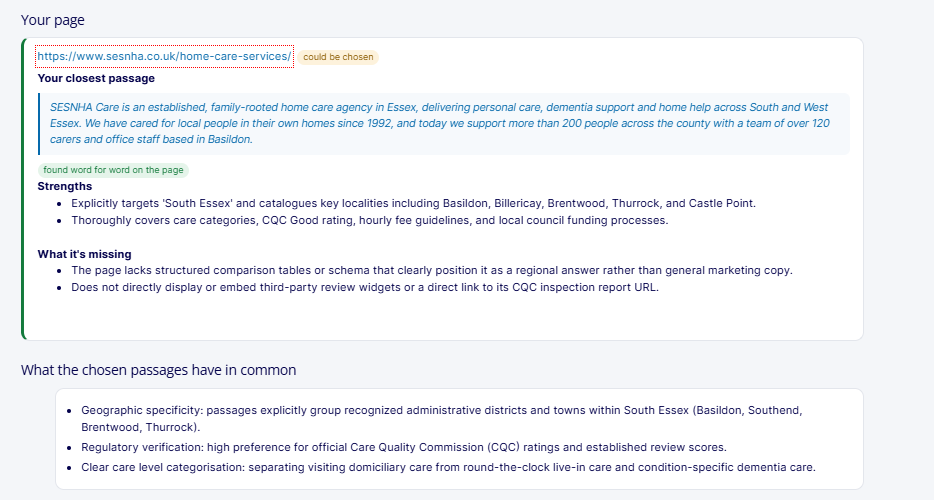
Figure 7. The client’s page compared with the passages used by Google AI Mode, including its closest matching passage, strengths and gaps.
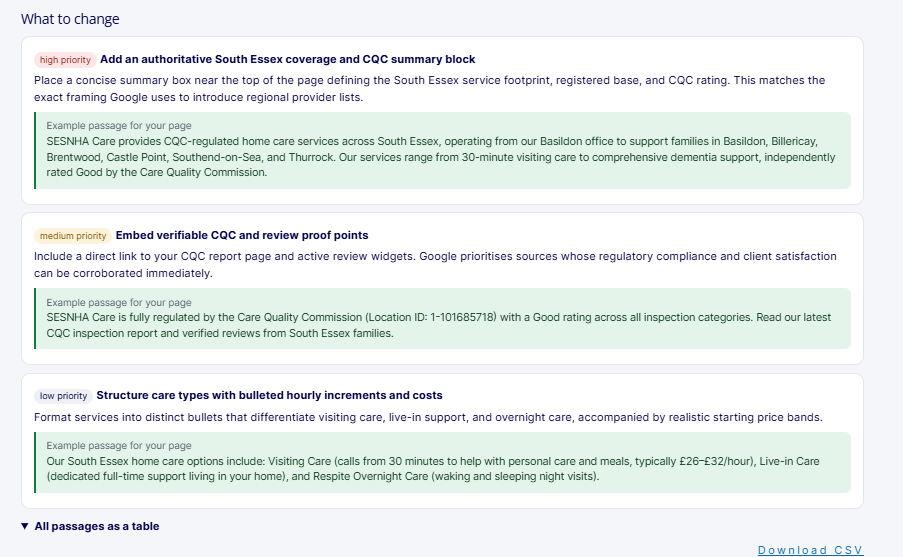
Figure 8. Passage analysis prioritised three improvements and provided example passages. Each suggestion still needs to be checked against the business’s actual information.
Step 4: Improve the Website
Responsible team: Content
The analysis showed us that the client already had much of the information Google needed. The problem was how clearly that information was presented.
I would focus on five improvements.
4.1. Add a Clear Service Area and CQC Summary Near the Top
The first part of the page should quickly explain:
- Who the business is.
- Where it provides care.
- Which types of care it offers.
- Whether it is registered with the CQC.
- Its latest overall rating and the date of that rating.
Don’t make visitors read several paragraphs to find out whether the provider serves their town.
The information should be written in normal language and appear as text, not only inside an image or widget.
For a South Essex provider, the summary should name the towns and areas it actually serves, using the business’s confirmed service information.
4.2. Make CQC Information Easy to Check
For a CQC-registered care provider, its latest rating is an important part of the information families use when comparing services.
CQC-registered providers are required under Regulation 20A to display their latest rating on their website.
The page should make the rating easy to find and include:
- The current rating.
- The date of the rating or assessment.
- A link to the relevant CQC information.
- Information explaining where visitors can find the latest assessment.
Show this information as ordinary text near the top of the page.
If the website uses the CQC ratings widget, keep it, but don’t rely on the widget alone. The rating and date should also be readable in the page HTML.
Always check that the information matches the provider’s latest CQC record before publishing it.
4.3. Add a Clear Summary of Reviews
Families often compare home care providers before making contact.
A short reviews section can help visitors understand what other customers and families say about the service.
Include:
- A genuine review summary.
- The review platform or source.
- The date the information was checked.
- A way to view the original reviews.
Never edit, select or invent reviews to make the business appear more positive.
The aim is to make genuine customer feedback easy to find and check.
4.4. Show Services and Prices Clearly
Create a simple HTML table covering the main services offered.
Where the information is available, include:
| Information | What to explain |
|---|---|
| Service | The type of care provided, such as personal care, dementia care or live-in care |
| What’s included | A clear explanation of the support provided |
| Minimum visit | The shortest visit the business offers |
| Starting price | The actual starting price, if the business is happy to publish it |
| Areas covered | The towns and locations where the service is available |
Use real prices only.
If the business doesn’t publish prices, explain how its pricing works and what factors affect the cost.
Don’t use a generic price range simply because an AI tool suggested it.
An HTML table is preferable to an image or a widget that hides the information from systems that cannot run the required scripts.
4.5. Use the Terms Customers and Search Engines Actually Use
The website should naturally include the different terms people use when searching for care.
For this topic, they include:
- Home care.
- Domiciliary care.
- Visiting care.
- Live-in care.
- Respite care.
- Dementia care.
- Personal care.
Each term should appear where it accurately describes the service.
Don’t create a separate page for every variation. That would risk producing multiple pages that offer almost identical information without helping readers.
Google’s guidance on generative AI features does not require websites to create pages for every related search or fan-out query.
The aim is to cover the topic properly on the right pages.
Step 5: Improve the Information on Other Websites
Responsible team: Local SEO and reputation
This experiment showed that Google AI Mode relied heavily on information outside the client’s website.
That means the off-site work is just as important as the content changes.
Google Business Profile
The AI Mode answer included five Google Maps listings, but the client wasn’t among them.
Review the Google Business Profile and check:
- The primary and secondary categories.
- Service areas.
- Services.
- Opening hours.
- Photos.
- Contact information.
- The website link.
Make sure the profile points to the right page and clearly describes the services the business provides.
Reviews are also important for helping potential customers make a decision.
Ask customers and families for honest feedback at appropriate points, such as after a care plan review, and respond to reviews professionally.
Care Directories
Homecare.co.uk appeared prominently in the AI Mode answer.
That makes the client’s directory profile particularly important.
Review the profile and check:
- Business name.
- Address.
- Contact information.
- Services.
- Areas covered.
- Minimum visit length.
- Pricing information.
- Reviews and their dates.
Our checks found differences between the information shown on the directory profile and the CQC listing. For example, the address and minimum visit information did not match.
These details need to be checked with the business and corrected wherever necessary.
The directory profile also had limited recent review activity, which is another area worth improving.
Council and Local Information Websites
Gemini used information from local websites, including Livewell Southend and the Essex Support Directory.
Check whether the business is listed accurately on the relevant council and local information websites.
Make sure the services, contact details and areas covered are correct.
These listings can be particularly useful when people search for care services within a specific council area.
Keep Business Information Consistent
Create one central record containing the correct:
- Business name.
- Address.
- Telephone number.
- Services.
- Areas covered.
- CQC details and rating.
Use that record when updating the website, Google Business Profile, care directories and local information websites.
This helps prevent different websites from showing conflicting information.
Step 6: Make Sure Search Engines Can Read the Information
Responsible team: Development
The content needs to be available to search engines, not just visible to people using a browser.
There are several technical checks I would carry out.
Show Important Details as Text
If the CQC rating is displayed using an embedded widget, make sure the rating and its date also appear as normal page text.
The same applies to services, prices, addresses and other important information.
Don’t rely entirely on JavaScript or images to communicate facts that customers and search engines need to understand.
Check Indexing and Snippet Settings
Google’s guidance says pages need to be indexed and eligible to show a text snippet to appear in its AI search features.
Check important pages for:
noindex.nosnippet.data-nosnippet.- Restrictive
max-snippetsettings.
Make sure nothing is unintentionally preventing Google from accessing or displaying the relevant content.
Use Clear HTML
Use standard HTML elements for the important information.
For example:
- Real headings for each section.
- HTML tables for services and prices.
- Lists for the areas covered.
- Text for CQC ratings, dates and business information.
This makes the information easier to read and gives search engines a clearer way to understand the page.
Keep Structured Data Consistent
Use appropriate structured data to describe the business and its locations.
For a local care provider, this can include:
- Business name.
- Address.
- Telephone number.
- Areas served.
- Links to official profiles and relevant listings using
sameAs.
Make sure the information matches the visible page and the official records.
However, Google does not require special schema markup for its AI search features. Treat structured data as a way to describe the business consistently and support eligible search features, not as a shortcut to AI citations.
Step 7: Test Again and Measure the Results
Responsible team: SEO
Once the changes have been published, repeat the same tests.
Consistency is important. Use the same query, market and model so you can compare the results with the original tests.
I would follow this process:
- Use the URL Inspection tool in Google Search Console to request a recrawl of the updated page.
- Run the same query in Grounding Lab three times using the same model and market.
- Run Passage analysis against the live Google AI Mode answer.
- Repeat Passage analysis using the live AI Overview and top results.
- Test the town-level searches for the main areas covered.
- Run Google Maps grounding to see which local businesses Gemini finds.
- Record whether the client’s website is cited, which passages are used and which providers are listed.
Track the following results:
| What to measure | What to look for |
|---|---|
| Grounding Lab citations | Whether the client’s website remains a leading source and how many parts of the answer it supports |
| Google AI Mode citations | Whether the client’s website appears among the cited sources |
| Google Maps listings | Whether the business appears among the local provider listings |
| Passage analysis | Whether the updated service area summary becomes the closest matching passage |
| Town-level searches | Whether the client appears when searches become more specific |
| Directory reviews | Whether review activity improves on the relevant platforms |
| Enquiries | Whether more enquiries arrive from the areas and services being targeted |
Don’t judge the results from one answer.
Run the tests more than once and look at the trend over time. AI answers can change between runs, even when the question is the same.
Implementation Checklists
The following checklists bring the work together for each stage of the project.
Before You Start
- List the priority searches, including broad service searches and town-level searches.
- Save the original results from three Grounding Lab runs.
- Run Passage analysis against the live AI Mode answer and AI Overview.
- Confirm the business address and contact details.
- Confirm the service areas and services offered.
- Check the latest CQC rating and date.
- Confirm minimum visit lengths and prices.
On the Website
- Add a clear service area and CQC summary near the top of the page.
- Show the CQC rating, date and link to the official record.
- Add a genuine reviews summary with its source and date.
- Present services and prices in an HTML table.
- Use the terms customers and search engines use where they accurately describe the services.
- Make sure each section answers the question in its heading near the beginning.
- Check that important information is available as text.
On Other Websites
- Complete and update the Google Business Profile.
- Check care directory profiles and request genuine customer reviews.
- Check council and local information listings.
- Make sure the CQC listing matches the information on the website.
- Resolve differences in addresses, services and minimum visit information.
- Keep one central record of the business’s correct details.
After the Changes
- Request a recrawl through Google Search Console.
- Repeat the Grounding Lab tests using the same settings.
- Repeat Passage analysis against both Google AI Mode and AI Overviews.
- Run the town-level searches.
- Record changes in citations, listings and passages.
- Monitor enquiries and their sources.
5. Frequently Asked Questions
What Is Grounding in AI?
Grounding connects an AI model to an external information source, such as Google Search, so it can use current information when answering a question.
Gemini can decide whether it needs to search, carry out its own searches, read the results and connect parts of its answer to the sources it uses.
The Grounding Lab shows these steps, making it easier to understand where the information in an answer comes from.
Is the Grounding Lab the Same as Google AI Mode?
No.
The Grounding Lab uses the Gemini API with Google’s Grounding with Google Search feature. This is the technology developers can use to build answers grounded in search information.
Google AI Mode is a separate product within Google Search. It has its own retrieval processes, local results and layout.
Use the Grounding Lab to investigate how Gemini uses Google Search. Use Passage analysis to study the live Google AI Mode answer.
Why Did Gemini Cite the Client but Google AI Mode Didn’t?
Our working explanation is that the two systems used different sources.
Gemini drew on several provider websites and local information websites. The client’s page covered many of the topics needed to answer the question, so it became the first source and supported eight parts of the answer.
Google AI Mode relied more heavily on a care directory, the regulator and Google Maps.
The client’s information on those third-party platforms was less complete, and its Google Maps listing did not appear in the results we tested.
This is why improving the website alone may not be enough for local businesses. Their information across directories, regulator records and Google Business Profile also needs attention.
What Does “Could Be Chosen” Mean in Passage Analysis?
It means Gemini believes your page contains information that could support parts of the answer, even though Google didn’t use it in the live AI answer.
This is Gemini’s assessment of your page compared with the selected sources. It is not a score provided by Google or a guarantee that the page will be cited.
Use it to identify potential improvements, then test again after making changes.
Why Were Only Three of the Nine Passages Confirmed?
Passage analysis checks quoted information against the live pages it can access.
The three CQC passages matched the regulator’s website word for word.
The checker couldn’t load the care directory pages, so the six passages from those pages could not be confirmed.
That doesn’t mean they were incorrect. It means we could not verify them against the live pages.
Do We Need Structured Data, llms.txt or Special Files to Appear in AI Mode?
Google’s guidance does not require special Schema.org markup, AI text files or Markdown versions of pages to appear in its AI search features.
Structured data can still help describe your business and support eligible rich results. It should be accurate and consistent with the information visible on the page.
The most important things are making sure the page can be indexed, the information can be read and the content is useful to the question being answered.
Should We Create a Separate Page for Every Search Gemini Runs?
No.
Gemini can carry out several related searches before answering a question, but that doesn’t mean your website needs a separate page for every variation.
Google warns that creating large numbers of pages mainly to target different search variations can fall under its scaled content abuse policy.
Cover the subject properly on the pages you already have. Create a new page only when it serves a genuinely different purpose or answers a distinct customer need.
How Many Credits Does Passage Analysis Use?
Passage analysis uses three times the selected model’s credit cost.
| Model | Credits per analysis |
|---|---|
| Gemini 3.8 Flash | 3 |
| Gemini 3.5 Flash-Lite | 3 |
| Gemini 4 Argon | 9 |
How Often Should We Repeat the Tests?
For priority local searches, I recommend testing weekly while changes are being made and pages are being recrawled.
Run the Grounding Lab query three times because the answers can vary between runs.
Once the main changes have been made and the results are more stable, review them monthly.
The important thing is to compare results over time rather than rely on one answer.
6. What We’re Watching Next
The changes are now being worked on, so the next stage of the experiment is about seeing whether the business earns a place in Google’s AI answers and local listings.
The main question is whether the improvements to the website and third-party profiles make a difference.
The Experiment So Far
| Date | What we did | What we found |
|---|---|---|
| 6 November 2026 | Grounding Lab: Gemini 3.8 Flash with Google Search | The client’s website was the first source, supported eight of the 23 parts of the answer that included citations and the client was named among seven providers |
| 7 November 2026 | Passage analysis against Google’s live AI Mode answer | The client wasn’t cited. Google used nine passages from a care directory and the CQC, and displayed five Google Maps listings. Gemini judged that the client’s page could be chosen |
What We’ll Test Next
The next test after the changes are live
We’ll run the same query again using the same market, model and tools.
This will show whether the website changes have improved the client’s position.
Town-level searches
Google AI Mode asked the user which town they were interested in.
We’ll test searches such as:
- Home care in Basildon.
- Home care in Southend-on-Sea.
- Home care in Billericay.
- Home care in Brentwood.
- Home care in Castle Point.
- Home care in Thurrock.
The aim is to see whether the client’s location pages and local profiles help it appear when the search becomes more specific.
Google Maps grounding
We’ll check whether the client’s Google Business Profile appears when Gemini uses Google Maps to answer the same local search.
Google AI Overviews
We’ll run the same query through Passage analysis using the live AI Overview and top results.
This will help us understand whether Google’s two AI search experiences use different sources for the same query.
Testing another Gemini model
We’ll repeat the analysis with Gemini 4 Argon to see whether the same content gaps appear when a different model is used.
Checking how stable the results are
We’ll continue running the same Grounding Lab searches to see how often the client’s website remains the first source.
Reviews
We’ll monitor the number and recency of reviews on Google and relevant care directories over the next three months.
Enquiries
We’ll also look at whether the changes lead to more enquiries and whether we can identify which channels and pages are contributing to them.
What’s Next in This Experiment?
This is the first part of a wider series of tests using SD SEO Suite’s Grounding Lab and Passage analysis.
The next investigations will look at:
- How Grounding with Google Search works and what it reveals for SEO teams.
- How Google’s AI selects passages from websites.
- How to use the Grounding Lab with Google Search, Google Maps, URLs and PDFs.
- How to improve pages using the information identified by Passage analysis.
- What happens when we repeat the same tests after making changes.
- Why AI answers use different sources and why their results can change.
Once the updates are live, we’ll also track the same questions using SD SEO Suite’s AI visibility tracking to see when and where the client starts appearing.
7. About Szymaniak Digital
Szymaniak Digital is a UK-based Enterprise AI SEO Consultancy led by Konrad Szymaniak.
We help businesses improve how they appear across Google and AI assistants, from the information on their websites to the business profiles and directories that influence AI-generated answers.
For local and regulated businesses, that means looking beyond traditional rankings. We investigate which websites Google’s AI uses, what information it relies on and where a business needs to improve its own content and online profiles.
We developed SD SEO Suite to help answer the questions SEO teams need to investigate:
- Which pages can Google’s AI read?
- Which websites and passages does it use?
- Why are competitors being cited?
- What information is missing from your own pages?
- What should you change to improve your visibility?
The Grounding Lab and Passage analysis sit alongside keyword research, rank tracking and AI visibility tracking in SD SEO Suite.
The aim isn’t simply to get your business mentioned in an AI answer. It’s to understand why other businesses are being recommended, improve the information available about your own business and give potential customers a better chance of finding you.
