

Google’s JSON-LD Escaping Change: What Breaks, Who’s Affected, and How to Fix It
The short answer
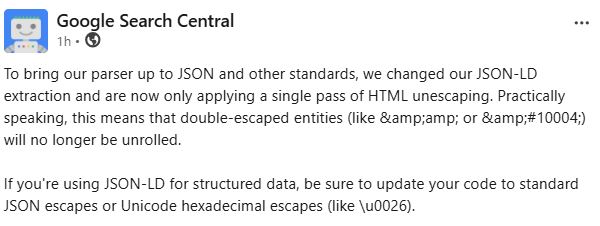
Google has changed how it extracts JSON-LD structured data. Its parser now applies a single pass of HTML unescaping rather than repeatedly unrolling escaped entities.
In practice, that means double-escaped entities are no longer unwound to their intended characters. A source value written as & now resolves to the literal text & rather than to an ampersand. A value written as ✔ resolves to the literal text ✔ rather than to a tick.
Google’s stated fix is to use standard JSON escapes or Unicode hexadecimal escapes – writing \u0026 where you mean an ampersand.
The dangerous part is what does not happen.
This is not a parse failure. Your JSON still validates. Search Console will not raise an error. Your structured data testing will very likely pass. What changes is the value Google stores – silently, and only visible if you look at the extracted output rather than the pass/fail verdict.
Analysis by Konrad Szymaniak, Founder of Szymaniak Digital, an enterprise SEO and AI search consultancy. Konrad has led search programmes for organisations including Frasers Group (Sports Direct), speaks at brightonSEO and MeasureFest, and guest lectures on enterprise AI search and agent optimisation at the University of Southampton and the University of Stirling.
Last reviewed: August 2026
What Happened? Google’s JSON-LD Escaping Change: What Breaks, Who’s Affected, and How to Fix It
Google Search Central announced that, in order to bring its parser in line with JSON and related standards, it has changed its JSON-LD extraction to apply only a single pass of HTML unescaping. Double-escaped entities will no longer be unrolled. Sites using JSON-LD are advised to move to standard JSON escapes or Unicode hexadecimal escapes such as \u0026.
- What “a single pass” actually means.
When JSON-LD sits inside a <script type="application/ld+json"> block in an HTML document, two separate escaping systems are in play at once: HTML entity encoding and JSON string escaping. Historically, Google’s parser was forgiving about how those two interacted, and would keep unrolling entities until it reached something that looked like a plain character.
That forgiveness has ended. One pass, then stop.
Concretely, if your template emits an ampersand that has been HTML-escaped twice – a common outcome when a value is escaped once by a CMS and again by a templating function – the source contains &amp;. One pass of unescaping turns that into &. Google stops there. The string value it stores is &, not &.
This is a warning to Shopify sites using auto-generated structured data apps, or WordPress sites relying on auto-generated plugins.
So a product named “Marks & Spencer” can end up stored as “Marks & Spencer” or “Marks & Spencer” depending on how many layers of escaping your CMS applied. The tick character used in feature lists, written as &#10004;, becomes the visible text ✔.
- This is the end of a decade-long ambiguity, not a new rule.
It is worth understanding why so many sites are exposed, because the answer is not carelessness. The question of whether HTML entities inside JSON-LD literals should be preserved or unescaped has been genuinely unsettled since the format’s early days. Martin Hepp raised it formally on the schema.org mailing list in June 2015, pointing out that literals supplied by backend databases frequently arrive HTML-encoded, and that developers routinely reuse those values inside
<script>blocks. The reply from Gregg Kellogg was that this is a matter for the HTML specification rather than JSON-LD, with no indication that entities receive special treatment.
Hepp also noted, in the same message, that Google’s structured data testing tooling appeared quite tolerant of the ambiguity. It was – for another eleven years. Meanwhile the W3C’s own JSON-LD syntax working group logged the same problem in 2018, observing that the structured data testing tool did not perform the decoding the specification implied.
Templating systems filled the gap with workarounds. Hugo users have been chaining htmlUnescape before plainify since at least 2019 to stop apostrophes emerging as the mangled hybrid \x26rsquo; and triggering “Bad escape sequence in string” errors in Search Console. Those workarounds were built against a forgiving parser. Some of them are about to behave differently.
One further note, verified at the time of writing: this change had not yet appeared in Google’s documentation changelog, where the most recent entry was dated 20 August. No effective date, rollout status or reprocessing policy has been published. We will update this page when it is.
Konrad Szymaniak, Szymaniak Digital: “The reason this one matters more than it looks is that nobody wrote the double-escaping deliberately. It emerges from the seam between two systems — the CMS escapes a value for safe HTML output, then the template escapes it again on the way into a script block, and Google quietly cleaned up after both for a decade. That cleanup has stopped. Most teams affected by this have no idea the escaping is even happening, because it was never visible in anything they looked at.”
Why Does It Matter?
1. It fails silently, which makes it far worse than an error.
Almost every structured data problem announces itself. Malformed JSON throws a parse error. A missing required property blocks a rich result and appears in Search Console. This one does neither. The JSON is syntactically valid. The property is present. The value is simply wrong — a string containing visible entity codes where a character should be.
That means your existing monitoring will not catch it. Search Console’s rich results reports flag errors and warnings, not semantically corrupted values. A validator confirms the markup parses. Neither is designed to notice that your product is now called “Marks & Spencer”.
2. Ampersands are not an edge case.
The affected characters are among the most common in commercial content:
- Ampersands in brand and product names – Marks & Spencer, Johnson & Johnson, Ben & Jerry’s, Barnes & Noble, and every “Terms & Conditions”, “Delivery & Returns” and “Health & Beauty” category page in retail.
- Ampersands in URLs carrying query parameters, which appear in
url,sameAsand@idvalues. - Curly quotes and apostrophes, which arrive HTML-encoded from most WYSIWYG editors and appear in virtually every headline and description.
- Symbol entities such as ticks, dashes, non-breaking spaces and currency marks, widely used in feature lists and specification tables.
Any of these passing through a double-escaping template layer is now at risk of being stored with visible entity codes.
3. The damage lands in the values Google actually uses.
Structured data values feed rich results, Knowledge Graph entity understanding, Merchant Center product matching, and increasingly the grounding layer beneath AI answers. A corrupted name value is not a cosmetic problem – it is a brand string that no longer matches the entity it is meant to identify.
For retailers this compounds an already difficult picture: separate research found AI Mode surfaces roughly 95% fewer product listings than standard search, so there are far fewer slots available and correspondingly less tolerance for a product record that does not cleanly match.
4. The fix belongs in the template layer, and that is where the risk sits.
Nobody will fix this by editing pages. It is a systemic output problem in whatever code assembles the JSON-LD block, which means it is a development ticket, a release cycle and a regression test – not an SEO task that can be completed in an afternoon.
It also means the fix can easily overshoot. Removing an escaping layer that was there for a reason can reintroduce the security problem the escaping originally solved: a string containing </script> that terminates the script block early and allows arbitrary markup to execute. This is precisely why the JSON-LD community has recommended Unicode escapes such as \u003c for over a decade. Google’s guidance to use \u0026 is the same principle applied to ampersands — and it is the right fix, because Unicode escapes are resolved by the JSON parser and never touch HTML entity handling at all.
5. No date, no reprocessing guidance, no error surface.
Google has not published when the change took effect, whether rollout is complete, or whether previously extracted values will be re-crawled and corrected once markup is fixed. In the absence of that, the safe assumption is that corrected pages will be picked up on their normal recrawl cadence — which for deep catalogue pages can be weeks.
Konrad Szymaniak, Szymaniak Digital: “My honest assessment is that most sites will be fine and a small number will be quietly broken for months. That asymmetry is exactly what makes it worth thirty minutes today. This is a view-source-and-search job. If you find nothing, you close the tab and get on with your week. If you find something, you have caught a silent data-quality problem that nothing in your reporting stack was ever going to tell you about.”
Who Is Affected?
- Sites using static site generators.
Hugo, Jekyll, Eleventy and similar tools apply escaping helpers when injecting content into templates, and the JSON-LD escaping problem is thoroughly documented in their communities going back years. Any site running an inherited workaround – a chain of escape and unescape functions someone added in 2019 to fix a Search Console error – should verify what that chain now produces.
- E-commerce and retail – the largest volume of affected values.
Product names, category names, brand fields and parameterised URLs. A single templating fault propagates across an entire catalogue simultaneously, and the affected characters are exactly the ones retail content is full of. Merchant listing markup carries additional exposure because product matching depends on clean name and brand strings.
- Publishers and media – headlines and body content.
Article headline and description values are typically drawn straight from a CMS field where curly apostrophes and ampersands are stored HTML-encoded. High publishing volume means a fault introduced today affects every article published afterwards until it is caught.
- Headless CMS and API-driven architectures.
Content arriving HTML-encoded from a database or content API, then rendered through a front-end framework that escapes on output, is the classic double-escaping pattern. It is also the hardest to spot, because the encoding happens in a layer most content and SEO teams never see.
- Enterprise organisations with shared template libraries.
One shared component generating JSON-LD across dozens of brands or markets means one fault replicated everywhere — and one fix that resolves everything. Audit the component, not the pages.
- Local and multi-location businesses.
Trading names containing ampersands are extremely common — every “Smith & Sons” and “Hair & Beauty” on the high street. LocalBusiness name fields are precisely the values that matter for entity matching.
Who is probably fine: sites whose JSON-LD is generated as a serialised object by a well-behaved library, output through a single escaping layer, and containing literal UTF-8 characters rather than HTML entities. That is the correct implementation and it was never relying on Google’s leniency. Verify rather than assume — but this is the common case, and the point of this page is not to cause panic.
What Should Businesses Do?
1. Run the view-source test today. It takes minutes.
Open a representative page — a product page, an article, a category page — and view the raw HTML source rather than the rendered DOM. Find the <script type="application/ld+json"> block and search inside it for &amp;, for &# and for any string beginning & followed by letters and a semicolon. If you find them, you have double-escaped values. If the block contains only literal characters or \u-prefixed escapes, you are almost certainly clear.
2. Check the extracted values, not the pass/fail verdict.
Run the page through the Rich Results Test and read the parsed property values it displays. This is the critical distinction: the test will report the markup as valid because it is valid. What you are looking for is entity codes appearing inside the extracted strings. A green tick tells you nothing about this problem.
3. Sample across templates, not across pages.
The fault lives in the template, so testing fifty product pages tells you what one product template does. Test one page from each distinct template type instead — product, category, article, local landing page, homepage — plus any page type where content originates from a different source or CMS.
4. Fix at the point of generation, using Unicode escapes.
The durable fix is to emit \u0026 for an ampersand, \u003c for a less-than sign, and standard JSON escapes elsewhere — or to emit the literal UTF-8 character directly where it is safe to do so. Unicode escapes are resolved by the JSON parser and never interact with HTML entity decoding, which removes the ambiguity entirely rather than compensating for it.
5. Do not fix it by stripping an escaping layer without understanding what it protects.
Escaping in a script block exists partly to prevent a content value containing </script> from terminating the block and allowing injected markup to run. Removing a layer to make ampersands render correctly can reopen that hole. Route the fix through whoever owns front-end security, and treat “just remove the escape” as a proposal requiring review rather than a solution.
6. Add a regression test so this cannot silently return.
Once fixed, add an automated check to your build or monitoring that asserts no & sequences appear inside JSON-LD blocks. This class of bug is reintroduced routinely by unrelated template changes, and it is invisible without an explicit test. If you already run scheduled crawls, add a custom extraction rule for the pattern.
7. Prioritise by commercial value, then wait for recrawl.
Fix templates covering your highest-value pages first. Google has published no reprocessing guidance, so assume corrected values are picked up on normal recrawl cadence. Request indexing for a small number of critical URLs if the corruption is affecting prominent brand or product names; do not attempt it at catalogue scale.
What not to do: do not run a find-and-replace across your content database. The content is generally not the problem — the encoding applied on output is. Rewriting stored content to compensate for a template fault leaves you with double-corrupted data the moment the template is fixed properly.
What We’re Watching Next

- A documentation changelog entry with a date attached.
At the time of writing this change was announced but not yet reflected in Google’s documentation updates page. When it lands it should confirm the effective date and rollout status, both of which are currently unknown and both of which determine how urgently sites need to act. We will update this page accordingly.
- Whether Search Console eventually surfaces it.
Right now there is no error surface for semantically corrupted values, only for parse failures and missing properties. Whether Google adds any signal — a warning, a flagged value, anything — determines whether teams find this proactively or stumble across it. Historically, silent value corruption has not generated a Search Console report, so plan on the assumption that it will not.
- How CMS and plugin vendors respond.
The practical resolution for most of the web runs through WordPress SEO plugins, Shopify themes, static site generator template libraries and headless CMS SDKs. Watch for patches, and be aware that a vendor fix arriving in a future release does nothing for a site that does not update. For agencies, vendor release notes are worth monitoring more closely than Google’s over the next few weeks.
- Whether other consumers follow Google’s lead.
Structured data is no longer read only by Google. Bing, Perplexity, ChatGPT’s crawler and a long tail of AI systems all extract JSON-LD, and each implements its own parser. Google standardising is likely to pull others in the same direction over time, which is a good outcome — a decade of divergent tolerance has been the root cause. In the interim, expect inconsistency between what different systems extract from the same page.
- Whether this signals broader parser tightening.
mplementations that have quietly depended on Google being more forgiving than the specification – malformed dates, loose enumeration values, non-standard property nesting – may be worth reviewing on the same principle. This is warning rather than announcement, and we will flag it as such until Google says more.
Konrad Szymaniak, Szymaniak Digital: “There’s a broader lesson in this that goes beyond escaping. A lot of technical SEO has quietly depended on Google being more tolerant than the specifications require, and every year Google gets a little less tolerant. The teams that implement to the standard rather than to the parser stop having these mornings. That’s not a glamorous position to argue for in a roadmap meeting, but it’s the one that ages well. Google’s parser change breaks values without breaking validation — your markup passes, your data is wrong, and nothing in Search Console will tell you. Szymaniak Digital’s Technical SEO Audit checks structured data at the template layer across every page type on your site, and builds the regression tests that stop it coming back.”
Frequently Asked Questions
What exactly changed in Google’s JSON-LD parser?
Google now applies a single pass of HTML unescaping when extracting JSON-LD, rather than repeatedly unrolling escaped entities. The stated reason is bringing the parser in line with JSON and related standards. The practical effect is that double-escaped entities are no longer resolved to their intended characters: a source value of &amp; now yields the literal text & rather than an ampersand.
How do I know if my site is affected?
View the raw HTML source of a representative page, locate the <script type="application/ld+json"> block, and search inside it for &amp; or &#. Their presence indicates double-escaped values. Then run the page through the Rich Results Test and read the extracted property values — not the pass or fail verdict — looking for entity codes appearing inside strings. Test one page per template type rather than many pages of the same type, since the fault lives in the template.
Will Search Console show me an error?
Almost certainly not. This is not a parse failure — the JSON remains valid and the properties remain present. Search Console’s structured data reporting flags syntax errors and missing required properties, neither of which applies here. The value is simply wrong, and no current report is designed to detect that. This is the single most important thing to understand about the change.
What is the correct fix?
Emit Unicode hexadecimal escapes at the point where the JSON-LD is generated – \u0026 for an ampersand, \u003c for a less-than sign – or emit the literal UTF-8 character directly where it is safe to do so. Unicode escapes are resolved by the JSON parser and never interact with HTML entity decoding, which eliminates the ambiguity rather than compensating for it. Fix it in the template, not in the content.
Can I just remove the HTML escaping from my template?
Not without review. Escaping inside a script block partly exists to stop a content value containing </script> from terminating the block early and allowing injected markup to execute – a genuine security concern that the JSON-LD community has warned about for over a decade. Removing an escaping layer to fix character rendering can reopen it. Use Unicode escapes instead, and involve whoever owns front-end security in the change.
When did this take effect, and will Google reprocess my old data?
Google has not published either detail. The announcement is written in the past tense, indicating the parser has already been changed, but no effective date, rollout status or reprocessing policy has been stated, and at the time of writing the change had not yet appeared in Google’s documentation changelog. The safe assumption is that corrected markup is picked up on your normal recrawl cadence, which for large catalogues can take weeks.
Does this affect Microdata or RDFa?
The announcement addresses JSON-LD extraction specifically. Microdata and RDFa embed values in HTML attributes and body content, where a single layer of HTML entity decoding is the expected and unambiguous behaviour — the double-escaping problem arises from the interaction between HTML and JSON escaping inside a script block, which those formats do not have. That said, Google recommends JSON-LD and the overwhelming majority of implementations use it, so this is where attention belongs.
Why was double-escaping so common in the first place?
Because the correct behaviour was genuinely ambiguous for a decade and Google’s parser was forgiving about it. The question of whether HTML entities inside JSON-LD literals should be preserved or decoded was raised formally on the schema.org mailing list in 2015 and logged by the W3C’s JSON-LD working group in 2018, without a clear resolution reaching implementers. Meanwhile content routinely arrives HTML-encoded from databases and editors, then gets escaped again on output. Nobody chose double-escaping; it emerged from the seam between two systems, and Google absorbed the difference until now.
About Szymaniak Digital
Szymaniak Digital is a UK-based enterprise SEO and AI search consultancy helping senior marketing leaders stay visible as search becomes conversational, agentic and personalised.
Founded by Konrad Szymaniak, the consultancy combines rigorous technical SEO with Generative Engine Optimisation (GEO) and Answer Engine Optimisation (AEO) — because clean, standards-compliant markup is what makes content legible to both traditional ranking systems and the AI layer now built on top of them.
Konrad has delivered search programmes for organisations including Frasers Group and Sports Direct, holds an MSc from the University of Southampton, speaks regularly at brightonSEO and MeasureFest, and guest lectures on enterprise AI search and agent optimisation at the University of Southampton and the University of Stirling. He contributes to Semrush, Screaming Frog, Sitebulb, Majestic and Wordtracker.
Not sure whether your markup is affected? Book a Technical SEO Consultation.