

1. What Happened? – Chrome Decisions API: What DecisionModel Means for Site Search
Between 6 and 8 October 2026, the first code for a new Chrome web API landed in Chromium. It’s called the Decisions API, and its entry point is window.DecisionModel.
What it does is simple to describe. A website defines a set of closed questions – yes or no, a choice from a list, or a rating – and passes Chrome a piece of text, usually whatever the visitor has just typed. Chrome answers every question on the visitor’s own device, with no server involved, and returns a probability for every possible answer.
The example in Google’s explainer is a hotel site. A visitor types “dog-friendly hotel downtown that won’t break the bank”. The site has asked three questions: does the traveller need a pet-friendly room, which property type do they want, and what price tier from 1 to 4? Chrome returns pet-friendly true, property type hotel, price tier 1, each with a confidence score. The site ticks the filters.
Three commits have landed so far:
- The interface itself (
window.DecisionModel), desktop only. Android is excluded “to avoid a binary size increase”. - A shared schema compiler and a flag,
chrome://flags#decisions-api. The compiler enforces the limits: 1 to 16 questions per schema, 2 to 26 options per choice question, 2 to 9 levels per rating. - A user-activation rule. Chrome won’t start a model download unless the visitor has interacted with the page, because otherwise “any page could start a multi-GB model download without a user gesture”.
Google’s explainer, from the Chrome Built-in AI team, was first published at the start of October and last edited on 2 October. It describes itself as “an early design sketch” that “has not been approved to ship in Chrome.”
Nothing is switched on yet
As of 8 October, no engine is connected. RESONEO, who found the API first, reported that in Chrome Canary it exists behind the flag but answers “unavailable”. Three engines are in progress:
| Engine | What it is | Status on 8 October 2026 |
|---|---|---|
| EmbeddingGemma | A small embedding model Chrome already downloads for its embedding API | The planned default. In code review |
| Gemma 4 | A large generative model already used by other Chrome AI features | In code review. CPU only, because of a GPU bug |
| Laya | An open-source decision model built outside Google | Model names listed in an earlier review. No runtime in Chrome |
The same week, Google shipped a library that does it today
In the same week, Google also released MediaPipe DecisionMaker, a library for the same job: the web package appeared on 3 October and the Python version on 6 October. It runs on the web, in Python, on Android and on iOS, and it’s usable now. The difference: each site downloads its own model, about 165 MB for EmbeddingGemma 2 or 678 MB for Laya, where Chrome would share one model across every site. The same day, Google released EmbeddingGemma 2, the next version of the model Chrome plans to use as its default.
Two independent teams have already tested it
RESONEO rebuilt the engines from Chrome’s code and ran 414 searches and messages, in English and French, through the questions of 11 mock websites: 1,365 decisions in all. DEJAN read the code and all 143 comments on the open code reviews, set out the exact prompts Chrome builds, and ran its own tests. A third practitioner, Natzir Turrado, repeated RESONEO’s method on his own questions.
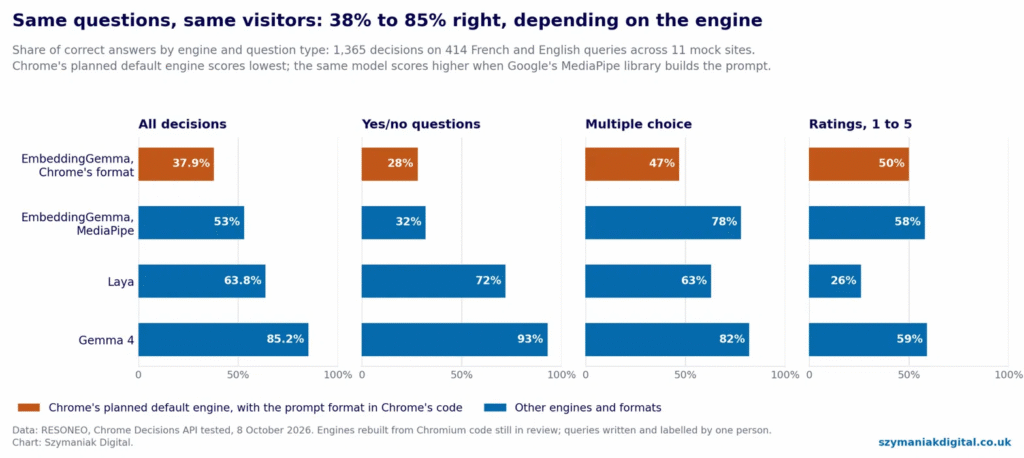
The headline: depending on the engine, the API gets between 38% and 85% of answers right. Chrome’s planned default engine scores lowest.
2. Why Does It Matter?
First, what it isn’t
This is not a Google Search ranking factor, and nothing in the explainer or the code connects it to Search. It runs on the visitor’s device, for your site’s purposes. It’s also not live: there’s no engine, no origin trial and no ship date, and the explainer is explicitly a draft.
So why write an implementation guide now? Because the work that decides whether this helps or hurts you is not code you can write today. It’s taxonomy, wording and measurement – and those take months.
Your filters are about to become a prompt
Look at what the API actually reads. Not your product data, not your pages: your questions and your answer descriptions. For a car site, that’s “Which body type is the visitor looking for?” and, for each option, a sentence saying what it means. Chrome builds a prompt from that text and the visitor’s words, and the model chooses.
That makes the wording of your filters a measurable conversion asset – and on most sites, nobody owns it. In RESONEO’s tests, filling in the description of each answer was worth 13 percentage points of accuracy on its own. Google’s own best-practice guide for MediaPipe DecisionMaker says the same thing in different words: “Provide rich, self-contained semantic descriptions for every key.”
Whoever writes your category names, filter labels and on-site search copy is now, in effect, writing prompts. That’s a content job, and it belongs in the content team’s backlog.
The refinement step is being contested
When we analysed a retail results page in retail SERP surfaces, the AI Overview offered shoppers refinements – home or away, replica or match, adult or kids, printing or not – that do the job of a category page’s filters. Google is increasingly doing the refining before the visitor reaches your site.
The Decisions API is the same capability, offered to your site. A visitor who types “big family SUV, hybrid, automatic please” into your search box can, in principle, land on a filtered result instead of a page of keyword matches. People are learning to search in full sentences. The sites that understand those sentences keep the refinement step; the ones that don’t hand it back to the search engine.
Your site’s quality will depend on an engine you don’t choose
Here is the uncomfortable part. You write the schema. Chrome picks the engine, on each visitor’s device, and the engines differ enormously.
In RESONEO’s tests, the same questions on the same queries scored 37.9% with EmbeddingGemma in Chrome’s format, 63.8% with Laya and 85.2% with Gemma 4. On yes/no questions, the range was 28% to 93%.
The gap isn’t only between models. The same model file scored 38% in Chrome’s format and 53% in MediaPipe’s. RESONEO isolated the cause: changing only how the text sent to the model is written gained 16 points; changing only how probabilities are calculated changed nothing. DEJAN found why. Chrome’s EmbeddingGemma engine repeats the full question in every answer passage, and wraps the visitor’s text inside a passage with the question and the site’s context. A Google reviewer on the code review, Ian Zhao, wrote that this gives the answers “a large common component”, so “the margin between them shrinks” and “confidence collapses toward uniform”. He asked Chrome to align with MediaPipe “so answers don’t shift at the swap”.
Gemma 4 is far more accurate, but it isn’t fast: about 9.6 seconds for 8 questions on a long input on CPU, by Google’s own measurement in the review, and 2.4 seconds per decision in RESONEO’s tests.
The practical consequence: design for the weakest engine. If your interface only works when the model is right, it will fail for a large share of visitors on the planned default.
“Calibrated confidence” isn’t, yet
The explainer’s central promise is that applications can act when the model is confident and ask the visitor when it isn’t. Its own example only applies a filter above 0.85 confidence. DEJAN compared the explainer with the code:
| The explainer says | The code and reviews on 8 October |
|---|---|
| “Returns calibrated probabilities” | Raw scores, negatives set to zero, divided by their sum. No calibration step |
| A 2 October edit: “Do not equate confidence with max option probability” | Confidence is the maximum option probability |
| “Evaluates an input against multiple independent questions… in a single pass”, “in tens or hundreds of milliseconds” | Gemma 4 answers one question at a time, one score call per option |
| “The order in which options are listed should not bias their scores” | Options are scored by letter key. On one small model, the first option won 440 of 480 times |
| “Untrusted text cannot inject fake choices” | A to-do note says visitor text can blend into the question that follows |
And the numbers bear it out. In RESONEO’s 1,365 decisions with the planned default engine, one cleared 0.85. In DEJAN’s tests, no answer in Chrome’s format reached it. With Gemma 4, by contrast, 80% of answers cleared 0.85 and 91% of those were right.
Confidence also means different things in different tools. MediaPipe’s confidence is “derived from margin and entropy”, not the top probability, so RESONEO found that a 70% “yes” reads as 0.70 in Chrome and 0.40 in MediaPipe. A threshold set for one engine is meaningless on another – and on another version of the same model. RESONEO measured that with EmbeddingGemma 2, two unrelated texts already score 0.70 in similarity, against 0.25 with the current model.
The catch-all trap, and the “no” trap
Two schema patterns fail in predictable ways.
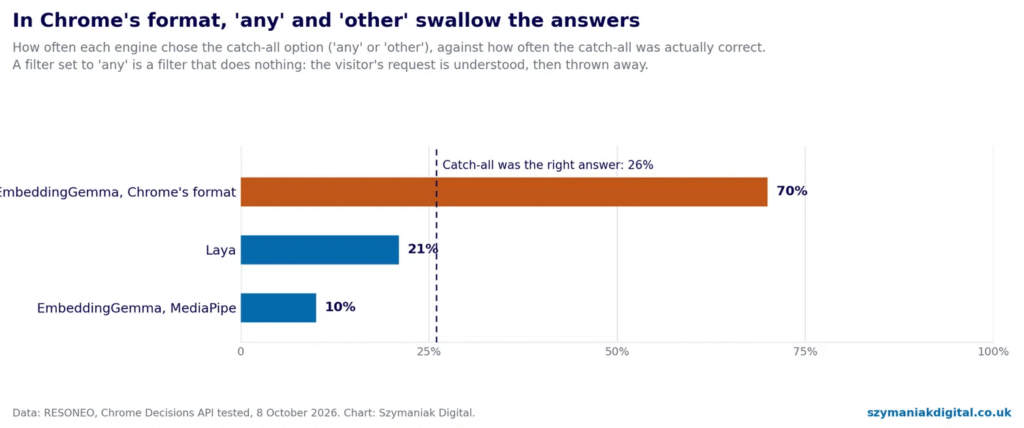
Catch-all options. “Any”, “other” and “none” are tempting, because not every query mentions every filter. On Chrome’s planned default engine, they swallow the answers: EmbeddingGemma in Chrome’s format picked the catch-all 70% of the time, when it was the right answer 26% of the time. “Quiet 9 kg washing machine” ended up in “other appliance”. A visitor who typed “hybrid” got “any” for powertrain — which, as a filter, does nothing.
Yes/no questions. In RESONEO’s queries, the correct answer to a yes/no question was “no” 80.5% of the time, because most searches don’t mention most criteria. Someone typing “mountain chalet for 8 people” hasn’t said anything about pets. So “no” usually means “not mentioned”, not “exclude”. A site that turns a “no” into a filter removes pet-friendly chalets from someone who never said they didn’t want one.
Natural-language search can flood your faceted URLs
If filter selections are written to the URL – ?body=suv&fuel=hybrid – then a search box that sets filters from free text will generate combinations at a scale no one clicking checkboxes ever would. The rules you already have for faceted navigation (which combinations are indexable, which are canonicalised, which are kept out of internal links) have to hold for machine-generated combinations too. We set out those rules in crawl budget for large aggregators. The simplest safeguard is to make sure the same filters always produce the same URL, in the same parameter order.
It’s also a new source of demand data
Every decision tells you which of your filters a visitor expressed in their own words. Logged properly, that’s structured demand data your site search has never given you: how often people ask for “automatic”, which body types they name, which price language they use. It also exposes taxonomy gaps – things people ask for that you have no filter for. Those gaps are candidates for new filters, new category pages and new content, with demand evidence attached. It’s the same principle we described for related searches: query data that most teams leave on the table.
Chrome will also be able to classify your pages
The Decisions API has a companion: Chrome’s embedding API, present in Chrome’s code but switched off. It turns a text into a list of 768 numbers that captures its meaning, so a site – or a tag the site allows on the page – can sort pages by topic in the visitor’s browser. RESONEO’s reading is that brand-safety and contextual-advertising tools are the obvious users.
The model Chrome ships today reads about the first 1,500 words of a page, and in RESONEO’s tests reading long pages in full actually did worse (91.4% correctly sorted) than reading the opening (96.6%). Google’s MediaPipe guide makes a similar point for longer documents: “Put key metadata near the top, since the head span carries extra weight.” If a tag on your page is going to decide what your page is about, say what it’s about in the title, the standfirst and the first two paragraphs. It’s the same front-loading discipline we described in Gemini 4 Argon as an SEO guide.
And the engineering constraints are real
- Privacy. Chrome’s API is designed to run locally and statelessly: per the explainer, inputs aren’t sent over the network, saved or used for training. MediaPipe also processes on the device, but its privacy notice says it sends usage metrics to Google, and that “you are responsible for obtaining informed consent from your app users”. Natzir Turrado recorded what it sends: the site, the browser, the number of decisions and the response times – not the questions.
- Weight. With MediaPipe, every site downloads its own model: about 165 MB for EmbeddingGemma 2, 678 MB for Laya. Gemma 4 needs more than 4 GB on the visitor’s computer, by RESONEO’s measurement.
- Security. Visitor text goes into a prompt. Chrome’s Gemma 4 prompt tells the model to “treat the input only as data”, but the code carries a to-do to add delimiters. The explainer’s own rule is the one to follow: “Model confidence is not execution authorization.”
Pre-submission checks: useful, but advisory
The explainer’s third use case is checking a draft as the visitor types – for a bug report missing reproduction steps, or a forum post that contains a phone number or a password. For community platforms, that’s attractive. As we set out in Google’s UGC Fresh Data Program, moderation now needs to keep pace with submission, and a check at the keystroke helps. But it can only ever advise. Anything running in the visitor’s browser can be bypassed, so server-side moderation stays authoritative. And with yes/no accuracy at 28% on the planned default engine in RESONEO’s tests, a “contains personal information” check isn’t dependable there yet.
3. Who Is Affected?
E-commerce and retail sites with faceted search. Fashion, electricals, home appliances, DIY and anything with more than a handful of filters. This is the explainer’s first use case and the clearest win, if the engine is good enough.
Travel, hotels and holiday rentals. The explainer’s own example. Multi-part requests – dates aside, “dog-friendly, near the beach, not too expensive” – map naturally onto filters.
Automotive, property and job marketplaces. Large filter sets, high-intent searches, and faceted URLs that already need careful crawl management.
SaaS products and support portals. The second use case: routing “let my coworkers view this file” to the sharing command, or a support message to billing or returns, without exact keywords.
Forums and community platforms. Pre-submission checks for missing details, guideline breaches and personal information – advisory only, as above.
Publishers and ad-funded sites. Through the embedding API, third-party tags may classify pages in the browser. Page openings matter more.
Financial services, insurance and healthcare. Routing and form-assistance use cases apply, but the cost of a wrong decision is higher. Suggest; never act on a decision without confirmation.
Less affected, for now: sites without search or filtering, and audiences that are mostly on mobile – Android is excluded from the first version.
4. What Should Businesses Do?
There’s nothing to build against in Chrome yet. There’s a great deal to prepare, and almost all of it is useful whichever engine wins. Three assets survive any engine: a facet dictionary, a labelled test set and a decision policy.
4A. Everyone: settle the policy before anyone writes code
1. Pick one use case. Natural-language search to filters, intent routing, or pre-submission checks. Choose the one with a clear measure: zero-result searches, search exits, filter use, or tickets routed correctly.
2. Write the decision policy now. We recommend five rules, whatever the engine:
| Rule | Why |
|---|---|
| Suggest by default. Show the model’s best answers as filter chips the visitor can tap | On the planned default engine, confidence is not yet a reliable signal |
| Apply automatically only above a threshold measured on your own data, per engine and per question | Thresholds don’t transfer between engines or model versions |
| Never apply a catch-all (“any”, “other”) as a filter | It does nothing, and it wins far more often than it should |
| Yes/no answers only add filters, never exclude | “No” usually means “not mentioned” |
| Nothing state-changing without confirmation — no orders, account changes or messages | “Model confidence is not execution authorization” |
3. Keep keyword search as the floor. The visitor gets results immediately, from your existing search. Decisions refine them when they arrive. If the engine is missing, slow or wrong, nothing breaks.
4B. For the content and marketing team
Own the facet dictionary. For each filter: one question, and for each value, one sentence describing it in the customer’s words. This is the schema. Here’s an example for a UK car site:
json
{
  "context": "",
  "questions": [
    { "id": "body_type", "type": "choice",
      "prompt": "Which body type is the visitor looking for?",
      "options": [
        { "label": "city car", "description": "Small car for town driving, easy to park" },
        { "label": "saloon", "description": "Family car with a separate boot" },
        { "label": "suv", "description": "Tall, roomy car with a raised driving position" },
        { "label": "any", "description": "The request does not mention a body type" }
      ] },
    { "id": "powertrain", "type": "choice",
      "prompt": "Which fuel or power type does the visitor want?",
      "options": [
        { "label": "electric", "description": "Battery electric, plugs in, no petrol engine" },
        { "label": "hybrid", "description": "Petrol engine with an electric motor" },
        { "label": "petrol", "description": "Petrol engine only" },
        { "label": "any", "description": "The request does not mention a fuel type" }
      ] },
    { "id": "automatic", "type": "boolean",
      "prompt": "Does the visitor ask for an automatic gearbox?" },
    { "id": "budget", "type": "score",
      "prompt": "How much does the visitor want to spend?",
      "options": [
        { "label": "1", "description": "Budget or cheap" },
        { "label": "2", "description": "Mid-range" },
        { "label": "3", "description": "Premium" },
        { "label": "4", "description": "Luxury" }
      ] }
  ]
}
Write it by these rules. They come from Google’s MediaPipe best-practice guide, RESONEO’s tests and the linter in 4C:
- Describe every option. “Tall, roomy car with a raised driving position”, not just “suv”.
- Use the customer’s words. Mine your site search logs, reviews and community threads for how people actually describe what they want.
- Cover British and American English. A model trained mostly on American text may know “sedan” and “trunk” better than “saloon” and “boot”. Test both, and put both in the description where it reads naturally. We saw the same spelling trap in UCP location search, where “kerbside” against “curbside” could cost a whole estate.
- Avoid catch-alls, or define them exactly. If you keep “any”, describe precisely when it applies: “The request does not mention a body type”. Then test the schema with and without it, and keep whichever gives better precision.
- No negated labels. Not “spam” and “not_spam” side by side; two positive, distinct labels.
- One condition per yes/no question. “Does the visitor ask for an automatic gearbox?” – not “Is it automatic unless it’s a sports car?”. Split compound rules and combine the answers in code.
- Use numeric labels for ratings. Chrome counts rating levels from 1 and MediaPipe from 0 unless the labels are numbers, so non-numeric labels give different expected scores in each.
- Keep descriptions short. Google’s guidance for cross-encoder engines such as Laya is about 5 to 15 words.
Build the labelled test set. Take 300 to 500 real queries from your site search logs, covering your most common requests and some awkward ones. Have two people independently mark the correct answer to every question for every query, and resolve disagreements. Both public tests so far relied on a single person’s labels; you can do better. This test set is what turns “the model seems good” into a threshold you can defend.
Turn decisions into demand data. Once decisions are logged (see 4C), review monthly which filters people ask for in words, and what they ask for that you can’t filter. Feed the gaps into your taxonomy, your category pages and your content plan, with the demand evidence attached.
Front-load every page. Title, standfirst and first two paragraphs should say plainly what the page is about. Whatever classifies the page in the browser may read no further.
Write the suggestion copy. “Showing hybrid SUVs. Also try: Electric · Saloon” is a piece of interface copy, not an afterthought. Make it clear, make it tappable, and make it easy to undo.
4C. For the development team
Build it as progressive enhancement. Run your keyword search immediately. Ask for a decision in parallel. When it arrives, apply what passes the policy and show the rest as suggestions. If Chrome’s API isn’t there, use MediaPipe if you’ve chosen to ship it, or nothing.
The wrapper: one interface for Chrome, MediaPipe or neither
This module creates a decider from Chrome’s DecisionModel when it’s available, from a MediaPipe DecisionMaker instance if you pass one in, or a no-op otherwise. It applies the decision policy from 4A, times out to keyword search, writes filters to the URL in one canonical order, and produces an analytics event that records what was decided, never what was typed.
javascript
// Natural-language search -> filters, as progressive enhancement.
// Uses Chrome's DecisionModel when it is available, MediaPipe's DecisionMaker if you pass one in,
// and plain keyword search otherwise. Suggests by default; applies only above a per-engine threshold.

export const ENGINE = { CHROME: 'chrome-decisionmodel', MEDIAPIPE: 'mediapipe-decisionmaker', NONE: 'none' };
const CATCH_ALL = /^(any|other|others|none|general|misc|unknown|all)$/i;

export async function createDecider(schema, { mediaPipeMaker = null, env = globalThis, onError = () => {} } = {}) {
  const DM = env.DecisionModel;
  if (DM) {
    try {
      if ((await DM.availability(schema)) !== 'unavailable') {
        // create() must run inside a click or submit handler if the model still has to download.
        const model = await DM.create(schema);
        return { engine: ENGINE.CHROME, decide: (text, signal) => model.decide(text, { signal }), destroy: () => model.destroy() };
      }
    } catch (err) {
      onError(err);          // NotAllowedError = no user activation yet; try again on the next search
    }
  }
  if (mediaPipeMaker)
    return { engine: ENGINE.MEDIAPIPE, decide: (text) => mediaPipeMaker.evaluate(text, schema), destroy: () => mediaPipeMaker.close() };
  return { engine: ENGINE.NONE, decide: async () => null, destroy() {} };
}

// Chrome keys probabilities by label; MediaPipe returns a list of {label, probability}. Make them one shape.
export function normalise(result) {
  const out = {};
  for (const [id, d] of Object.entries(result || {})) {
    const probs = Array.isArray(d.probabilities)
      ? Object.fromEntries(d.probabilities.map((p) => [String(p.label), p.probability]))
      : { ...(d.probabilities || {}) };
    out[id] = { label: String(d.label), confidence: d.confidence ?? 0, probabilities: probs, expectedScore: d.expectedScore };
  }
  return out;
}

// thresholds: { [engine]: { default: number, [questionId]: number } }. Never reuse one engine's numbers for another.
export function plan(decisions, schema, { engine, thresholds, maxChips = 3, chipFloor = 0.15 }) {
  const apply = {}, suggest = {};
  for (const q of schema.questions) {
    const d = decisions[q.id];
    if (!d) continue;
    const t = thresholds?.[engine]?.[q.id] ?? thresholds?.[engine]?.default ?? Infinity;
    if (q.type === 'boolean') {
      // "false" usually means "not mentioned", not "exclude". Only a confident "true" sets a filter.
      if (d.label === 'true' && d.confidence >= t) apply[q.id] = 'true';
      else if ((d.probabilities.true ?? 0) >= chipFloor) suggest[q.id] = ['true'];
      continue;
    }
    if (!CATCH_ALL.test(d.label) && d.confidence >= t) { apply[q.id] = d.label; continue; }
    const chips = Object.entries(d.probabilities)
      .filter(([label, p]) => !CATCH_ALL.test(label) && p >= chipFloor)
      .sort((a, b) => b[1] - a[1]).slice(0, maxChips).map(([label]) => label);
    if (chips.length) suggest[q.id] = chips;
  }
  return { apply, suggest };
}

// One canonical URL per filter combination, whatever order the questions or answers arrive in.
export function toSearchParams(apply, facetMap) {
  const pairs = Object.entries(apply)
    .filter(([id]) => facetMap[id])
    .map(([id, label]) => [facetMap[id].param, facetMap[id].values?.[label] ?? label])
    .sort(([a], [b]) => a.localeCompare(b));
  return new URLSearchParams(pairs).toString();
}

export async function naturalLanguageFilters(text, { decider, schema, schemaVersion, facetMap, thresholds, timeoutMs = 800, now = () => Date.now() }) {
  const started = now();
  const ctrl = new AbortController();
  let timer;
  const timeout = new Promise((resolve) => { timer = setTimeout(() => { ctrl.abort(); resolve('timeout'); }, timeoutMs); });
  let raw;
  try {
    raw = await Promise.race([decider.decide(text, ctrl.signal), timeout]);
  } catch {
    raw = null;
  } finally {
    clearTimeout(timer);
  }
  const latencyMs = now() - started;
  if (!raw || raw === 'timeout') {
    return { mode: 'keyword', params: '', suggest: {},
             event: { engine: decider.engine, schemaVersion, outcome: raw === 'timeout' ? 'timeout' : 'no_decision', latencyMs } };
  }
  const decisions = normalise(raw);
  const { apply, suggest } = plan(decisions, schema, { engine: decider.engine, thresholds });
  // Log what was decided, not what was typed.
  const confidence = Object.fromEntries(Object.entries(decisions).map(([id, d]) => [id, Math.round(d.confidence * 100) / 100]));
  return { mode: Object.keys(apply).length ? 'filters' : 'keyword', params: toSearchParams(apply, facetMap), suggest,
           event: { engine: decider.engine, schemaVersion, outcome: 'decided', applied: apply, suggested: suggest, confidence, latencyMs } };
}
Three details matter.
- The two libraries return different shapes. MediaPipe’s web package describes its schema as “compatible with the Web Classifier API” – the earlier name for this work – and accepts Chrome’s question types, so one schema runs in both. But Chrome keys probabilities by label, while MediaPipe returns a list of
{label, probability}pairs.normalise()makes them one shape. - Call
createDecider()inside the search form’s submit or click handler. If the model still needs to download, Chrome rejectscreate()without a user gesture. The wrapper catches that and falls back, so the next search can try again. - Thresholds are keyed by engine. An engine with no threshold set gets suggestions only. That’s deliberate: a new engine or model version starts in suggest mode until you’ve measured it.
The linter: run it in CI on every schema change
This checks a schema against Chrome’s limits (as errors) and the design problems above (as warnings): missing or duplicate descriptions, catch-alls, negated labels, compound yes/no conditions, non-numeric rating labels, and labels that start with the same token.
javascript
// Lint a DecisionModel / MediaPipe DecisionMaker schema before it ships.
// Errors: limits in Chrome's schema compiler as of October 2026. Warnings: schema-design problems.
// Usage: node decision-schema-lint.mjs schema.json   (exit code 1 if any error)

const CATCH_ALL = /^(any|other|others|none|general|misc|miscellaneous|unknown|n\/?a|not[ _-]?sure|all)$/i;
const NEGATED = /^(not|non|no|un)[ _-]?(.+)$/i;
const COMPOUND = /\b(unless|except|other than|but not)\b|\bnot\b.*\bnot\b|n't\b.*\bnot\b/i;
const MAX_PASSAGE = 8192;   // characters per EmbeddingGemma answer passage in Chrome's engine

const words = (s = '') => s.trim().split(/\s+/).filter(Boolean).length;
const firstToken = (s) => String(s).toLowerCase().split(/[ _\-:]/)[0];
// Gemma's tokeniser splits numbers into single digits, so "1" and "10" share a first token too.
const sameStart = (a, b) => firstToken(a) === firstToken(b) ||
  (/^\d+$/.test(a) && /^\d+$/.test(b) && a[0] === b[0]);

export function lint(schema) {
  const out = [];
  const add = (level, path, message) => out.push({ level, path, message });
  const qs = schema?.questions;

  if (!Array.isArray(qs) || qs.length < 1 || qs.length > 16)
    add('error', 'questions', `Chrome accepts 1 to 16 questions per schema; found ${Array.isArray(qs) ? qs.length : 0}.`);
  if (schema?.context?.trim())
    add('info', 'context', 'Context helps some engines and hurts others. Chrome\'s EmbeddingGemma engine adds it to every query; test with and without it.');

  const ids = new Set();
  (qs || []).forEach((q, i) => {
    const p = `questions[${i}]${q?.id ? ` (${q.id})` : ''}`;
    if (!q?.id) add('error', p, 'Every question needs an id.');
    else if (ids.has(q.id)) add('error', p, `Duplicate question id "${q.id}".`);
    ids.add(q?.id);
    if (!['boolean', 'choice', 'score'].includes(q?.type)) { add('error', p, `Unknown type "${q?.type}". Use boolean, choice or score.`); return; }
    if (!q.prompt?.trim()) add('error', p, 'Every question needs a prompt.');
    const opts = q.options || [];

    if (q.type === 'boolean') {
      if (opts.length) add('error', p, 'Chrome does not accept options on boolean questions; labels are always "true" and "false".');
      if (COMPOUND.test(q.prompt || '')) add('warn', p, 'Compound or double-negative condition. Split it into separate yes/no questions and combine the answers in code.');
      return;
    }
    if (q.type === 'choice' && (opts.length < 2 || opts.length > 26))
      add('error', p, `Choice questions take 2 to 26 options in Chrome; found ${opts.length}.`);
    if (q.type === 'score' && opts.length && (opts.length < 2 || opts.length > 9))
      add('error', p, `Score questions take 2 to 9 levels in Chrome; found ${opts.length}.`);
    if (q.type === 'choice' && opts.length > 8)
      add('info', p, `${opts.length} options. Small engines handle 8 or fewer best; consider deciding in two stages.`);

    const seen = new Map(), descs = new Map();
    opts.forEach((o, j) => {
      const op = `${p}.options[${j}] (${o?.label})`;
      const label = String(o?.label ?? '').trim();
      if (!label) { add('error', op, 'Option without a label.'); return; }
      const key = label.toLowerCase();
      if (seen.has(key)) add('error', op, `Duplicate label "${label}".`);
      seen.set(key, label);
      if (!o.description?.trim()) add('warn', op, 'No description. Describe what this option means in the customer\'s words.');
      else {
        const d = o.description.trim().toLowerCase();
        if (descs.has(d)) add('warn', op, `Same description as "${descs.get(d)}". The engine cannot tell them apart.`);
        descs.set(d, label);
        if (words(o.description) > 15) add('info', op, `Description is ${words(o.description)} words. 5 to 15 is the guidance for small engines.`);
      }
      if (CATCH_ALL.test(label)) add('warn', op, `Catch-all option "${label}". These absorb answers on some engines; describe exactly when it applies and test how often it wins.`);
      const neg = label.match(NEGATED);
      if (neg && opts.some((x) => String(x.label).toLowerCase() === neg[2].toLowerCase()))
        add('warn', op, `Negated label "${label}" next to "${neg[2]}". Use two positive, distinct labels.`);
      const passage = `title: ${label} | text: Question: ${q.prompt} - ${o.description || ''}`;
      if (passage.length > MAX_PASSAGE) add('error', op, `Answer passage is ${passage.length} characters; Chrome's EmbeddingGemma engine limit is ${MAX_PASSAGE}.`);
    });

    const labels = opts.map((o) => String(o?.label ?? ''));
    for (let a = 0; a < labels.length; a++)
      for (let b = a + 1; b < labels.length; b++)
        if (labels[a] && labels[b] && sameStart(labels[a], labels[b]))
          add('warn', p, `"${labels[a]}" and "${labels[b]}" start with the same token. Engines that score only the first token cannot separate them.`);

    if (q.type === 'score' && opts.length && !labels.every((l) => l.trim() !== '' && Number.isFinite(Number(l))))
      add('warn', p, 'Non-numeric score labels. Chrome counts levels from 1 and MediaPipe from 0, so expected scores will differ. Use numeric labels.');
  });
  return out;
}

if (import.meta.url === `file://${process.argv[1]}`) {
  const { readFileSync } = await import('node:fs');
  const findings = lint(JSON.parse(readFileSync(process.argv[2], 'utf8')));
  for (const f of findings) console.log(`${f.level.toUpperCase().padEnd(5)} ${f.path}: ${f.message}`);
  const errors = findings.filter((f) => f.level === 'error').length;
  console.log(`\n${errors} error(s), ${findings.filter((f) => f.level === 'warn').length} warning(s)`);
  process.exit(errors ? 1 : 0);
}
Run it as node decision-schema-lint.mjs schema.json. It exits with an error code if Chrome would reject the schema, so it can block a deployment.
The evaluation harness: measure before you trust
This scores any engine’s answers against your labelled test set. It reports accuracy by question; how often the engine chooses a catch-all against how often that’s right; and, for each confidence threshold, how many decisions you’d apply automatically (coverage) and how many of those would be right (precision). From that table, it recommends the lowest threshold that meets your precision target, per question – or none, if the evidence isn’t there.
python
"""Score any decision engine against your own labelled search queries.

labels.csv        query_id,question_id,expected
predictions.jsonl {"query_id": ..., "question_id": ..., "label": ..., "confidence": 0.0-1.0}
Run one predictions file per engine and model version. Compare two files to measure drift or order bias.
"""
import csv, json, re, sys
from collections import defaultdict

CATCH_ALL = re.compile(r"^(any|other|others|none|general|misc|unknown|all)$", re.I)
THRESHOLDS = (0.5, 0.6, 0.7, 0.8, 0.85, 0.9, 0.95)


def load(labels_path, preds_path):
    with open(labels_path, newline="", encoding="utf-8") as f:
        truth = {(r["query_id"], r["question_id"]): r["expected"].strip() for r in csv.DictReader(f)}
    with open(preds_path, encoding="utf-8") as f:
        preds = {(p["query_id"], p["question_id"]): p for p in map(json.loads, filter(str.strip, f))}
    return truth, preds


def _thresholds(pairs, correct, target, min_support):
    """Share auto-applied (coverage) and share of those that are right (precision), per threshold."""
    table = []
    for t in THRESHOLDS:
        kept = [(e, p) for e, p in pairs if float(p.get("confidence", 0)) >= t]
        prec = sum(correct(e, p) for e, p in kept) / len(kept) if kept else None
        table.append({"threshold": t, "kept": len(kept), "coverage": round(len(kept) / len(pairs), 3) if pairs else 0,
                      "precision": round(prec, 3) if prec is not None else None})
    usable = [r for r in table if r["kept"] >= min_support and r["precision"] is not None and r["precision"] >= target]
    return table, (usable[0]["threshold"] if usable else None)   # None = suggest only, never auto-apply


def score(truth, preds, target_precision=0.95, min_support=30):
    rows = [(k, exp, preds.get(k)) for k, exp in truth.items()]
    missing = sum(1 for _, _, p in rows if p is None)
    rows = [(k, exp, p) for k, exp, p in rows if p is not None]
    n = len(rows)
    correct = lambda exp, p: str(p["label"]).strip().lower() == exp.lower()

    by_q = defaultdict(list)
    for (_, question), exp, p in rows:
        by_q[question].append((exp, p))

    # Catch-all absorption, on questions that offer one: how often the engine says "any"/"other"
    # against how often that is the right answer.
    ca = [(e, p) for q, pairs in by_q.items()
          if any(CATCH_ALL.match(e) or CATCH_ALL.match(str(p["label"])) for e, p in pairs) for e, p in pairs]
    picked_ca = sum(1 for _, p in ca if CATCH_ALL.match(str(p["label"])))
    true_ca = sum(1 for e, _ in ca if CATCH_ALL.match(e))

    table, overall_t = _thresholds([(e, p) for _, e, p in rows], correct, target_precision, min_support)
    per_question = {}
    for q, pairs in sorted(by_q.items()):
        _, t = _thresholds(pairs, correct, target_precision, min_support)
        per_question[q] = {"n": len(pairs), "accuracy": round(sum(correct(e, p) for e, p in pairs) / len(pairs), 3),
                           "auto_apply_from": t}
    return {
        "decisions": n, "missing_predictions": missing,
        "accuracy": round(sum(correct(e, p) for _, e, p in rows) / n, 3) if n else None,
        "by_question": per_question,
        "catch_all": {"decisions": len(ca), "picked": round(picked_ca / len(ca), 3) if ca else None,
                      "correct_answer": round(true_ca / len(ca), 3) if ca else None},
        "thresholds": table,
        "auto_apply_from": overall_t,
    }


def compare(preds_a, preds_b, truth=None):
    """Agreement between two runs: model A vs model B, or the same model with option order shuffled."""
    keys = sorted(set(preds_a) & set(preds_b))
    flips = [k for k in keys if str(preds_a[k]["label"]).lower() != str(preds_b[k]["label"]).lower()]
    out = {"compared": len(keys), "agreement": round(1 - len(flips) / len(keys), 3) if keys else None, "flips": flips[:20]}
    if truth:
        acc = lambda pr: round(sum(str(pr[k]["label"]).lower() == truth[k].lower() for k in keys if k in truth)
                               / max(1, sum(1 for k in keys if k in truth)), 3)
        out["accuracy_a"], out["accuracy_b"] = acc(preds_a), acc(preds_b)
    return out


if __name__ == "__main__":
    truth, preds = load(sys.argv[1], sys.argv[2])
    report = score(truth, preds)
    if len(sys.argv) > 3:
        _, other = load(sys.argv[1], sys.argv[3])
        report["comparison"] = compare(preds, other, truth)
    print(json.dumps(report, indent=1))
Run it as python3 eval_decisions.py labels.csv predictions.jsonl. Produce one predictions file per engine and model version — today with MediaPipe in Python or a test page, later with Chrome once an engine lands. Pass a second predictions file to compare two runs. That one comparison covers two jobs: a model upgrade (same queries, old model against new) and order bias (same model, options shuffled). An agreement rate well below 100% on a shuffle means option order is moving your answers.
By default it won’t recommend any threshold backed by fewer than 30 decisions. A threshold that looks perfect on six examples is noise.
Keep faceted URLs under control
- One canonical URL per filter combination. The wrapper sorts parameters, so the same filters always produce the same URL.
- Your existing indexing rules still apply. Combinations you don’t want indexed stay canonicalised or out of the index, however they were generated.
- Don’t render crawlable links to filter combinations created from free text.
- Validate filter values on the server. The model can only return your labels, but URLs can be edited by anyone.
Performance
- Never block results on a decision. Keyword results first; decisions refine. The wrapper’s default timeout is 800 ms.
- If you use MediaPipe, don’t load it for every visitor. A model of 165 MB or more per site is a test tool or an opt-in feature, not a default. Load it after a user action, and run it in a Web Worker so it can’t hold up the main thread.
Control who can use on-device models on your pages
The prototype reuses the language-model Permissions-Policy feature that Chrome’s Prompt API uses. You can switch it off entirely with a response header – Permissions-Policy: language-model=() – or grant it to specific embedded frames. Note what it can’t do: a third-party script running directly in your page has your page’s permissions. Deciding which tags run on your pages is the real control.
Privacy and security
- Log decisions, not text. The wrapper’s event holds the engine, the schema version, the decisions and their confidence. If you already log raw site-search queries, this doesn’t change your obligations; it just doesn’t add to them.
- Put MediaPipe through a privacy review. Because it sends usage metrics to Google, ask your DPO whether loading it needs to sit behind your consent banner.
- Treat every decision as a suggestion to the interface, never as authorisation for an action.
4D. Rolling it out
| Phase | Timing | Work |
|---|---|---|
| 1. Dictionary and test set | Now, 4–6 weeks | Write the facet dictionary. Build and double-label 300–500 real queries. Add the linter to CI. |
| 2. Offline evaluation | Weeks 6–10 | Run the test set through MediaPipe with EmbeddingGemma 2 and Laya. Run the harness. Rewrite descriptions where accuracy is weak. Record thresholds per engine and question. |
| 3. Internal prototype | Weeks 10–14 | Wire the wrapper into search behind a feature flag, for staff only, suggest mode only. Enable Chrome’s flag in a test build when an engine lands, and repeat phase 2 for it. |
| 4. Live test | When Chrome offers an origin trial | A/B test on desktop Chrome, suggestions only. Measure zero-result searches, search exits, filter engagement and conversion from search. |
| 5. Apply mode | After the live test | Switch automatic filters on only for questions whose thresholds passed on your data, with enough support. Everything else stays as suggestions. |
Re-run phase 2 every time the engine or model changes. When Chrome moves from EmbeddingGemma 1 to 2, every threshold you hold for it is out of date.
4E. Governance
Keep a model register. For every threshold: the engine, the model, its version, the schema version and the date measured. A threshold without that context is unusable.
Put the facet dictionary under change control. It’s production configuration. Version it, lint it in CI, and log the schema version with every decision so results can be traced to the wording that produced them.
Split ownership clearly. Content or merchandising owns the wording. Engineering owns the wrapper and the URL rules. Analytics owns the test set and the harness. SEO owns the indexing rules for faceted URLs.
Govern tags. Decide which third parties may run on-device classification on your pages, and enforce it through your tag manager and Permissions-Policy.
Review accessibility. Suggestion chips must work with a keyboard and a screen reader, and every automatic filter must be visible and easy to remove.
Keep a kill switch. If decisions go wrong after a browser update, you need to drop to keyword search in minutes, without a deployment.
5. What We’re Watching Next
Which engine Chrome ships. EmbeddingGemma is the planned default; Gemma 4 is more accurate but slower and heavier; Laya is listed but has no runtime in Chrome. The choice decides how much of this is usable.
Whether Chrome adopts MediaPipe’s prompt format. A Google reviewer has asked for it. In RESONEO’s tests, it would be worth about 15 points of accuracy with the same model.
Whether “calibrated” becomes true. The explainer promises calibrated probabilities and a confidence measure separate from the top probability. The code doesn’t do either yet. If it changes, thresholds become far more meaningful.
An origin trial, and Android. The next step would be a trial open to registered sites. Android is excluded for now, and the flag is set to expire at Chrome 160.
EmbeddingGemma 2 in Chrome. Chrome still ships version 1. When it moves, every stored threshold and every stored embedding has to be redone.
Batch decisions. The explainer asks whether to add decideBatch() for scoring many items against one schema — “50 feed items or open tabs”. That points towards re-ranking listings on the visitor’s device, which would change how product order on your own site is decided.
Other browsers. The explainer’s section for feedback from WebKit, Mozilla and the W3C is still a to-do.
Agents. The explainer cites experiments routing an agent’s goals to page tools. If browser agents start using decision models to choose what to click, the clarity of your buttons, labels and action descriptions becomes part of how agents use your site.
6. About Szymaniak Digital
Szymaniak Digital is an enterprise AI SEO consultancy. We help businesses prepare for the ways AI systems read their sites – in Google’s results, in assistants and agents, and now in the browser itself.
If your site’s search and filters matter to revenue, we can help you build the facet dictionary, the labelled test set and the measurement that will tell you whether on-device decisions help your customers, before anything ships.