

Ask Google AI Mode about home care services in South Essex and it may show you a list of local businesses rather than a list of websites.
In our research for SESNHA Care, Google AI Mode displayed five Google Maps listings: Home Instead, Bluebird Care, Caremark (twice) and Bloomsbury. SESNHA wasn’t included, even though its website had been the most frequently used source in our earlier Gemini experiment.
This raises an important question for local SEO: does having a strong website actually help your business appear in AI-generated local recommendations, or does your Google Business Profile play a bigger part?
To investigate, we’re running a separate experiment using Google’s Grounding with Google Maps feature. It lets Gemini find local places and use information from Google Maps when answering a question.
This is the sixth experiment in our seven-part Inside the Grounded Answer series. We’ll explain how Maps grounding works in Google’s two Gemini API formats, what information it returns and how we’re testing whether the places Gemini selects are also shown in Google AI Mode.
The experiment in brief
- The question: Can the places Gemini finds through Google Maps help predict which businesses Google AI Mode lists for the same local search?
- The method: We run local search prompts from a grid of locations across each service area. Each prompt is tested five times at each point, and the results are compared with Google AI Mode during the same week.
- What we measure: The places returned, how often each business appears, its position in the results, review information, distance from the searcher, Google rating and review count, and whether AI Mode lists the same business.
- Our first example: In our SESNHA research, Google AI Mode showed five Maps listings, but SESNHA wasn’t included. Our earlier Grounding Lab test used Google Search rather than Maps, so this experiment provides the first direct comparison.
- Research status: The wider study is in progress. The SESNHA result is an initial observation, not a conclusion about all local searches.
1. How Does Grounding with Google Maps Work?
Grounding with Google Maps allows Gemini to use information about local places when answering a question.
Unlike Google Search grounding, which returns web pages, Maps grounding can return business listings and other places from Google Maps.
The answer can include details about those places, alongside citations that identify where the information came from.
Google’s two Gemini API formats handle this information differently.
How to send a Maps grounding request
In the generateContent API, you enable the googleMaps tool and provide the searcher’s location through the tool configuration.
For example:
{
  "contents": [
    {
      "parts": [
        {
          "text": "home care services near me"
        }
      ]
    }
  ],
  "tools": [
    {
      "googleMaps": {}
    }
  ],
  "toolConfig": {
    "retrievalConfig": {
      "latLng": {
        "latitude": 51.5761,
        "longitude": 0.4887
      }
    }
  }
}
In the Interactions API, the location is included directly in the Google Maps tool settings:
{
  "model": "gemini-3.8-flash",
  "input": "home care services near me",
  "tools": [
    {
      "type": "google_maps",
      "latitude": 51.5761,
      "longitude": 0.4887
    }
  ]
}
Both examples use coordinates in central Basildon.
The location is important because it tells Gemini where the searcher is. A search for “home care near me” is difficult to answer properly without knowing what “near me” means.
For research across a wider service area, we change the coordinates and repeat the same search from different points.
Where to find the places in generateContent
In the generateContent API, Google Maps results appear in:
candidates[0].groundingMetadata.groundingChunks[]
A web source appears under a web field. A Google Maps place appears under a maps field.
The main information includes:
| Field | What it contains |
|---|---|
maps.uri | A link to the place in Google Maps. |
maps.title | The name of the business or place. |
maps.placeId | The Google Maps Place ID, normally in the format places/{placeId}. |
maps.text | Text associated with the place answer, where returned. |
maps.placeAnswerSources.reviewSnippets[] | Review information used by Gemini, including review IDs, Google Maps links and titles. |
groundingSupports | Links parts of Gemini’s answer to the relevant Maps sources. |
webSearchQueries | Google Search queries, which may also appear when Search and Maps grounding are used together. |
sourceFlaggingUris | Links for reporting inappropriate Google Maps sources, where provided. |
Here’s a shortened example of a Maps source:
{
  "groundingChunks": [
    {
      "maps": {
        "uri": "https://maps.google.com/?cid=...",
        "title": "Example Home Care Basildon",
        "placeId": "places/ChIJ...",
        "placeAnswerSources": {
          "reviewSnippets": [
            {
              "reviewId": "...",
              "googleMapsUri": "https://maps.google.com/...",
              "title": "..."
            }
          ]
        }
      }
    }
  ]
}
This gives us the place name, its Google Maps identifier and information about the reviews Gemini used.
It also allows us to connect parts of the answer to the places supporting them.
One field worth noting is googleMapsWidgetContextToken. Google Cloud’s documentation marks this as deprecated, and it is no longer populated in the responses described in the source material.
Where to find places in the Interactions API
The Interactions API uses place_citation annotations to identify Google Maps sources in the answer.
Each annotation can include:
place_id: the Google Maps Place ID.name: the name of the business or place.url: the Google Maps link.review_snippets: review information used in the answer.start_indexandend_index: the positions of the answer text supported by the place.
For example:
{
  "type": "place_citation",
  "place_id": "places/ChIJ...",
  "name": "Example Home Care Basildon",
  "url": "https://maps.google.com/?cid=...",
  "review_snippets": [
    {
      "title": "...",
      "url": "https://maps.google.com/...",
      "review_id": "..."
    }
  ],
  "start_index": 0,
  "end_index": 26
}
The Interactions API also provides separate steps for the searches and results:
| API step | What it contains |
|---|---|
google_maps_call | The Google Maps searches Gemini ran, recorded in arguments.queries. |
google_maps_result | The places returned by those searches, including their IDs, names, links and review snippets. |
place_citation | A place cited in the final answer, with the text it supports. |
The difference between the result and citation steps matters. A place can appear in the Maps results without being included in the final answer.
For research purposes, we record both. This lets us see which businesses Gemini found and which ones it actually used.
Supported models and pricing
Google lists several models that support Maps grounding, including Gemini 4 Argon, Gemini 3.8 Flash, Gemini 3.6 Flash, Gemini 3.5 Flash-Lite, Gemini 3.1 Pro Preview, Gemini 3.1 Flash-Lite, Gemini 3 Flash Preview and the Gemini 2.5 family.
Google also supports combining Google Search and Google Maps grounding on Gemini 3.5 Flash-Lite and later models. This allows one answer to use both website information and local business listings.
The pricing depends on the model:
| Model family | Maps grounding price in the supplied pricing information |
|---|---|
| Gemini 3 and newer | The first 5,000 searches per month are free across these models, followed by $14 per 1,000 searches. |
| Gemini 2.5 and earlier | $25 per 1,000 grounded prompts, charged only when at least one Maps result is returned. |
Check Google’s current API pricing before planning a large study, as charges and model availability can change.
Google Maps attribution and data requirements
Google has specific rules for displaying information returned through Maps grounding.
When an application displays a Maps-grounded answer:
- Attribute the information to Google Maps.
- Place the attribution immediately after the content it supports.
- Make the source available within one user interaction.
- Include the place’s title and a link using its
uriorgoogleMapsUri. - Keep the words “Google Maps” in their original form. Don’t change their capitalisation, wording or presentation.
Google also states that Place IDs and review IDs can be cached, stored and exported. This is useful for research because it allows us to track the same places over time.
There are also restrictions on how Maps grounding can be used. Google prohibits certain high-risk applications, including emergency response uses, and restricts distribution in specified territories. Check the current Maps grounding terms before building a product around the data.
2. What Did Google AI Mode Show for SESNHA?
We asked Google AI Mode:
home care services in South Essex
It returned five Google Maps listings:
- Home Instead.
- Bluebird Care.
- Caremark.
- Caremark, appearing a second time.
- Bloomsbury.
SESNHA Care wasn’t included.
This is particularly interesting because our earlier Grounding Lab experiment found that SESNHA’s website supported more of Gemini’s answer than any other website.
However, that earlier test used Google Search grounding, not Google Maps grounding.
We therefore don’t yet have a direct comparison between the places Gemini finds through Maps and the businesses Google AI Mode lists.
That’s the main purpose of this sixth experiment.
3. Why Does Google Maps Grounding Matter for Local SEO?
For local searches, appearing as a business listing can be just as important as having your website cited.
A business might have a strong website and plenty of relevant information, but still be missing from the local businesses shown in an AI answer.
Our SESNHA research is a good example. Its website was the most frequently used source in Gemini’s web-grounded answer, but the business didn’t appear among AI Mode’s five local listings.
This means local SEO needs to consider more than website content and organic rankings.
Local AI answers can show places rather than websites
Research by SE Ranking, reported by Search Engine Journal in July 2025, found that Google’s own properties were the most-cited group in AI Mode, accounting for 5.7% of citations. Most of these were Google Maps business profiles.
That finding reinforces the importance of local business information.
For businesses that depend on customers finding them nearby, an AI answer may give more attention to the Maps listing than to the business’s website.
The searcher’s location changes the results
Google Maps grounding uses the searcher’s coordinates.
Move the searcher a few miles and the businesses returned may change. This is similar to the way local search results can vary depending on where someone searches.
One test from one address tells you very little about visibility across an entire county or service area.
For a business operating across several towns, we need to test from multiple locations.
A grid of search points helps us understand:
- Where the business appears.
- Where it doesn’t appear.
- Which competitors appear instead.
- How often the same business is selected.
- Whether the results change as the searcher moves further away.
Review information can appear in the answer
Google Maps grounding can return review snippets that Gemini has used.
This means customer reviews can influence the information included in an AI-generated response.
For businesses, this is another reason to maintain an accurate Google Business Profile and encourage genuine customer feedback.
However, a review appearing in a grounded answer doesn’t prove that it caused the business to be selected. Our research will examine how review information relates to visibility.
Relevance, distance and prominence
Google says local search results are mainly based on three factors:
- Relevance: how well a business matches what someone is looking for.
- Distance: how far the business is from the searcher’s location.
- Prominence: how well known the business is, including information such as reviews and reputation.
These give us a useful starting point for the experiment.
We’ll examine whether a business’s category and services match the query, how far it is from each search point, and its Google rating and review count.
These are factors we’re testing. We aren’t assuming that they explain every Maps result or that Gemini uses them in exactly the same way as Google Maps Search.
The four hypotheses we’re testing
- The places Gemini finds through Maps grounding are likely to overlap with the businesses Google AI Mode lists. We’ll measure how consistently each place appears across repeated runs and locations.
- Distance is an important factor in whether Gemini returns a business. We’ll test whether businesses closer to the search point are more likely to appear.
- Ratings and review counts help explain visibility. We’ll examine whether these measures are associated with business inclusion after taking distance into account.
- A website citation doesn’t necessarily predict a Maps citation. We’re testing whether businesses whose websites appear in Google Search grounding are also likely to appear as places in Maps grounding.
4. Which Businesses Should Pay Attention?
This research is relevant to any business that serves customers in a particular location.
It applies to a single local business just as much as a franchise or company with hundreds of branches.
| Sector | Example local search | What to check in Maps grounding |
|---|---|---|
| Healthcare and social care | “home care services near me” | Whether each branch appears across the areas it serves, and which customer reviews are included. |
| Trades and home services | “emergency plumber near me” | Whether the business appears across its actual service area and how far it is from each search point. |
| Hospitality and restaurants | “family restaurant near the station” | Which reviews appear and how the business is described. |
| Retail stores | “running shop open now” | Whether opening hours and other business details are accurate. |
| Legal and financial advisers | “conveyancing solicitor nearby” | Whether the Google Business Profile categories accurately describe the services offered. |
| Automotive | “MOT centre near me” | Whether the business appears and where it sits compared with nearby competitors. |
| Multi-location brands and franchises | Brand or service name followed by “near me” | Which branch appears at each location and whether branches are competing against one another. |
The businesses most exposed are those whose customers search based on their current location and choose from a short list of nearby options.
5. How Should Businesses Test Google Maps Visibility?
Testing from one location isn’t enough when a business serves a wider area.
We recommend running the same local prompts from several points across the service area, then recording which businesses appear and how often.
This gives you a clearer view of local visibility than a single search from one address.
Step 1: Plan a grid across the service area
For the SESNHA experiment, we’re using a grid of search locations around the centre of the service area.
The planned approach is to place search points every 2.5 km within a 10 km radius.
This produces 49 points.
Each point represents a different searcher location. We run the same prompt from each point five times to see how consistently Gemini returns the same businesses.
That’s 245 API calls for one prompt:
[
49\text{ points}\times5\text{ runs}=245\text{ calls}
]
The number of points and runs needs to be balanced against the available budget, particularly when testing several prompts or locations.
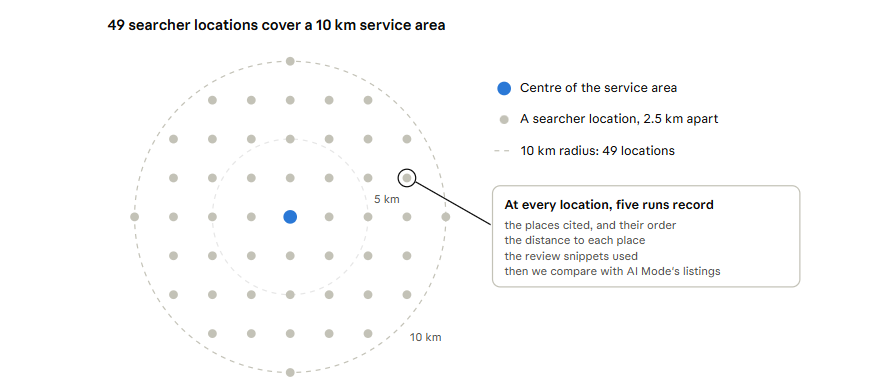
Figure 1. A location grid places search points across the service area. Testing the same prompt from each point shows where a business appears and where it is missing.
Step 2: Run the prompts and record the places
The following Python example extracts the places cited by Gemini from either API format.
def places(resp):
    """Return cited places in order, including review counts."""
    out = []

    if "candidates" in resp:  # generateContent
        gm = resp["candidates"][0].get("groundingMetadata", {})

        for chunk in gm.get("groundingChunks", []):
            place = chunk.get("maps")

            if place:
                reviews = (
                    place.get("placeAnswerSources", {})
                    .get("reviewSnippets", [])
                )

                out.append({
                    "name": place.get("title"),
                    "place_id": place.get("placeId"),
                    "review_count": len(reviews)
                })

    else:  # Interactions API
        for step in resp.get("steps", []):
            if step.get("type") != "model_output":
                continue

            for block in step.get("content", []):
                for ann in block.get("annotations", []):
                    if ann.get("type") == "place_citation":
                        out.append({
                            "name": ann.get("name"),
                            "place_id": ann.get("place_id"),
                            "review_count": len(
                                ann.get("review_snippets", [])
                            )
                        })

    # Remove repeated citations for the same place.
    unique = []
    seen = set()

    for place in out:
        place_id = place.get("place_id")

        if place_id and place_id not in seen:
            seen.add(place_id)
            unique.append(place)

    return unique
In the Interactions API, the same place can be cited in several parts of the answer. The example removes repeated citations using the Place ID before counting the business.
Keep the original response data as well, so you can still examine which parts of the answer each place supports.
Step 3: Measure each business
Once the places have been extracted, we record several measures.
| Measure | What it means |
|---|---|
| Presence | The percentage of all runs across all grid points in which the business appears. |
| Share of grid points | The percentage of locations where the business appears at least once. |
| Position | The average position of the business in the list of places returned. |
| Distance | The distance in kilometres between the searcher’s coordinates and the business. |
| Reviews used | The average number of review snippets returned for the business. |
| Rating and review count | The business’s Google rating and review total, recorded during the same week. |
| AI Mode listing | Whether Google AI Mode shows the business for the same prompt and period. |
We calculate the distance between the search point and the business using the Haversine formula.
This estimates the distance between two points on the Earth’s surface using their latitude and longitude.
[
d=2r\arcsin\sqrt{
\sin^2\left(\frac{\varphi_2-\varphi_1}{2}\right)
+\cos\varphi_1\cos\varphi_2
\sin^2\left(\frac{\lambda_2-\lambda_1}{2}\right)
}
]
Where:
- (d) is the distance in kilometres.
- (r) is the Earth’s mean radius, approximately 6,371 km.
- (\varphi) represents latitude.
- (\lambda) represents longitude.
This gives us a consistent way to compare businesses across different search locations.
The six research methods we’re using
We use six methods to examine the relationship between Maps grounding and Google AI Mode.
| Test | What we measure |
|---|---|
| Client one-time test | Run SESNHA’s local prompts from a grid around Basildon, with five runs per point. Compare the places Gemini returns with AI Mode’s listings during the same week. |
| Longitudinal test | Repeat the same tests across the grid every week for 12 weeks. Track each business’s presence at each point and compare it with AI Mode. |
| Bivariate test | Compare each business’s presence with its inclusion in AI Mode. Test distance, rating and review count separately against whether it is cited at each point. |
| Multivariate test | Consider distance, rating, review count and business category together. Also examine whether Gemini’s Google Search grounding cites the business’s website. Account for repeated observations of the same place. |
| A/B test | Improve Google Business Profiles at randomly selected test locations while leaving the control locations unchanged. Compare business presence and AI Mode listings before and after. |
| Before-and-after test | Compare business presence across the grid during the four weeks before and after a profile change, Google core update or Gemini model release. |
The multivariate test is particularly useful because local visibility is unlikely to depend on one factor alone.
A business may be close to the searcher but have an inaccurate category. Another may be further away but have a stronger profile and more reviews.
We want to understand how these factors work together rather than assume that one explains every result.
What local SEO, content and development teams should do now
Local SEO: keep Google Business Profiles complete
Check that every profile has the correct:
- Primary and secondary categories.
- Services.
- Business address and service areas.
- Opening hours.
- Photos.
- Contact details.
The category needs to describe what the business actually does. Incorrect categories can make it harder for Google to understand which searches are relevant.
Local SEO: keep business information consistent
Make sure your business name, address and telephone number match across your website, Google Business Profile and relevant directories.
In our SESNHA research, one care directory showed a different town and postcode from the client’s website. Differences like this can make it harder to identify the correct location and business information.
Reputation teams: encourage genuine reviews
Ask satisfied customers to leave honest feedback and respond to reviews professionally.
Don’t buy, write or manipulate reviews. Fake reviews are prohibited under UK consumer protection law, including the Digital Markets, Competition and Consumers Act 2024.
Multi-location businesses: keep each branch distinct
Give each branch its own accurate Google Business Profile and relevant location page.
Then use the location grid to check which branches appear at each point. This can help identify areas where one branch is being shown instead of another, or where several branches are competing for the same searches.
Development teams: follow Google’s Maps attribution rules
When displaying Maps-grounded answers in your own application, provide the required Google Maps attribution alongside the content it supports.
Use the place’s uri or googleMapsUri as the link and keep the words “Google Maps” unchanged.
6. What We’re Measuring in the Wider Study
The first SESNHA test showed that Google AI Mode listed five Maps results, but the client wasn’t included.
The next stage is to find out whether Gemini returns SESNHA through Maps grounding at different locations across its service area, and whether those results help explain AI Mode’s local listings.
We’ll report the following measures:
| Measure | What it tells us |
|---|---|
| Places per answer | The median and range of unique places returned in each answer. |
| Overlap with AI Mode | How closely the businesses Gemini returns match the listings in Google AI Mode, using average Jaccard similarity. |
| Presence and AI Mode inclusion | Whether businesses appearing more often in Gemini’s Maps results are also more likely to appear in AI Mode. |
| Distance and business inclusion | Whether businesses closer to a search point are more likely to appear. |
| Main factor in the combined model | Which factors provide the strongest explanation of business inclusion when distance, rating, review count and category are considered together. |
| Website citations and Maps results | Whether a business whose website appears in Google Search grounding is also more likely to appear as a place in Maps grounding. |
The wider study will help us understand whether Google Maps grounding provides a useful way to monitor local AI visibility and identify the factors associated with businesses appearing in AI answers.
7. Frequently Asked Questions
Does Google Maps grounding use my Google Business Profile?
Maps grounding uses Google Maps place information. This includes information associated with business listings.
Google doesn’t publish a complete explanation of which individual Business Profile fields influence the places returned for every query.
Our research looks at the relationship between business information, distance, ratings, reviews and whether a place appears in the answer.
Why should we test from a grid instead of one location?
Because local results change depending on where the person is searching.
One test from a single address tells you what someone might see in that location. A grid gives you a better picture of visibility across a wider service area.
Can we store Google Maps Place IDs and review IDs?
Google says Place IDs and review IDs can be cached, stored and exported.
This allows businesses to identify the same places and reviews across repeated tests, making it easier to monitor changes over time.
Can Gemini use Google Search and Google Maps together?
Yes. Google supports combined Search and Maps grounding on Gemini 3.5 Flash-Lite and later models.
This means one answer can use information from websites as well as Google Maps places.
How many API calls does a location grid need?
The calculation is:
[
\text{API calls}=\text{Grid points}\times\text{Prompts}\times\text{Runs}
]
For example, 49 locations, one prompt and five runs require 245 API calls.
Add more prompts or runs and the total increases accordingly.
Plan the grid and number of tests before running the experiment so you can estimate the cost.
8. The Toolkit: Maps Grounding Extractor
We’ve built a Python script to help plan location grids and analyse the places returned by Gemini.
The Maps Grounding Extractor has two main commands.
The grid command
The grid command creates a set of search points around a central location.
It also prepares request bodies for both the generateContent and Interactions APIs, together with a manifest showing where each response should be saved.
This makes it easier to run the same prompt from several locations without preparing every request manually.
The places command
The places command reads the saved responses and measures how often each business appears.
It records:
- How often each place is returned.
- The percentage of grid points where it appears.
- Its average position.
- Its distance from the searcher.
- The number of review snippets used.
- Its Google rating and review count.
- Whether it appears in Google AI Mode.
The output can then be used for further analysis.
Running the script
Use these commands in your terminal:
python3 maps_grounding_extractor.py grid --lat 51.5761 --lng 0.4887 --radius-km 10 --step-km 2.5 --prompt "home care services near me"

python3 maps_grounding_extractor.py places responses/ --manifest manifest.csv --places-info places.csv --ai-mode ai_mode_local.csv --name "Your Business"

python3 grounding_experiment_stats.py multivariate maps_points.csv --outcome cited_any --factors distance_km,rating,reviews --cluster place
Replace the coordinates, prompt and business name with the details for your own research.
The final command runs a multivariate analysis to examine how distance, ratings and review counts relate to whether a business appears in the results.
9. What We’re Watching Next
The next stage of the research is to find out whether the places Gemini returns through Google Maps grounding are also the businesses Google AI Mode shows.
There are five areas we’re particularly interested in.
Do Gemini’s Maps results match AI Mode’s local listings?
We’ll compare the businesses returned across the location grid with those shown in AI Mode.
This will help us understand whether Maps grounding provides a useful indication of local AI visibility.
How does Gemini combine Search and Maps?
Google supports combined grounding on Gemini 3.5 Flash-Lite and later models.
We’ll investigate how a local answer uses website information and Google Maps listings together, and whether the result resembles what Google AI Mode shows.
Which customer reviews appear in AI answers?
We’ll examine the review snippets Gemini uses and whether certain types of reviews appear more often.
For example, we’ll look at whether recent and detailed reviews are more likely to be included. This is something to test rather than assume.
What happens to the Maps widget?
Google Cloud’s documentation marks the Maps widget context token as deprecated.
We’ll monitor any changes to the way applications display Maps-grounded answers and places.
Can SESNHA appear in Gemini’s Maps results?
The final question is whether SESNHA, which was missing from Google AI Mode’s local listings, appears in Gemini’s Maps-grounded answers at any point across its service area.
We’ll compare its presence at different grid locations with the business listings shown by AI Mode.
The Inside the Grounded Answer research series
This seven-part series examines different parts of a grounded Gemini response:
- The final answer: What Gemini tells users and which brands it names.
- Search queries: What Gemini searched for.
- Sources: Which websites Gemini cites.
- Supported sections: Which parts of the answer are linked to a source.
- Search suggestions: The Google searches shown with the answer.
- Google Maps sources: Which places Gemini finds and cites. This article.
- Thinking summaries: What the model’s planning summary tells us about its approach.
Together, these experiments will help us understand how Gemini finds websites and local businesses, which information it uses and how closely its results match what customers see in Google AI Mode.
10. About Szymaniak Digital
Szymaniak Digital is an Enterprise AI SEO Consultancy led by Konrad Szymaniak.
We help local and multi-location businesses understand where they appear in AI-generated answers and which websites, business profiles and listings influence those results.
Our work combines local SEO, Google Business Profile optimisation, AI search research and performance measurement. We use the findings to help businesses improve their visibility across the locations they serve.
The Grounding Lab in SD SEO Suite helps teams investigate how Gemini uses Google Search and Google Maps information. Our wider AI search research looks at how those results compare with Google AI Mode and other AI platforms.
