
My website is starting to recover after being affected by Google’s September 2026 spam update. The interesting part? I haven’t changed a single page.
Since reaching its lowest point in late October, the site has more than doubled its daily clicks. Daily impressions have also increased by around 65%, and average position has started to improve.
It’s encouraging, but I wouldn’t call it a full recovery just yet.
In early September 2026, I published around 3,000 AI-assisted pages on a test website in the space of a week. The pages included detailed explanations, short paragraphs and useful images. I wanted to see what would happen when a large amount of AI-assisted content was published with the intention of helping readers.
The site initially gained visibility for around five weeks. Then traffic fell sharply during and after Google’s September 2026 spam update, which ran from 24 September to 8 October.
In the first part of this experiment, I looked at the traffic drop. In Part 2, I decided to leave the website alone and see whether its visibility could recover without rewriting or removing any pages.
The recovery has continued, so I’m sharing the latest data, what I think it tells us and what businesses should consider when cleaning up a website affected by a spam update.
1. What Has Happened to the Website?
The recovery I first spotted in October has continued through November.
The latest Google Search Console data shows that daily clicks have increased from around 2.3 at the lowest point to approximately five. Daily impressions have risen from around 340 to 560.
That is a considerable improvement, but the website is still well below its performance before the spam update.
What Google Search Console shows
The six-month Performance report, covering the period to mid-November, currently shows:
| Metric | Latest six-month report |
|---|---|
| Clicks | 987 |
| Impressions | 65,400 |
| Average CTR | 1.5% |
| Average position | 11.6 |
In Part 2, the reported six-month totals were 916 clicks and 58,600 impressions. The latest figures are therefore 71 clicks and approximately 6,800 impressions higher than the figures I previously reported.
The rolling six-month report is useful for monitoring the overall trend, but the weekly figures make the recent recovery much easier to see.
How performance has changed
The following figures are approximate. I read them from the Search Console chart and scaled them to match the report’s totals, so they should be treated as estimates rather than exact daily averages.
| Period | Average clicks per day | Average impressions per day | Clicks compared with pre-update baseline |
|---|---|---|---|
| Baseline: 17–23 September | 28 | 1,750 | 100% |
| Lowest point: 25–31 October | 2.3 | 340 | 8% |
| 1–7 November | 4.4 | 360 | 16% |
| 8–14 November | 5.0 | 500 | 18% |
| Latest seven days: 10–16 November | 5.0 | 560 | 18% |
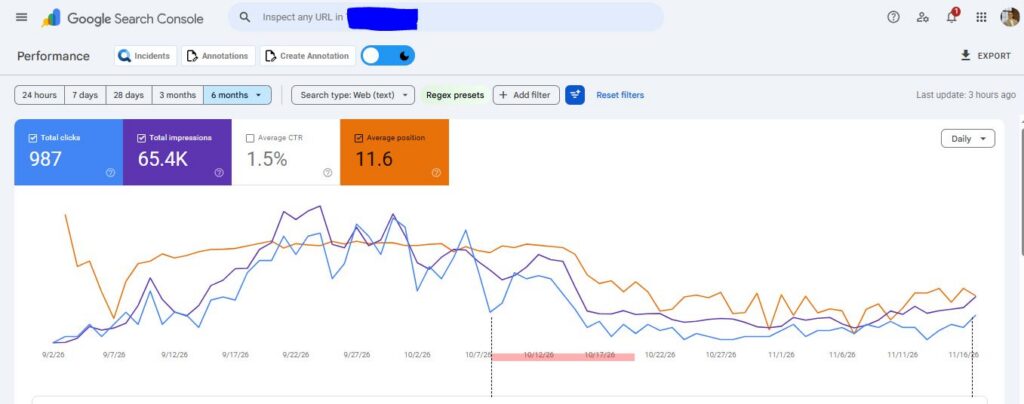
There have now been two weeks of growth in a row.
Compared with the lowest point:
- Daily clicks have increased by approximately 120%.
- Daily impressions have increased by approximately 65%.
- Average position has been improving since early November.
That’s a positive change, particularly because I haven’t made any changes to the website.
Has the website recovered?
Not yet. I set recovery thresholds in Part 2 so that I wouldn’t change my definition of recovery just because the numbers started improving.
The working definitions are:
| Recovery stage | Requirement |
|---|---|
| Partial recovery | Clicks reach at least 40% of the pre-update baseline for four consecutive weeks. |
| Recovered | Clicks reach at least 80% of the pre-update baseline for four consecutive weeks. |
The website is currently receiving around 18% of its pre-update daily clicks.
That means it is showing signs of recovery, but it hasn’t reached either threshold.
I want to see sustained improvement over several weeks before calling this a recovery.
The November core update is another factor
Google started its November 2026 core update on 10 November.
The timing makes this experiment more interesting, but it also makes it harder to identify exactly what is driving the improvement.
Clicks had already started increasing during the first week of November, before the core update began. The largest increase in impressions came during the week the update started.
The core update could be contributing to the latest improvement, but I can’t separate its effect from the changes Google’s spam systems may be making.
I’ll continue monitoring the website as the core update rolls out.
What is scaled content abuse?
Scaled content abuse is one of Google’s spam policies. It covers publishing large numbers of pages mainly to manipulate search rankings rather than provide useful information to readers.
The policy applies whether content is written by AI, by people or through a combination of both.
Using AI isn’t, by itself, what makes a page spam. The important question is whether the page provides genuine value.
For example, imagine creating 500 local service pages using the same template, changing only the town name and a few sentences. If those pages don’t contain useful information specific to each location, they may fall within Google’s scaled content abuse policy.
The same issue can affect product pages, comparison articles, guides and other types of content.
Google can take action in two ways:
Algorithmic action
Google’s automated systems can reduce a website’s visibility without issuing a manual action in Search Console.
This appears to be what happened to my test website. There is no reconsideration form to submit. You need to improve the website and allow Google’s systems to reassess it.
Google has said that recovery from spam-related ranking changes can take months.
Manual action
A Google reviewer can issue a manual action when a website violates its spam policies.
You’ll see this in Search Console under Security and Manual Actions. Once you’ve fixed the affected pages and the wider issues, you’ll need to submit a reconsideration request.
The distinction matters because the recovery process is different.
2. Why Does This Recovery Matter?
The latest results support one of the main questions behind this experiment: can pages regain search visibility without being rewritten or removed?
So far, the test website is showing that this is possible. It lost visibility after the spam update, reached a low point and then started to recover while the content remained unchanged.
However, there are still other possible explanations, and I don’t want to draw conclusions too early.
What the recovery suggests
Google’s guidance on spam updates explains that websites which comply with its policies may see improvements as its automated systems reassess them over time.
My test website is showing a pattern that is consistent with that guidance.
The September spam update finished on 8 October. The website reached its lowest point around 25–31 October, then started to improve.
If the automated systems are reassessing the pages, it suggests that publishing AI-assisted content doesn’t automatically mean those pages can never regain visibility.
The more important question is whether the pages provide something useful.
If Google’s systems were judging the website only by the fact that it published around 3,000 AI-assisted pages in a week, I wouldn’t expect to see this improvement without making any changes.
That said, the experiment doesn’t prove exactly what Google’s systems are doing. There are other possible explanations.
What we still cannot prove
There are three main factors I need to consider.
1. The November core update
The improvement started before the core update, so the core update didn’t initiate the recovery.
However, it may be contributing to the latest gains. Until the rollout finishes and I have more data, I can’t separate the two.
2. The website is still relatively new
New websites can experience changes in visibility as Google discovers, evaluates and ranks their content.
Some of the movement could be part of that process rather than a direct response to the spam update.
3. The website has a small number of clicks
Five clicks a day is still a relatively small number.
One good day or week can make a large difference to the percentage change. That’s why I set the four-week recovery thresholds in advance.
I want to see consistent improvements rather than report a recovery based on a short period of growth.
What this means for businesses recovering from a spam update
The biggest lesson is that recovery can take a long time.
My website is now showing improvement, but it is still receiving only around 18% of its pre-update clicks.
For a business website, that could mean several months of lost traffic and enquiries, even after the necessary changes have been made.
I would plan for recovery in months rather than weeks. Some websites may never return to their previous positions because the search results and competitors around them have changed.
There is another important lesson: Google needs to be able to see the cleanup.
A discussion on Google’s Search Central Help community in October 2026 highlighted a problem with a European tourism website.
The business had ranked in positions one and two for around ten years. Between December 2025 and March 2026, it removed approximately 5,900 weak blog articles.
However, its rankings remained low.
A Product Expert who reviewed the timeline noticed that the deleted pages had been redirected to the homepage until October 2026.
This may have been a major part of the problem. Google often treats a redirect from a removed page to an unrelated homepage as a soft 404. In other words, the page may be treated as if it has been removed, even though the server returns a redirect.
From Google’s perspective, the cleanup may only have been correctly implemented a few weeks earlier, not when the articles were originally deleted.
The business had made the content changes, but its website wasn’t sending Google the right signals about what had happened to those URLs.
That’s a development issue, not a content decision.
New pages can provide an early sign of improvement
The same discussion included another interesting observation.
The business had started publishing new articles that were carefully reviewed, and some were earning impressions and clicks within weeks. Older commercial pages were still struggling.
The Product Expert suggested that when a strong sitewide signal is holding a website back, new pages will often struggle as well.
It’s only one example, but it is worth monitoring. New pages earning impressions and clicks can be an encouraging early sign, even when the wider website hasn’t recovered.
The cost of publishing at scale
The cost of scaled content isn’t just the time spent writing thousands of pages.
In Part 1, I showed that even at its peak, the test website’s 3,000 pages were generating fewer than one impression per page per day on average.
The bigger cost is the potential loss of visibility across the pages that actually bring in customers and revenue.
You also need to consider the time and development work involved in reviewing, improving, merging or removing thousands of URLs.
Publishing more content isn’t necessarily cheaper when you have to spend months cleaning it up afterwards.
The main risks for businesses
| Risk | What it looks like | Who should manage it |
|---|---|---|
| Slow recovery | Traffic remains well below previous levels for months, even after cleanup. | Marketing leadership |
| Google can’t see the cleanup | Removed pages still redirect to the homepage, remain in sitemaps or are blocked from being crawled. | Development |
| Recovery is attributed to the wrong cause | A core update or seasonal change is credited to the cleanup, or vice versa. | SEO |
| Decisions are based on too little data | One good week is reported as a full recovery. | SEO and marketing |
| AI search visibility is also affected | Pages disappear from AI Overviews and AI Mode sources and may take longer to return. | SEO and content |
3. Which Businesses Are Affected?
Any website that has published pages faster than it could make each one genuinely useful is potentially at risk.
This isn’t limited to websites using AI. The same issues can arise from large-scale templates, programmatic SEO, product feeds and manually produced pages.
The problem often becomes more obvious when a business tries to clean up its website after a spam update.
Different industries have different types of scaled content and different technical problems to consider.
| Industry | Common examples of scaled content | Common cleanup problems |
|---|---|---|
| Ecommerce | AI-written product descriptions, filter pages and category pages with very little unique information. | Discontinued products and filter URLs redirected to the homepage or a broad category instead of a relevant replacement or a proper 404/410 response. |
| Travel and local businesses | One page for every town, resort or postcode. | Removed location pages remain in sitemaps, footer links or translation plugin outputs. |
| Finance and professional services | Large numbers of similar guides based on products, terms or locations. | Unsupported statistics and invented author details remain on pages that are kept. |
| Healthcare | Treatment-by-location pages and large numbers of symptom explainers. | Pages remain live without clinical review, or noindex pages are blocked in robots.txt so Google cannot see the instruction. |
| SaaS and B2B | Integration pages, “alternatives to” pages and glossary content. | Redirect chains, or canonical tags pointing to pages that no longer exist. |
| Publishers and affiliates | Large numbers of buying guides, “best of” lists and articles that repeat information from other websites. | Deleting too much content instead of keeping pages that still attract useful traffic. |
Three teams need to work together
In my experience, a content cleanup can stall when one team finishes its part and assumes the rest is complete.
You need three core teams working together.
Content decides which pages are worth keeping and makes sure they provide useful, accurate information.
Development makes sure the server, redirects, sitemaps, internal links and templates reflect the agreed plan.
Marketing leadership sets realistic expectations, funds the review work and stops further scaled publishing while the website is being cleaned up.
If any of these areas is missed, Google may continue to see a different website from the one your team thinks it has created.
4. How Should Businesses Recover After a Spam Update?
I’m deliberately leaving my test website unchanged because that’s the experiment.
A business website shouldn’t necessarily do the same. If you’ve lost visibility after publishing content at scale, I would recommend reviewing the website, deciding what to keep and carrying out a proper cleanup.
The important thing is to fix the content and the technical implementation together, then check that Google can see the changes.
Here is the order I would follow.
Step 1: Confirm what caused the problem
Owner: SEO team · Day 1
Start in Google Search Console.
Open Security and Manual Actions → Manual actions.
Check whether Google has issued a manual action.
- If there is a manual action: you will need to fix the affected pages and submit a reconsideration request.
- If there isn’t one: you aren’t dealing with a manual action. Investigate algorithmic changes, confirmed Google updates and other possible causes of the traffic drop.
Next, compare the date of the decline with Google’s confirmed updates.
For this experiment, the two dates to consider are:
- September 2026 spam update: 24 September to 8 October.
- November 2026 core update: started on 10 November.
Don’t just look at the website’s total traffic. Break the data down by URL folder and page type.
For example, did product pages lose visibility, or was the biggest decline in blog articles and location pages?
This helps you understand which parts of the website need attention.
Step 2: Stop the process that created the problem
Owner: SEO and content teams · Week 1
Before deleting or rewriting pages, find out how they were created.
Was it a page template, an AI prompt, a product feed, a spreadsheet or an automated publishing process?
You need to stop the source of the problem before starting the cleanup.
Otherwise, you could spend weeks removing pages while the same system continues publishing new ones.
Pause scaled publishing until you’ve reviewed the process and agreed on a better way to produce and check content.
Step 3: Decide what should happen to every URL
Owner: SEO and content teams · Week 1
This is where I would spend a lot of time before asking developers to make changes.
Every URL needs a clear decision.
I use two simple tests to help decide whether a page is worth keeping.
The swap test
Change the product name, town or keyword in the page.
Would the rest of the page still make sense?
If nothing else needs to change, the page may simply be a copy of another page with a different keyword or location inserted.
The uniqueness test
Does the page contain information, experience or an insight that isn’t available on the other pages in the same group?
More importantly, would a reader find that information useful?
If a page doesn’t pass either test, it needs a closer review.
Once you’ve assessed the content, give every URL one of five decisions.
| Decision | When to use it | What the server should return | Sitemap | Internal links |
|---|---|---|---|---|
| Keep | The page attracts traffic and its information is accurate and useful. | 200, self-referencing canonical and indexable. | Keep it listed. | Keep links pointing to it. |
| Improve | The page has potential or existing demand but needs more useful information. | 200 while improvements are made. | Keep it listed if it remains indexable. | Keep links pointing to it. |
| Merge | The page overlaps with a stronger, more useful page. | One permanent 301 or 308 redirect to the closest relevant page. | Remove the old URL and retain the target. | Update links to point directly to the target. |
| Remove | The page has no demand, no useful content and no suitable replacement. | 410 or 404. | Remove it. | Remove links to it. |
| Noindex | People still need the page, but it shouldn’t appear in search. | 200 with a noindex meta tag or HTTP header. Don’t block it in robots.txt. | Remove it. | Keep links only where visitors need them. |
The key is to make the decision before the development work begins.
Don’t ask developers to redirect a list of URLs without explaining which ones should be kept, merged or removed.
Step 4: Improve the pages you’re keeping
Owner: Content team · Weeks 2–6
Once you’ve decided which pages are worth keeping, make sure they provide information that readers can’t easily find elsewhere.
I would focus on:
- Original information: your own research, figures, data and experience.
- Accurate prices: include the price and the date it was checked where relevant.
- Real examples: genuine case studies and examples from your business.
- Complete specifications: particularly important for product and ecommerce pages.
- Useful local information: details based on real work carried out in the areas you serve.
- Expert review: use a named, real reviewer with the relevant experience.
- Verified claims: check every statistic, quotation and factual statement.
- Accurate author details: remove author credentials or first-person experiences that aren’t true.
You should also remove unnecessary wording.
A 1,200-word article that answers a question properly is more useful than a 2,500-word article that repeats the same points.
The same applies to images. Use images that explain a product, process or example rather than adding generic stock photography to make a page look complete.
The aim is not to make every page longer. It’s to make the pages you keep worth keeping.
Step 5: Carry out the technical cleanup across the whole website
Owner: Development team · Weeks 2–4
This is one of the most important stages.
A business might delete thousands of pages, but if the server redirects them all to the homepage, Google may not recognise that the content has actually been removed.
I would ask your development team to check the following.
Removed pages must return a proper 404 or 410
If a page has been permanently removed and there isn’t a genuinely relevant replacement, return a 404 or 410 status code.
Don’t redirect every removed page to the homepage.
Google can treat an unrelated homepage redirect as a soft 404. This means the URL may still be treated as a missing page, even though the server returns a successful redirect.
Also check for catch-all rules in your server configuration, CMS or plugins that send every missing URL to the homepage.
Merged pages need one direct permanent redirect
When you merge two pages, redirect the old URL directly to the closest relevant replacement.
Use a 301 or 308 permanent redirect, rather than a temporary 302.
Avoid redirect chains.
For example:
/guides/old-page/ → /guides/new-page/
Don’t send the old URL through several other redirects before it reaches the final page.
If there’s no suitable replacement, remove the old page instead.
Noindexed pages must remain crawlable
If a page needs a noindex tag, Google must be able to crawl it to see that instruction.
Don’t block noindexed URLs in robots.txt.
Otherwise, Google can’t read the tag and may continue treating the URL as indexed.
Keep your XML sitemaps clean
Your sitemaps should contain only URLs you want Google to index.
Check that every listed URL:
- Returns a 200 status code.
- Is indexable.
- Uses the correct canonical URL.
- Has an accurate
lastmoddate where one is provided.
Remove URLs that have been deleted, merged or noindexed.
Regenerate your sitemaps after each batch of changes.
Update internal links
A removed page shouldn’t still be linked from your menus, footers, related article sections or other content.
For merged pages, update internal links so they point directly to the replacement URL rather than relying on redirects.
This helps both visitors and search engines reach the correct page.
Check for duplicates created by plugins and parameters
Not all duplicate pages are created deliberately.
Translation plugins, faceted navigation and URL parameters can create thousands of additional URLs.
Review:
- Canonical tags.
- Hreflang implementation.
- Language versions.
- Filter and sorting URLs.
- Plugin-generated pages.
- Duplicate templates.
Disable languages you don’t serve and correct any technical issues that are creating unnecessary URL variations.
Make quality checks part of your CMS
Don’t rely on someone remembering to review every page after it has been published.
Where possible, add fields to your CMS to record:
- Which publishing batch the page belongs to.
- Whether AI was used to help create it.
- Who checked the facts.
- When the facts were checked.
- Who reviewed the content.
- Whether the page should be indexed.
For sites using a strict publishing approval process, a page without a completed review record should remain unpublished or noindexed and excluded from the sitemap until it has been approved.
Example server rules for removing and merging pages
Your developers can use server-level rules to return the correct status.
A permanent removal can use:
Redirect gone /guides/old-page/A merge can use:
Redirect 301 /guides/old-page/ /guides/new-page/For Nginx, a permanent removal can use:
location = /guides/old-page/ {
    return 410;
}
A merge can use:
location = /guides/old-page/ {
    return 301 /guides/new-page/;
}
These are alternative rules for the same URL. Use the removal rule when the page has no replacement, or the redirect rule when there is a relevant replacement. Don’t apply both to the same URL.
Test server rules on a staging environment before making them live.
Step 6: Check that the cleanup has actually worked
Owner: SEO and development teams · End of week 4
Don’t assume that the website is behaving as expected just because the changes have been made.
Check the actual server responses.
For example:
- Do deleted pages return 404 or 410?
- Do merged pages have one direct permanent redirect?
- Do noindexed pages contain the noindex instruction and remain crawlable?
- Do kept pages return 200 and have a self-referencing canonical?
- Are there any redirects to the homepage?
- Are there any 302 redirects or chains?
- Do all redirect targets exist and load correctly?
You can use the cleanup verification script described later in this article to check the URLs against your plan.
After that, use Google’s URL Inspection tool to check important pages and see whether Google can access them.
As Google recrawls removed URLs, you should start to see the relevant 404 and 410 information reflected in the Page indexing report.
Step 7: Help Google find the changes
Owner: SEO team · Weeks 4–8
Once the cleanup has been verified:
- Submit your updated XML sitemaps in Search Console.
- Use URL Inspection to request indexing for your most important fixed pages.
- Spread indexing requests out rather than trying to submit every URL at once.
- Check that the pages are accessible and that the correct canonical and indexing instructions are in place.
Don’t use Google’s Indexing API for ordinary articles, product pages or standard website content. It is intended for supported content types such as job postings and livestreams.
Requesting indexing doesn’t guarantee that Google will index a page or improve its rankings. It simply gives Google another way to discover an important URL.
Step 8: Measure recovery properly
Owner: SEO and marketing · Weekly from week 4
Compare performance with the week before the traffic drop, not just with the previous day.
For this experiment, the baseline is 17–23 September 2026.
Record every significant change you make, including:
- Pages removed.
- Pages merged.
- Redirects added.
- Content improvements.
- Sitemap changes.
- Internal link changes.
- Template and plugin changes.
This gives you a timeline to compare with changes in search performance.
The signs I would look for include:
Several important searches improving together. One query moving up isn’t enough. Look for improvements across multiple commercially important searches.
New and reviewed pages earning impressions. Carefully reviewed pages starting to attract impressions and clicks within a few weeks can be an encouraging sign.
Non-branded impressions increasing. Check whether the page types you’ve improved are attracting more searches from people who aren’t already looking for your brand.
The number of removed URLs being processed by Google. The Page indexing report may initially show more 404 pages as Google recrawls deleted URLs. That number should eventually fall as the URLs are processed.
Pages appearing in AI search results again. Monitor whether your content starts appearing as a source in AI Overviews and AI Mode. Changes in AI search visibility may not happen at the same time as traditional organic recovery.
Step 9: Submit a reconsideration request only if you have a manual action
If Google has issued a manual action, complete the cleanup across the affected website before requesting another review.
Don’t fix only the example URLs shown in Search Console. Review every page affected by the same problem.
In the reconsideration request, explain:
- What caused the issue.
- Which changes you made.
- How you reviewed the affected pages.
- How you’ve changed your publishing process to prevent the same problem happening again.
You only need to submit the request once the work is complete and you can explain what you’ve done.
If there is no manual action, there is no reconsideration request to submit. You need to wait for Google’s automated systems to reassess the website.
Who should do what?
| Team | Responsibilities | The work is complete when… |
|---|---|---|
| SEO | Check for manual actions, compare the traffic drop with Google updates, create the URL-by-URL plan, verify changes and report weekly. | Every URL has a decision and an owner, and the verification checks show no outstanding issues. |
| Content | Review pages using the swap and uniqueness tests, improve the pages being kept, check facts and author details, and prepare new content briefs. | Kept pages contain no unsupported statistics, unverified quotations or false author information. |
| Development | Implement 404/410 responses and permanent redirects, fix canonicals and hreflang, remove duplicate URLs, update sitemaps and internal links, and add CMS review fields. | Every URL returns the correct response and sitemaps contain only suitable pages. |
| Marketing leadership | Pause scaled publishing, adjust forecasts, fund proper content review and agree a sensible publishing schedule. | Recovery is measured against the original baseline and new templates aren’t launched without quality checks. |
How long should a recovery take?
I would approach recovery in stages rather than expect everything to improve immediately.
| Period | What should happen |
|---|---|
| Week 1 | Pause scaled publishing, investigate the cause and agree the URL-by-URL plan. |
| Weeks 2–4 | Improve the pages being kept and implement removals, redirects, sitemap changes and internal link updates. |
| End of week 4 | Check that the changes work, submit the updated sitemaps and request indexing for important pages. |
| Weeks 4–12 | Google continues to recrawl the website. New and improved pages may provide the first signs of progress. |
| Months 3–6 and beyond | Wider recovery may become visible, depending on the website and how Google’s systems reassess it. |
My test website started improving around three weeks after its lowest point. However, it is still receiving only around 18% of its pre-update clicks.
Use that as an example of how recovery can develop, not as a timetable that every business should expect to follow.
5. The Toolkit: Cleanup Verifier
One of the biggest problems with a website cleanup is the difference between what the team planned to change and what the website actually does.
A developer might confirm that 5,000 pages have been removed, but that doesn’t tell you whether those pages return 404 or 410, whether redirects go to the right place or whether deleted URLs are still included in the sitemap.
That’s why I’ve built a Python script called cleanup_verifier.py.
It checks the live website against your cleanup plan and works with the output from the first experiment’s URL triage script.
It runs on Python 3 and doesn’t require additional packages.
The check command
The check command visits every URL in your plan without automatically following redirects.
It checks that:
- Removed pages return 404 or 410.
- Merged pages use one permanent redirect to the planned destination.
- Noindexed pages contain a noindex instruction and aren’t blocked by robots.txt.
- Kept pages return 200, can be indexed and use a self-referencing canonical.
It also flags problems such as redirects to the homepage, temporary 302 redirects, redirect chains and broken destinations.
The sitemap command
The sitemap command checks your XML sitemaps.
It supports sitemap indexes and compressed .gz files.
It identifies:
- Removed pages that are still listed.
- Merged pages that are still listed.
- Noindexed pages that remain in the sitemap.
- Kept pages that are missing from the sitemap.
The links command
The links command scans the pages you’re keeping.
It identifies internal links that still point to pages you’ve removed, merged or noindexed, so your team can update them.
Running the script
Use these commands in your terminal:
python3 cleanup_verifier.py check plan.csv

python3 cleanup_verifier.py sitemap plan.csv https://www.example.co.uk/sitemap_index.xml

python3 cleanup_verifier.py links plan.csv
I recommend running the script once the main cleanup is complete and again after significant website releases.
This gives you a way to check that the technical implementation still matches the plan, rather than relying on a one-off confirmation from the development team.
6. What I’m Watching Next
The test website is recovering, but there are still several questions I want to answer before drawing any conclusions.
Will the recovery continue after the November core update?
The November 2026 core update is still rolling out.
If clicks continue to rise after it finishes, that will provide stronger evidence that the website’s visibility is being reassessed.
If performance falls again, the core update may have contributed more to the recent gains than I initially thought.
I’ll continue recording the data rather than trying to attribute every movement to one update.
Will the site reach the partial recovery threshold?
I’ll keep running the recovery checks each week using the definitions established in Part 2.
The next milestone is four consecutive weeks at 40% or more of the pre-update click baseline.
At the moment, the site is at around 18%.
I’ll report the result whether it reaches the threshold or not.
Which pages recover first?
I want to understand whether the more useful page types recover before the thinner ones.
If that happens, it may suggest that Google is reassessing different sections of the website rather than applying one simple sitewide switch.
I’ll compare performance by URL folder each month.
What happens when I start improving the content?
The current phase of the experiment is deliberately leaving the website unchanged.
Once that phase ends, I’ll split the pages into matched groups.
I’ll update one group with new examples, data and images, while leaving the other group unchanged.
Comparing their performance before and after the changes should help separate the effect of improving the content from other changes happening in Google at the same time.
Will the pages return to AI search results?
I’ll also monitor whether the test pages start appearing again as sources in Google AI Overviews and AI Mode.
It’s possible that improvements in traditional organic visibility and AI search visibility won’t happen at the same time.
I want to understand whether there is a delay between the two.
What happens after the next spam update?
There have been several Google spam and ranking updates during 2026.
If another spam update arrives, I’ll be checking whether the same pages lose visibility again or whether the website is in a stronger position to withstand it.
7. About Szymaniak Digital
Szymaniak Digital is a UK Enterprise SEO and AI Search Consultancy led by Konrad Szymaniak.
I run experiments on my own websites to understand how Google’s systems respond to different types of content, technical changes and SEO strategies. I use those findings to inform the advice I give clients, rather than relying on assumptions about how search works.
We also help businesses review websites affected by large-scale publishing, technical SEO issues and Google updates.
Our work includes identifying which page types have lost visibility, creating a clear plan for every affected URL and working with content and development teams to make sure the cleanup is implemented correctly.
SD SEO Suite includes website auditing tools to help identify thin and duplicated page templates, alongside AI visibility tracking to monitor whether your website appears in AI-generated answers.
If your website has lost visibility after publishing content at scale, the first step is to understand what happened and which parts of the website were affected. From there, we can plan and verify the work needed to put things right.
Konrad Szymaniak
Enterprise AI SEO Consultant
