

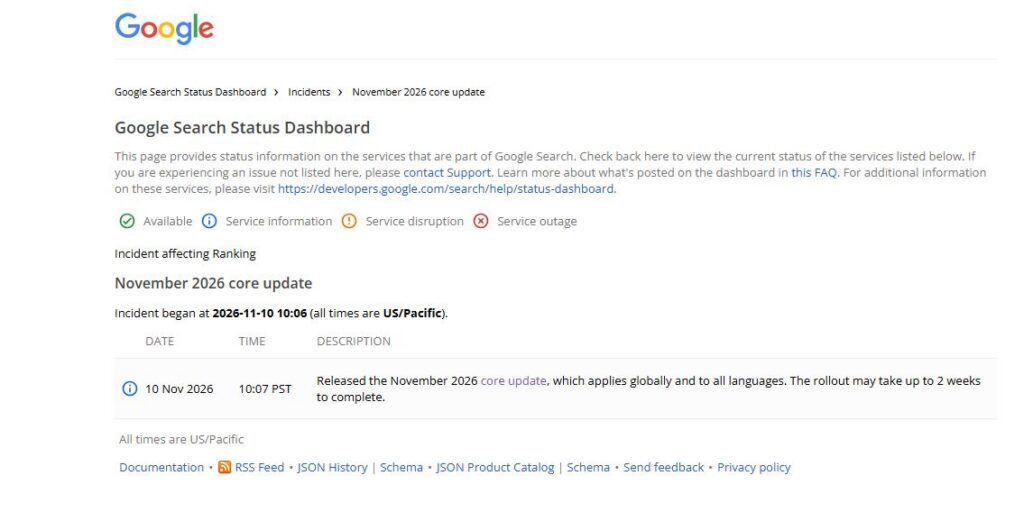
Google’s November 2026 core update started rolling out on 10 November and could take up to two weeks to complete.
At the time of writing, on 12 November, the rollout is still underway. That means it’s too early to make firm conclusions about which websites have been affected or what has changed.
However, businesses can use this time to prepare.
Google’s advice following a core update is relatively straightforward. If your website sees a small drop in rankings, don’t rush to make changes. If it experiences a large and sustained decline, take a closer look at the website as a whole.
The problem is that Google doesn’t provide a detailed process for carrying out that assessment.
It asks website owners to consider whether their content is helpful, reliable and written for people, but leaves it to individual teams to decide how to review their pages and identify problems.
I’ve put together a practical process that marketing, SEO, content and development teams can follow. It covers how to check whether a drop is significant, rule out other causes, review affected pages against Google’s guidance and decide what needs to change across the website.
The November 2026 Core Update: Current Status
Status at 12 November 2026
| Update detail | Current information |
|---|---|
| Rollout started | 10 November 2026 at 10:06 Pacific |
| Scope | Global, all languages |
| Expected duration | Up to two weeks |
| Rollout completed? | No |
| Latest possible completion date | 24 November 2026 |
| Earliest date for a reliable assessment if the rollout takes the full two weeks | Around 1 December 2026 |
| Baseline period for comparison | 3 to 9 November 2026 |
The important point: Don’t judge your website’s performance while the update is still rolling out. If it takes the full two weeks, wait until the rollout finishes and then allow another full week before making a proper comparison.
Google’s guidance also makes an important distinction between two types of ranking changes:
- Small drop: For example, a page moves from position 2 to position 4. Google advises against making drastic changes to content that is already performing well.
- Large drop: For example, a page moves from position 4 to position 29. Google recommends carrying out a deeper assessment.
This article explains how to do that assessment properly.
1. What Happened?
Google released the November 2026 core update on 10 November. According to the Search Status Dashboard, the rollout applies globally and to all languages and may take up to two weeks.
It’s the third core update of 2026, following the March update, which ran from 27 March to 8 April, and the May update, which ran from 21 May to 2 June.
Search Engine Journal counted it as the eighth ranking update listed on Google’s dashboard during 2026. PPC Land reported that 173 days had passed since the May core update, making this the longest gap between the named core updates this year.
What Has Google Said About the Update?
Google hasn’t provided much detail about what has changed.
Its LinkedIn announcement described the update as:
“A regular update designed to better surface relevant, satisfying content for searchers from all types of sites.”
There has been no detailed Search Central blog post explaining the changes or setting out a specific objective for the update.
Google’s core updates documentation also still shows a last-updated date of 10 December 2025. This means the official advice on how to respond remains the same guidance that applied to previous core updates.
Google’s Advice: Small Drop or Large Drop?
Google’s guidance is based on how significant the ranking change is.
Small drops in position
Google gives the example of a page moving from position 2 to position 4.
Its advice is not to make drastic changes. A small movement doesn’t necessarily mean the content needs improving, particularly when the page is still performing well.
Large drops in position
Google gives the example of a page moving from position 4 to position 29.
In this situation, Google recommends carrying out a deeper assessment.
This is where SEO teams need to do more work.
Google doesn’t provide a step-by-step assessment process. Instead, it asks website owners to consider whether their website as a whole provides helpful, reliable and people-first content.
The rest of this article explains how to turn that advice into a practical review.
2. Why Does It Matter?
A core update can affect more than the individual pages that lose rankings.
Google’s guidance specifically asks website owners to consider whether the website as a whole is providing useful content, rather than focusing only on the pages that have dropped.
That changes how SEO teams should investigate a loss of visibility.
The Assessment Needs to Cover the Whole Website
Google’s guidance refers to a sustained, large drop in position across a website.
It asks whether the website overall, rather than just individual pages, is delivering helpful, reliable and people-first content.
Its debugging advice makes the same point: assess the whole website, not just the pages that have lost traffic.
This is important because many SEO teams instinctively focus on the ten or twenty URLs that have lost the most clicks.
Those pages are useful starting points, but they may not explain the wider problem.
For example, a website might have:
- Hundreds of product pages with very little original information.
- Location pages that repeat the same content with different town names.
- Articles written without input from people who understand the subject.
- Comparison pages that summarise competitors without adding anything useful.
- Author profiles that don’t explain the experience of the people responsible for the content.
Looking at the pages individually may not reveal the wider pattern.
If the same problems appear across a template, content section or group of authors, the business needs to address the underlying issue.
Google’s Helpful Content Guidance Was Updated More Recently
There is another reason to review Google’s guidance before carrying out an assessment.
The core updates page was last updated in December 2025, but the page covering helpful, reliable and people-first content shows a last-updated date of 5 October 2026.
That was five weeks before the November core update.
We cannot confirm exactly what changed on 5 October. However, the current version contains several areas that SEO and content teams should review.
It includes 38 self-assessment questions across six groups:
| Group | Number of questions | What it covers |
|---|---|---|
| Content and quality | 12 | The usefulness, originality, accuracy and overall quality of the content |
| Expertise | 4 | The knowledge and experience behind the information |
| People-first content | 5 | Whether the page genuinely helps the intended reader |
| Search-engine-first warning signs | 11 | Whether content has been created mainly to attract search traffic |
| Who created the content | 3 | Whether readers can identify the people responsible for it |
| How automation was used | 3 | How content was produced and whether automation was used appropriately |
The guidance also contains some details that are easy to overlook.
Google’s definition of main content is broader than just written text.
It can include interactive tools, user-generated contributions, tabbed or expandable sections, page titles and headings.
It also identifies four qualities that help assess the main content:
- Effort.
- Originality.
- Talent or skill.
- Accuracy.
Google is also explicit about misleading author information.
Invented author profiles, including AI-generated headshots, made-up names and false qualifications, are described as deceptive and a sign of a low-quality page.
The guidance also refers to scaled AI content.
Using generative AI to produce large amounts of text without proper human oversight or review is given as an example of content created with little or no effort.
These are areas worth including in your assessment, particularly if the website publishes content at scale.
A Ranking Drop Doesn’t Automatically Mean Your Content Is Broken
Google makes an important point in its core updates guidance: a ranking decline does not necessarily mean that something is fundamentally wrong with your content.
It uses the example of a list of 20 favourite restaurants being updated. A restaurant moving down the list isn’t automatically a bad restaurant. Other restaurants may simply have become more suitable choices.
The same principle applies to search results.
Your page might not have changed, but another website could now provide a better answer to the searcher’s question.
Google also says that many websites may not even realise a core update has happened.
This is consistent with our own analysis of a client website across 12 months and eight Google updates. We didn’t see a clear, immediate change in performance after every update.
The practical lesson is that you need to look outside your own website as well.
Compare the pages that have overtaken you.
Google specifically recognises that other pages may be doing a better job of helping the searcher.
An assessment that only reviews your own content will miss that part of the picture.
Recovery Can Take Months
Google explains that some improvements may take effect within days, but it can take several months for its systems to recognise that a website is consistently producing helpful content.
If performance hasn’t improved after a few months, Google says you may need to wait until another core update.
Google also confirms that smaller, unannounced core updates take place between the larger named updates. These can sometimes lead to improvements without another announced core update.
The time between this year’s March and May core updates was around two months. The gap between May and November was much longer, at 173 days.
That makes it particularly important to get the assessment right.
A poor diagnosis in December could leave a business waiting a long time to see whether its improvements have made a difference.
Black Friday Makes This Update Harder to Measure
The timing of the November update creates another problem for ecommerce businesses.
Google recommends waiting until a full week after the rollout finishes, then comparing that period with a week before the update started.
If the November update finishes on 24 November, the first full week after the update will include Black Friday on 27 November and Cyber Monday on 30 November.
That creates an obvious problem.
A retailer following Google’s comparison method without making any adjustments could end up comparing a major shopping period with an ordinary week in early November.
In that situation, clicks and impressions might increase because of seasonal demand, even if rankings have declined.
The opposite can also happen. A normal seasonal drop in demand could be mistaken for an update-related problem.
Section 4 explains how to account for this when reviewing performance.
3. Who Is Affected?
Any website can be affected by a core update, but some types of businesses have particular areas worth reviewing.
Ecommerce and Retail
Black Friday and Cyber Monday make it harder to compare clicks and impressions during this update.
Retailers should pay particular attention to ranking positions, year-on-year performance and the difference between demand changes and actual visibility losses.
Category pages, product pages and buying guides are useful starting points.
Publishers and Media Websites
Google’s questions about authorship, effort and originality are particularly relevant to publishers.
Review:
- Author biographies and experience.
- Original reporting and research.
- Byline accuracy.
- The amount of original work included in articles.
- Whether articles simply rewrite information from other publications.
Websites producing large numbers of short articles that summarise other sources should pay particular attention to Google’s warning signs.
Healthcare and Finance
Google says its systems give even more weight to strong E-E-A-T for topics that can affect people’s health, financial stability or safety.
Accuracy is particularly important in these areas.
Review whether:
- Authors have relevant qualifications or experience.
- Medical or financial content is checked by suitable experts.
- Information is supported by reliable sources.
- Claims are consistent with established expert knowledge.
- Reviewer details are visible and accurate.
SaaS and B2B Websites
SaaS and B2B businesses often produce large numbers of comparison, integration, alternative and use-case pages.
These pages can become repetitive when they are built around the same template.
Review whether each page provides useful information about the product or service, rather than simply changing the competitor name or keyword.
Also check whether automation has been used to produce large amounts of content without enough subject knowledge or review.
Affiliate and Programmatic Websites
Effort and originality are particularly important for these websites.
Google’s guidance identifies pages generated from product feeds as an example of content that can involve little effort.
If your website produces pages automatically from feeds or databases, check whether those pages provide something useful that readers cannot already find elsewhere.
Enterprise and Multi-Section Websites
Large websites often have different teams responsible for different sections.
For example, an ecommerce section, a support centre, a blog and a product comparison section may all have separate content processes.
Google’s advice to assess the website as a whole makes this particularly important.
A weak section can form part of a wider content quality problem, even when other parts of the website perform well.
Google also says that considering the removal of entire sections can be a sign that those sections were originally created for search engines rather than people.
Which Teams Need to Be Involved?
| Team | Responsibility |
|---|---|
| Marketing and SEO | Lead the investigation, manage the timeline and identify the areas affected |
| Content | Review the pages, assess quality and decide what needs improving |
| Development | Provide the data, review technical issues and implement changes across templates |
| Subject experts | Check factual accuracy and provide relevant experience and knowledge |
| Marketing leadership | Agree priorities, resources and the expected timeframe for improvements |
4. What Should Businesses Do?
The following five steps turn Google’s published guidance into a process that teams can follow.
The review method, page sampling and scoring recommendations are my suggested approach. They are designed to make the assessment easier to manage across a large website.
Step 1: Wait Until the Data Is Ready
Responsible team: Marketing and SEO.
Don’t start making decisions based on ranking changes while the core update is still rolling out.
Google’s first instruction is to check the Search Status Dashboard and confirm that the update has finished.
Once it has completed, wait another full week before carrying out the main comparison.
While you’re waiting, prepare the data.
Save a baseline for 3 to 9 November 2026.
This is the week immediately before the rollout began.
Export your Google Search Console data by:
- Page.
- Search query.
- Country.
- Device.
- Search type.
Keep the original exports so you can compare them with the post-update data later.
Google Search Console retains 16 months of performance data. If you need to keep data for longer, use the Search Analytics API or bulk data export.
Also add annotations to your reporting for:
- 10 November, when the update started.
- The date Google confirms the rollout has finished.
- Any significant website changes made during the assessment period.
This will make it easier to understand what happened and when.
Step 2: Rule Out Other Causes Before Blaming the Update
Responsible teams: Marketing and Development.
A fall in organic traffic does not automatically mean a core update is responsible.
Google’s debugging guidance identifies several other causes that should be investigated first.
| Possible cause | Where to check | What to look for |
|---|---|---|
| Technical problems | Crawl Stats and Page Indexing reports in Search Console | Crawling issues, server errors, blocked pages and indexing changes |
| Security problems | Security Issues report | Hacked content, malware and other security warnings |
| Manual action or spam issue | Manual Actions report and Google’s spam policies | Manual actions and violations of Google’s spam policies |
| Seasonality or changing demand | Google Trends and the 16-month Search Console date range | Changes in search interest that could explain the decline |
| Website migration or URL changes | Migration records and redirect checks | Missing redirects, changed URLs and pages that no longer exist |
| Reporting changes | Search Console Data Anomalies page | Changes in how performance data has been collected or reported |
Don’t skip this step.
There is little value in rewriting content if the actual problem is a technical issue, a change in search demand or a website migration.
Step 3: Work Out How Serious the Ranking Drop Is
Responsible team: Marketing and SEO.
Once you’ve ruled out other causes, establish the size and scope of the ranking changes.
The aim is to understand whether the website has experienced a small movement or a large, sustained decline.
Small or Large?
Compare the ranking positions of your most important pages and queries before and after the update.
A movement from position 2 to 4 is an example of a relatively small change.
A movement from position 4 to 29 is much more significant.
Look at the wider pattern rather than focusing on one keyword.
If hundreds of important queries have dropped out of the top results, that deserves a deeper assessment.
If most of the website is stable and only a few rankings have moved slightly, there may be no reason to make major changes.
Look at Clicks and Impressions Together
Google’s debugging guidance also explains that different changes in clicks and impressions can point towards different problems.
For example, if clicks fall while impressions remain relatively stable, the website may still be appearing in search results but receiving fewer visits.
This could be linked to a change in ranking position, a less appealing title or description, or a competitor displaying a more useful search result feature.
Don’t automatically assume that every drop in clicks is a content quality problem.
Separate Different Search Types
Google Search Console allows you to review different types of search activity.
Check Web, Image, Video and News separately where relevant.
The Performance report also separates Web results into text-based and multimodal search data.
This matters because a decline in video visibility, for example, should not automatically be treated as a decline in traditional text results.
Find Out Which Parts of the Website Have Lost Visibility
Use the Pages table in Google Search Console and switch to comparison mode.
Sort by the difference in clicks to identify the pages with the largest losses.
Then group the affected URLs by template or section.
For example:
- Product pages.
- Category pages.
- Location pages.
- Blog articles.
- Buying guides.
- Support pages.
- Comparison pages.
This will help you understand whether the decline affects the entire website or a particular group of pages.
One important point: the Search Console chart is aggregated at property level, while the Pages table shows data by individual page. The totals may therefore differ.
Use one view consistently when comparing the results.
Account for Black Friday and Seasonal Demand
Retailers should not rely on clicks and impressions alone during this update.
Compare performance year on year as well as against the pre-update baseline.
Pay particular attention to average position and individual query performance.
Also check Google Trends for the main products and categories.
For example, an increase in impressions during Black Friday week doesn’t necessarily mean rankings have improved. It could simply reflect more people searching for those products.
Likewise, a seasonal fall in demand should not automatically be blamed on the update.
Step 4: Carry Out a Deeper Content Assessment
Responsible team: Content, supported by SEO and subject experts.
This is the most important part of the process when Google shows a large and sustained decline.
Rather than rewriting the pages with the largest traffic losses, review a sample of the website and look for repeated problems.
Build a Representative Sample
I would start with:
- The 20 to 30 pages with the largest ranking losses.
- Another 10 pages that held their positions or improved, to use as a comparison.
- The competing page that now ranks above your website for each important lost query.
The pages that gained visibility are useful because they give you something to compare against.
You can look at what the competing pages provide that your own pages may not.
Use Reviewers Who Were Not Involved in Writing the Content
Google suggests asking people who are not associated with your website to review the content.
I recommend using at least three reviewers for each sampled page, including one external reviewer.
Give everyone the same review sheet.
The aim is to avoid a situation where the people who created the content are also the only people deciding whether it is good enough.
Review the 38 Questions in Google’s Guidance
Google’s self-assessment questions can be turned into a simple review sheet.
Use three possible answers for each question:
- Yes.
- Partly.
- No.
Record evidence whenever someone answers no.
The six groups are:
| Group | Number of questions | What to look for |
|---|---|---|
| Content and quality | 12 | Rewriting other sources, exaggerated headings, missing information and content that adds little beyond the obvious |
| Expertise | 4 | Lack of reliable sources, missing author experience and factual errors |
| People-first content | 5 | Little first-hand experience and content that leaves readers needing to search again |
| Search-engine-first warning signs | 11 | Publishing across unrelated topics, writing to hit word counts and changing dates without making meaningful updates |
| Who created the content | 3 | Missing bylines or author information that doesn’t explain who is responsible for the content |
| How automation was used | 3 | Inappropriate use of automation or failure to explain how content was produced where readers would reasonably expect that information |
Assess the Four Main Content Qualities
In addition to the 38 questions, assess the four main qualities Google highlights.
Use the same four criteria for your page and the competing page.
| Quality | What to assess |
|---|---|
| Effort | Does the page show that someone has spent time producing useful content, research or practical information? |
| Originality | Does it include information, ideas, data or experience that cannot easily be found elsewhere? |
| Talent or skill | Does it show an appropriate level of knowledge, writing ability and subject understanding? |
| Accuracy | Are the facts, figures, claims and recommendations correct? |
The comparison is important.
If a competitor has gained visibility, look at what its page does better.
Does it include original research? Is the answer easier to find? Does it provide clearer examples or more accurate information?
This is often where you find the most useful reasons for the ranking change.
Ask Why the Page Exists
Google describes this as one of the most important questions in its assessment.
Ask the people responsible for each page:
Would we still publish this page if Google did not send us traffic?
If the answer is no, investigate why the page exists and whether it genuinely helps the intended audience.
For example, a page created solely to target a slightly different keyword variation may not provide a good reason for someone to visit it.
The answer should help guide the decision about whether the page needs improving, merging or removing.
Look for Patterns Across the Website
Don’t focus on individual scores alone.
Look for repeated problems across:
- A particular page template.
- A content section.
- A group of authors.
- A particular content production process.
- Pages created using automation.
If the same weaknesses appear across hundreds of pages, you’ve identified something that needs to be addressed at a wider level.
Step 5: Decide What to Change and Implement It Across the Website
Responsible teams: Content and Development.
Once the assessment is complete, decide what needs to happen to each group of pages.
Not every page needs rewriting, and removing content should not be the first response to a ranking decline.
Use the findings to decide which pages should be improved, consolidated or removed.
| What you find | Recommended action | Why |
|---|---|---|
| The content is useful but difficult to read or navigate | Rewrite or restructure it | Makes the information easier for readers to find and understand |
| The page is thin but covers a topic that matters to your audience | Add original information, first-hand experience and reliable evidence | Improves the effort and originality of the content |
| Several pages cover essentially the same customer need | Consolidate them into the strongest page | Avoids unnecessary duplication and gives users one more useful resource |
| A page was created mainly for search engines and has little value for readers | Consider removing it if it cannot be improved | Google describes deletion as a last resort, but removing unhelpful content may help the rest of the website perform |
Make Changes at Template Level Where Possible
Many content problems are caused by the way pages are produced.
For large websites, it makes sense to fix the templates and processes that affect several pages rather than making the same changes manually across hundreds of URLs.
Here are the areas I would review.
Author profiles and bylines
Make sure articles identify the person responsible for the content.
Author names should link to genuine profiles explaining their experience, qualifications and areas of knowledge.
Use real people, accurate credentials and genuine photographs.
Reviewer and source information
For healthcare, finance and other sensitive topics, make it clear who reviewed the content and where important information comes from.
Reviewer details should be accurate and reflect the actual review process.
Explain how content was produced
Where readers would reasonably expect to know how content was researched, written or tested, include a clear explanation.
This is particularly relevant when automation or AI has been used as part of the process.
Use accurate publication and modification dates
Only change a modified date when the content has been substantially updated.
Remove automated processes that update dates across large numbers of pages without making meaningful changes.
Improve titles and headings
Use headings that explain what the section covers.
Avoid exaggerated titles that promise more than the page delivers.
Review title and H1 templates to make sure they produce useful descriptions of the content.
Check tabs and expandable sections
Google includes interactive and expandable content in its definition of main content.
Make sure important information is available when users and search engines access the page, and check that these elements work properly on mobile.
Review tools and user contributions
Calculators, product reviews, customer discussions and other interactive elements can form an important part of a page.
Check that they work properly and genuinely help the reader.
Review the overall page experience
Google advises against focusing on just one or two aspects of page experience.
Look at the page as a whole, including how easy it is to use, navigate and understand.
Rules to Follow During the Recovery Programme
There are several mistakes I would avoid.
- Don’t make quick changes based on SEO rumours. Google’s own example is removing a page element simply because someone heard it was bad for SEO.
- Leave pages with small ranking drops alone. Don’t rewrite content that is already performing well without a clear reason.
- Don’t add or remove large amounts of content just to make the website look fresh. Google explicitly says that refreshing dates or making changes for this reason will not help.
- Don’t make several large changes at once. Release improvements in dated batches so you can track what changed and when.
- Don’t promise a quick recovery. Google says its systems may take several months to recognise sustained improvements, and there is no guarantee that every change will lead to better rankings.
5. What We’re Watching Next
The rollout is still underway, so the next few weeks will be important for understanding the impact of the November 2026 core update.
There are several developments I’m monitoring.
Google’s Confirmation That the Rollout Has Finished
The first thing to watch is the Search Status Dashboard.
Google will update the dashboard and its ranking release history when the rollout is complete.
The March and May core updates each took around 12 days. If November follows a similar timeline, it could finish before the latest possible date of 24 November.
However, we should use Google’s confirmed completion date rather than assume the update will follow the same pattern.
No final assessment should be based on the rollout period itself.
Whether Google Provides More Information
So far, Google has provided a short announcement without a detailed explanation of what changed.
If a Search Central blog post or documentation update follows, it could provide more information about the update and how website owners should respond.
I’ll update this article if Google publishes anything useful.
The October Update to Google’s Helpful Content Guidance
The current helpful content guidance shows a last-updated date of 5 October 2026.
We’re interested in understanding what changed compared with earlier versions.
Once those differences have been checked, they may provide more context for the assessment process.
Black Friday and Cyber Monday
The timing of this update makes seasonal reporting particularly important for ecommerce websites.
I expect some retailers to mistake an increase in seasonal search demand for a recovery in rankings.
Others may blame the update for a decline that is actually caused by changing demand.
The key will be to compare year-on-year performance, ranking positions and individual search queries rather than relying on clicks alone.
Changes to Google AI Mode
PPC Land reported that Google also began rolling out a new Gemini model in AI Mode to its highest subscription tier on the same day as the core update.
This is a separate development, but it could affect some search behaviour.
The rollout is limited to a particular audience, so it shouldn’t automatically be used to explain wider organic traffic changes.
However, it is another reason to investigate the data carefully rather than assume every movement is caused by the core update.
Smaller Google Updates Between Core Updates
Google confirms that smaller, unannounced core updates can happen between the larger named updates.
For websites that complete their assessment in December, these updates may provide an earlier opportunity to see improvements.
However, don’t treat them as a guaranteed recovery point.
What This Guide Can and Cannot Tell You
Google hasn’t explained exactly what changed in the November 2026 core update.
The process in this article is based on Google’s existing documentation and our own SEO audit approach.
It explains how to investigate a ranking decline, assess the quality of your website and decide what needs to change.
It cannot tell you which specific factors the November update targeted or guarantee that making changes will restore your rankings.
6. About Szymaniak Digital
Szymaniak Digital is a UK-based Enterprise AI SEO Consultancy.
We work with marketing, content and development teams to improve visibility across Google Search and AI-driven search experiences.
When a website loses rankings after a core update, the most important task is understanding what has actually happened before making changes.
That means checking whether the decline is significant, ruling out technical and seasonal problems, comparing competing pages and reviewing the website as a whole.
We then help businesses turn the findings into practical improvements across content, website templates and SEO processes.
A core update doesn’t mean you should rewrite everything. It means you need to understand where your website has lost ground, why other pages are performing better and what changes will genuinely improve the experience for your customers.
