

Ready to simulate Gemini with Google Search, Google Maps, URLs and PDFs?
When an AI assistant answers a question about your business, do you know which websites it has looked at, what it has searched for or where its information came from?
The Grounding Lab in SD SEO Suite helps you investigate this.
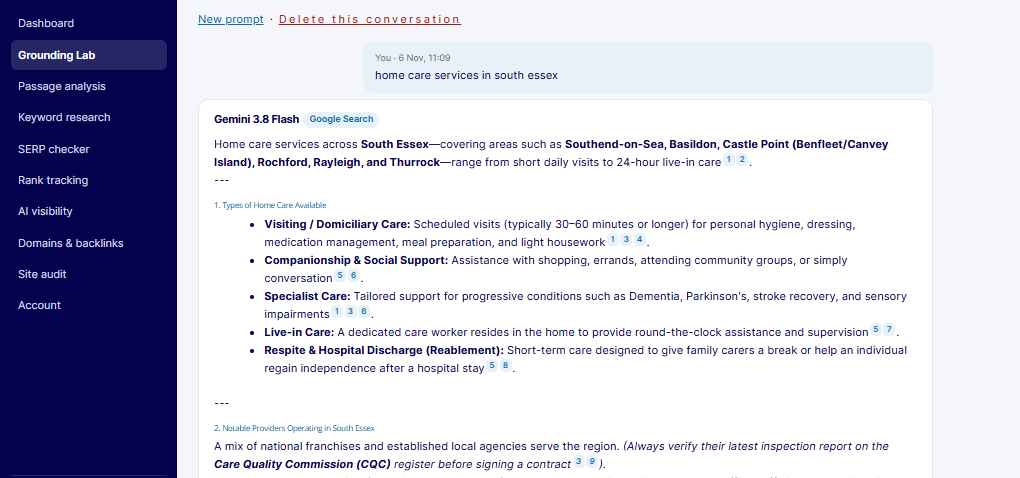
It runs your question through Gemini with grounding enabled, then shows you the answer, the sources it used, the searches it ran and which sources support different parts of its response.
You can also use it to test your own website, investigate competitors, check local business information and examine documents such as brochures and price lists.
This guide explains how the Grounding Lab works, the different sources you can use, how to understand the results and how we use it in our work with clients.
1. What Is the Grounding Lab?
The Grounding Lab is a feature in SD SEO Suite that lets you ask questions through Gemini using Google’s grounding tools.
Grounding allows Gemini to use external information when answering a question. Instead of relying only on what the model already knows, it can search for relevant information and use selected sources to support its response.
The Lab uses Google’s Gemini API and its published grounding tools. It is not a copy of Google AI Mode, and it doesn’t scrape Google Search results to recreate an AI Mode answer.
The important difference is that the Lab gives you information about how Gemini reached its answer. You can see the searches it ran, the sources it used and how those sources support the response.
The sources you can use
There are four types of information you can use when testing grounded answers.
| Source | What Gemini can use | Best for | Important detail |
|---|---|---|---|
| Google Search | Web pages found through Google’s Search index | Questions about products, services, costs, comparisons and how-to advice | Gemini can generate several related searches to find information. |
| Google Maps | Business and location information, including addresses, opening hours, reviews and photos | Local searches, such as finding services in a particular town | Google’s documentation says Maps grounding supports English prompts and answers. Sources must be shown with the answer and credited to Google Maps. |
| URL context | A web page you provide | Testing your own website or examining a competitor’s page | The page must be publicly accessible. |
| PDF upload | A document you provide | Checking brochures, price lists, reports and policies | Useful for testing information contained in documents rather than web pages. |
The source you choose should depend on the question you’re investigating.
For example, Google Search is useful when you want to understand which websites Gemini uses to answer a question about local services. Google Maps is more relevant when you want to investigate which businesses appear for a local search.
URL context lets you examine a specific page, while PDF uploads allow you to test information contained in documents.
What you see in a Grounding Lab run
The Lab provides more than the final answer. It gives you several ways to investigate how Gemini found and used its information.
| Part of the run | What it shows | How to use it |
|---|---|---|
| The answer | Gemini’s response, with numbered citations beside information supported by sources | Read it as a potential customer would. Check whether your business is mentioned, recommended or described accurately. |
| Sources | The websites and other sources cited by Gemini, in order | Identify which of your pages appear, which competitors are included and which third-party websites influence the answer. |
| Google Search suggestions | The searches associated with the grounded response, presented as Google’s search suggestions | Compare the suggested searches with the live search results and understand the terms being explored. |
| What Gemini searched for | The related searches Gemini generated to investigate different parts of the question, often called fan-out queries | Identify the subtopics and related questions your website may need to cover. |
| Which source supports which part | A breakdown showing which sources support different parts of the answer | Understand how much of the answer your website supports and which claims rely on other sources. |
| Gemini’s approach summary | A summary of how the model approached the question | Understand the topics and areas covered in the response. |
| Run details | The model, API method, token counts, finish reason and exact prompt sent | Reproduce tests and compare results using consistent settings. |
This information makes it easier to move beyond simply checking whether your brand appears in an AI answer. You can investigate why certain sources were used and what information they provided.
A real example: home care in South Essex
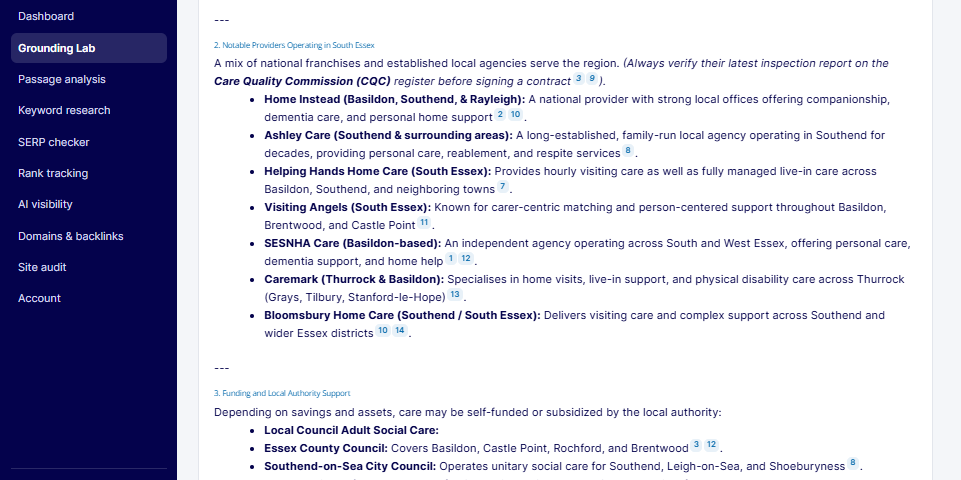
In one of our home care experiments, we asked Gemini to answer a question about home care providers in South Essex.
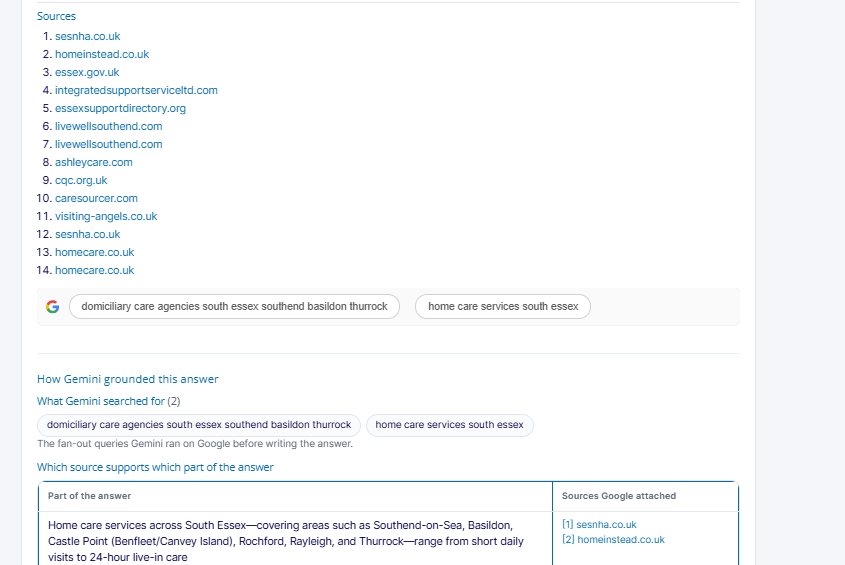
The response included seven providers. The Grounding Lab showed the sources behind the answer, allowing us to see where the information about each provider came from.
We could also examine the searches Gemini ran and the individual sources supporting different parts of the response.
This matters because a business might be mentioned in an AI answer, but that doesn’t necessarily mean its own website was responsible for the information.
2. Why Does the Grounding Lab Matter?
AI search can make it difficult to understand why one business appears in an answer while another doesn’t.
Traditional SEO tools show rankings, impressions, clicks and backlinks. They don’t necessarily tell you which websites an AI assistant has used to build a particular answer.
The Grounding Lab helps fill that gap by showing the searches and sources behind Gemini’s response.
You can see which sources influence an answer
Rather than looking only at the final response, you can examine the websites Gemini used.
This helps you identify whether your business is being supported by its own website, a directory, a review platform, a publisher or another third-party source.
You can also see which competitors appear and how often their websites are used.
You can test content before publishing it
URL context gives you a way to examine a page before it goes live.
You can provide the page and ask questions that a potential customer might ask.
For example:
Using this page, what areas does this business cover, which services does it offer and how much does it charge?
You can then check whether Gemini finds the information you intended to communicate.
This is useful when reviewing important landing pages, service pages and location pages.
You can investigate local AI visibility
Google Maps grounding helps you examine which businesses Gemini finds when answering local questions.
For example, you could ask:
Which home care providers serve Basildon?
You can then check which businesses appear, how they’re described and what information is included.
This gives local SEO teams another way to investigate their visibility beyond traditional Google Maps rankings.
You have evidence to share with clients and stakeholders
The Grounding Lab provides information that can be used in SEO reports, client presentations and internal discussions.
Instead of simply saying that a competitor appears in AI answers more often, you can show which questions were tested, which sources were used and what information supported the response.
That makes it easier to explain where improvements are needed.
It is a Gemini test, not a copy of Google AI Mode
This distinction is important.
The Grounding Lab uses Gemini through Google’s API and published grounding tools. Google AI Mode and AI Overviews are Search products with their own systems.
They don’t necessarily use the same sources or produce the same answers.
In our home care experiment, for example, Gemini and Google AI Mode used different sources when answering the same query.
Use the Grounding Lab to investigate how Gemini answers grounded questions. Use Passage analysis when you need to examine the passages used in a live Google AI Mode or AI Overview answer.
You can plan costs more easily
Google charges for the searches made through its grounding tools.
The Lab uses credits to give you a set cost for a run, rather than leaving you to calculate the cost of every search Gemini decides to make.
This makes it easier to plan regular testing across multiple prompts and markets.
3. Who Should Use the Grounding Lab?
The Grounding Lab is useful for anyone responsible for a brand’s visibility in AI search.
| Role | How to use the Lab | Example prompt |
|---|---|---|
| Head of SEO | Investigate which websites appear for important customer questions and how often your pages are cited | “Best [service] in [city]” |
| Content lead | Test a draft page to see whether Gemini can find and understand the information | “Using this page, what does [brand] offer for [need]?” |
| Local SEO specialist | Investigate which businesses Gemini finds through Google Maps | “Home care near Basildon” |
| Brand and PR team | Examine how Gemini describes a brand and which sources support that description | “[Brand] reviews” |
| Technical SEO specialist | Inspect generated searches, source information and run details | Run the same priority question three times |
| Agency teams | Build evidence about AI visibility across different clients, services and locations | “[Service] in [area]” |
The Lab can be particularly useful in industries where customers use AI assistants to research options, compare services and make buying decisions.
Examples include local services, healthcare, legal and financial services, retail, travel and B2B software.
4. How to Use the Grounding Lab
The best way to use the Lab is to start with the question you’re investigating, then select the source that makes the most sense.
Ground an answer in Google Search
Use Google Search grounding when you want Gemini to find information across the web.
This is useful for questions about:
- Available products or services.
- Prices and costs.
- Competitor comparisons.
- Recommendations and alternatives.
- How-to questions and practical advice.
Choose your model, select Google Search, enter the question and run the analysis.
Pay particular attention to the searches Gemini generates, the websites it cites and which sources support different parts of the answer.
Look for:
- Whether your website appears among the sources.
- Which competitors are cited.
- Whether directories and comparison websites are used.
- Which parts of the answer rely on third-party information.
- Whether any claims have no clear supporting source.
The searches Gemini generates are also useful when planning content. They can reveal related topics and questions that you may not have considered when creating your original page.
Ground an answer in Google Maps
Use Google Maps grounding for questions about local businesses and services.
Examples include:
- Home care near Basildon.
- Emergency plumbers in Southend.
- Private dentists in Southampton.
- Restaurants in Winchester.
Include the town or location in your question so the search has a clear geographical focus.
Look at which businesses appear and the information Gemini uses to describe them.
For a business that isn’t appearing, start by reviewing its Google Business Profile.
Check that the following information is accurate and complete:
- Primary and additional categories.
- Business address and service areas.
- Services and products.
- Opening hours.
- Photos.
- Customer reviews.
Also check that the information on the profile matches the business’s website.
Ground an answer in a web page using URL context
URL context is useful when you want to investigate how Gemini reads a particular page.
You can provide your own website address or a competitor’s public page.
For example, you could ask:
Using this page, which locations does this business cover and how much do its services cost?
You can also ask questions about individual services, eligibility, product specifications or other important details.
Compare Gemini’s answer with the actual page.
Does it find the correct information? Does it describe the service accurately? Does it miss something that should be easy to find?
A fact that Gemini struggles to find or understand may also be difficult for customers to locate.
Ground an answer in a PDF
PDF uploads are useful when you want to test information in documents rather than web pages.
Examples include:
- Product brochures.
- Service price lists.
- Reports.
- Terms and conditions.
- Policies.
- Customer guides.
Upload the document and ask specific questions about its contents.
For example:
What are the prices listed in this document?
Or:
What are the eligibility requirements and conditions described in this policy?
Check whether Gemini provides the correct answer and whether it misses important details.
If the answer is incorrect or incomplete, review the document. Tables saved as images, unclear headings and information spread across several pages can make important details harder to interpret.
5. How to Write Better Test Prompts
The quality of your research depends partly on the questions you ask.
Use prompts that reflect how your customers search, rather than relying only on technical industry terminology.
Here are some useful guidelines.
Use your customers’ language. Think about how someone would naturally ask a question before buying a product or contacting a service provider. You can test industry terminology separately.
Include the location. For local searches, include the town, city or area you want to investigate.
Include the market and currency where relevant. This is particularly important when testing prices, product availability and international searches.
Ask one question at a time. Separate different topics rather than trying to cover everything in one long prompt.
Don’t mention your brand unless you’re testing branded searches. When investigating general recommendations, let Gemini decide which businesses or products to include.
Keep your prompt list consistent. Use the same set of questions each month so you can compare results properly.
How many times should you run each prompt?
Run each important prompt three times.
Grounded answers can change between runs. Gemini may generate different searches, find different sources or present information in a different way.
Running the same question several times helps you see whether a source appears consistently or only in one response.
For comparisons over time, keep the model and other settings consistent.
We recommend using Gemini 3.8 Flash for regular checks and Gemini 4 Argon when you want a second opinion on an important question.
Plan your Lab credits
The number of credits required depends on the model and the type of analysis.
Before starting a larger research project, calculate how many prompts you want to test and how many times you plan to run each one.
For example, testing 20 questions three times each requires 60 runs.
Keeping a fixed prompt list and planning your credits in advance makes it easier to repeat the research regularly.
6. Five Practical Workflows We Use With Clients
The Grounding Lab is most useful when you connect the results to specific SEO and content improvements.
Here are five ways we use it.
1. Test a page before publishing
Before publishing an important page, provide its URL and ask questions the page is designed to answer.
For example, if you’re publishing a new service page, test whether Gemini can identify:
- What the business offers.
- Who the service is for.
- Which locations it covers.
- How much it costs.
- What makes the service different.
Fix any missing or unclear information.
Once the page is live, run the same questions using Google Search grounding. This lets you investigate whether Gemini finds and cites the page when searching the web.
2. Check local visibility
Run important local searches for each town or area your business serves.
Use Google Maps grounding to see which businesses appear. Then run related questions using Google Search grounding to investigate which websites support the answers.
Record the businesses and websites that appear most often.
Use the findings to review your Google Business Profile, location pages and local content.
3. Build a competitor source map
Choose ten important questions that potential customers might ask.
Run each question three times using Google Search grounding.
Record every website Gemini cites, how often it appears and which parts of the answer it supports.
You can then group the sources into categories such as:
- Competitor websites.
- Directories.
- Review platforms.
- Comparison websites.
- Publishers.
- Forums and communities.
- Government and regulatory websites.
This gives you a clearer picture of the websites influencing AI answers in your market.
It can also help your SEO and digital PR teams decide which third-party websites deserve attention.
4. Check the accuracy of brochures and documents
Upload important documents, such as price lists, product brochures and policies.
Ask direct questions about the information they contain.
For example, test whether Gemini can correctly identify prices, terms, eligibility requirements and important dates.
Where answers are missing or incorrect, review how the information is presented in the document.
This is particularly useful when customers rely on PDFs to make purchasing decisions.
5. Compare Gemini with the live Google AI answer
When a search has commercial value, don’t stop at the Grounding Lab.
Run the same query through the Lab, then examine the live Google AI Mode answer using Passage analysis.
Compare the sources and information used by each system.
Our home care experiment showed why this matters: Gemini and Google AI Mode selected different sources when answering the same question.
The two tools provide different types of evidence. Using both gives you a more complete view of how your business appears across Google’s AI search experiences.
7. Frequently Asked Questions
Is the Grounding Lab the same as Google AI Mode?
No. The Grounding Lab uses the Gemini API with Google’s published grounding tools.
Google AI Mode is part of Google Search and uses its own systems to find and present information.
Use the Grounding Lab to investigate how Gemini answers grounded questions. Use Passage analysis to examine the passages and sources in live Google AI Mode answers.
Does the Grounding Lab use my location?
For local searches, include the town or city in your prompt so Gemini has a clear geographical focus.
When using Google Maps grounding, keep the location information consistent between tests so you can compare the results properly.
Why do answers change between runs?
Gemini can generate different searches and find different sources each time it answers a question.
This means the response, citations and wording can change.
Run important prompts several times and look for patterns rather than relying on one result.
Which Gemini model should I use?
Use Gemini 3.8 Flash for regular testing and Gemini 4 Argon when you want a second opinion on an important question.
The most important thing when comparing results over time is to keep the model consistent.
Can I test pages behind a login?
URL context is intended for publicly accessible web pages.
For documents that you can provide directly, PDF upload offers another way to test the information they contain.
Can I see what was sent to Gemini?
Yes. The run details show the model, API method, token counts, finish reason and exact prompt sent.
This makes it easier to reproduce a test and compare results using the same settings.
How does Google Maps grounding choose businesses?
Google doesn’t publish a complete explanation of how its Maps grounding system selects businesses for every answer.
Its documentation explains that the tool can use Google Maps information, including places, reviews, photos, addresses and opening hours.
The Grounding Lab lets you examine the businesses returned for your own questions, but it doesn’t reveal Google’s complete selection process.
8. The Toolkit: Lab Prompt Planner
We have also built a free Python script to help plan research in the Grounding Lab.
The script needs Python, with nothing else to install. It has three commands.
Build a testing plan
The build command takes your services and locations and turns them into a list of prompts to test.
It creates different types of questions, including:
- Local searches.
- Cost questions.
- Comparisons.
- How-to questions.
- Branded searches.
The plan also records which source to use, which model to select and how many times to run each prompt.
Calculate credit requirements
The credits command calculates how many Lab credits your plan requires.
It also lets you compare the total with your available monthly allowance.
Compare two runs
The compare command examines two Lab runs that you’ve saved as text files.
It identifies changes in the searches and sources, including which ones appeared or disappeared. It can also show how your website’s share of the answer changed.
Running the script
Use the following commands in your terminal:
python3 lab_prompt_planner.py build --services "home care,dementia care" --places "Basildon,Southend-on-Sea" --brand "Your Brand"

python3 lab_prompt_planner.py credits prompts.csv --allowance 300

python3 lab_prompt_planner.py compare run_before.txt run_after.txt --domain yoursite.co.uk
You can adapt the services, locations, brand name, allowance and website address to match your research.
9. What We’re Watching Next
Google continues to develop its grounding tools and the way Gemini returns information. We’re monitoring the changes and how they affect the research we carry out in the Lab.
Combining Google Search and Google Maps
Google’s documentation explains that Gemini 3.5 Flash and later models can combine Google Search and Google Maps grounding in one answer.
This is particularly interesting for local questions, where an answer may need information from both websites and business listings.
Changes to the way Gemini returns results
Google’s Interactions API provides a different way of returning information from grounded responses.
Citations can appear as annotations on the answer, with individual searches represented as separate steps.
We’re following these changes because they affect how developers can inspect and analyse grounded responses.
New Gemini models
New models can search for information and cite sources differently.
When a new model becomes available, we’ll test our priority questions again and compare the results with previous runs.
Improving the Lab
We’ll continue reviewing how the Lab presents sources, searches and supporting information.
The aim is to make it easier for SEO and marketing teams to investigate AI answers, identify opportunities and turn the findings into practical improvements.
10. About Szymaniak Digital
Szymaniak Digital is an Enterprise AI SEO Consultancy led by Konrad Szymaniak.
We built the Grounding Lab because businesses need a better understanding of how AI assistants find information and answer questions about their products and services.
The Grounding Lab and Passage analysis are part of SD SEO Suite, alongside tools for SEO research, rank tracking and AI search visibility.
Our work combines research into Google and AI search with practical recommendations that content, SEO and development teams can put into action.
