
1. What Happened? – Google AI Overviews Are Recommending Retailers That Do Not Rank Organically
We took a full scrape of one UK commercial search:
“England Football Shirts”
The search was from Greater London on desktop in early October 2026.
We counted everything that appeared on the results page.
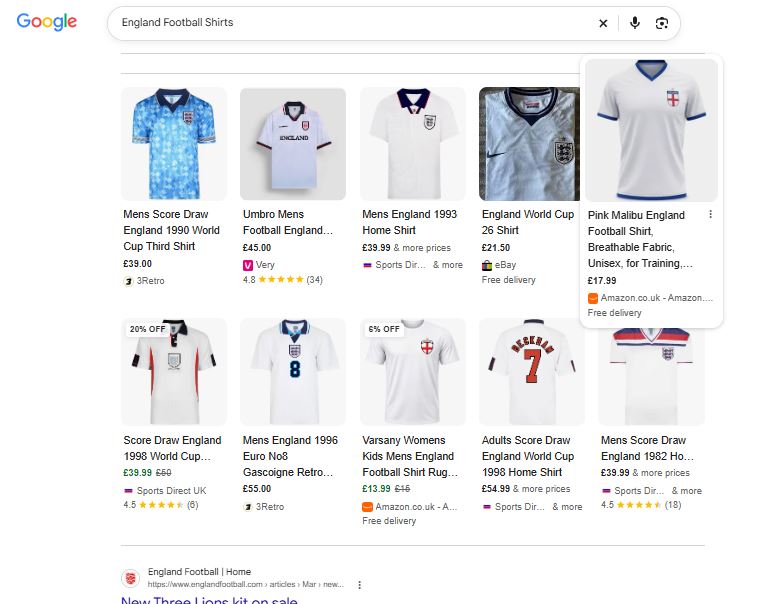
| Search feature | Count |
|---|---|
| Sponsored product listings | 29 |
| Sponsored text ads | 4 |
| Free product listings | 20 |
| Organic blue links | 8 |
| Image results | 8 |
| Local results | 2 |
| Query refinement blocks | 2 |
That gives us 53 paid or product-focused placements compared with just 8 organic blue links.
Prices ranged from £4.98 to £149.99 across roughly 25 different merchants.
That ratio will probably get all the attention.
But it is not the most interesting thing we found.
The more important finding: Google recommended retailers that did not rank
The AI Overview on this search did not simply describe England football shirts.
It named retailers.
It gave prices.
And it told the user where they could buy.
For example, the AI Overview mentioned:
- Nike England 2026 Stadium Home Shirt — £89.99, directly from Nike UK
- Stadium Home replica — around £89.99 at Nike UK and Sports Direct
- Aero-FIT Match Away — around £135 at JD Sports UK and Pro Soccer
- Custom printed shirts — from around £149.99 at Fanatics UK
- Retro kits — from £50 at Score Draw Official Store
- England x Palace and training ranges at the England FA Store
Seven retailers were named.
Now compare that with the organic results on the same page:
- England FA Shop
- Sports Direct
- Score Draw
- Nike
- 3Retro
- England Football
- Primark
- Classic Football Shirts
Three of the retailers recommended by Google’s AI Overview were not showing as organic blue links on page one.
Those were:
- JD Sports UK
- Pro Soccer
- Fanatics UK
JD Sports appeared in a sponsored product result.
Pro appeared in the image results.
Fanatics appeared in a sponsored text ad and several sponsored product listings.
So Google was recommending businesses in its AI answer that were not organically ranking for the main query.
The prices in the AI Overview did not always match the products below it
We checked three of the prices mentioned by Google against the listings on the same page.
AI Overview:
“around £89.99 at Nike UK and Sports Direct”
Sports Direct had a sponsored listing for a 2024 shirt at £44.00.
Its organic result also showed a much wider range of £20 to £125.
AI Overview:
“Score Draw retro kits from £50.00”
The results page showed Score Draw shirts at:
- £39.00
- £39.99
- £39.99
3Retro also showed a price range of £15 to £55.
AI Overview:
“Aero-FIT Match Away around £135 via JD Sports UK and Pro Soccer”
We could not find that exact product price from either retailer anywhere on the page.
The closest products we found were:
- Away Stadium Shirt — £89.99
- Home Aero-FIT with printing — £149.99
At least two of those three AI-generated price claims did not match the product listings visible on the same page.
We cannot see exactly how Google produced those figures.
We are not going to guess.
What we can see is much simpler:
The AI Overview can give a user one price while the listings underneath show another.
And the retailer named next to the price has no direct control over what Google says.
Google’s AI Overview Is Starting to Do the Retailer’s Job
The AI Overview also asked:
Are you looking for a Home or Away shirt?
Then:
- Replica or Player-issue?
- Adult, women’s or kids’ sizing?
- Player printing or no printing?
Those are exactly the filters a football retailer would normally put on its category page.
For years, the basic SEO strategy was:
Rank for the category term → get the user onto your category page → let them filter the products.
Google is now starting to do some of that filtering before the user reaches the website.
That changes the job of the category page.
It is no longer only about being a destination.
It also needs to make your products and their attributes clear enough for Google to understand and use in its answer.
And your product pages need to answer those questions clearly.
2. Why Does This Matter?
One search now has several different ways to win
For a commercial search like this, there are at least three important opportunities:
| Surface | What affects it | Who usually owns it |
|---|---|---|
| Organic results | Content, authority, technical SEO | SEO |
| Product listings | Product feed, bids, Merchant Centre, account health | Paid media / ecommerce / SEO |
| AI Overview | Information across your site, product data and the wider web | No clear owner or SEO / AI Discoverability |
These do not necessarily match.
On this one search:
- JD Sports was mentioned in the AI Overview but did not rank organically
- Printerval appeared in six sponsored product listings but was not mentioned in the AI Overview
- England FA appeared in organic, product listings and the AI Overview
So you can win one surface and lose another.
The problem is that many businesses measure the first one, have a separate team managing the second, and do not measure the third at all.
Being Mentioned Without Ranking Is Now a Real SEO Outcome
Imagine Google recommends your brand in the AI Overview.
That sounds positive.
But then the user looks below the answer and clicks a competitor’s product.
You have received the recommendation.
Your competitor gets the sale.
There is another problem.
Google can attach a price to your brand that you never published.
If someone sees:
“around £135 at [your brand]”
and then visits your site and finds the product for £89.99 or £149.99, that creates confusion.
The customer does not care why Google got it wrong.
They blame the brand they were told to buy from.
And there is currently very little reporting for this.
Search Console can show impressions and clicks.
It does not tell you:
- How many times your brand was named in an AI Overview
- What price Google quoted next to your name
- Whether that price was correct
- Which competitor was mentioned instead
That is a major measurement gap.
The Category Page Is Losing Some of Its Traditional Role
Go back to the questions Google asked:
- Home or away?
- Replica or match?
- Adult, women’s or kids’?
- Printing or no printing?
Those are category-page filters.
The difference is that Google is starting to provide them before someone visits the retailer.
For years, retailers built large category pages around filtering and comparison.
Now Google is beginning to handle some of that work.
That means product pages become increasingly important.
A product page needs to answer:
- What exactly is this?
- Which season is it?
- Is it home or away?
- Is it replica or match?
- Who is it for?
- How much does it cost?
- Is printing available?
- Is it in stock?
If the information is unclear, Google has to work it out.
And that is where mistakes happen.
Season Confusion Is Causing a Lot of the Problems
This was one of the clearest issues on the results page.
The same search contained:
- 2026 shirts
- 2024 shirts
- 25/26 kits
- Retro shirts from 1982
- 1990
- 1993
- 1996
- 1998
The product grid was also mixing completely different products.
For example, a £44 Nike 2024 shirt appeared close to a £4.98 generic England-themed polo.
That creates a very difficult job for an AI system.
It has to work out which product belongs to which season, price and category.
Sports Direct is a useful example.
Its organic title clearly referred to:
England Football Shirts & Kit | Adults, Kids | 2026
But its sponsored product on the same page was a 2024 shirt at £44.00.
That could help explain why Google’s AI Overview associated an £89.99 price with Sports Direct for a 2026 replica while the visible sponsored listing showed £44 for a different year’s product.
The bigger point is simple:
Your product data needs to make the season completely clear.
Otherwise Google can group different products together.
Official Products Are Sitting Next to Generic Products
Another issue appeared in the free product listings.
Official licensed England shirts were shown beside generic England-themed T-shirts from marketplace sellers.
Some were only £4.98 to £10.99.
The listings used similar visual formatting.
There was not always an obvious distinction between:
Official licensed product
and
Generic England-themed product
For a licensed brand, that matters.
You are paying for the rights to use the brand.
Google’s product listings do not automatically communicate that difference well.
So your own product data needs to do more of the work.
You Can Also See How Competitors Run Their Shopping Feeds
There is another interesting detail on the results page.
Sponsored product listings show the comparison shopping service responsible for the listing.
On this SERP we saw:
- Nike Official — Channable
- JD Sports — Google
- Sports Direct — Feedoptimise
- Fanatics UK — Productcaster
- England FA Store — Productcaster
- eBay GB — Cleobi
- Etsy UK — Shopzilla
- Printerval — Shopping in EU
That gives you useful competitive intelligence.
You can see which competitors:
- Use Google directly
- Use a feed management platform
- Use a comparison shopping partner
- Share the same shopping provider
It is sitting in front of you on the SERP.
3. Who Is Most Affected?
Fashion, sportswear and apparel
These sectors have:
- Seasonal products
- Large numbers of variants
- Fast product turnover
- Strong marketplace competition
They are likely to feel these changes quickly.
Any retailer with seasonal products
This is not just football.
Think about:
- Automotive parts
- Electronics
- Annual product releases
- Seasonal fashion
- Holiday collections
- Limited editions
Whenever the question “Which year is this?” matters, your product data needs to answer it clearly.
Licensed brands
If you pay for a licence, make sure that information is clear in your:
- Product title
- Description
- Structured data
- Product feed
Do not expect Google to make the distinction for you.
Marketplace sellers
Keyword-heavy product titles can still win product listings today.
But AI systems are increasingly trying to understand products and attributes rather than simply match words.
That makes good product data more important.
Retailers with separate SEO and paid teams
This is probably one of the clearest organisational problems.
SEO manages organic.
Paid media manages Shopping.
And nobody owns the AI Overview.
The three surfaces are becoming more connected, even though the teams often remain separate.
Premium and mid-market brands
A quoted price can affect what customers expect before they ever reach your website.
That makes accuracy particularly important.
Less affected businesses
Businesses are less exposed when they:
- Sell services rather than products
- Make bespoke products
- Do not use product feeds
- Need a sales conversation before someone can buy
4. What Should Businesses Do?
The practical answer is:
Audit all three surfaces, fix the product data behind them and report them together.
4A. Run a Three-Surface Audit
Take your 20 most important commercial search terms.
For each one, record:
- Organic page-one visibility
- Paid product visibility
- Free product visibility
- AI Overview visibility
- Whether your brand is named
- The price Google quotes next to your brand
You can then score each term.
For example:
Organic: 1
Product listings: 1
AI Overview: 1
A score of 3 means you are visible across all three.
A score of 1 means you have a major gap.
This will probably produce a very uncomfortable report.
But that is useful.
Check the AI Price Against Your Website
Whenever Google names your business in an AI Overview, check the price.
Is it correct?
Is it the right product?
Is it the right season?
Is it a promotional price?
Does it include printing?
Does it include delivery?
If the answer is no, you have a live commercial problem.
Find Where You Rank But Are Missing From Product Listings
If you have good organic visibility but your products are not appearing in Shopping or free listings, investigate:
- Product feed quality
- Merchant Centre issues
- Missing attributes
- Prices
- Availability
- Product identifiers
- Shipping information
This can often produce a faster commercial improvement than trying to move an organic result from position three to position one.
Find Where You Appear in Product Listings But Not Organically
This tells you something different.
Your product data is strong enough to get into the shopping results.
But your website content may not be strong enough to win the organic result or AI Overview.
That becomes an SEO and content opportunity.
Recheck These Surfaces Regularly
I would review the data at least quarterly.
These results can change much faster than a traditional organic ranking report.
4B. For Content Teams: Be Clear About What the Product Is
Put the season in the title
Make sure these all agree:
- Product title
- H1
- Meta title
- Product feed title
- Structured data
If it is the 2026 shirt, say 2026.
Do not make Google work it out.
Clearly name the product type
Instead of:
England 2026 Home Shirt
be more specific:
Nike England 2026 Home Stadium Shirt – Men’s Replica
The second version tells Google much more.
And those distinctions matter because they are exactly the questions Google’s AI Overview is asking.
Create a clear current-season page
If you sell multiple seasons, make the current one obvious.
Have a clear page answering:
- What is the current England kit?
- What versions are available?
- What is the difference?
- How much does each cost?
Put prices on the page in plain text
Do not make the price impossible to find.
Include:
- Product price
- Price differences between variants
- Printing costs
- Delivery costs where relevant
If Google is going to quote a price next to your brand, give it a clear number to work with.
Separate current, previous and retro products
Use:
- Separate URLs
- Clear titles
- Clear navigation
- Clear breadcrumbs
- Explicit year references
Do not combine five seasons into one confusing page.
Make official licensing clear
If your product is officially licensed, say so.
Put it in:
- The title
- Product description
- Structured data
- Feed data
4C. For Developers: Make the Data Agree
The most important technical task is simple:
Your feed, your page and your structured data need to say the same thing.
The price should match.
The currency should match.
Availability should match.
The season should match.
The product name should match.
For example:
async function checkProduct(sku) {
  const feed = await getFeedRow(sku);
  const page = await scrapeRenderedPrice(sku);
  const schema = await extractJsonLdOffer(sku);

  const normalise = value =>
    Number(String(value).replace(/[^0-9.]/g, '')).toFixed(2);

  const prices = {
    feed: normalise(feed.price),
    page: normalise(page.price),
    schema: normalise(schema.price)
  };

  const issues = [];

  if (new Set(Object.values(prices)).size > 1) {
    issues.push({
      type: 'price_mismatch',
      prices
    });
  }

  if (feed.currency !== schema.priceCurrency) {
    issues.push({
      type: 'currency_mismatch'
    });
  }

  if (feed.availability !== schema.availability) {
    issues.push({
      type: 'availability_mismatch'
    });
  }

  if (!feed.title.includes(String(feed.season))) {
    issues.push({
      type: 'season_missing'
    });
  }

  return {
    sku,
    ok: issues.length === 0,
    issues
  };
}
The exact code will depend on your system.
The principle is much more important:
Do not allow different systems to publish different versions of the same product information.
Make Product Variants Clear
If you sell several sizes, colours or product versions, explain the relationship between them.
For example:
- Same product
- Different size
- Different colour
- Different customer type
- Different product tier
Structured data should make these relationships clear rather than forcing Google to work them out from product names.
For seasonal products, keep different seasons separate.
A 2024 product and a 2026 product should not look like the same product family.
Make the Filters Google Is Asking About Available as Data
Look at the questions Google is asking:
- Home or away?
- Replica or match?
- Adult or women’s?
- Kids?
- Printing?
These should not exist only in a paragraph of text.
They should also be clear product attributes.
That gives Google a much better chance of returning the correct product when someone asks a follow-up question.
Make Customisation Prices Clear
Suppose:
- Shirt = £89.99
- Printing = £20
Do not leave Google to work out whether £109.99 is the shirt price or the shirt plus printing.
Make the costs clear.
The more clearly the information is separated, the less likely it is that Google combines values incorrectly.
Make Sure Important Product Information Loads Without JavaScript
If the price or key product details only appear after JavaScript runs, there is a risk some systems will not see them correctly.
For important product information, make sure it is available in the page HTML.
4D. A Practical Rollout
For a large ecommerce website, I would do this in this order:
- Audit your top 20 commercial search terms.
- Compare organic, paid, free listings and AI Overview visibility.
- Record the price Google quotes when it names your brand.
- Show the results to SEO and paid media together.
- Run product feed, page and structured data checks across your catalogue.
- Fix season information first.
- Improve product titles and attributes.
- Separate current, previous and retro products.
- Improve ProductGroup and variant information.
- Add the same product attributes to feeds and structured data.
- Build monitoring for AI Overview citations and prices.
- Combine reporting across SEO, Shopping and AI search.
- Review the data quarterly.
4E. Give Someone Ownership
This is where many businesses will struggle.
The person responsible should have visibility across:
- SEO
- Paid Shopping
- Ecommerce
- Product data
- AI search
And make price consistency a release requirement.
Do not wait until a dashboard tells you the feed and page disagree.
By then, Google may already have quoted the wrong price.
5. What We’re Watching Next
Could AI Overview pricing become a consumer protection issue?
If Google tells someone:
“Buy from Brand X for £89.99”
but Brand X is actually selling the product for £109.99, that creates an interesting question.
Especially when the price is explicitly attached to the retailer’s name.
UK and EU businesses should be paying attention to how this develops.
Will retailers get more control over AI answers?
At the moment, there is no clear way to correct a price Google attributes to your business inside an AI Overview.
Merchant Centre gives you control over your product listings.
It does not give you control over Google’s final AI answer.
That could change.
But I would not build a strategy around Google giving you more control anytime soon.
Will organic results continue shrinking on commercial searches?
On this query we saw:
53 paid or product placements
against
8 organic blue links.
That is a very different search page from the one most SEO reports still show clients.
Will free product listings become the main organic retail surface?
For some retailers, they already provide more commercial visibility than the blue link.
But they are often managed outside the core SEO team.
That needs to change.
Will AI agents eventually buy from these pages?
The pieces are already appearing:
- Product data
- Prices
- Attributes
- Refinement questions
- Retailer recommendations
The next step is moving from:
“Here are the products.”
to:
“I’ll help you choose and buy one.”
6. About Szymaniak Digital
Szymaniak Digital is an Enterprise AI SEO consultancy working with retail and ecommerce teams.
We look at all the surfaces where customers can discover a product:
- Organic search
- Paid Shopping
- Free product listings
- AI Overviews
A retailer can rank well and still lose visibility in Google’s product results.
A brand can be recommended by AI and still be shown at the wrong price.
And a product can appear in Shopping while being almost invisible organically.
That is why we look at the whole search journey, not just rankings.
If you do not know how your products appear across these surfaces, that is where I would start.