

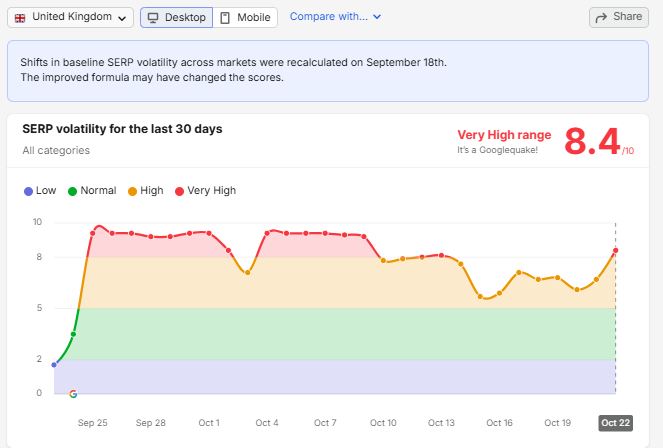
On 22 October 2026, Semrush Sensor gave UK desktop search results a volatility score of 8.4 out of 10, putting them in its highest category, labelled a Googlequake.
Google has not confirmed a new update since the September 2026 spam update finished on 8 October.
The bigger story, however, is what has happened over the past month. According to Semrush Sensor, every day since 25 September has recorded high or very high volatility. That means UK search results have spent almost four weeks without a genuinely calm day.
For businesses trying to understand changes in organic traffic, this creates a problem. There is no recent, stable period to compare against, and two waves of unconfirmed changes have followed a confirmed Google update.
This does not mean every website has been affected. A market-wide volatility score cannot tell you whether your rankings or traffic have changed. You need to look at your own data to find out.
In this guide, we’ll explain what the latest volatility shows, which industries appear most affected, how to diagnose changes in your own search performance, and what your SEO, content, marketing and development teams should do next.
We’ll also look at how to measure volatility across your own tracked keywords rather than relying entirely on third-party tools.
1. What’s Happening in Google Search?
On 22 October 2026, Semrush Sensor recorded a score of 8.4 out of 10 for UK desktop search results. This was an increase from the high-volatility readings recorded during the previous week.
Semrush Sensor tracks changes in search results for a set of keywords. A high score means that many of the tracked results pages have changed from one day to the next.
It does not tell you which websites gained or lost traffic, or whether your own rankings have changed.
Google has not confirmed a new update. Its Search Status Dashboard lists the September 2026 spam update, which ran from 24 September to 8 October, but no subsequent update.
Search Engine Roundtable reported further unconfirmed volatility and increased discussion in the SEO community on 15 and 16 October, followed by another period of volatility on 20 and 21 October. Several third-party trackers recorded elevated readings, and a Google core update was widely expected.
The important distinction is that the September spam update was confirmed, while the later changes had not been confirmed by Google.
The Past Month, Broken Down
The quiet readings on 23 and 24 September were the last calm days before the September spam update began.
The following timeline shows how the month developed.
| Phase | Dates | What Google confirmed | What was reported |
|---|---|---|---|
| Spam update | 25 September–9 October | The September 2026 spam update ran from 24 September to 8 October. | Three waves of volatility: 25–27 September, 30 September, and 4–6 October. |
| Settling period | 10–14 October | No new update. | Scores eased from very high towards the top of the high-volatility band. |
| Unconfirmed changes | 15–21 October | No new update. | Further volatility and reports on 15–16 and 20–21 October, including erratic Discover traffic, stale Google News stories and ranking changes in both directions. |
| Latest spike | 22 October | No new update. | The highest reading since 9 October, the day after the spam update finished. |
This timeline matters because a traffic change in late October may not have the same cause as a change that began in late September.
Before making changes to your website, you need to establish when the decline started and whether it coincided with a confirmed update, an unconfirmed period of volatility or one of your own releases.
Which Search Features Changed on 22 October?
Semrush Sensor also tracks how often different search features appear across the top 20 results for its keyword set.
On 22 October, the biggest daily changes involved adverts and sitelinks rather than AI features.
| Search feature | Share of tracked results pages | Change since 21 October |
|---|---|---|
| Adverts at the bottom of the page | 3.15% | +1.94 percentage points |
| Sitelinks | 24.95% | +1.10 percentage points |
| Adverts at the top of the page | 1.02% | +0.45 percentage points |
| Related searches | 93.70% | +0.43 percentage points |
| AI Overviews | 78.49% | +0.29 percentage points |
| People also ask | 67.37% | −0.58 percentage points |
| Video | 52.75% | −0.30 percentage points |
| Popular products | 14.64% | −0.17 percentage points |
The changes in the number of pages showing adverts are particularly noticeable. Bottom-of-page adverts increased by 1.94 percentage points in a single day, reaching around 2.6 times the previous day’s share.
The overall figures are just as important as the daily changes.
On this keyword set, AI Overviews appeared on almost four in five UK desktop results pages. People also ask appeared on around two in three, while related searches appeared on nearly all of them.
Only 1.3% of tracked pages showed no search features at all.
These figures describe Semrush Sensor’s keyword set. They should not be treated as exact measurements of every UK search or every industry.
What the Volatility Score Can and Cannot Tell You
Before using the score to make business decisions, understand its limitations.
It measures the market, not your website. Sensor tracks a set of keywords across different categories. A high score means those results have changed considerably, not that your pages have lost rankings.
It measures change, not direction. A results page changing contributes to volatility whether a website moves up or down, and whether the changes involve rankings or search features.
Its baseline changed on 18 September. The dashboard says that baseline volatility was recalculated using an improved formula. Scores from before and after that change are not directly comparable. The 30-day period discussed in this article falls entirely after the recalculation.
Its keywords may not match yours. For example, adverts appear in only about 1% of the top-of-page slots in the tracked results, which suggests that the keyword set leans towards informational searches. Retailers should therefore be cautious when using its search-feature data to draw conclusions about commercial queries.
The takeaway is simple: use market-wide tools to identify periods of instability, then use your own search data to establish what happened to your business.
2. Why Does This Matter to Businesses?
A very high volatility score increases the possibility that rankings have changed. It does not confirm that they have, and it does not explain why.
The biggest challenge is separating genuine problems from normal changes in the market. Businesses that react to every movement can create more problems than the volatility itself.
1. You No Longer Have a Clean Recent Baseline
Comparisons using dates after 23 September now include a confirmed spam update and two further periods of unconfirmed volatility.
That makes a straightforward October-versus-September report difficult to interpret.
The last clean comparison window for most websites is 21 August to 23 September, between the August and September spam updates. This was also the baseline used in our analysis of the September 2026 spam update.
Use that period when investigating changes in performance. It gives you a more stable reference point than comparing two months affected by different waves of volatility.
2. A Changing Market Does Not Mean Your Website Has Changed
Sensor summarises thousands of search results, most of which have nothing to do with your business.
Third-party trackers can also disagree. When we compared 11 trackers on 17 and 18 October, they all showed elevated volatility but did not agree on its direction. We covered this in our guide to why volatility trackers disagree.
The only way to establish whether your website was affected is to examine your own Search Console data and keyword tracking.
3. You Can Lose Clicks Without Losing Rankings
A website’s ranking can remain stable while fewer people click through to it.
AI Overviews appeared on almost four in five of Sensor’s tracked UK desktop results pages, while People also ask appeared on around two in three. When these features take up more space above an organic listing, fewer people may reach that listing even if its position does not change.
One possible sign is stable impressions but falling clicks.
Our research into answer capture ratios measured an almost five-times-lower click-through rate for question-based queries in the top ten.
The same issue applies to adverts. If more paid listings appear above or below organic results, organic listings may receive less attention even when their rankings stay the same.
This is why a ranking report alone may not explain a fall in organic traffic.
4. Sitelinks Can Give Leading Brands More Space
Sitelinks appeared on 1.1 percentage points more of Sensor’s tracked results pages in a single day, reaching almost one in four.
Sitelinks give a search result additional links to pages on the same website. They often appear under the leading result, particularly when someone searches for a brand.
That extra space can benefit the brand appearing first while pushing competing listings further down the page.
For businesses relying on non-brand searches, including resellers, comparison websites and affiliates, this is another reason to measure clicks as well as rankings.
5. Changes You Make Now May Take Weeks to Evaluate
Google’s recrawling and processing of known pages can take time. Our analysis of Google’s crawl, index and serving timings explains why changes do not always appear in search results immediately.
A rewrite published today may not be fully reflected in search results until mid-November. By then, another Google update could have rolled out.
If you rewrite or redirect pages during a period of market volatility, it becomes much harder to establish whether any improvement or decline resulted from your changes or from Google.
That does not mean you should ignore genuine problems. It means you should avoid making major changes before you have identified the cause.
6. Google Search Is More Than Ten Blue Links
Reports between 15 and 21 October included problems with Discover traffic and Google News. Some publishers described traffic appearing briefly and then disappearing, while others reported stale stories in Google News.
These surfaces are not covered by standard ranking trackers in the same way as traditional web search.
As a result, a publisher can lose traffic from Discover or News even if its tracked organic rankings remain stable.
If your business relies on these channels, analyse their performance separately. Our guide to visibility increasing while traffic falls explains how to distinguish ranking changes from other causes.
The Risks of Reacting to Volatility Without a Diagnosis
| Risk | What it looks like | Potential cost |
|---|---|---|
| Using the wrong baseline | Comparing October with September without accounting for the updates and volatility | Blaming losses on the wrong cause |
| Confusing market movement with website performance | Assuming a high Sensor score means your site has been hit | Changing pages that were not affected |
| Ignoring changes to the results page | Impressions remain steady while clicks fall | Rewriting content when the real issue is the search layout |
| Making reactive changes | Rewriting or redirecting pages while rankings are unstable | Changes that cannot be measured reliably, with more risk before a potential core update |
| Ignoring other search surfaces | Discover or News traffic falls while rankings appear stable | Losing traffic without understanding why |
The priority is to diagnose the problem first. Only then should you decide what to change.
3. Which Industries Are Most Affected?
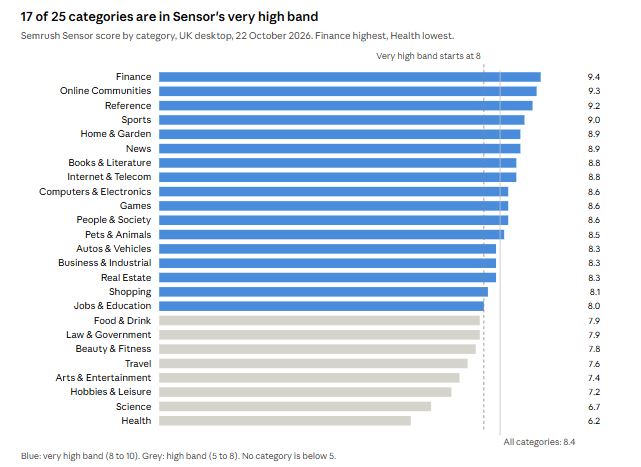
Every category tracked by Semrush Sensor is in the high or very high volatility band. No sector is particularly calm at the moment.
However, the differences between categories still provide useful clues about where changes are concentrated.
Three Patterns Worth Watching
Finance is the most volatile category, while Health is the least volatile.
Both cover topics where Google applies high standards because the information can affect people’s money or health. The difference between them suggests that the current volatility is not simply a broad crackdown on sensitive topics.
Finance search results often contain comparison websites, affiliates and lead-generation businesses. These types of sites may be more exposed to changes involving spam policies, paid listings and the space available to organic results.
Online communities and reference websites are also seeing substantial volatility.
These categories rank second and third for volatility after Finance. Their results may be affected by changes in how Google uses discussion-based content and how AI Overviews answer questions directly.
That is a possible explanation, not a confirmed cause. You would need to compare your own search data to establish whether it applies to your website.
News and Sports are also highly volatile.
These topics change frequently, so daily fluctuations are less surprising. Top Stories appeared on slightly more pages, while reports of stale Google News results and erratic Discover traffic have made publishers particularly difficult to diagnose.
A publisher’s rankings may tell only part of the story when other Google surfaces account for a meaningful share of its traffic.
What Different Types of Business Should Watch
Finance, insurance and lead generation
Finance is the most volatile category, and the share of results pages showing adverts at the top and bottom increased. Comparison websites and affiliates may also face greater competition for space when sitelinks expand brand results.
Check the performance of individual page groups rather than assuming the entire site has been affected.
Publishers and news websites
Monitor Google News and Discover separately from ordinary web search. A decline on either surface may not appear in a traditional ranking tracker.
E-commerce
Home & Garden, Computers & Electronics and Shopping are all in the very high volatility band.
Popular products appeared on fewer tracked pages on 22 October. However, because Sensor’s keyword set under-represents commercial searches, retailers need their own keyword tracking and search-feature data.
Our study of retail search results pages explains how many separate choices can appear during a single shopping search.
Forums, communities and user-generated content websites
Online Communities and Reference are near the top of the volatility table. Sites in these categories should monitor changes to question-based queries, discussion content and pages that compete with direct answers in AI Overviews.
B2B, SaaS and technology businesses
Computers & Electronics and Business & Industrial are both in the very high band.
For businesses with longer research and purchasing journeys, AI Overviews and People also ask may influence visibility across many different searches. Do not rely on a single ranking to assess the performance of the entire journey.
Local businesses
The local pack changed little on 22 October. However, location-based service pages can be affected by Google’s spam policies, particularly where pages exist mainly to target different locations without offering meaningful value.
Health, science and hobby websites
These are among the least volatile categories, but they are still in the high band. Being less volatile than other sectors does not mean a website is unaffected.
4. What Should Businesses Do Now?
Do not make decisions based on the volatility score alone.
First establish whether your website has actually changed, when the change began, and what kind of loss you are seeing. Then choose a response based on the likely cause.
For now, the priority is measurement, technical protection and preparation. Make content changes once you understand the problem.
The following eight steps set out what to do and who should lead each task.
Step 1. Keep Planned Work Moving, but Record Every Change
Who: Everyone
Do not rush into rewriting, redirecting or deleting pages simply because rankings have moved this week.
Continue work that was already planned, but pause major reactive changes until you understand the cause.
There are exceptions. Fix genuine technical faults immediately. Server errors, accidental noindex tags, incorrect robots.txt rules and broken redirects should not be left in place while you wait for the market to settle.
Record all changes in one shared log. Include the date, the pages or templates affected, and the reason for the change.
Without a change log, it becomes much harder to separate the effects of your own releases from changes made by Google.
Add the key market events to your reporting annotations:
- September 2026 spam update: 24 September to 8 October.
- Unconfirmed volatility: 15 and 16 October.
- Further volatility: 20 to 22 October.
Our bulk data export guide includes a BigQuery annotations table that already lists Google’s 2026 data anomalies.
Step 2. Check Whether Your Website Was Actually Affected
Who: SEO lead or analyst
Use Google Search Console to compare your actual performance with a more stable period.
- Export daily web clicks and impressions for the last eight weeks, along with the equivalent weeks from the previous year.
- Use 21 August to 23 September as your baseline.
- Compare seven-day totals to reduce the effect of normal weekday patterns.
- Establish the usual range by looking at the lowest and highest seven-day totals in the baseline period.
- Check Discover and Google News separately. Their Search Console reports are needed to assess those surfaces.
- Compare this year’s results with the same weeks last year. Late October can be seasonal for retail, travel and education, so a fall in traffic may reflect demand rather than rankings.
If the most recent seven-day total remains within your normal range, there may be no material change in overall performance, regardless of what third-party trackers report.
However, do not stop at the site-wide total. A stable overall figure can hide losses in one important category or page group and gains elsewhere.
Step 3. Establish When the Decline Began
Who: Analyst
The timing of a decline is one of the strongest clues to its possible cause.
Plot daily clicks for each important page group, such as product pages, category pages, guides and location pages. Then identify the first day the pattern changed.
Use the dates as starting points for your investigation, not proof of what caused the change.
| If the decline started… | Possible explanation | What to investigate first |
|---|---|---|
| 25–27 September, 30 September, or 4–6 October | The September 2026 spam update | Check affected pages against Google’s spam policies. See our September spam update analysis. |
| 15 or 16 October | An unconfirmed change | Check Discover and Google News traffic, which featured prominently in forum reports. |
| 20–22 October | Another unconfirmed change, potentially ahead of a core update | Monitor performance for another week before making major changes, unless you find a clear technical problem. |
| On the same day as one of your releases | Your own release may be responsible | Review the change log from Step 1. |
| Gradually over several weeks | Potentially something other than an update | Investigate demand, competitors, results-page features and technical health. |
A date match is not enough to prove causation. Use it to narrow down what you investigate next.
Step 4. Identify the Type of Loss
Who: Analyst and SEO lead
Different problems produce different patterns in Search Console.
Look at the data by page group rather than relying on individual URLs or a single site-wide figure.
| Performance pattern | Most likely explanation | Appropriate response |
|---|---|---|
| Average position falls, impressions fall and clicks fall | Ranking loss | Compare your losing pages with the pages and competitors that gained. Once volatility settles, identify the quality improvements needed. |
| Position remains steady, impressions remain steady, but clicks fall | A change to the results page, such as AI Overviews, adverts or sitelinks | Review titles, descriptions, structured data and opportunities to be cited in AI answers. Rewriting the main content may not address the problem. |
| Impressions fall while position remains steady | Lower demand or fewer queries showing your pages | Compare with the same weeks last year, Google Trends and the number of queries bringing traffic to each page. |
| Analytics traffic falls but Search Console remains steady | A measurement problem | Check consent settings, tracking tags, bot filtering and referral classification. |
| Only Discover or Google News traffic falls | A change affecting that surface | Review the relevant Search Console reports and assess your dependence on that source of traffic. |
The triage script discussed in our analysis of Semrush’s October volatility alert applies this type of analysis to Search Console exports by page group.
Our guide to visibility increasing while traffic falls also explains how to separate changes in Discover, News, rankings and measurement.
Step 5. Measure Volatility Across Your Own Keywords
Who: Developer and SEO lead
A market score of 8.4 tells you that search results are changing across Semrush’s tracked keywords. It does not tell you whether the same thing is happening to your business.
A score calculated from your own tracked keywords gives you a more relevant view of which results pages are changing and by how much.
The serp_volatility_score.py tool described below calculates a daily score from your own ranking snapshots. It compares each day’s score with a 28-day baseline and breaks the results down by keyword group.
If your score remains within its normal range, the wider market movement may not have reached your tracked results pages.
Keep in mind that the comparison period matters. A rolling 28-day baseline can gradually absorb a prolonged period of volatility, making it appear normal. Where possible, compare against a separate, clean baseline from August and September as well.
Step 6. Respond to the Cause, Not the Score
Who: Content, marketing and development teams
Once you have diagnosed the problem, choose the appropriate response.
If the pattern suggests a spam-policy issue
Audit the affected page templates against Google’s spam policies. Check for doorway-style location pages, scaled content, site reputation abuse, and hacked or injected pages.
Fix policy violations where you find them. Recovery depends on Google reprocessing the affected pages or site, which may happen later. Request a review only if Search Console reports a manual action.
If rankings have fallen but there is no clear spam pattern
Wait until volatility has returned to the normal range for a week before making major content decisions.
Then compare your losing pages with those that replaced them. Look at depth, first-hand experience and clarity, and consider merging pages that are thin or overlap substantially.
Do not delete large sections of content in a rush.
If the results page is taking clicks away from organic listings
Review titles and descriptions, apply structured data where relevant rich results are available, and put clear, factual answers near the beginning of pages where they can help users and support AI Overviews.
For valuable commercial queries where adverts have expanded, review paid search coverage as well.
If sitelinks are affecting the competitive landscape
Brands should maintain a clear site structure and consistent internal link text. Google uses these signals when selecting sitelinks.
Affiliates and resellers that appear below a brand result may need to focus more on non-brand searches.
If demand has fallen
There may be nothing to fix on the website. Adjust forecasts and explain the demand change clearly in reporting.
Step 7. Prepare for a Possible Core Update
Who: Everyone | When: Over the next two to four weeks
At the time of writing, a core update was widely expected, but Google had not announced one. Treat that expectation as a possibility, not a confirmed event.
There are four sensible preparations to make.
Save a reliable baseline now. Export page and query data from Search Console and save your current keyword rankings. If you have not enabled Search Console’s bulk data export, consider setting it up this week. It does not backfill historical data.
Fix known quality problems. Outdated pages, thin content and near-duplicates are worth reviewing now rather than waiting for another update.
Avoid major structural changes where possible. A migration, URL change or template redesign launched during another update can be difficult to assess. Where practical, move these projects until the update has finished and the results have settled.
Agree how performance will be reported. Explain what a normal range looks like and which market events are outside your control. This helps leadership interpret November’s performance without assuming every movement reflects the success or failure of the SEO programme.
Step 8. Give Each Team Clear Responsibilities
Everyone should know what to do during this period and which actions to avoid.
| Team | What to do this week | What to avoid |
|---|---|---|
| Content | Review losing page groups once the cause is understood. Strengthen clear, direct answers on question-based pages. | Rewriting pages while the market is still moving without a clear diagnosis. |
| Marketing | Annotate reports, separate Discover and News from organic web search, and review paid coverage where adverts have expanded. | Relying on month-on-month comparisons across a period affected by several events. |
| Development | Fix technical faults, record releases, run the volatility script daily and postpone major migrations or URL changes where practical. | Shipping major structural changes before a possible core update without a strong reason. |
| Leadership | Approve the reporting baseline and agree which changes should be paused. | Demanding fixes before the cause of a decline has been established. |
The aim is not to stop work across the business. It is to make sure that technical faults are fixed quickly while decisions about content and structure are based on evidence.
5. Developer Toolkit: Measuring Your Own Search Volatility
Semrush Sensor is useful for understanding the wider search market. Your own keyword tracking is more useful when you need to know whether your results pages are changing.
The serp_volatility_score.py tool described here calculates volatility from daily ranking snapshots. It uses Python’s standard library and can read either a CSV export from a rank tracker or saved responses from an api.
The CSV format needs one row for each keyword, date and ranking URL. The required columns are:
datekeywordpositionurl
The file can also include category and features columns. The features column lists the search features appearing on the results page, separated by semicolons.
How the Volatility Score Works
This is our own scoring formula. Semrush does not publish the formula used by Sensor, so this should not be treated as a reproduction of its calculation.
The process works as follows:
- For each keyword, compare two consecutive days. Every URL appearing in either day’s top 20 results is included. A URL outside the top 20 is treated as position 21.
- Calculate how far each URL moved. Divide that movement by the better of its two positions, so changes near the top of the results count more heavily than similar changes lower down.
- Divide the total by the maximum possible value, which represents a complete replacement of the top 20. This produces a score between 0 and 1 for each keyword.
- Average the keyword scores for the day and multiply the result by 10.
- Compare the daily score with the median of the preceding 28 days. The script flags a day when its score reaches at least twice that median.
The score helps you spot unusual movement in your own tracked results. It also reports your domain’s ranking keywords, average position, a visibility index, the keywords and categories that changed most, and changes in the share of tracked keywords showing different search features.
The visibility index is based on the average of (1 \div \text{best ranking position}) across all tracked keywords.
Example Output from a Test Dataset
The following output comes from a synthetic dataset created to demonstrate the tool. It contains 12 keywords for an imaginary DIY retailer, with additional movement during the September spam update and a change in advice-related keywords from 20 October.
Example command:
python3 serp_volatility_score.py rankings.csv --domain diyshop.co.uk --show 4Example output:
Top 20 results, 38 tracked day(s)

Date        Keywords  Score  x baseline  Flag  Ranking  Avg pos  Visibility
2026-09-23        12   0.04        1.4x             12      4.2        25.0
2026-09-24        12   0.03        1.0x             12      4.2        25.0
2026-09-25        12   0.10        3.4x  HIGH       12      4.2        25.8
2026-09-26        12   0.10        3.5x  HIGH       12      4.1        27.4
...
2026-10-04        12   0.10        1.8x             12      4.4        30.2
...
2026-10-19        12   0.02        0.4x             12      4.0        35.6
2026-10-20        12   0.33        5.8x  HIGH       11      3.9        34.9
2026-10-21        12   0.22        3.0x  HIGH       11      3.6        41.3
2026-10-22        12   0.19        2.3x  HIGH       11      3.6        41.2

Biggest movers on 2026-10-22 (keyword change, 0 to 10):
   1.34  how to bleed a radiator
   0.19  how to hang a door
   0.18  sds drill
   0.15  how to fix a dripping tap

By category:
   0.45  Advice
   0.08  Tools
   0.03  Garden

Search features on 2026-10-22 (share of your keywords, change since 2026-10-21):
   related_searches              100.0%    +0.0 pts
   people_also_ask               100.0%    +0.0 pts
   popular_products               66.7%    +0.0 pts
   ai_overview                    41.7%    +8.3 pts
The output highlights two important points.
First, the September update days were initially flagged, but the volatility was no longer flagged by 4 October, even though movement continued. This illustrates a limitation of rolling baselines: when volatility lasts for a long time, the new level of activity can gradually become the normal comparison point.
For that reason, keep a separate baseline from a cleaner period in August and September rather than relying on the rolling 28-day figure alone.
Second, the category breakdown helps narrow down the problem. In this example, the largest movement is in advice-related keywords rather than product keywords. That points towards question-based results and AI search features as areas to investigate, rather than immediately assuming the entire website has a problem.
This is a test dataset, not evidence of changes on a real retailer’s website.
The Core Scoring Functions
The following excerpt shows the main scoring logic. It is not the complete standalone script. The full tool also needs the data readers, setup and supporting definitions described above.
def max_raw(n):
    """Largest possible weighted displacement: every URL replaced."""
    return 2 * sum((n + 1 - k) / k for k in range(1, n + 1))


def keyword_change(yesterday, today, n):
    """0..1 change score for one keyword between two days.
    Inputs: {url: position}.
    """
    raw = 0.0
    for url in set(yesterday) | set(today):
        p1, p2 = yesterday.get(url, n + 1), today.get(url, n + 1)
        if p1 != p2:
            raw += abs(p1 - p2) / min(p1, p2)
    return raw / max_raw(n)


def add_baselines(scored):
    """Median of up to 28 previous scored days (at least 7),
    the ratio to it and the flag.
    """
    for j, d in enumerate(scored):
        history = [
            x["score"]
            for x in scored[max(0, j - BASELINE_DAYS):j]
        ]
        d["baseline"] = (
            statistics.median(history) if len(history) >= 7 else None
        )
        d["ratio"] = (
            d["score"] / d["baseline"] if d["baseline"] else None
        )
        d["flag"] = bool(
            d["ratio"] and d["ratio"] >= FLAG_RATIO
        )
The script was tested with 30 checks, most of which compared its results with values calculated by hand. These included checks that identical days score zero, a full replacement scores 10, swapping positions one and two returns the expected formula result, and the CSV return matching results for the same rankings.
Run the tool daily after your rank tracker has finished collecting data. Keep the output alongside your change log so you can compare ranking changes with technical releases and other site changes.
6. What We’re Watching Next
There are four developments worth monitoring after the 22 October spike.
Will Google Confirm a Core Update?
Search Engine Roundtable described the volatility on 20 and 21 October as potentially being Google testing changes ahead of a core update that was widely expected at the time.
Google announces core updates through its Search Status Dashboard, usually when a rollout begins.
If Google announces an update in the coming days, 20 October may be a useful date to investigate as a possible early sign of change. That would not, by itself, prove that the update began on that date.
A core update could also add another period of instability to a month that has already seen substantial movement.
Will the Volatility Spike Continue?
The 8.4 score on 22 October followed a week in the high-volatility band. It could turn out to be a short-lived spike.
If several more days return to the very high band without a Google announcement, that would suggest a more sustained period of unconfirmed change.
We will compare Sensor with other trackers again, as we did on 17 and 18 October. Agreement between independent tools provides more useful evidence than relying on a single score.
Will Adverts and AI Overviews Take Up More Space?
The share of tracked results pages showing adverts at the top and bottom rose sharply in a single day. AI Overviews were already appearing on almost four in five of Sensor’s UK desktop results pages.
If the increase in adverts continues, commercial searches may give organic listings less visibility even where rankings remain stable.
We will continue tracking the share of results pages showing adverts and AI Overviews each week.
What Happens to Discover and Google News?
Reports between 15 and 21 October included erratic Discover traffic and stale Google News results.
Neither surface is adequately represented by ordinary ranking trackers. Publishers should therefore monitor their own Search Console reports for Discover and News rather than relying on a general volatility score to explain traffic changes.
How Reliable Are Volatility Trackers?
Semrush Sensor recalculated its baseline on 18 September, while Search Engine Roundtable reported that some trackers were struggling to keep up with Google’s changes.
Scores from different tools are not directly interchangeable. The same tool’s scores may also be difficult to compare across a change in its measurement method.
For day-to-day decisions, the safest benchmark remains your own tracked keywords compared with your own clean baseline.
About Szymaniak Digital
Szymaniak Digital is a UK enterprise SEO and AI search consultancy. We help businesses separate market-wide volatility from genuine losses in search performance by identifying when changes began, diagnosing them by page group, and building recovery plans.
That includes investigating spam and core update impacts, technical problems, and changes to search results pages increasingly shaped by AI Overviews.
If October’s volatility has left you unsure whether your traffic changes are caused by Google, wider market movement or your own website releases, we can help diagnose the problem and put better tracking in place for the next time search results change.
Get in touch with Szymaniak Digital to discuss your organic search performance.