
1. What Happened?
We’ve just released the biggest update to SD SEO Suite so far. There’s a new Enterprise plan, built for large websites and the teams behind them, and a set of new tools for every customer, from AI citation tracking to a much smarter site dashboard.
The Enterprise plan does three things most SEO tools can’t do together. It shows you which search engine and AI bots visit your site and what they do there. It crawls large sites and puts every page next to its real search performance. And it keeps your Search Console and Google Analytics history for good, long after Google deletes it.
We didn’t build this as a theory. We’ve been using it on client sites, and it has already changed how we work.
What’s new on the Enterprise plan
1. Bot and AI agent log analysis. The suite reads your server logs and shows which bots visit which pages, when and what they’re served. Every visit is sorted into one of five groups:
- search crawlers, such as Googlebot
- AI search crawlers, which build the indexes AI search tools draw on
- AI assistants visiting live, when someone asks an assistant to look something up or do something for them
- AI training bots, which collect content to train AI models
- everything else
On top of that, you can see the pages where bots hit errors, the pages that earn search impressions but no AI bot has visited, and the pages search engines keep crawling that earn nothing. For every bot, you also get advice on your robots.txt file.
2. Large site crawls joined to real performance. Instead of a long list of technical issues, every crawled page sits beside its Search Console clicks and impressions and its Googlebot visits from your logs. Problems are ranked by what they actually cost you, with an explanation and a fix. The crawl also covers orphan pages, internal linking opportunities, hreflang errors, Product structured data and what changes on a page when JavaScript runs.
3. Your search history, kept for good. Connect Search Console and Google Analytics, and the suite stores your data beyond Google’s 16-month limit, so your history keeps growing instead of disappearing.
What’s new for every customer
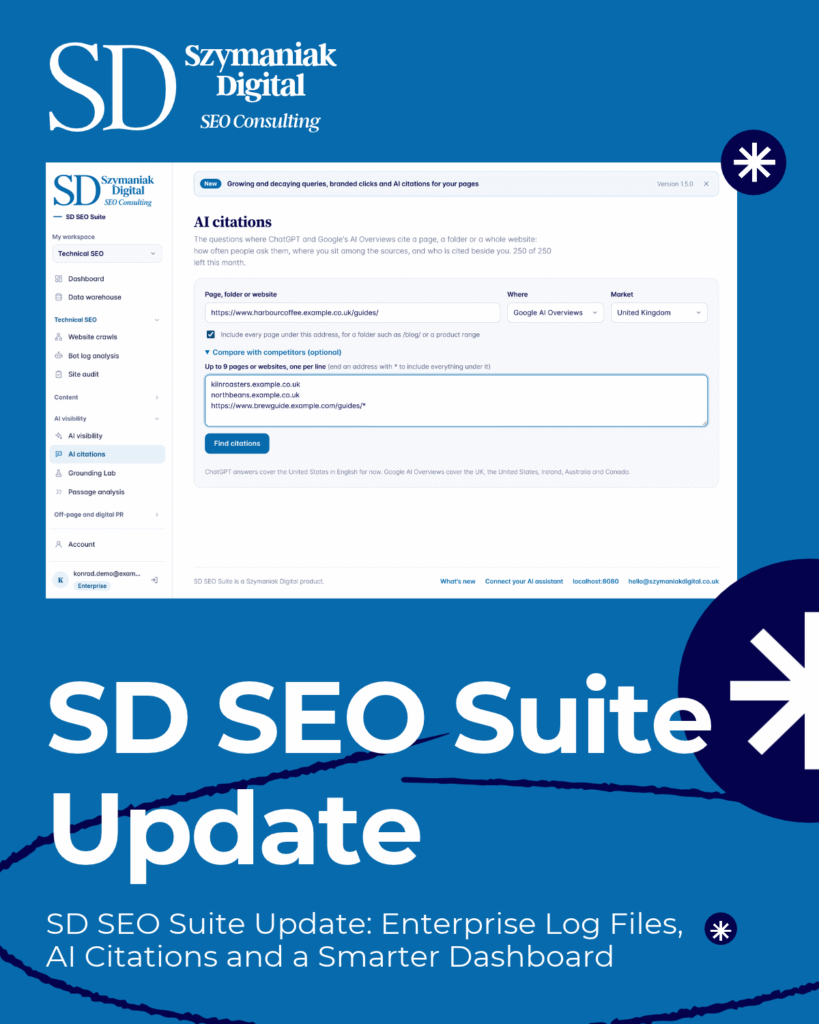
1. AI citations: see exactly which AI answers quote your pages. Enter a single page, a whole section of your site (such as /blog/ or a product range) or your entire domain, and the suite shows you:
- how many AI answers cite it
- how many people search for those questions each month
- its average place among the sources in each answer
- every question it’s cited for, up to 100, most-searched first, each opening to the full AI answer and its sources
- the other websites cited alongside it most often
You can also compare yourself with up to nine competitor pages or domains side by side. Google AI Overviews can be checked in the UK, US, Ireland, Australia and Canada, and ChatGPT in the US, in English, for now. AI citation lookups come with every plan: 20 a month on Starter, 60 on Pro and 250 on Enterprise.
2. A much smarter site dashboard. Once you’ve connected Search Console, your site dashboard now shows:
- growing and decaying searches, pages and countries: the top ten, the ten gaining the most clicks and the ten losing the most, with a full list and spreadsheet downloads
- branded and non-branded clicks, day by day, once you type in your brand words
- hidden searches: the share of your clicks that comes from searches Search Console keeps private
- how many searches you appear for, each day, by position: 1 to 3, 4 to 10, 11 to 20 and lower
- new rankings: searches and pages earning impressions now that had none before
- clicks by device
3. Google results with the real page addresses. Google now hides some result links behind its own addresses. The SERP checker now finds the real page behind each one, so every result is credited to the right website. A check takes one to three minutes, and you can leave the page while it runs. If Google’s results haven’t come back after 15 minutes, the check goes back into your allowance. Any link Google still hides is clearly marked, rather than credited to Google. AI Overview text also now shows proper bold text and lists.
4. A cleaner, simpler look. The suite has a fresh design in the Szymaniak Digital brand, with a simpler menu. Once you choose your workspace, the tools your team uses most come first and the rest fold away. The dashboard shows your two most-used tools and all your allowances in one tidy panel.
5. What’s new, inside the suite. After every update, a slim bar at the top of the app shows the headline. A What’s new page lists every release, newest first, with a button that takes you straight to each feature.
6. Smarter answers from your AI assistant. If you’ve connected SD SEO Suite to an AI assistant such as Claude, you can now ask questions like “which pages are decaying?”, “which searches are new this month?” or “what share of last month’s clicks were branded?” and get the answer straight from your own data.
What it found on client sites
These results come from our own recent experiments, all run with the new Enterprise tools:
- Google’s automated traffic is growing fast. On the sites we work with, visits from Googlebot and Google-Agent rose by 70% in a single month, and together made up 45% of all traffic.
- AI agents are buying. Once sensitive pages were properly protected and genuine Google agents could get through, we saw more key actions completed than ever before, including agents going all the way through checkout.
- One in eight “Google” visits was fake. 12% of requests claiming to be Google came from IP addresses that don’t belong to Google.
- Old data found new clicks. Using clients’ stored click history, we found pages that had quietly faded and recovered 12,000 clicks on them.
None of that would have been visible in a normal analytics report or a standard SEO tool.
2. Why Does It Matter?
The way people find and buy from websites is changing faster than most reporting can keep up with. These are the gaps the Enterprise plan is designed to close.
Nearly half your traffic may be invisible to you
Analytics tools only see visitors that run their tracking code. Most bots and AI agents don’t. When almost half of a site’s traffic comes from Googlebot and Google’s agents, a report built on analytics alone is missing a huge part of the picture. Log files are the only place that full picture exists.
AI agents are becoming customers
AI assistants now research, compare and buy on behalf of real people. If your security settings block them, or your pages are slow or unclear, those sales go elsewhere, and you’ll never see why. Knowing which agents visit, what they’re served and how far they get is now a commercial question, not just a technical one.
Not every visitor that claims to be Google is Google
Fake bots use Google’s name to get past security rules, scrape prices and copy content. You can only separate the real visits from the fakes if you check them against Google’s published IP addresses.
A list of technical issues isn’t a priority list
Most crawlers give you hundreds of issues and no sense of which ones matter. By joining every page to its clicks, impressions and Googlebot visits, the suite shows you which problems are actually costing you traffic, so your developers fix the right things first.
JavaScript can hide your content from AI
If important content only appears once JavaScript runs, some crawlers and AI bots may never see it. The JavaScript check shows exactly what changes, so you can move the important parts into the page’s HTML.
Your search history is an asset, and Google deletes it
Search Console only keeps 16 months of data. Once it’s gone, it’s gone. Keeping it lets you spot slow decline, compare seasons year on year and understand how each core update affected you. That’s how we found 12,000 clicks to recover.
Being cited by AI is the new ranking
More and more searches end with an AI answer, not a click on a blue link. If you don’t know which of your pages AI Overviews and ChatGPT quote, for which questions, and who they quote instead of you, you’re missing a growing part of your visibility. AI citations shows you that, page by page, section by section or for your whole site.
Not all clicks are equal
Branded clicks come from people who already know you. Non-branded clicks are the new customers SEO is meant to win. If your total clicks look steady but non-branded clicks are falling, you have a problem your headline numbers are hiding. The same goes for hidden searches: when a growing share of your clicks comes from searches Search Console keeps private, you need to know how much you can’t see.
Decay is easier to fix when you catch it early
Pages rarely collapse overnight. They fade, a few clicks at a time. The growing and decaying views put those pages in front of you every time you open the dashboard, long before they show up as a problem in a monthly report.
Accurate results mean accurate decisions
When Google hides result links behind its own addresses, it’s easy to credit a result to the wrong website and draw the wrong conclusion about who you’re competing with. The SERP checker now shows the real page behind each result.
3. Who Is Affected?
Any business with a large or growing website, and especially those where AI search and AI agents are starting to shape how customers find and buy.
E-commerce retailers
AI agents are already moving from category pages to product pages and through to checkout. Retailers need to know whether agents can complete that journey, and whether security rules are turning them away.
Large and enterprise websites
Sites with tens of thousands of pages need to know where search engines spend their time, which pages they never reach and which problems cost the most. That’s where joining crawl data to real performance pays off.
Multi-market and international brands
International sites need correct hreflang, the right page shown in each market, and a clear view of how each country version performs.
Booking, travel and service businesses
Anywhere customers might ask an assistant to book, reserve or enquire for them, the booking flow becomes something agents need to get through.
Publishers and content-led businesses
Publishers need to see which AI bots collect their content, which ones train on it and which ones send visitors, so they can make informed choices in robots.txt.
The teams involved
- SEO teams get priorities ranked by real impact, and a full history of their search data.
- Developers and infrastructure teams see which bots hit which pages, what they’re served and where errors happen.
- Security teams get the evidence they need to adjust bot rules without blocking the visitors that matter.
- Content teams see which pages have faded, and which content only appears once JavaScript runs.
- Marketing leaders finally see the share of traffic that analytics misses, and how AI agents fit into the customer journey.
4. What Should Businesses Do?
Here’s the process we follow when we set up a client on the Enterprise plan. It’s written so your SEO, development and content teams can each pick up their part.
Step 1: Start keeping your search history today
Connect Search Console and Google Analytics first. Search Console deletes data after 16 months, so every day you wait is a day of history you can’t get back. Once connected, the suite keeps adding to your history automatically.
Step 2: Set up your log files
Ask your development or hosting team to send your server or CDN logs to the secure cloud folder the suite reads from. This is a one-off job, and we’ll guide them through it. Make sure the logs include the date and time, the page requested, the response code, the visitor’s IP address and its user agent, which is the name a bot gives itself.
Step 3: Get to know your bot traffic
Start with the overview. Look at how visits split between search crawlers, AI search crawlers, AI assistants visiting live, AI training bots and everything else. Check the daily trend and the response codes each group receives. Most teams are surprised by how much of their traffic is automated, and by how quickly it’s growing.
Step 4: Fix the errors bots are hitting
Open the error pages report. Any important page returning errors to Googlebot or to AI assistants is losing visibility, and possibly sales. Fix those first, starting with category, product, service and booking pages.
Step 5: Find the pages AI bots are missing
The “pages AI bots miss” report lists pages that earn search impressions but haven’t been visited by any AI bot. For each one, check whether robots.txt blocks AI crawlers, whether the page is well linked from the rest of your site, and whether its main content only appears once JavaScript runs.
Step 6: Cut the crawl waste
The crawl waste report shows pages search engines keep crawling that earn no impressions. These are often filtered or duplicate pages, old campaign pages or endless parameter combinations. Consolidate, redirect, noindex or block them, so search engines spend their time on pages that matter.
Step 7: Set a clear robots.txt policy for every bot
Use the robots.txt advice to decide, bot by bot, what you allow. Many businesses choose to welcome search crawlers and AI assistants while limiting AI training bots, but the right answer depends on your business. One rule is the same for everyone: never rely on robots.txt to protect private pages. Account areas, payment details and admin pages must sit behind a login.
Step 8: Run a crawl and work through the priorities
Run your first full crawl. Start with the priorities report, where problems are ranked by the clicks, impressions and Googlebot visits they affect, each with why it matters and how to fix it. Then look at the funnel for each section of your site: how many pages are found, indexable, crawled by Googlebot, earning impressions and earning clicks. The biggest drop between two stages is usually your biggest opportunity.
Step 9: Fix links, international pages, structured data and JavaScript
- Orphan pages: link to pages that earn impressions or bot visits but can’t be reached through your site’s links.
- Internal links: for pages ranking between positions 4 and 20, add links from the related pages the suite suggests.
- hreflang: fix any errors in your international annotations.
- Product structured data: fill the gaps in your product markup.
- JavaScript: move any important content that only appears after JavaScript runs into the page’s HTML.
Step 10: Compare and report every month
Crawl again each month and use the comparison report to see what’s changed. Add the bot overview to your monthly reporting, alongside your analytics, so everyone can see the share of traffic that analytics misses.
Step 11: Set up your site dashboard (every plan)
Once Search Console is connected, open your site dashboard and type in your brand words. The suite suggests one from your domain. Then make three checks part of your weekly routine:
- the decaying searches and pages, so you can catch fading pages early
- the non-branded clicks, to see whether you’re winning new customers
- the new rankings, to spot searches you’ve only just started appearing for
Step 12: Check your AI citations and compare competitors (every plan)
Start with your most important section, such as your product range or your guides, and look at which questions it’s cited for and where it sits among the sources. Then add your main competitors and compare. The questions where they’re cited and you’re not are your clearest content opportunities.
Who does what
| Team | What to do |
|---|---|
| SEO | Connect Search Console and Google Analytics, run the crawls, work through the priorities and report monthly |
| Development and infrastructure | Set up log delivery, fix errors served to bots, move key content out of JavaScript, update robots.txt |
| Security | Review bot rules so genuine search and AI bots get through and fakes don’t |
| Content | Refresh faded pages, fix structured data and improve internal links |
| Marketing leadership | Add bot and AI agent traffic to reporting, and treat AI agents as a customer channel |
A simple timeline
- Day 1: connect Search Console and Google Analytics.
- Week 1: set up log delivery and run your first crawl.
- Weeks 2 to 4: fix bot errors, review robots.txt, cut crawl waste and work through the top priorities.
- Every month after that: crawl again, compare, and report on bot and agent traffic.
How to get started
The Enterprise plan is priced around your sites: their size, how many you connect, how much you crawl and how many people need access. Get in touch and we’ll put together a plan and walk your team through the set-up. AI citations and the new site dashboard are available now on every plan, including Starter and Pro.
5. What We’re Watching Next
This release is a starting point. Here’s what we’re watching, and building towards.
How fast AI agent traffic grows
If the growth we’ve seen on client sites continues, AI agents will soon be one of the biggest groups of visitors on many websites. We’ll keep tracking it month by month and sharing what we find.
How AI agents behave on a site
Log files show which pages an agent requests. The next question is what it does there: how far through a journey it gets, where it gives up and what helps it finish. That’s an area we want the suite to cover next.
How Google’s agents identify themselves
Google has started testing ways for its agents to sign their requests digitally, so websites can confirm a visit is genuine. If that becomes standard, telling real agents from fakes will become far simpler, and it’s something we’d want the suite to check for you.
What the December core update does
With the December 2026 core update on its way, the stored click history and crawl data put our clients in a strong position to measure exactly what changes, page by page.
What you’d like to see
The best features in SD SEO Suite came from questions our clients asked. If there’s something you wish your SEO tools could show you, tell us. There’s a good chance it ends up in the next release, and you’ll see it on the What’s new page inside the suite.
A final thought
For years, SEO tools have shown us what Google ranks. But the bigger questions now are who’s actually visiting your site, what they see when they get there, and whether they can do what they came to do, whether that visitor is a person, a search engine or an AI agent buying on someone’s behalf. That’s what the Enterprise plan is built to answer.
If you’d like to see it running on your own site, get in touch.
Konrad Szymaniak, Enterprise AI SEO Consultant, Szymaniak Digital
